
agentsense
Make sense of what your AI agents did. A local-first, MCP-native observability & debugging tool: a transparent MCP proxy traces every protocol message with zero code change to the agent, PII is redacted deterministically on the write path, and traces are stored whole (no field whitelist) in local SQLite — then replayed and diffed to see how a different model would have decided.
Apache-2.0 · local-first · no cloud signup
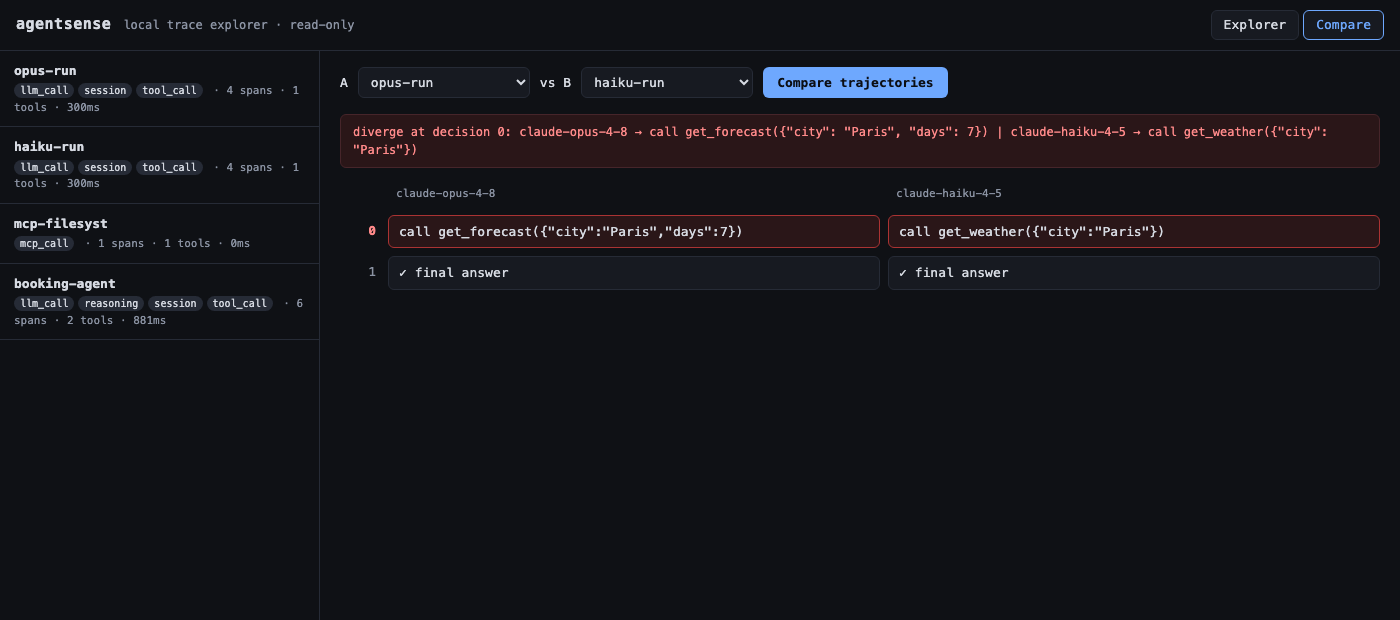
Compare view — the same run replayed against two models; the first point where their decisions diverge is highlighted.
What makes it different
Agent-observability tools each miss at least one of these — agentsense combines all four:
- Local-first — runs entirely on your machine; no cloud signup or account.
- MCP-native — instruments inside the Model Context Protocol at the wire, not wrapped via OpenTelemetry, so it traces tool calls with zero code change.
- Trace replay + trajectory diff — re-run a recorded trace against a different model and see exactly where the decisions diverge.
- Open source — Apache-2.0.
Why it's useful
When an AI agent misbehaves — wrong tool, bad decision, runaway cost — you are usually guessing. agentsense gives you ground truth:
- Protocol-level tracing with zero code change. Point the agent's MCP config at the proxy and every tool call, input/output, latency, and cost is captured — even for agents you can't instrument.
- "Would a different model fix this?" Replay a recorded trace against another model/prompt, feeding back stored tool results, and diff the trajectory to see exactly where behaviour diverges — no live tool calls, no API cost, no side effects.
- Compliance-ready audit trails. PII is redacted deterministically before it is ever stored, and the redaction itself is logged — the audit-trail story for EU AI Act enforcement (from August 2026).
- Local-first. No cloud signup, fully self-hostable.
What's included
| Component | Module | Status |
|---|---|---|
| MCP proxy (stdio, transparent) | proxy/ |
✅ |
| Deterministic PII redaction | redaction/ |
✅ write-path |
| SQLite trace store (whole objects) | store/ |
✅ |
| Replay + trajectory diff | replay/ |
✅ pluggable model client |
| Python capture SDK | sdk/ |
✅ OTel GenAI conventions |
| Local trace-explorer UI | ui/ |
✅ read-only, FastAPI |
Design guarantees
- Proxy forwards raw bytes unchanged; only a copy is parsed for tracing.
- Logs go to stderr / file, never stdout (stdout is the JSON-RPC channel).
- Trace store preserves unknown/vendor fields — whole objects, no whitelist.
- Redaction is deterministic (hash-derived tokens) so replay aligns.
Install
pip install agentsense-ai            # distribution name; the CLI and import are `agentsense`
# extras: pip install "agentsense-ai[ui,replay]"   # web UI + live-replay model clients
The install/import names differ (like scikit-learn → sklearn): the package is
agentsense-ai, but you run agentsense … and import agentsense.
How it's used
Capture → explore → replay:
- Capture a run — either or both:
- Zero code change: put the proxy in front of your MCP server (Quick start) — it traces every tool call.
- Richer detail: wrap your own loop with the capture SDK to also record reasoning and model calls.
- Explore —
agentsense ui --db traces.dbopens the trace explorer: span tree, timeline, PII-redaction badges. - Replay — re-run a captured trace against a different model and diff the trajectory to see where its decisions change.
Quick start
The proxy is a stdio MCP server your client launches, wrapping the real server. Add it to your MCP client's config (e.g. Claude Desktop, Cursor):
{
  "mcpServers": {
    "filesystem": {
      "command": "agentsense",
      "args": ["proxy", "--db", "traces.db",
               "--", "npx", "-y", "@modelcontextprotocol/server-filesystem", "/data"]
    }
  }
}
Use your agent as usual, then explore what it did:
agentsense ui --db traces.db # opens http://127.0.0.1:8000
Just want to see it work now? Drive it with the MCP Inspector — no config edit:
npx @modelcontextprotocol/inspector \
  agentsense proxy --db traces.db -- npx -y @modelcontextprotocol/server-filesystem /tmp
# make a tool call in the Inspector, then:  agentsense ui --db traces.db
Tests
uv run pytest            # unit tests run offline; the proxy has no model dependency
uv run ruff check .
test_proxy_transparency.py is an integration test that drives server-filesystem
through the proxy with a real MCP client; it self-skips if npx is unavailable.
UI (local trace explorer)
A read-only web app over the trace store — no build step, no Node. It serves a JSON API and a single static page (trace list → span tree + timeline + redaction badges).
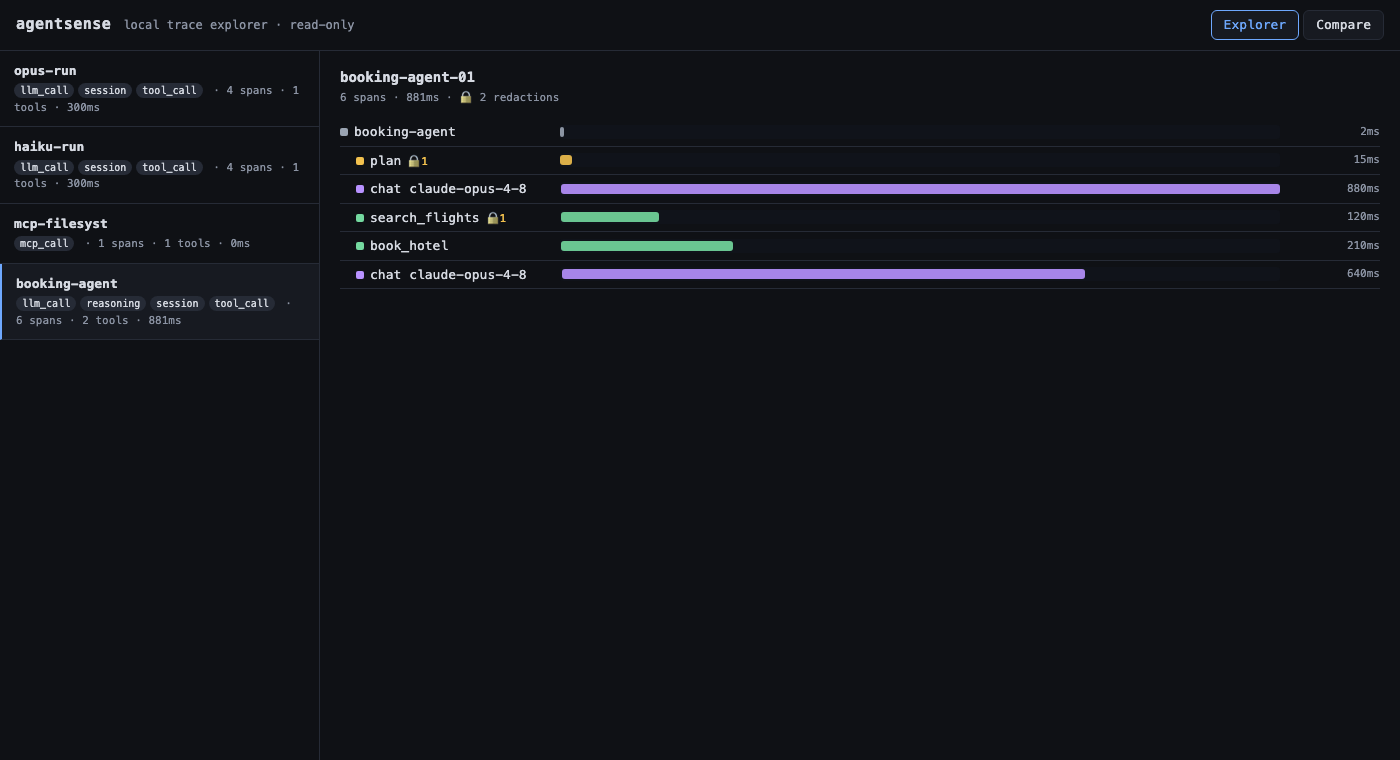
uv sync --extra ui
uv run agentsense ui --db traces.db        # opens http://127.0.0.1:8000
The Compare tab renders the side-by-side trajectory diff: pick two captured traces and see their decision sequences aligned, with the first point of divergence highlighted.
Live replay — on any captured trace, pick a model and re-run it right there: agentsense rebuilds the recording, replays it against your chosen model (OpenAI-compatible/Ollama or AWS Bedrock), and diffs the result against what the agent actually did. Ephemeral — no store writes.
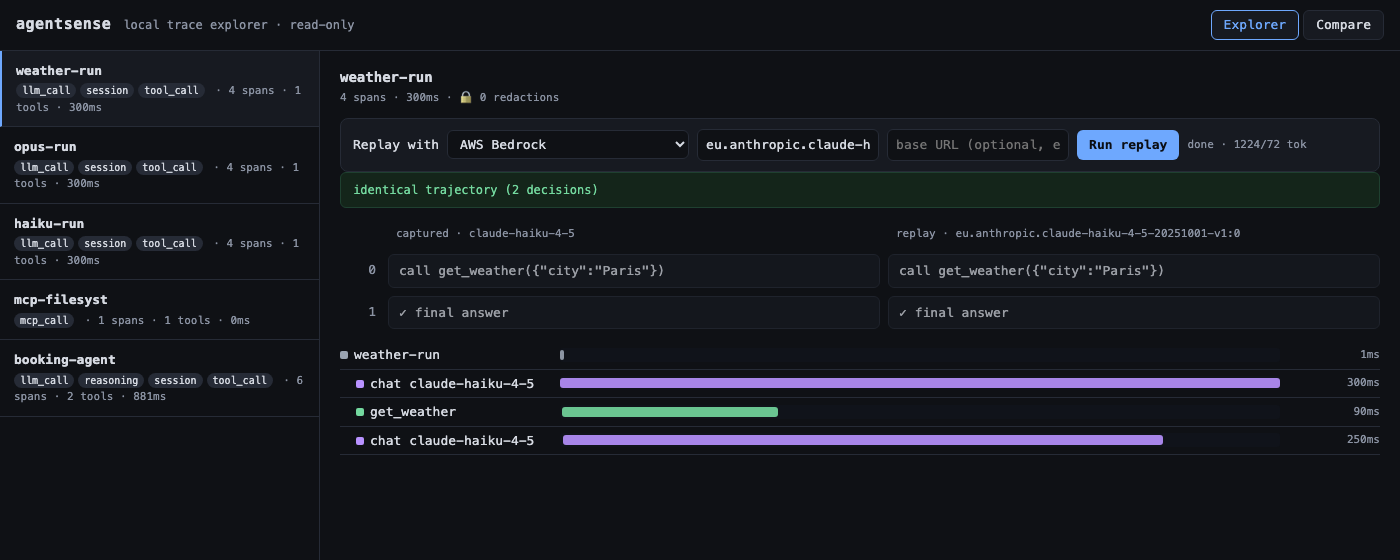
Endpoints: GET /api/traces, GET /api/traces/{id}/spans, GET /api/diff?a=&b=,
POST /api/replay. The frontend is plain HTML/JS in ui/static/ — swappable for React
later behind the same API.
Capture SDK
For agents you can instrument, the SDK records reasoning-level detail the proxy can't
see. It writes through the same store — and therefore the same redaction path — as the
proxy, using OpenTelemetry GenAI attribute naming (gen_ai.*) for interop.
from agentsense.sdk import Tracer
from agentsense.store import SpanStore

tracer = Tracer(SpanStore("traces.db"))
with tracer.session("booking-agent") as s:
    s.step("plan", reasoning=..., model="claude-opus-4-8")
    s.llm_call("claude-opus-4-8", messages=[...], response={...},
               usage={"input_tokens": 1200, "output_tokens": 80})
    s.tool_call("search_flights", args={...}, result={...}, cost=0.002)
Spans form a shallow tree (session → steps). llm_call stores the whole conversation
(messages, tools, response) so a captured run can be reconstructed into a replayable
Recording. Demo: uv run python examples/sdk_capture.py.
Replay + trajectory diff
Re-drive an agent run against a different model, injecting recorded tool results (the engine cannot call a live tool — the guarantee holds by construction), then diff the two decision trajectories to find the first point of divergence.
# Offline, no creds — two scripted "models" over the same recorded results:
uv run python examples/replay_scripted.py
# → diverge at decision 0: haiku-4.5 → call get_weather(...) | opus-4.8 → call get_forecast(...)
The model client is pluggable behind one adapter (replay/adapters/): BedrockAdapter
(AWS Bedrock Converse), OpenAICompatAdapter (OpenAI, Ollama, or any OpenAI-compatible
endpoint), and ScriptedAdapter (offline/tests). The engine speaks only provider-neutral
types — swapping providers never touches it. Recorded tool results can be supplied directly
or pulled from a captured proxy trace via Recording.from_trace_store(...).
Honest about forks and redaction. The diff is only meaningful up to the first
divergence — once the replay requests a tool the trace didn't record, the branch forks.
agentsense makes that explicit: by default it stops at the fork (on_unrecorded="stop";
also stub or live with an executor), and labels the result aligned / diverged /
unresolvable_fork with a comparable_until marker. The same applies to endings:
a run is only credited with finishing if an answer was actually captured (the proxy
watches the wire, so it never sees one), and comparing past a missing ending is
reported as unknown_terminal instead of a false aligned. And since redaction runs before
storage, a divergence at a redacted value could be caused by redaction rather than the
model — those are flagged redaction_suspect so you don't misattribute them.
Capture → replay (the full loop)
An SDK-captured run replays end-to-end: Recording.from_sdk_trace(store, trace_id)
reconstructs the question, tools, model, and recorded tool results, and
captured_trajectory(store, trace_id) reconstructs what the agent actually did. Diff
the two to answer "would a different model have decided differently than my agent did?"
uv run python examples/capture_then_replay.py
# → diverge at decision 0: claude-haiku-4-5 → call get_weather(...) | rushed-model → final answer
Model access (live replay only — not needed for the proxy)
Live replay calls a model, so it needs credentials for whichever provider you pick —
either an OpenAI-compatible endpoint (OPENAI_API_KEY, or a local Ollama base URL) or AWS
Bedrock. For the Bedrock example:
aws sso login --profile <your-aws-profile>        # temporary SSO creds
export AWS_PROFILE=<your-aws-profile> AWS_REGION=eu-west-1
uv run --extra replay python examples/replay_bedrock.py
Contributing
Issues and PRs welcome — see CONTRIBUTING.md. All tests run offline
(uv run pytest); the proxy has no model dependency.
License
Apache License 2.0 — includes an explicit patent grant.
1 maintainer

Metadata
1 maintainer
Release files for agentsense-ai 0.1.4
For a detailed explanation of source distributions (sdists) and built distributions (wheels), please see the package formats documentation.
Source distribution (sdist)
| File | Size | Uploaded | Provenance | |
|---|---|---|---|---|
| agentsense_ai-0.1.4.tar.gz | 303.3 kB | Without provenance | Details |
Built distribution (wheel)
| File | Interpreter | ABI | Platform | Reset |
|---|---|---|---|---|
| agentsense_ai-0.1.4-py3-none-any.whl | Python 3 | none | any | Details |
Total release size: 355.3 kB
Release files / agentsense_ai-0.1.4.tar.gz
| Download URL | agentsense_ai-0.1.4.tar.gz |
|---|---|
| Size | 303.3 kB |
| Tags | Source |
|
SHA-256 checksum How to use checksums |
310b65e52d3bd3ea005810621a0dbfd183b2585163eeeed2983b5d45dfe30580
|
|
BLAKE2b-256 checksum How to use checksums |
1f7f7ac0430f7fb1b1402bf2c4f4288829ebb17619cdb88afee99353fa733510
|
| Upload date | |
|
Uploaded using Trusted Publishing? What is trusted publishing? |
Yes |
| Uploaded via |
uv/0.12.8 {"installer":{"name":"uv","version":"0.12.8","subcommand":["publish"]},"python":null,"implementation":{"name":null,"version":null},"distro":{"name":"Ubuntu","version":"24.04","id":"noble","libc":null},"system":{"name":null,"release":null},"cpu":null,"openssl_version":null,"setuptools_version":null,"rustc_version":null,"ci":true}
|
Release files / agentsense_ai-0.1.4-py3-none-any.whl
| Download URL | agentsense_ai-0.1.4-py3-none-any.whl |
|---|---|
| Size | 52.0 kB |
| Tags | Python 3 |
|
SHA-256 checksum How to use checksums |
9f9dcdc087677464581ada26160272132c762c43373b389d67a5ba90f2d06b0b
|
|
BLAKE2b-256 checksum How to use checksums |
b8ef38ecf4a3208c29fe66744956c7421b12e34df3c9f5146d12497e7482957e
|
| Upload date | |
|
Uploaded using Trusted Publishing? What is trusted publishing? |
Yes |
| Uploaded via |
uv/0.12.8 {"installer":{"name":"uv","version":"0.12.8","subcommand":["publish"]},"python":null,"implementation":{"name":null,"version":null},"distro":{"name":"Ubuntu","version":"24.04","id":"noble","libc":null},"system":{"name":null,"release":null},"cpu":null,"openssl_version":null,"setuptools_version":null,"rustc_version":null,"ci":true}
|
Security for agentsense-ai 0.1.4
Provenance
Provenance describes where a file came from. On PyPI, provenance is shared via attestations, which provide a verifiable record of the build or publishing details. View details, limitations and caveats.
No provenance found
None of the files in this release were uploaded with provenance metadata.
A note on package security
PyPI is a repository for distributing packages, not a service for auditing them. While third-party security researchers and our staff do their best to detect and remove malicious packages, PyPI cannot guarantee the quality, security or suitability of any given package.














