
Web-based agent session visualizer for Claude Code

Project description
AgentsTV


Turn your AI coding agent sessions into a Twitch-style pixel art live stream.
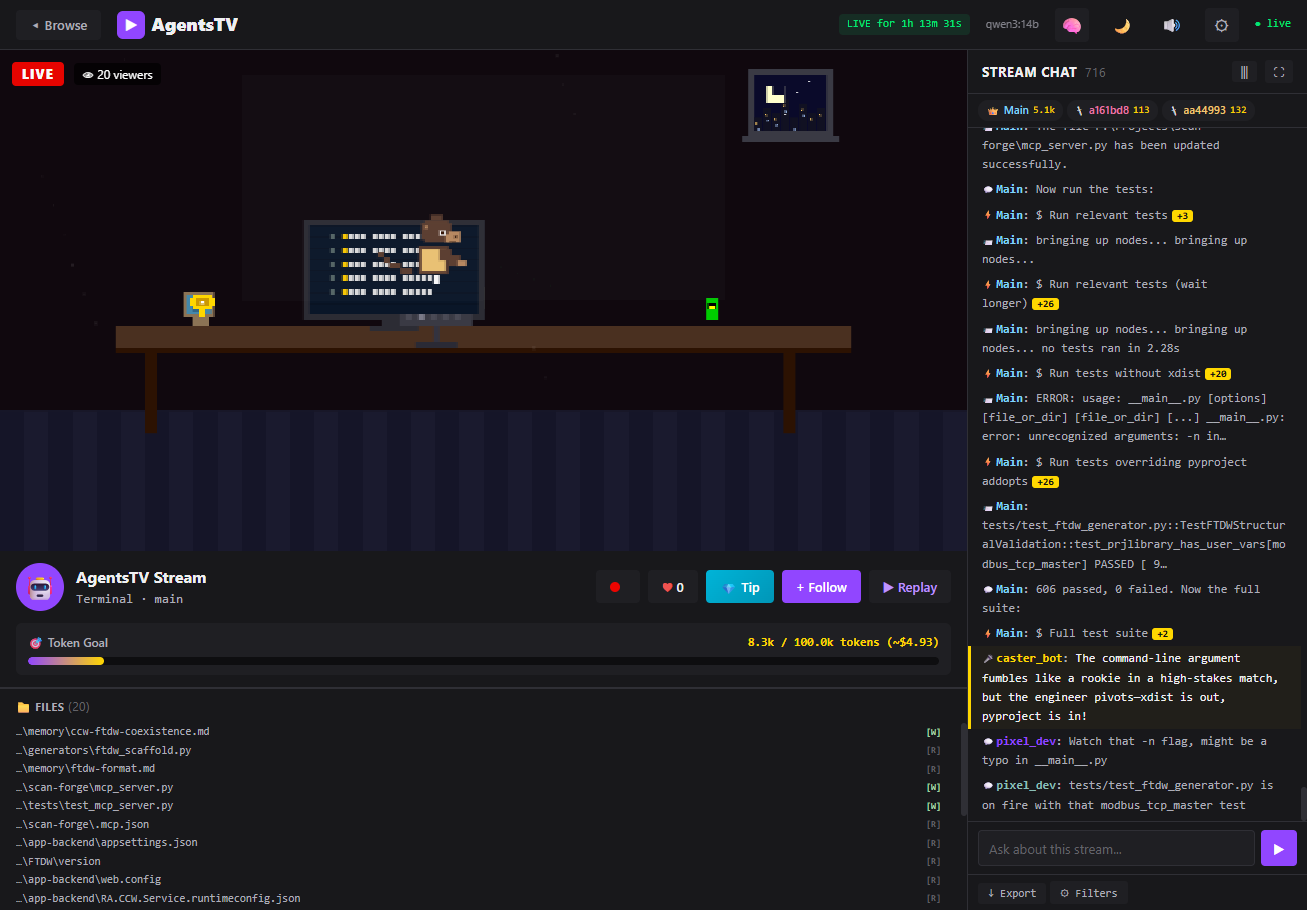
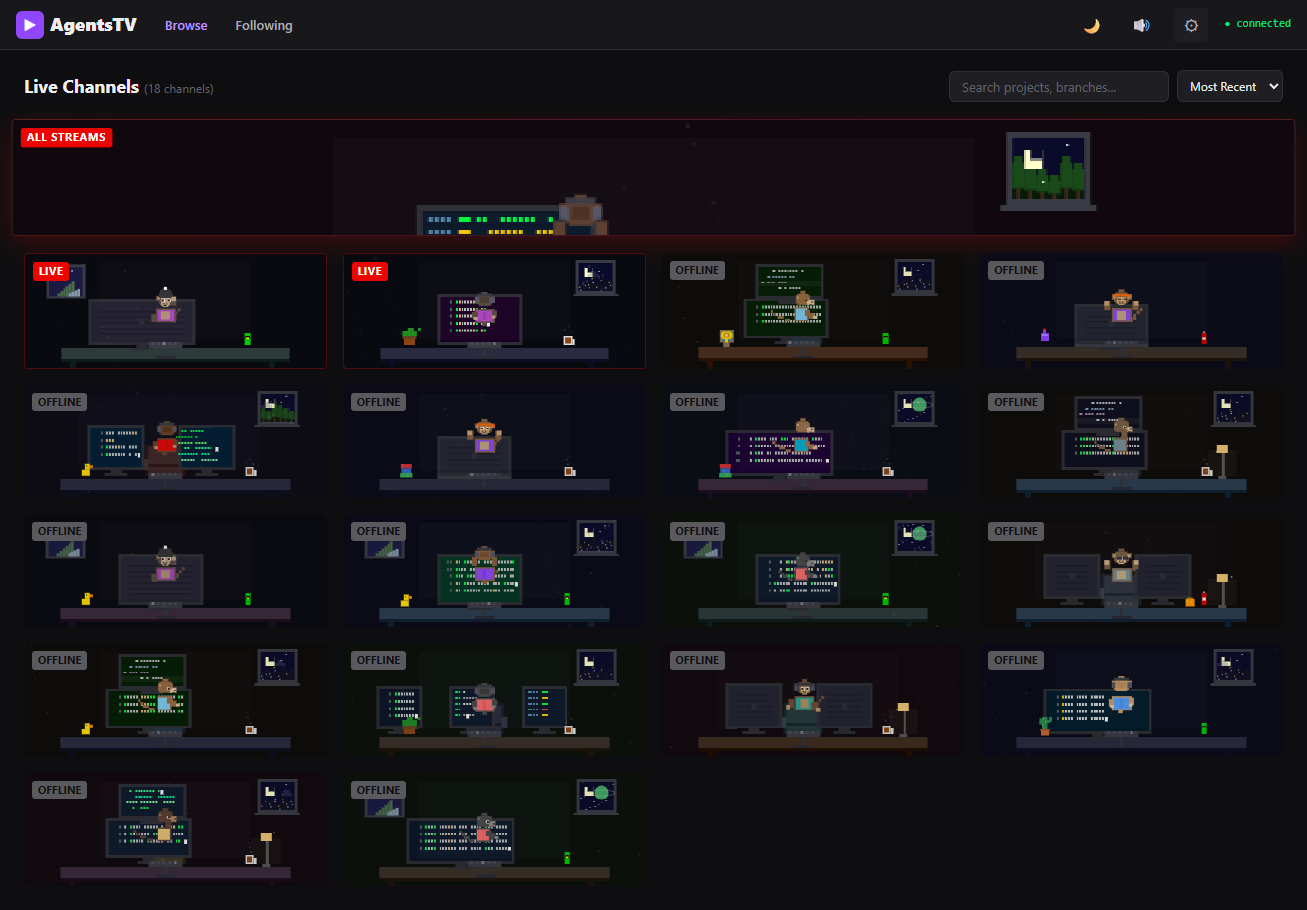
Your Claude Code sessions are already generating thousands of events. AgentsTV turns them into something you can actually watch -- pixel art characters coding in real-time, simulated Twitch chat reacting to what the agent does, esports-style narration, and a Master Control Room when you're running multiple sessions.
Quick Start
pip install agentstv
agentstv
That's it. The dashboard auto-discovers your Claude Code session logs and opens in your browser.
Add AI Chat (optional)
AgentsTV can use a local LLM via Ollama for viewer chat, narrator commentary, and interactive Q&A:
ollama pull qwen3:14b
agentstv --llm ollama --ollama-model qwen3:14b
Without Ollama, everything works -- viewer chat uses built-in fallback messages.
| Hardware | Model | Notes |
|---|---|---|
| Desktop GPU (12GB+ VRAM) | qwen3:14b |
Best overall |
| MacBook / Laptop | qwen3:8b |
Good balance of quality and speed |
| Low VRAM / older GPU | phi4-mini |
Lightweight, surprisingly capable |
Also supports OpenAI and Anthropic as cloud LLM providers. Configure via CLI flags or the in-app settings panel.
Features
- Pixel art webcam -- Procedurally generated coding scenes with idle animations, desk decorations, weather effects, and event reactions (error shakes, completion confetti, spawn rings, thinking bubbles)
- Viewer chat -- Simulated Twitch chat where LLM-generated viewers react to what the agent is doing
- Interactive chat -- Ask questions about what the agent is working on and get context-aware answers
- Narrator bot -- Esports-style play-by-play commentary on agent activity
- Auto stream titles -- Generated from recent activity (e.g.
Coding / Python / main) - Master Control Room -- Multi-monitor view aggregating all active sessions with status LEDs and alert lights
- Session replay -- Play back completed sessions with seek, speed control (0.5x-8x), and full event recreation
- Clip recording -- Record and download WebM clips of interesting moments
- OBS overlay -- Browser Source page at
/overlay.htmlfor compositing over your stream - Sound effects -- Keystrokes, error buzzer, completion chime, chat pops
- Public mode --
--publicflag scrubs API keys, tokens, paths, and secrets server-side before sharing - Dark / light theme, keyboard shortcuts (
?to view), search and sort, stream alert toasts
Usage
agentstv                         # Launch (opens browser)
agentstv --port 8420             # Custom port (default: 8420)
agentstv --host 0.0.0.0         # Bind to all interfaces (LAN access)
agentstv --public                # Redact secrets for public sharing
agentstv --low-power             # Reduce LLM batch sizes for laptops
agentstv --no-browser            # Don't auto-open browser
Session logs are discovered from ~/.claude/projects/. Override with AGENTSTV_DATA_DIR=/path/to/logs.
Remote LLM Setup
You can run AgentsTV on the machine where your sessions live and offload LLM inference to a separate machine (e.g. a MacBook running Ollama). No file syncing required -- only lightweight API calls go over the network.
On the LLM machine (e.g. MacBook with Ollama):
# Allow remote connections
OLLAMA_HOST=0.0.0.0 ollama serve
On the Claude Code machine (where your sessions are):
agentstv --host 0.0.0.0 --ollama-url http://<llm-machine-ip>:11434 --ollama-model qwen3:8b
Then open http://<claude-code-machine-ip>:8420 from any browser on your network.
This is useful when your coding machine has no GPU or you want to keep LLM inference on a power-efficient device like an Apple Silicon Mac.
Supported Formats
- Claude Code JSONL transcripts (full support)
- Codex CLI session logs (experimental)
- Gemini CLI session logs (experimental)
About
The idea started as a simple TUI to replay Claude Code session logs. I built the first version, went to bed, and woke up wanting something completely different: a Twitch-style live dashboard with pixel art characters, LLM-powered chat, and streaming overlays. The full web app was built and published in about 12 hours.
Built with Claude Code. I made the architectural decisions and directed the implementation across Python, JavaScript, HTML, and CSS.
Contributing
Contributions are welcome! AgentsTV is MIT-licensed and open to PRs.
git clone https://github.com/andrewle8/AgentsTV.git
cd AgentsTV
pip install -e .
agentstv --no-browser
Areas where help is especially welcome:
- Additional agent format parsers (Copilot CLI, Aider, etc.)
- Custom pixel art themes and character skins
- Mobile layout improvements
- OBS overlay enhancements
License
MIT
Release history Release notifications | RSS feed


Download files
Download the file for your platform. If you're not sure which to choose, learn more about installing packages.
Source Distribution
Built Distribution
Filter files by name, interpreter, ABI, and platform.
If you're not sure about the file name format, learn more about wheel file names.
Copy a direct link to the current filters
File details
Details for the file agentstv-0.7.2.tar.gz.
File metadata
- Download URL: agentstv-0.7.2.tar.gz
- Upload date:
- Size: 530.4 kB
- Tags: Source
- Uploaded using Trusted Publishing? No
- Uploaded via: twine/6.2.0 CPython/3.12.10
File hashes
| Algorithm | Hash digest | |
|---|---|---|
| SHA256 |
f8c697d61589b27c097217e343515e61256ac4acef166c07eab767f82f1b5f06
|
|
| MD5 |
8514d5f057692940d9c48d20be8e3f42
|
|
| BLAKE2b-256 |
9f7c15d92c48d4f0859301af68e141b08c748e97a93c4774c0d7b11811ef2c52
|
File details
Details for the file agentstv-0.7.2-py3-none-any.whl.
File metadata
- Download URL: agentstv-0.7.2-py3-none-any.whl
- Upload date:
- Size: 102.4 kB
- Tags: Python 3
- Uploaded using Trusted Publishing? No
- Uploaded via: twine/6.2.0 CPython/3.12.10
File hashes
| Algorithm | Hash digest | |
|---|---|---|
| SHA256 |
34333fb172523828b7e585c7cf72dfe3a9f56a752ff72be6e7bb1a6374fbf45a
|
|
| MD5 |
b21eddb610e8223f79e16d9eb134abea
|
|
| BLAKE2b-256 |
7cda8898efe86200544e6ead87e7e381ea430596650b0a742419b4bb1d309390
|






