
Local web viewer for AI agent sessions
Verified details
These details have been verified by PyPIProject links
GitHub Statistics
Maintainers

Project description
agentsview
A local-first desktop and web application for browsing, searching, and analyzing AI agent coding sessions. Supports Claude Code, Codex, OpenCode, and more (full list).
Desktop App
Download the desktop installer for macOS or Windows from GitHub Releases. The desktop app includes auto-updates and runs the server as a local sidecar -- no terminal required.
CLI Install
curl -fsSL https://agentsview.io/install.sh | bash
Windows:
powershell -ExecutionPolicy ByPass -c "irm https://agentsview.io/install.ps1 | iex"
The CLI installer downloads the latest release, verifies the SHA-256 checksum, and installs the binary.
Build from source (requires Go 1.25+ with CGO and Node.js 22+):
git clone https://github.com/wesm/agentsview.git
cd agentsview
make build
make install  # installs to ~/.local/bin
Why?
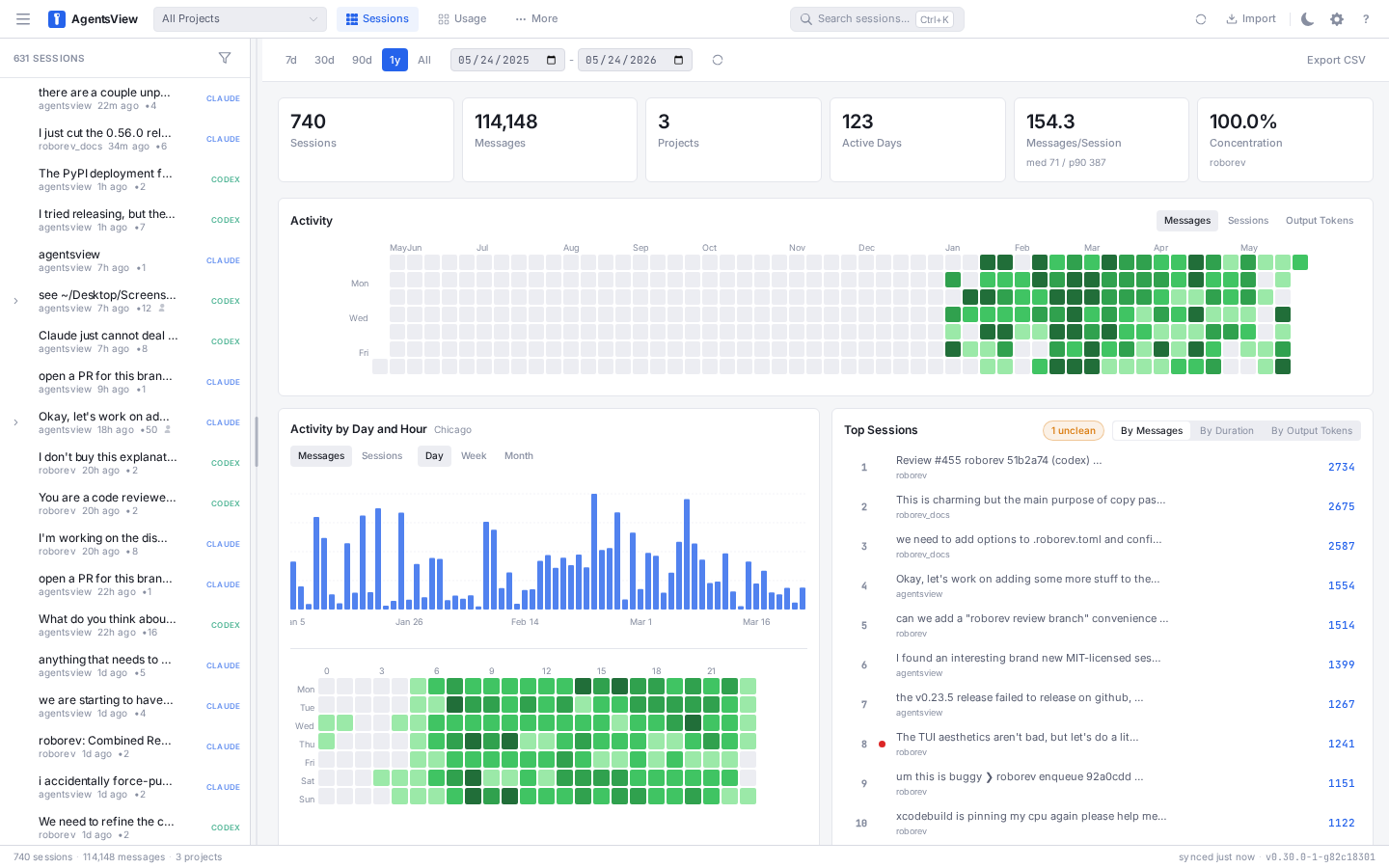
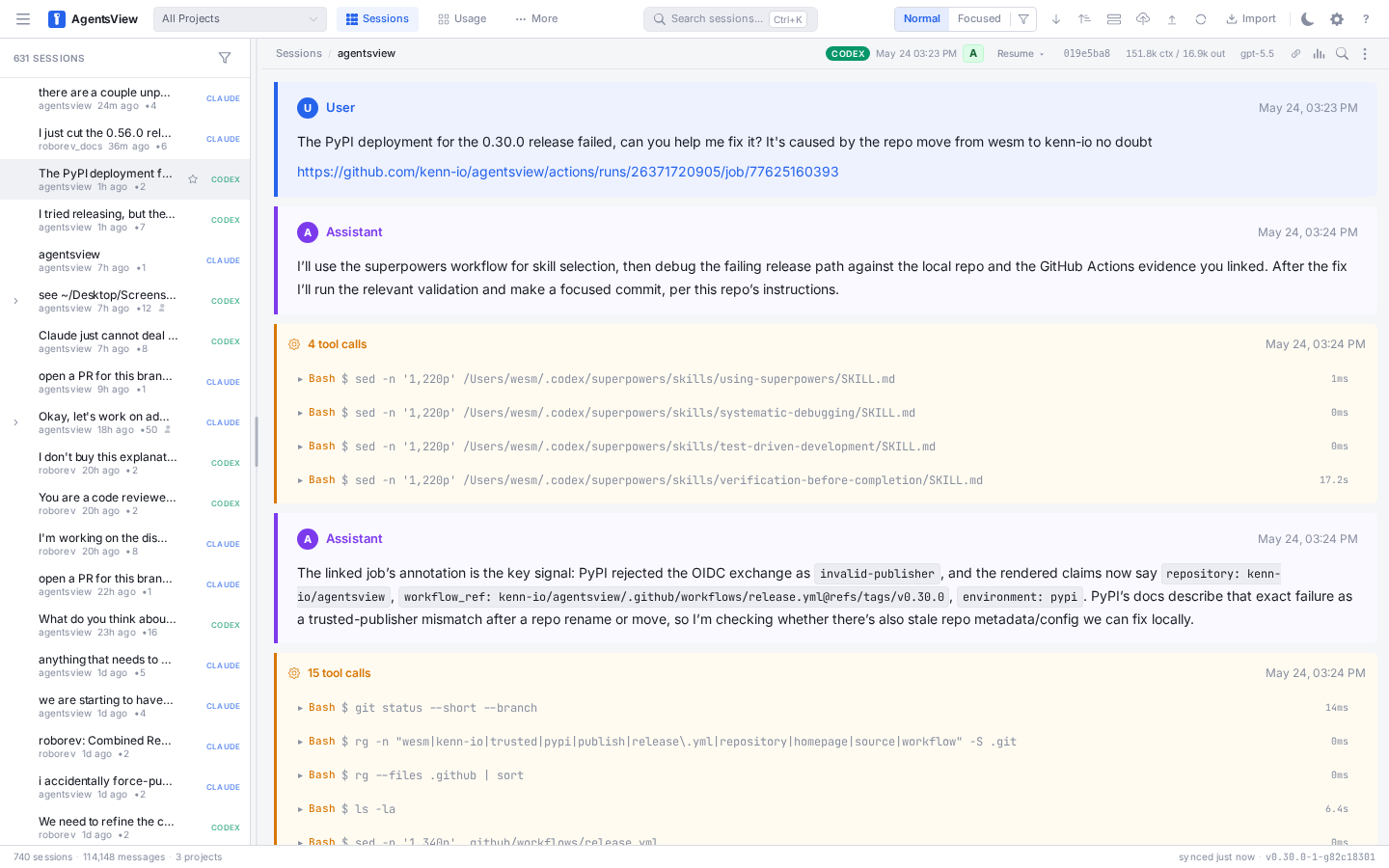
AI coding agents generate large volumes of session data across projects. agentsview indexes these sessions into a local SQLite database with full-text search, providing a web interface to find past conversations, review agent behavior, and track usage patterns over time.
Features
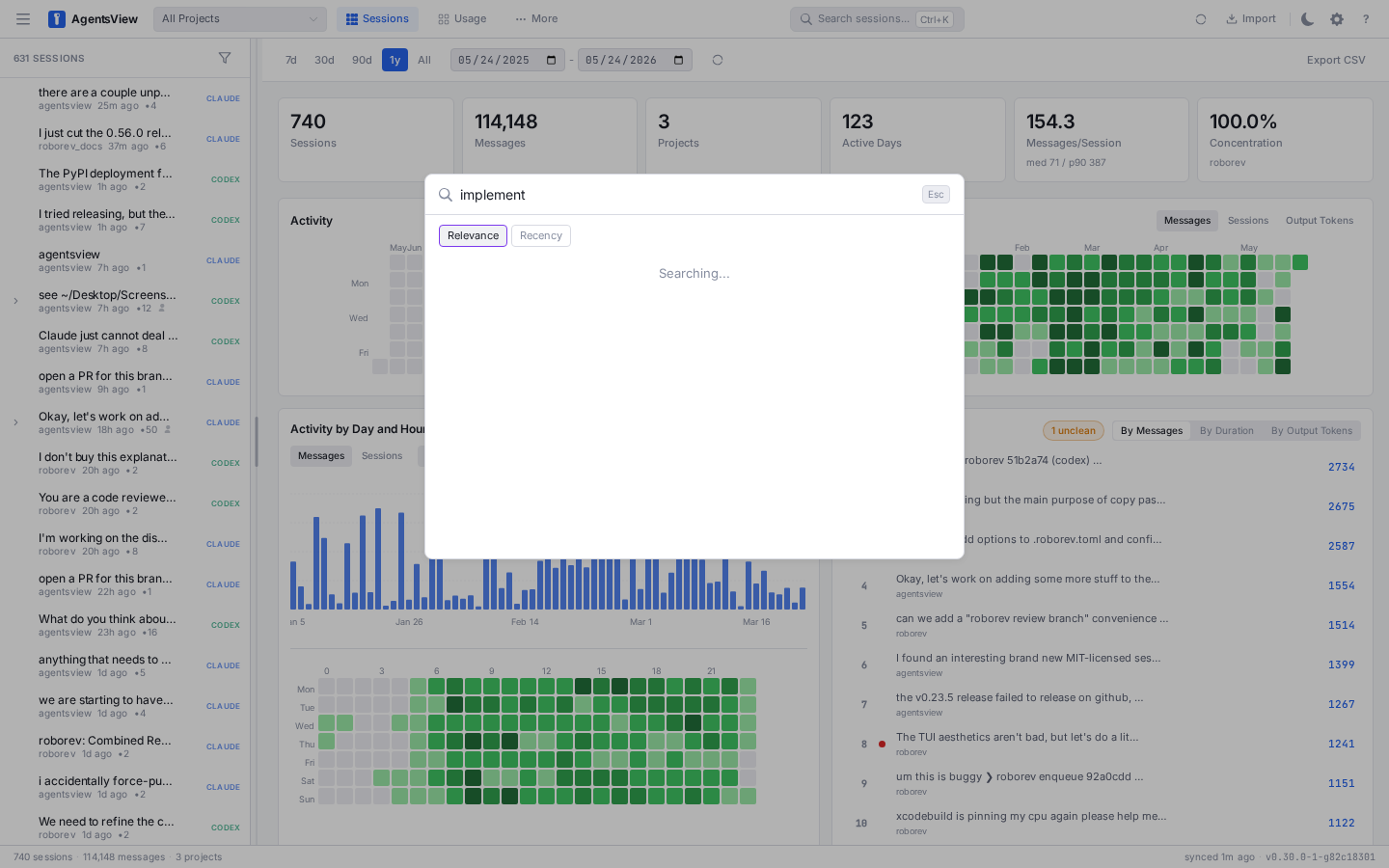
- Full-text search across all message content, instantly
- Analytics dashboard with activity heatmaps, tool usage, velocity metrics, and project breakdowns
- Multi-agent support — Claude Code, Codex, OpenCode, and more (full list)
- Live updates via SSE as active sessions receive new messages
- Keyboard-first navigation (vim-style
j/k/[/]) - Export and publish sessions as HTML or to GitHub Gist
- Local-first -- all data stays on your machine, single binary, no accounts
Privacy and Telemetry
agentsview has no telemetry and no analytics. No usage data, crash reports, or diagnostics are collected or sent anywhere.
- All session data stays on your machine in a local SQLite database
- The server binds to
127.0.0.1by default and is not network-accessible - No accounts, no sign-ups, no tracking
- The optional PostgreSQL sync is explicit and user-initiated (
pg push), connecting only to a server you configure
The only automatic outbound requests are update checks on startup. The CLI/web UI fetches release metadata from the GitHub API, while the desktop app uses its own native updater to check for new releases. Neither check sends analytics or session data. To disable:
- Desktop app: set
AGENTSVIEW_DESKTOP_AUTOUPDATE=0 - CLI/web UI: set
AGENTSVIEW_DISABLE_UPDATE_CHECK=1, pass-no-update-check, or setdisable_update_check = truein~/.agentsview/config.toml
Usage
agentsview              # start server
agentsview -port 9090   # custom port
On startup, agentsview discovers sessions from all supported agents, syncs them
into a local SQLite database with FTS5 full-text search, and opens a web UI at
http://127.0.0.1:8080.
For hostname or reverse-proxy access, set a public_url. This preserves the
default DNS-rebinding and CSRF protections while explicitly trusting the
external browser origin you expect.
# Direct HTTP on a custom hostname/port
agentsview -host 0.0.0.0 -port 8004 \
  -public-url http://viewer.example.test:8004

# HTTPS behind your own reverse proxy
agentsview -host 127.0.0.1 -port 8004 \
  -public-url https://viewer.example.test
agentsview can also manage a Caddy frontend for you. In managed-Caddy mode, keep
the backend on loopback and let Caddy terminate TLS and optionally restrict
client IP ranges. By default, managed Caddy binds to 127.0.0.1 and exposes the
public URL on port 8443. To expose it on a non-loopback interface, set
-proxy-bind-host explicitly and provide at least one -allowed-subnet.
Managed Caddy mode requires the caddy CLI to already be installed. This patch
does not automate Caddy installation. Use your normal OS package manager or ask
your coding agent to install Caddy for your platform first. Caddy supports
Linux, macOS, and Windows.
For privileged ports such as 443 or 80, prefer leaving agentsview itself
unprivileged and granting the Caddy binary permission to bind low ports. On
Linux, that typically means:
sudo setcap cap_net_bind_service=+ep "$(command -v caddy)"
Then run agentsview normally as your user with -public-port 443 or
-public-port 80. This avoids running the session viewer as root, which would
otherwise change which home directory and agent session data it can see. If you
do not need a privileged port, the default 8443 is the simpler option.
agentsview -host 127.0.0.1 -port 8080 \
  -public-url https://viewer.example.test \
  -proxy caddy \
  -proxy-bind-host 0.0.0.0 \
  -public-port 8443 \
  -tls-cert ~/.certs/viewer.crt \
  -tls-key ~/.certs/viewer.key \
  -allowed-subnet 10.0/16 \
  -allowed-subnet 192.168.1.0/24
You can persist the same settings in ~/.agentsview/config.toml:
public_url = "https://viewer.example.test"

[proxy]
mode = "caddy"
bind_host = "0.0.0.0"
public_port = 8443
tls_cert = "/home/user/.certs/viewer.crt"
tls_key = "/home/user/.certs/viewer.key"
allowed_subnets = ["10.0/16", "192.168.1.0/24"]
public_origins remains available as an advanced override when you need to
allow additional browser origins beyond the main public_url.
Screenshots
| Dashboard | Session viewer |
|---|---|
|
 |
| Search | Activity heatmap |
|---|---|
 |
 |
Keyboard Shortcuts
| Key | Action |
|---|---|
Cmd+K |
Open search |
j / k |
Next / previous message |
] / [ |
Next / previous session |
o |
Toggle sort order |
t |
Toggle thinking blocks |
e |
Export session as HTML |
p |
Publish to GitHub Gist |
r |
Sync sessions |
? |
Show all shortcuts |
PostgreSQL Sync
agentsview can push session data from the local SQLite database to a remote PostgreSQL instance, enabling shared team dashboards and centralized search across multiple machines.
Push Sync (SQLite to PG)
Configure pg in ~/.agentsview/config.toml:
[pg]
url = "postgres://user:pass@host:5432/dbname?sslmode=require"
machine_name = "my-laptop"
Use sslmode=require (or verify-full for CA-verified connections) for
non-local PostgreSQL instances. Only use sslmode=disable for trusted
local/loopback connections.
The machine_name identifies which machine pushed each session (must not be
"local", which is reserved).
CLI commands:
agentsview pg push          # push now
agentsview pg push --full   # force full re-push (bypasses heuristic)
agentsview pg status        # show sync status
Push is on-demand — run pg push whenever you want to sync to PostgreSQL. There
is no automatic background push.
PG Read-Only Mode
Serve the web UI directly from PostgreSQL with no local SQLite. Configure
[pg].url in config (as shown above), then:
agentsview pg serve              # default: 127.0.0.1:8080
agentsview pg serve -port 9090   # custom port
To have pg serve manage a Caddy TLS frontend directly:
The same managed-Caddy prerequisites and backend-loopback requirement described
earlier for normal serve mode also apply here.
agentsview pg serve \
  -host 127.0.0.1 \
  -port 18080 \
  -public-url https://viewer.example.test \
  -proxy caddy \
  -proxy-bind-host 0.0.0.0 \
  -public-port 8443 \
  -tls-cert ~/.certs/viewer.crt \
  -tls-key ~/.certs/viewer.key \
  -allowed-subnet 10.0/16
This mode is useful for shared team viewers where multiple machines push to a
central PG database and one or more read-only instances serve the UI. Uploads,
file watching, and local sync are disabled. For managed-Caddy mode, keep the
backend -host on loopback and use -proxy-bind-host / -public-port to
expose the public listener. If you run plain pg serve without -proxy caddy,
then using a non-loopback -host enables token-authenticated remote access and
prints the auth token on startup.
The normal SQLite-backed serve mode and PostgreSQL-backed pg serve mode keep
separate managed-Caddy state, so both can coexist on one host.
Known Limitations
- Deleted sessions: Sessions permanently pruned from SQLite (via
agentsview prune) are not propagated as deletions to PG. Sessions soft-deleted withdeleted_atare synced correctly. - Change detection: Push uses aggregate length statistics rather than
content hashes. Use
-fullto force a complete re-push if content was rewritten in-place.
Documentation
Full documentation is available at agentsview.io:
- Quick Start -- installation and first run
- Usage Guide -- dashboard, session browser, search, export
- CLI Reference -- commands, flags, and environment variables
- Configuration -- data directory, config file, session discovery
- Architecture -- how the sync engine, parsers, and server work
Development
make dev            # run Go server in dev mode
make frontend-dev   # run Vite dev server (use alongside make dev)
make desktop-dev    # run Tauri desktop app in dev mode
make test           # Go tests (CGO_ENABLED=1 -tags fts5)
make lint           # golangci-lint (auto-fix)
make e2e            # Playwright E2E tests
make install-hooks  # install pre-commit hooks via prek
Pre-commit hooks are managed with prek and
require uv for the Markdown formatting hook.
Install both, then run make install-hooks after cloning:
# macOS
brew install prek uv

# Linux (or any platform; requires Go on PATH)
curl -LsSf https://astral.sh/uv/install.sh | sh
go install github.com/j178/prek/cmd/prek@latest
# ensure ~/.local/bin and ~/go/bin are on PATH
The hooks run make lint on every commit and mdformat when Markdown files are
staged, auto-fixing formatting issues. If a hook rewrites files, re-stage and
re-commit.
Desktop Development
The desktop app is a Tauri wrapper under desktop/. It launches the
agentsview Go binary as a local sidecar and loads http://127.0.0.1:<port> in
a native webview.
make desktop-dev                 # run desktop app in dev mode
make desktop-build               # build desktop bundles (.app/.exe)
make desktop-macos-app           # build macOS .app only
make desktop-windows-installer   # build Windows installer (.exe)
Desktop env escape hatch: ~/.agentsview/desktop.env (for PATH/API keys
overrides).
Project Structure
cmd/agentsview/     CLI entrypoint
internal/config/    Configuration loading
internal/db/        SQLite operations (sessions, search, analytics)
internal/postgres/  PostgreSQL support (push sync, read-only store, schema)
internal/parser/    Session parsers (all supported agents)
internal/server/    HTTP handlers, SSE, middleware
internal/sync/      Sync engine, file watcher, discovery
frontend/           Svelte 5 SPA (Vite, TypeScript)
Supported Agents
| Agent | Session Directory | Env Override |
|---|---|---|
| Claude Code | ~/.claude/projects/ |
CLAUDE_PROJECTS_DIR |
| Codex | ~/.codex/sessions/ |
CODEX_SESSIONS_DIR |
| Copilot | ~/.copilot/ |
COPILOT_DIR |
| Gemini | ~/.gemini/ |
GEMINI_DIR |
| OpenCode | ~/.local/share/opencode/ |
OPENCODE_DIR |
| OpenHands CLI | ~/.openhands/conversations/ |
OPENHANDS_CONVERSATIONS_DIR |
| Cursor | ~/.cursor/projects/ |
CURSOR_PROJECTS_DIR |
| Amp | ~/.local/share/amp/threads/ |
AMP_DIR |
| iFlow | ~/.iflow/projects/ |
IFLOW_DIR |
| VSCode Copilot | ~/Library/Application Support/Code/User/ (macOS) |
VSCODE_COPILOT_DIR |
| Pi | ~/.pi/agent/sessions/ |
PI_DIR |
| OpenClaw | ~/.openclaw/agents/ |
OPENCLAW_DIR |
| Kimi | ~/.kimi/sessions/ |
KIMI_DIR |
| Kiro CLI | ~/.kiro/sessions/cli/ |
KIRO_SESSIONS_DIR |
| Kiro IDE | ~/Library/Application Support/Kiro/ (macOS) |
KIRO_IDE_DIR |
| Cortex Code | ~/.snowflake/cortex/conversations/ |
CORTEX_DIR |
Acknowledgements
Inspired by claude-history-tool by Andy Fischer and claude-code-transcripts by Simon Willison.
License
MIT
Project details
Verified details
These details have been verified by PyPIProject links
GitHub Statistics
Maintainers
Release history Release notifications | RSS feed


Download files
Download the file for your platform. If you're not sure which to choose, learn more about installing packages.
Source Distributions
Built Distributions
Filter files by name, interpreter, ABI, and platform.
If you're not sure about the file name format, learn more about wheel file names.
Copy a direct link to the current filters
File details
Details for the file agentsview-0.20.0-py3-none-win_amd64.whl.
File metadata
- Download URL: agentsview-0.20.0-py3-none-win_amd64.whl
- Upload date:
- Size: 7.3 MB
- Tags: Python 3, Windows x86-64
- Uploaded using Trusted Publishing? Yes
- Uploaded via: twine/6.1.0 CPython/3.13.13
File hashes
| Algorithm | Hash digest | |
|---|---|---|
| SHA256 |
5c481033caef6e88fc7ca45b95f4da9f026455a2ea143a5f42b6af09ffd11ed7
|
|
| MD5 |
3ea85c68267eea415c00cab57e877c37
|
|
| BLAKE2b-256 |
a51cc7a3337c5fa5bfee126f57bf4861dc0c5bc25a2785e36ed73e9efb3982fe
|
Provenance
The following attestation bundles were made for agentsview-0.20.0-py3-none-win_amd64.whl:
Publisher:
release.yml on wesm/agentsview
-
Statement:
-
Statement type:
https://in-toto.io/Statement/v1 -
Predicate type:
https://docs.pypi.org/attestations/publish/v1 -
Subject name:
agentsview-0.20.0-py3-none-win_amd64.whl -
Subject digest:
5c481033caef6e88fc7ca45b95f4da9f026455a2ea143a5f42b6af09ffd11ed7 - Sigstore transparency entry: 1280849104
- Sigstore integration time:
-
Permalink:
wesm/agentsview@6532d49df5037dcc088b0acaea8154181cf68e7f -
Branch / Tag:
refs/tags/v0.20.0 - Owner: https://github.com/wesm
-
Access:
public
-
Token Issuer:
https://token.actions.githubusercontent.com -
Runner Environment:
github-hosted -
Publication workflow:
release.yml@6532d49df5037dcc088b0acaea8154181cf68e7f -
Trigger Event:
push
-
Statement type:
File details
Details for the file agentsview-0.20.0-py3-none-manylinux_2_28_x86_64.whl.
File metadata
- Download URL: agentsview-0.20.0-py3-none-manylinux_2_28_x86_64.whl
- Upload date:
- Size: 7.1 MB
- Tags: Python 3, manylinux: glibc 2.28+ x86-64
- Uploaded using Trusted Publishing? Yes
- Uploaded via: twine/6.1.0 CPython/3.13.13
File hashes
| Algorithm | Hash digest | |
|---|---|---|
| SHA256 |
1ea546f48ed8b7248422f9832bc22942064308b920bbe6e528a7cb3355866bc5
|
|
| MD5 |
9c074b21276e8e02443bdab4f8361de5
|
|
| BLAKE2b-256 |
e2244fc573186590adfca931201f4803542eb88c0318bf01ac5af4164482810e
|
Provenance
The following attestation bundles were made for agentsview-0.20.0-py3-none-manylinux_2_28_x86_64.whl:
Publisher:
release.yml on wesm/agentsview
-
Statement:
-
Statement type:
https://in-toto.io/Statement/v1 -
Predicate type:
https://docs.pypi.org/attestations/publish/v1 -
Subject name:
agentsview-0.20.0-py3-none-manylinux_2_28_x86_64.whl -
Subject digest:
1ea546f48ed8b7248422f9832bc22942064308b920bbe6e528a7cb3355866bc5 - Sigstore transparency entry: 1280849110
- Sigstore integration time:
-
Permalink:
wesm/agentsview@6532d49df5037dcc088b0acaea8154181cf68e7f -
Branch / Tag:
refs/tags/v0.20.0 - Owner: https://github.com/wesm
-
Access:
public
-
Token Issuer:
https://token.actions.githubusercontent.com -
Runner Environment:
github-hosted -
Publication workflow:
release.yml@6532d49df5037dcc088b0acaea8154181cf68e7f -
Trigger Event:
push
-
Statement type:
File details
Details for the file agentsview-0.20.0-py3-none-manylinux_2_28_aarch64.whl.
File metadata
- Download URL: agentsview-0.20.0-py3-none-manylinux_2_28_aarch64.whl
- Upload date:
- Size: 6.5 MB
- Tags: Python 3, manylinux: glibc 2.28+ ARM64
- Uploaded using Trusted Publishing? Yes
- Uploaded via: twine/6.1.0 CPython/3.13.13
File hashes
| Algorithm | Hash digest | |
|---|---|---|
| SHA256 |
2cf86fc734ef49c6f3d67b981dfed2dc253da759b03e9435b00168c9a457cc5c
|
|
| MD5 |
9b8fe27ff94a8e7701f85ff5f9398d3c
|
|
| BLAKE2b-256 |
94dd78ebd99953035bb981bc5798c5c4ba12503fa6d5bdd35595272d05508acf
|
Provenance
The following attestation bundles were made for agentsview-0.20.0-py3-none-manylinux_2_28_aarch64.whl:
Publisher:
release.yml on wesm/agentsview
-
Statement:
-
Statement type:
https://in-toto.io/Statement/v1 -
Predicate type:
https://docs.pypi.org/attestations/publish/v1 -
Subject name:
agentsview-0.20.0-py3-none-manylinux_2_28_aarch64.whl -
Subject digest:
2cf86fc734ef49c6f3d67b981dfed2dc253da759b03e9435b00168c9a457cc5c - Sigstore transparency entry: 1280849106
- Sigstore integration time:
-
Permalink:
wesm/agentsview@6532d49df5037dcc088b0acaea8154181cf68e7f -
Branch / Tag:
refs/tags/v0.20.0 - Owner: https://github.com/wesm
-
Access:
public
-
Token Issuer:
https://token.actions.githubusercontent.com -
Runner Environment:
github-hosted -
Publication workflow:
release.yml@6532d49df5037dcc088b0acaea8154181cf68e7f -
Trigger Event:
push
-
Statement type:
File details
Details for the file agentsview-0.20.0-py3-none-macosx_11_0_x86_64.whl.
File metadata
- Download URL: agentsview-0.20.0-py3-none-macosx_11_0_x86_64.whl
- Upload date:
- Size: 7.2 MB
- Tags: Python 3, macOS 11.0+ x86-64
- Uploaded using Trusted Publishing? Yes
- Uploaded via: twine/6.1.0 CPython/3.13.13
File hashes
| Algorithm | Hash digest | |
|---|---|---|
| SHA256 |
939b196a1289e832e43bd0dd40dc6d5e143d6bb3fb9d4053e58f8f7e41aa87e9
|
|
| MD5 |
0729cecc90e6569245b3f6e54a39d332
|
|
| BLAKE2b-256 |
6e740aed206a5b4c9fa42c00baeeceefeb8371f8969e9656536c54dfe36c6c6d
|
Provenance
The following attestation bundles were made for agentsview-0.20.0-py3-none-macosx_11_0_x86_64.whl:
Publisher:
release.yml on wesm/agentsview
-
Statement:
-
Statement type:
https://in-toto.io/Statement/v1 -
Predicate type:
https://docs.pypi.org/attestations/publish/v1 -
Subject name:
agentsview-0.20.0-py3-none-macosx_11_0_x86_64.whl -
Subject digest:
939b196a1289e832e43bd0dd40dc6d5e143d6bb3fb9d4053e58f8f7e41aa87e9 - Sigstore transparency entry: 1280849112
- Sigstore integration time:
-
Permalink:
wesm/agentsview@6532d49df5037dcc088b0acaea8154181cf68e7f -
Branch / Tag:
refs/tags/v0.20.0 - Owner: https://github.com/wesm
-
Access:
public
-
Token Issuer:
https://token.actions.githubusercontent.com -
Runner Environment:
github-hosted -
Publication workflow:
release.yml@6532d49df5037dcc088b0acaea8154181cf68e7f -
Trigger Event:
push
-
Statement type:
File details
Details for the file agentsview-0.20.0-py3-none-macosx_11_0_arm64.whl.
File metadata
- Download URL: agentsview-0.20.0-py3-none-macosx_11_0_arm64.whl
- Upload date:
- Size: 6.7 MB
- Tags: Python 3, macOS 11.0+ ARM64
- Uploaded using Trusted Publishing? Yes
- Uploaded via: twine/6.1.0 CPython/3.13.13
File hashes
| Algorithm | Hash digest | |
|---|---|---|
| SHA256 |
e8d43a04f3a11d760a45d6ba1b0c84b6ac54d301decc4350a4c18f6f18d36685
|
|
| MD5 |
dff10465a8b8a4fc8ddcaaa5d221ac2e
|
|
| BLAKE2b-256 |
81848c9411ca51cfb0681c6424ae0211dd49486484473fd2a72a5f401b0475b6
|
Provenance
The following attestation bundles were made for agentsview-0.20.0-py3-none-macosx_11_0_arm64.whl:
Publisher:
release.yml on wesm/agentsview
-
Statement:
-
Statement type:
https://in-toto.io/Statement/v1 -
Predicate type:
https://docs.pypi.org/attestations/publish/v1 -
Subject name:
agentsview-0.20.0-py3-none-macosx_11_0_arm64.whl -
Subject digest:
e8d43a04f3a11d760a45d6ba1b0c84b6ac54d301decc4350a4c18f6f18d36685 - Sigstore transparency entry: 1280849114
- Sigstore integration time:
-
Permalink:
wesm/agentsview@6532d49df5037dcc088b0acaea8154181cf68e7f -
Branch / Tag:
refs/tags/v0.20.0 - Owner: https://github.com/wesm
-
Access:
public
-
Token Issuer:
https://token.actions.githubusercontent.com -
Runner Environment:
github-hosted -
Publication workflow:
release.yml@6532d49df5037dcc088b0acaea8154181cf68e7f -
Trigger Event:
push
-
Statement type:






