
Agentune Simulate





Launching an AI Agent? Stop guessing, start simulating.
Many developers and data scientists struggle to test and validate AI agents effectively. Some deploy directly to production, testing on real customers! Others perform A/B testing, which also means testing on real customers. Many rely on predefined tests that cover main use cases but fail to capture real user intents.
Agentune Simulate creates a customer simulator (twin) based on a set of real conversations. It captures the essence of your customers' inquiries and the way they converse, allowing you to simulate conversations with your AI agent, ensuring it behaves as expected before deployment.
Ready to deploy your improved AI agent? Use Agentune Simulate to validate it first against real customer interactions!
Need help? Please contact us. We are committed to assist early adopters in making the most of it!
How Does It Work?
Running a simulation with Agentune Simulate generates realistic conversations between your AI agent and simulated customers. This lets you evaluate your agent's performance, identify edge cases, and validate behavior before real deployment.
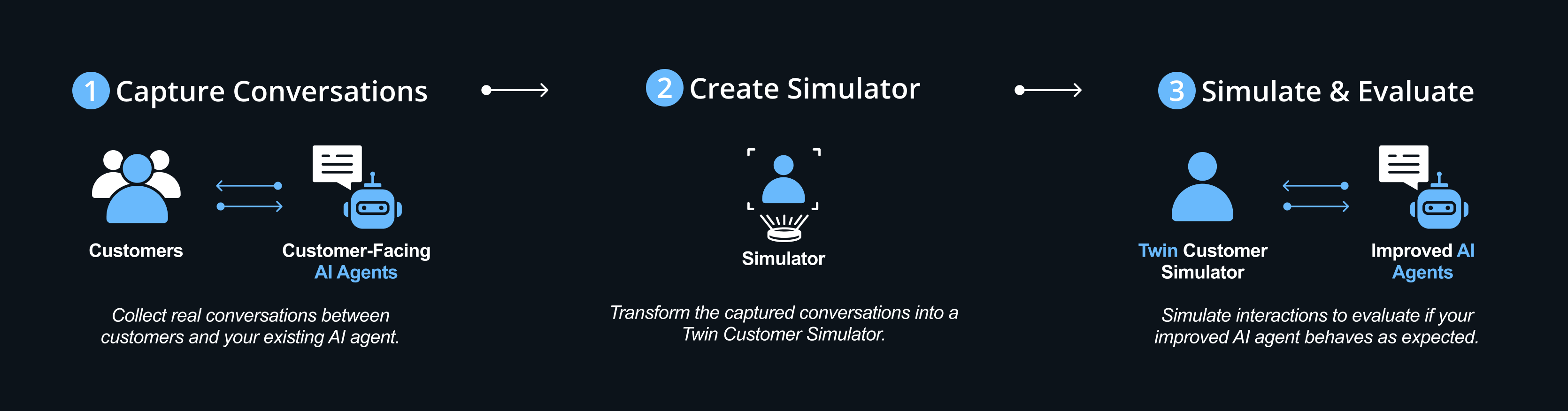
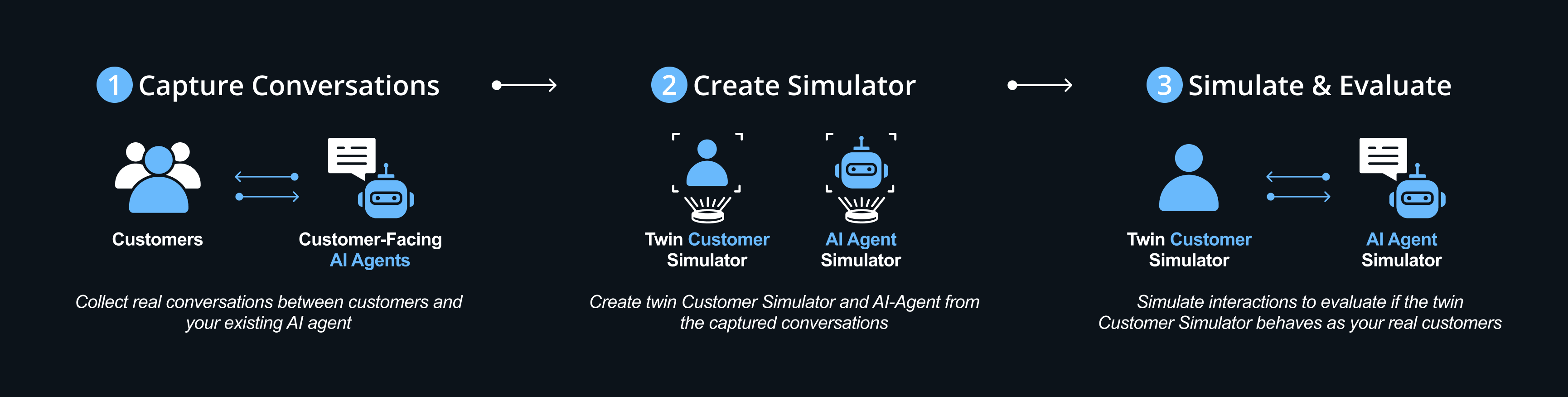
How do we validate the twin customer simulator? We create a twin AI-Agent and let them converse. we then evaluate the conversations to check that the customer simulator behaves as the real customer:
- Capture Conversations - Collect real conversations between customers and your existing AI-agent
- Create Simulator - Create twin Customer Simulator and AI-Agent from the captured conversations
- Simulate & Evaluate - Simulate interactions to evaluate if the twin Customer Simulator behaves as your real customers
Testing & Costs
We've tested Agentune Simulate with gpt-4o. In our tests, the cost per conversation was approximately 5-10 cents per conversation.
Quick Start
Install Agentune Simulate
pip install agentune-simulate
Basic usage example
from agentune.simulate import SimulationSessionBuilder
from langchain_openai import ChatOpenAI

# Load your conversations and create outcomes
session = SimulationSessionBuilder(
    default_chat_model=ChatOpenAI(model="gpt-4o"),
    outcomes=outcomes,
    vector_store=vector_store
).build()

# Run simulation
results = await session.run_simulation(real_conversations=conversations)
Learn with examples
- Quick Start -
getting_started.ipynbfor a quick getting started example - Production Setup -
persistent_storage_example.ipynbfor a closer to real life, scalable, persistent example - Validate Your Data - Adapt the 2nd example to load your conversations data and validate the simulation.
Here is an example of how to load conversations from tabular data:
loading_conversations.ipynb - Connect Real Agent -
real_agent_integration.ipynbfor integrating your existing agent systems
📧 Need help? Have feedback? Contact us at agentune-dev@sparkbeyond.com
Contributing
- Environment Setup: Environment Setup Guide
- Coding Standards: Style Guide
1 maintainer

Release files for agentune-simulate 0.0.4
For a detailed explanation of source distributions (sdists) and built distributions (wheels), please see the package formats documentation.
Source distribution (sdist)
| File | Size | Uploaded | |
|---|---|---|---|
| agentune_simulate-0.0.4.tar.gz | 42.0 kB | Details |
Built distribution (wheel)
| File | Interpreter | ABI | Platform | Reset |
|---|---|---|---|---|
| agentune_simulate-0.0.4-py3-none-any.whl | Python 3 | none | any | Details |
Total release size: 111.1 kB
Release files / agentune_simulate-0.0.4.tar.gz
| Download URL | agentune_simulate-0.0.4.tar.gz |
|---|---|
| Size | 42.0 kB |
| Tags | Source |
|
SHA-256 checksum How to use checksums |
0d8dfc346eddc13737244b0f8e6db2d2d0a1ff49f3581050ff222e9717d18646
|
|
BLAKE2b-256 checksum How to use checksums |
062f45e55809a41db16a03e242cebf236a69a95171d27e37f4bf8e6e64bc3a65
|
| Upload date | |
|
Uploaded using Trusted Publishing? What is trusted publishing? |
Yes |
| Uploaded via |
twine/6.1.0 CPython/3.12.9
|
Provenance
Provenance describes where a file came from. On PyPI, provenance is shared via attestations, which provide a verifiable record of the build or publishing details. View details, limitations and caveats.


PyPI Publish Attestation
PyPI verified that this artifact, at this checksum, originated from the publisher listed below.
Signed by GitHub Actions, verified by PyPI on Jul 25, 2025.
Transparency logRelease files / agentune_simulate-0.0.4-py3-none-any.whl
| Download URL | agentune_simulate-0.0.4-py3-none-any.whl |
|---|---|
| Size | 69.1 kB |
| Tags | Python 3 |
|
SHA-256 checksum How to use checksums |
b8c00bc87ece6ace3e37aa0c1fbfdc74a731058d17377288a1afdfad08d70f4e
|
|
BLAKE2b-256 checksum How to use checksums |
eca884fe9b7495d999f1ba2d53c25b0fdb4d562993301c39dd3f39d7b4ce9f8f
|
| Upload date | |
|
Uploaded using Trusted Publishing? What is trusted publishing? |
Yes |
| Uploaded via |
twine/6.1.0 CPython/3.12.9
|
Provenance
Provenance describes where a file came from. On PyPI, provenance is shared via attestations, which provide a verifiable record of the build or publishing details. View details, limitations and caveats.
PyPI Publish Attestation
PyPI verified that this artifact, at this checksum, originated from the publisher listed below.
Signed by GitHub Actions, verified by PyPI on Jul 25, 2025.
Transparency log













