
agentvis

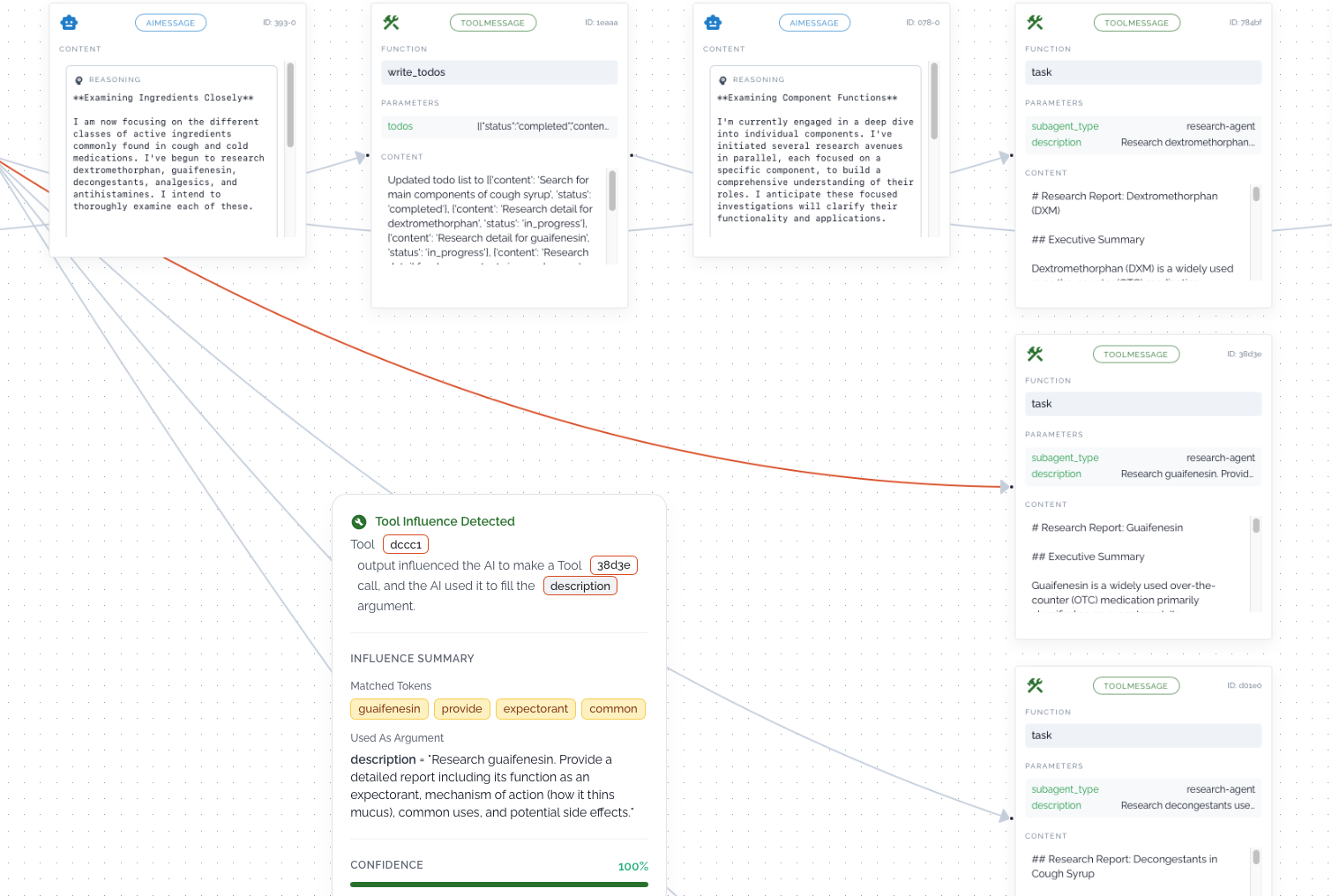
agentvis visualizes an agent’s reasoning trace and run, giving you clear insight into what’s happening behind the scenes and why the agent chose a particular path or triggered a specific tool call. By surfacing behavior that is often opaque, it helps reveal the factors that may have influenced the LLM to select a particular action or tool.
By exposing the influence flow behind each decision, it transforms opaque agent behavior into something understandable and actionable — so you can confidently refine and improve your prompts, which is often the hardest part of building reliable agents. 🧠✨
agentvis reasoning visualization example - link
Installation
Install core:
pip install agentvis
With LangChain support:
pip install agentvis[langchain]
How to generate an agent reasoning graph
1. Define your LangChain / LangGraph agent
from langchain_tavily import TavilySearch
from langchain_google_genai import ChatGoogleGenerativeAI
from langchain.agents import create_agent
from langchain.messages import HumanMessage
import os

os.environ["TAVILY_API_KEY"] = "<your-tavily-api-key>"

tavily_search = TavilySearch(
    max_results=5,
    search_depth="basic",
)

llm = ChatGoogleGenerativeAI(
    model="gemini-2.5-flash-lite",
    temperature=0.7,
    google_api_key="<your-google-api-key>",
)

agent = create_agent(
    llm,
    [tavily_search],
    system_prompt=(
        "You are a helpful web search agent. "
        "Use the Tavily tool when you need fresh information from the web."
    ),
)

result = agent.invoke(
    {"messages": [HumanMessage("Top warm countries and weather of each.")]}
)
messages = result["messages"]
2. Build the reasoning graph with agentvis and get a shareable link in exchange of messages produced by agent
from agentvis.framework.langchain import LangChainAdapter
from agentvis.core.export import ExportFactory
from agentvis.core import AgentVis

graph = AgentVis.build_agent_graph(messages=LangChainAdapter().convert(messages))
link = ExportFactory.export_graph(graph=graph, export_strategy="link")  # export_strategy = "link" | "json"
print(link)
Open the printed
linkin your browser to inspect the full reasoning trace of your agent.
How to generate an agent reasoning graph in multi agent case
1. Define your LangChain / LangGraph deep agent(which implements multi agent system)
from tavily import TavilyClient
from langchain_google_genai import ChatGoogleGenerativeAI
from langchain.agents import create_agent
from langchain.messages import HumanMessage
from deepagents import create_deep_agent
import os

os.environ["TAVILY_API_KEY"] = "<your-tavily-api-key>"
tavily_client = TavilyClient(api_key=os.environ["TAVILY_API_KEY"])
def internet_search(
    query: str,
    max_results: int = 5,
    topic: Literal["general", "news", "finance"] = "general",
    include_raw_content: bool = False,
):
    """Run a web search"""
    return tavily_client.search(
        query,
        max_results=max_results,
        include_raw_content=include_raw_content,
        topic=topic,
    )

llm = ChatGoogleGenerativeAI(
    model="gemini-2.5-flash-lite",
    temperature=0.7,
    google_api_key="<your-google-api-key>",
)

research_subagent = {
    "name": "research-agent",
    "description": "Used to research more in depth questions",
    "system_prompt": "You are a great researcher",
    "tools": [internet_search],
    "model": llm,
}
subagents = [research_subagent]
agent = create_deep_agent(model=llm,subagents=subagents)
2. Fetch messages and subagent messages from langchain streaming mode
messages = []
subagent_messages = defaultdict(list)
namespace_to_tool_mapping = {}

for chunk in agent.stream(
    {"messages": [{"role": "user", "content": "what are the main components used to make cough syrup and give me detailed answer for each component"}]},
    stream_mode=["updates", "tasks"],
    subgraphs=True,
):
    if not (isinstance(chunk, tuple) and len(chunk) == 3):
        continue
    namespace, event_type, payload = chunk
    is_subagent = bool(namespace)

    if event_type == "tasks" and isinstance(payload, dict):
        if payload.get("name") != "tools":
            continue
        task_id = payload.get("id", "")
        tool_call = (payload.get("input") or {}).get("tool_call")
        if not task_id or not isinstance(tool_call, dict):
            continue
        tool_call_id = tool_call.get("id")
        if not tool_call_id:
            continue
        namespace_to_tool_mapping[f"tools:{task_id}"] = tool_call_id
    elif event_type == "updates" and isinstance(payload, dict):
        if is_subagent:
            tool_call_id = next(s for s in namespace if s.startswith("tools:"))
            for _, data in payload.items():
                if data and "messages" in data:
                    if hasattr(data["messages"], "value"):
                        new_msgs = data["messages"].value
                    else:
                        new_msgs = data["messages"]
                    subagent_messages[tool_call_id].extend(new_msgs)
        else:
            for _, data in payload.items():
                if data and "messages" in data:
                    if hasattr(data["messages"], "value"):
                        new_msgs = data["messages"].value
                    else:
                        new_msgs = data["messages"]
                    messages.extend(new_msgs)

old_keys = list(subagent_messages.keys())
for key in old_keys:
    new_key = namespace_to_tool_mapping[key]
    subagent_messages[new_key] = subagent_messages.pop(key)
3. Build the reasoning graph with agentvis and get a shareable link in exchange of messages produced by agent
from agentvis.framework.langchain import LangChainAdapter
from agentvis.core.export import ExportFactory
from agentvis.core import AgentVis

graph = AgentVis.build_agent_graph(messages=LangChainAdapter().convert(messages,subagent_msgs))
link = ExportFactory.export_graph(graph=graph, export_strategy="link")  # export_strategy = "link" | "json"
print(link)
Open the printed
linkin your browser to inspect the full reasoning trace of your agent.
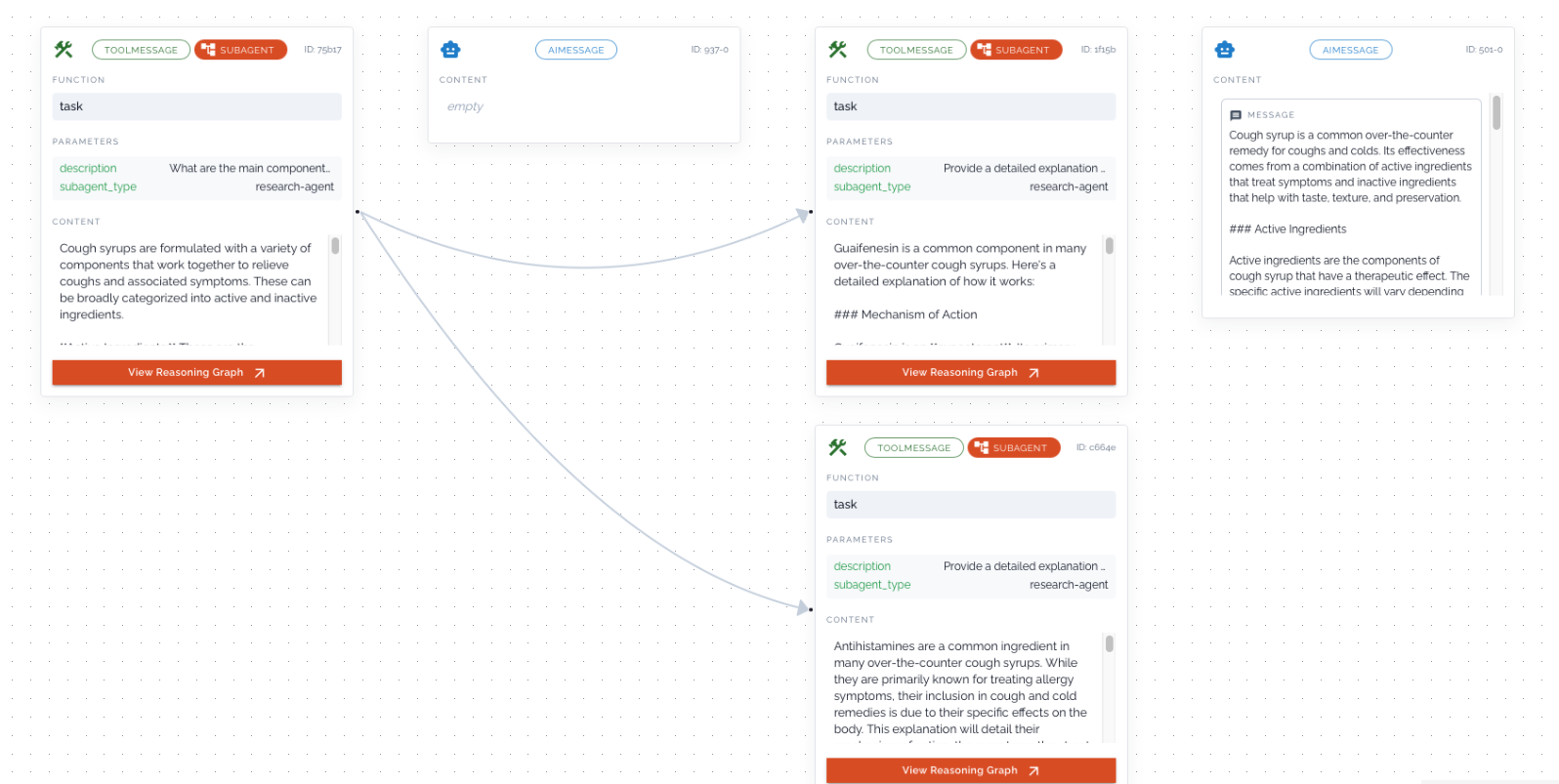
Multi agent reasoning visualization example - link
Current Capabilities
-
Currently, agentvis generates reasoning graphs for both single-agent and multi-agent systems. Multi-agent setups can provide deeper insights, especially as many modern AI applications are increasingly moving toward autonomous agent architectures.
-
At the moment, we also attempt to surface certain connections that help explain what may have influenced the LLM to choose a particular tool call. These insights can help identify shortcomings or missing context in prompts or tool outputs.
Current Limitations
- As of now in agentvis we are only supporting langchain framework.
- Our why tool call capability is currently intended to provide an initial indication of what may have influenced a tool invocation. It is an early feature and can be further improved if there is strong demand for deeper insights.
License
This project is licensed under the Apache License 2.0.
1 maintainer

Release files for agentvis 0.1.7
For a detailed explanation of source distributions (sdists) and built distributions (wheels), please see the package formats documentation.
Source distribution (sdist)
| File | Size | Uploaded | |
|---|---|---|---|
| agentvis-0.1.7.tar.gz | 101.6 kB | Details |
Built distribution (wheel)
| File | Interpreter | ABI | Platform | Reset |
|---|---|---|---|---|
| agentvis-0.1.7-py3-none-any.whl | Python 3 | none | any | Details |
Total release size: 145.7 kB
Release files / agentvis-0.1.7.tar.gz
| Download URL | agentvis-0.1.7.tar.gz |
|---|---|
| Size | 101.6 kB |
| Tags | Source |
|
SHA-256 checksum How to use checksums |
7c2a48dc6a7945cd224434e0c87d3221c87f0802999a3589aadf8ab34de27b5c
|
|
BLAKE2b-256 checksum How to use checksums |
47dfd817d2b63c84c7cec21eb8e9ab09244cc1604a1535dcf36006cf071879d2
|
| Upload date | |
|
Uploaded using Trusted Publishing? What is trusted publishing? |
No |
| Uploaded via |
twine/6.2.0 CPython/3.11.13
|
Release files / agentvis-0.1.7-py3-none-any.whl
| Download URL | agentvis-0.1.7-py3-none-any.whl |
|---|---|
| Size | 44.1 kB |
| Tags | Python 3 |
|
SHA-256 checksum How to use checksums |
5be85c6863582d4e48836f013b362e1f74a15271237995ff8ef5d124d882bb7a
|
|
BLAKE2b-256 checksum How to use checksums |
8ec740864d336ab2bd27944e70df48191a615ca19e5fbf7d7b569f095bf822d0
|
| Upload date | |
|
Uploaded using Trusted Publishing? What is trusted publishing? |
No |
| Uploaded via |
twine/6.2.0 CPython/3.11.13
|














