
AgentWarden




AgentWarden is a local, OpenAI-compatible proxy that tracks and reduces repeated context sent by tool-using agents. Your API key stays in your own agent process.
Start here
Important: turn the optimizers on
Every optimizer is off by default. After starting the dashboard, open the top-right settings button, enable the four toggles, and press Apply settings. They apply immediately to the running local proxy.
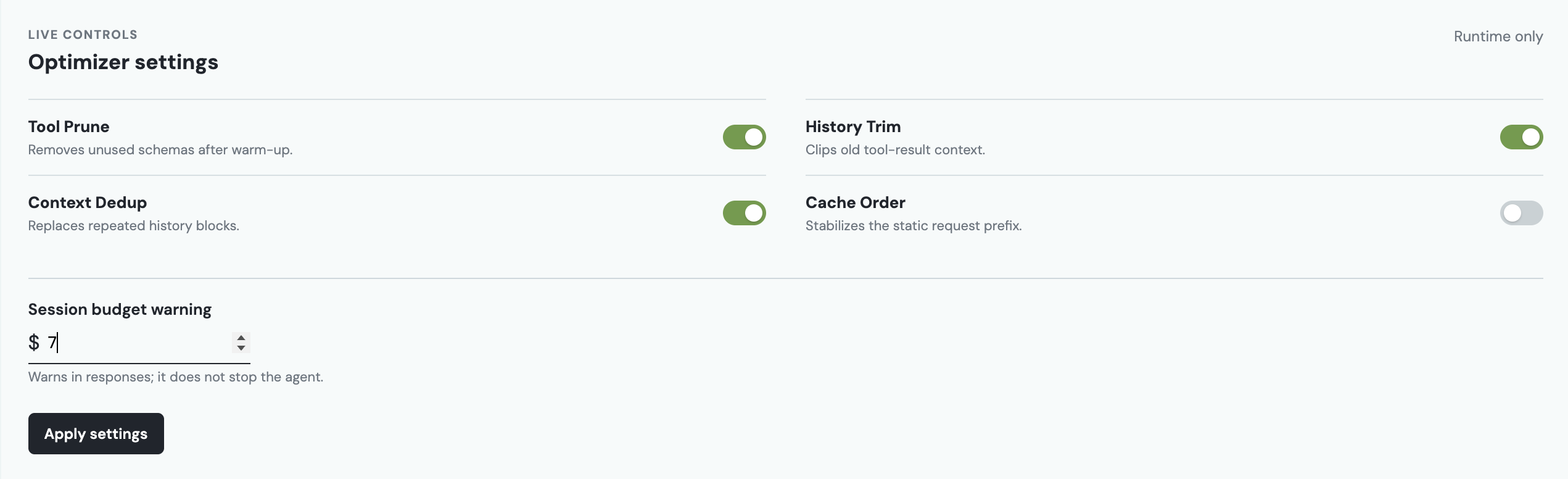
The controls reset when the proxy stops. For durable defaults, use the environment variables in Configuration.
1. Install and start
Requirements: Python 3.11+ and an OpenAI API key.
python3.11 -m venv .venv
source .venv/bin/activate
pip install agentwarden-ai
agentwarden dashboard
This starts your local proxy and dashboard at http://127.0.0.1:8080/dashboard.
2. Change one line in your agent
Keep your API key exactly where it already is. Change only the OpenAI client's base URL:
from openai import OpenAI

client = OpenAI(
    api_key="your-openai-api-key",
    base_url="http://127.0.0.1:8080/v1",
)
Run your agent normally. Then return to the dashboard to see its request receipt: input tokens, estimated spend, tools removed, per-segment usage, and the optimization passes that ran.
That is the whole integration. AgentWarden supports OpenAI Chat Completions clients, including streaming. It does not store API keys.
How savings grow
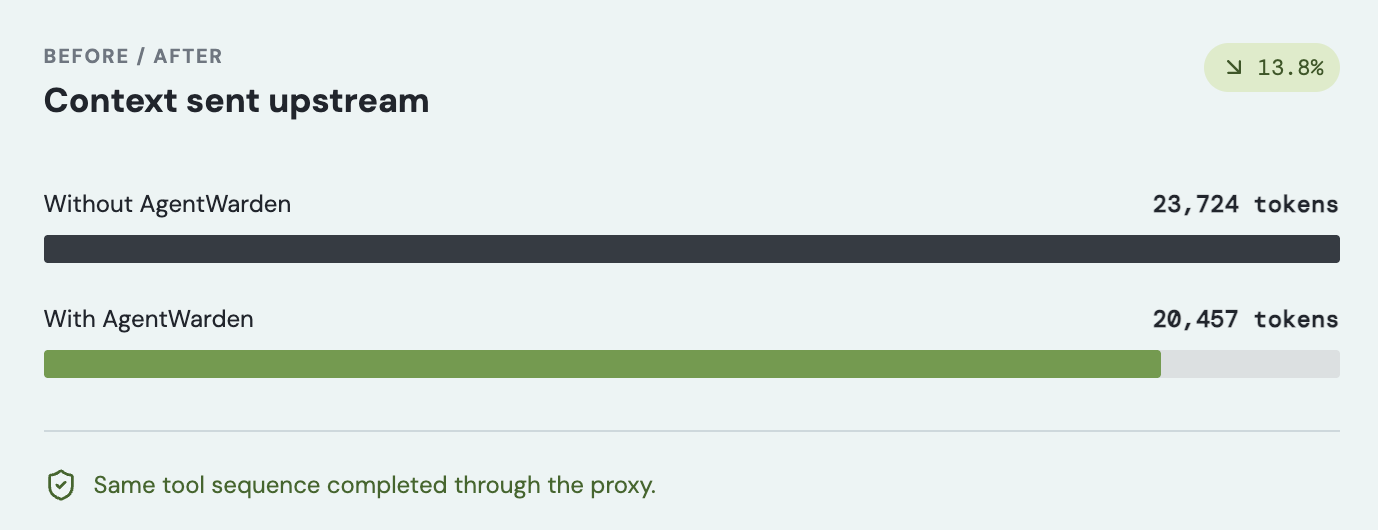
Tool Prune observes the tools your agent actually calls, keeps the first three requests unchanged, then removes unused tool schemas. The other enabled passes clean redundant old context deterministically. In other words, AgentWarden has more opportunity to help as an agent has a longer, repeated workflow.
For agents with repeated tool schemas and growing history, 10-15+ requests can reduce input cost by roughly 16-50%, depending on the toolset and context. This is a workload-dependent range, not a guaranteed result. Always use the local receipt and replay verifier to measure your own agent.
The four optimizers
| Toggle | What it does |
|---|---|
| Tool Prune | After three warm-up requests, forwards only tools already used in the session or named in the current user request. |
| History Trim | Keeps the latest turns intact and clips older tool-result content. |
| Context Dedup | Replaces repeated history blocks with a deterministic reference to the earlier content. |
| Cache Order | Keeps the system-and-tools prefix stable so provider prompt caching has a better chance to apply. |
Every pass is independently toggleable. With all four off, AgentWarden is a byte-identical pass-through proxy.
Track what is happening
The dashboard is the simplest way to inspect a session. It is local and bundled with the Python package; no Node.js or separate frontend server is required.
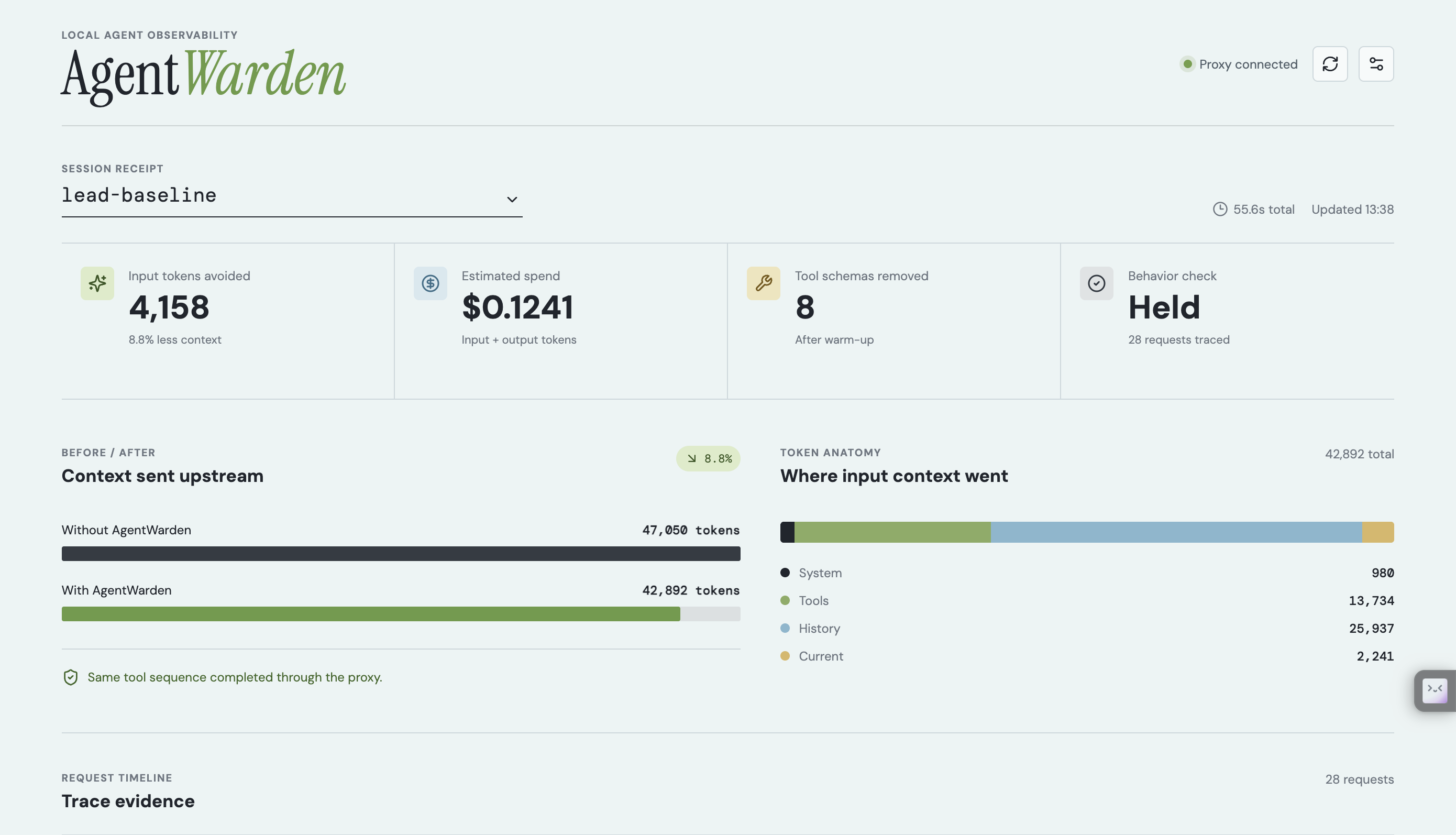
For a stable receipt per agent run, optionally send a session header:
client.chat.completions.create(
    model="gpt-5.6-terra",
    messages=messages,
    extra_headers={"X-AgentWarden-Session": "support-agent-run-42"},
)
You can also query the receipt directly:
agentwarden stats --session-id support-agent-run-42
curl "http://127.0.0.1:8080/traces?session_id=support-agent-run-42"
Configuration
Use these before agentwarden dashboard or agentwarden serve when you want
the settings to survive a restart:
export AGENTWARDEN_ENABLE_TOOL_PRUNE=true
export AGENTWARDEN_ENABLE_HISTORY_TRIM=true
export AGENTWARDEN_ENABLE_CONTEXT_DEDUP=true
export AGENTWARDEN_ENABLE_CACHE_ORDER=true
export AGENTWARDEN_SESSION_BUDGET_USD=0.02
agentwarden dashboard
| Variable | Meaning |
|---|---|
AGENTWARDEN_ENABLE_TOOL_PRUNE |
Enable unused tool-schema removal after warm-up. |
AGENTWARDEN_ENABLE_HISTORY_TRIM |
Enable trimming for older tool-result messages. |
AGENTWARDEN_ENABLE_CONTEXT_DEDUP |
Enable repeated-history cleanup. |
AGENTWARDEN_ENABLE_CACHE_ORDER |
Enable stable static-prefix ordering. |
AGENTWARDEN_SESSION_BUDGET_USD |
Add a response warning after projected session spend reaches this amount. |
AGENTWARDEN_DB_PATH |
SQLite receipt location; defaults to agentwarden.sqlite3. |
Useful commands:
agentwarden dashboard                 # dashboard + proxy on port 8080
agentwarden serve                     # proxy only on port 8080
agentwarden doctor                    # check that the local proxy is reachable
agentwarden stats --session-id NAME   # print a session receipt
agentwarden verify --no-judge         # compare the demo workflow with optimizers off vs. on
Judge and contributor test path
AgentWarden is installable directly from PyPI; no frontend build is required:
python3.11 -m venv .venv
source .venv/bin/activate
pip install agentwarden-ai
agentwarden dashboard
Open http://127.0.0.1:8080/dashboard, enable the optimizer toggles, and
point an OpenAI Chat Completions client at http://127.0.0.1:8080/v1.
Live requests require the tester's own OPENAI_API_KEY and OpenAI API quota.
To run the repository's offline test suite instead:
git clone https://github.com/Jahanshah1/AgentWarden.git
cd AgentWarden
python3.11 -m venv .venv
.venv/bin/pip install -e '.[dev]'
.venv/bin/pytest -m 'not live' -q
Built with Codex and GPT-5.6
AgentWarden was built during OpenAI Build Week by Jahan Shah in collaboration with Codex and GPT-5.6. Codex accelerated implementation and iteration across the OpenAI-compatible streaming proxy, deterministic optimizer pipeline, pytest coverage, local dashboard, PyPI packaging, and the public site. Jahan defined the product direction, reviewed implementation choices, and ran the real agent workflows used for the receipts shown above.
The project keeps the build story inspectable: the repository includes the tests, demo agent, release workflow, design decisions, and documentation used to get from the core proxy to the packaged product.
Verify the project from a clone
python3.11 -m venv .venv
.venv/bin/pip install -e '.[dev]'
.venv/bin/pytest -m 'not live' -q
For the end-to-end demo agent:
export OPENAI_API_KEY="your-key"
.venv/bin/agentwarden demo
.venv/bin/agentwarden verify --no-judge
See the user guide for troubleshooting and the launch playbook for rollout guidance.
Current scope
AgentWarden is a local, single-user alpha, published on PyPI as
agentwarden-ai. It currently
proxies OpenAI Chat Completions only; the Responses API and non-OpenAI
providers are outside the current scope.
Created by Jahan Shah.
1 maintainer

Metadata
1 maintainer
Release files for agentwarden-ai 0.1.4
For a detailed explanation of source distributions (sdists) and built distributions (wheels), please see the package formats documentation.
Source distribution (sdist)
| File | Size | Uploaded | Provenance | Actions |
|---|---|---|---|---|
| agentwarden_ai-0.1.4.tar.gz | 287.8 kB | With provenance | Details for agentwarden_ai-0.1.4.tar.gz |
Built distribution (wheel)
| File | Interpreter | ABI | Platform | Actions Reset |
|---|---|---|---|---|
| agentwarden_ai-0.1.4-py3-none-any.whl | Python 3 | none | any | Details for agentwarden_ai-0.1.4-py3-none-any.whl |
Total release size: 583.3 kB
Release files / agentwarden_ai-0.1.4.tar.gz
| Download URL | agentwarden_ai-0.1.4.tar.gz |
|---|---|
| Size | 287.8 kB |
| Tags | Source |
|
SHA-256 checksum How to use checksums |
1ef9da0397d98c2b29dcd28dad4adb1daa00b70f38ba58c41a4f6b055735c97d
|
|
BLAKE2b-256 checksum How to use checksums |
2e536137901dc3614377ed9e7f819eab11c85d157142e3c7b7f71a0e217e27a5
|
| Upload date | |
|
Uploaded using Trusted Publishing? What is trusted publishing? |
Yes |
| Uploaded via |
twine/6.1.0 CPython/3.13.14
|
Provenance
Provenance describes where a file came from. On PyPI, provenance is shared via attestations, which provide a verifiable record of the build or publishing details. View details, limitations and caveats.


PyPI Publish Attestation
PyPI verified that this artifact, at this checksum, originated from the publisher listed below.
Signed by GitHub Actions, verified by PyPI on Jul 20, 2026.
Transparency logRelease files / agentwarden_ai-0.1.4-py3-none-any.whl
| Download URL | agentwarden_ai-0.1.4-py3-none-any.whl |
|---|---|
| Size | 295.5 kB |
| Tags | Python 3 |
|
SHA-256 checksum How to use checksums |
b6c4b1f32c078a014e2faa41557b2cb120cfa61ce29596d55c73e6d324c072b7
|
|
BLAKE2b-256 checksum How to use checksums |
7b3e4d45da829aed2bd96ccd0010d691c3baa610588b94132e2ace773f3ed952
|
| Upload date | |
|
Uploaded using Trusted Publishing? What is trusted publishing? |
Yes |
| Uploaded via |
twine/6.1.0 CPython/3.13.14
|
Provenance
Provenance describes where a file came from. On PyPI, provenance is shared via attestations, which provide a verifiable record of the build or publishing details. View details, limitations and caveats.
PyPI Publish Attestation
PyPI verified that this artifact, at this checksum, originated from the publisher listed below.
Signed by GitHub Actions, verified by PyPI on Jul 20, 2026.
Transparency logSecurity for agentwarden-ai 0.1.4
Provenance
Provenance describes where a file came from. On PyPI, provenance is shared via attestations, which provide a verifiable record of the build or publishing details. View details, limitations and caveats.
Full provenance
All 2 files in this release have been uploaded with provenance metadata.
Attestation for agentwarden_ai-0.1.4.tar.gz
PyPI Publish Attestation
PyPI verified that this artifact, at this checksum, originated from the publisher listed below.
Signed by GitHub Actions, verified by PyPI on Jul 20, 2026.
Transparency logA note on package security
PyPI is a repository for distributing packages, not a service for auditing them. While third-party security researchers and our staff do their best to detect and remove malicious packages, PyPI cannot guarantee the quality, security or suitability of any given package.
To learn more about protecting yourself from malicious actors, visit our package security documentation.














