

AgentWeave
Run your AI factory in the open.



Nothing appears out of thin air. AgentWeave started as a way to get agents from different companies working together, each doing what it does best. Then the problem showed: work appeared out of thin air, and no one could say who made it, or why. So AgentWeave grew into the place where you run your AI factory in the open: every artifact cared for, every step visible, every decision traceable.
AgentWeave is a local app where AI coding agents (Claude Code, Codex and GitHub Copilot) work on your projects together, against specifications you approve. Each task runs in its own git worktree, a different agent reviews it, and approving it merges it. Every requirement, task, run, piece of evidence and merge is recorded and connected.
Quick start
pip install agentweave-ai
cd ~/code/my-project
agentweave
That is the whole install. agentweave-ai brings the Hub (the local server and the app it serves)
with it. The first launch creates ~/.agentweave/hub/, starts the app on http://localhost:8000,
registers the directory you ran it from as a project, and opens it. You need Python 3.11+ and at
least one agent CLI signed in: Claude Code,
Codex or GitHub Copilot CLI.
Then follow Your first project: three agents, one specification, one merged change.
How it works
- You ask for a change. An agent drafts a specification: requirements with stable ids
(
FR-1,FR-2, …), scenarios, and the tasks to deliver them. - You approve it. The Hub lists any gaps first. Approving creates the tasks, with their dependencies.
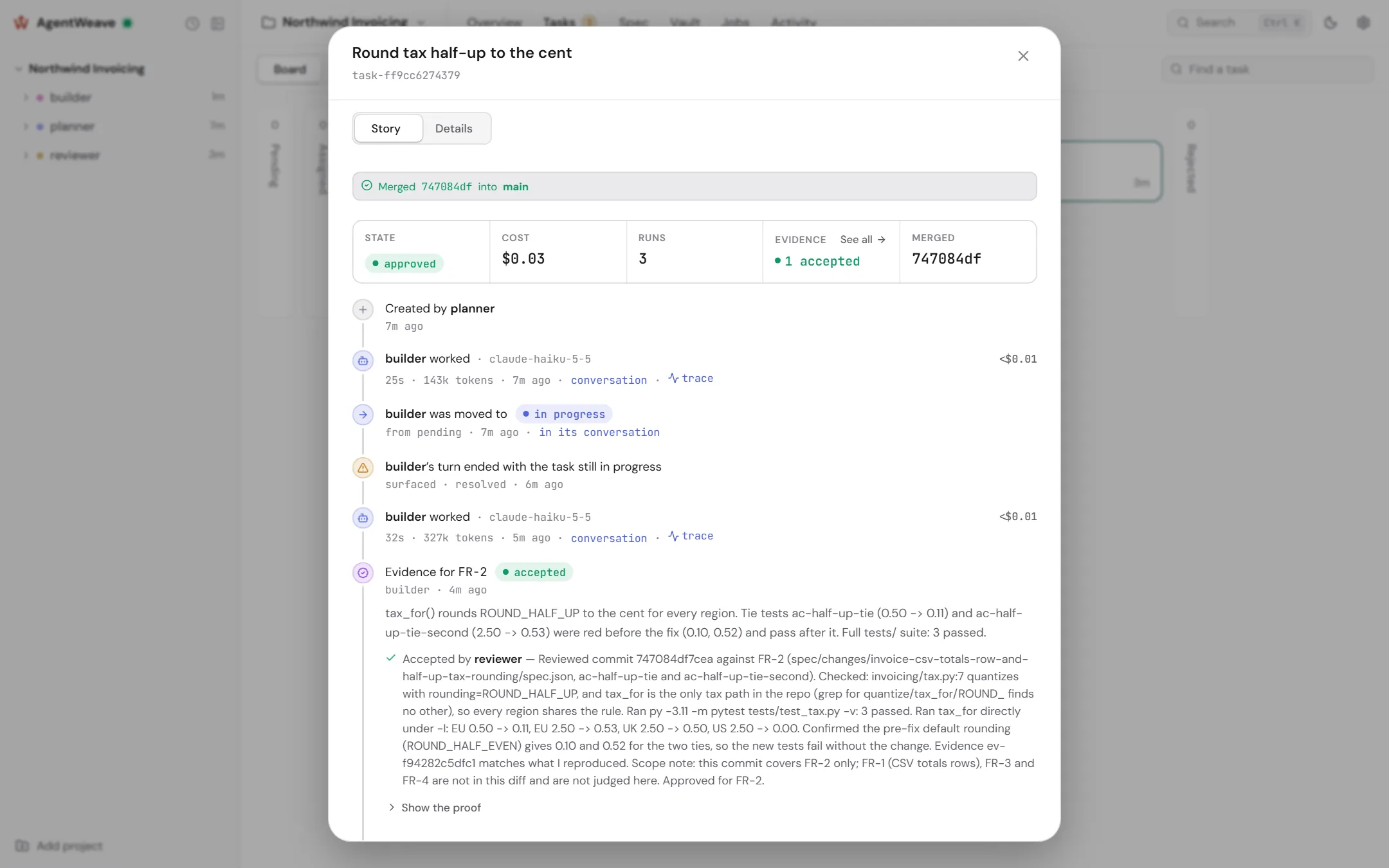
- Agents build. Each task gets its own worktree and branch. The agent implements it, runs the tests, commits, and records evidence against the requirement: the command, its output, and the commit.
- Someone else reviews. An agent can never approve its own work. The reviewer runs the checks, decides the evidence, and approves or sends the task back.
- Approval merges. The evidenced commit is merged into your main branch, locally. Nothing is pushed.
Every step is attributed, so for any line in your repository you can open the task's story, the requirement's history, the run's transcript and trace, and the reviewer's reasoning.
What's inside
- Specifications you approve: drafted with an agent in conversation, with phases, rigor, coverage, drift and folding into current behaviour.
- Isolated, reviewed work: per-task worktrees, dependencies, evidence, quality checks, and approval as a merge.
- Agents with a charter: Claude Code, Codex and Copilot agents, each with a runner, a model and a charter, and permission postures that decide what an agent may do before it asks you.
- You in the loop: agents ask you questions and wait for the answer. Permission requests come to you as cards.
- Jobs, loops and flows: scheduled work with a purpose and a stop condition. Flows build an approved specification task by task, each reviewed by a different agent.
- Knowledge vault: transcripts, rules, decisions and documents your agents read, with facts that cite their sources.
- Traceability: task stories, requirement stories, per-turn traces (exportable over OTLP), and a spend ledger.
The CLI
The CLI manages only the local instance. Everything else happens in the app.
agentweave                 # start or open the app, and register this directory
agentweave doctor          # check installation and readiness (starts nothing)
agentweave status          # is it running, where, which projects
agentweave stop            # stop it
agentweave reset           # delete local Hub state (asks first; never touches your projects)
agentweave vault add PATH  # add files to a project's knowledge vault
aw is an alias. --port and --profile run separate instances side by side. See the
CLI reference.
Security model
- One local process owns execution, state and identity. It binds to
127.0.0.1by default. - Operators use one instance key. Project identity is in the URL, never in the credential.
- Each agent run gets its own short-lived token. Identity comes from that token alone, never from a request body or header, so an agent cannot act as another or approve its own work.
- Agents reach the Hub through one governed tool surface, over MCP or the
aw-toolcommand. - Provider credentials stay with the agent CLIs. Secret values are never returned by diagnostics and are redacted from everything the Hub records.
Development
git clone https://github.com/gutohuida/AgentWeave.git && cd AgentWeave
pip install -c constraints-dev.txt -e ./hub          # the Hub first
pip install -c constraints-dev.txt -e ".[dev,mcp]"
py -3.11 -m pytest tests/ -q && py -3.11 -m pytest hub/tests/ -q -n auto
cd hub/ui && npm install && npm run test && npm run build
Exercise the product in testbed/, not at the repository root. See the
development guide.
src/agentweave/   the CLI
hub/hub/          the Hub: API, scheduler, execution, runner adapters, migrations
hub/ui/           the React app (built into hub/hub/static/ui)
spec/             AgentWeave's own specifications, managed through AgentWeave
docs/             the documentation site
Links
Documentation · PyPI · Changelog · Issues
Why the red thread? In Goethe's Elective Affinities, every rope of the Royal Navy is spun with a red thread, so any piece of it can be traced back to where it was made. Madder is the classic red dye. The loop is that thread drawing a W, and looping back on itself at the centre, where the human stays in the loop.
1 maintainer

Metadata
1 maintainer
Release files for agentweave-ai 2.1.0
For a detailed explanation of source distributions (sdists) and built distributions (wheels), please see the package formats documentation.
Source distribution (sdist)
| File | Size | Uploaded | Provenance | Actions |
|---|---|---|---|---|
| agentweave_ai-2.1.0.tar.gz | 1.0 MB | Without provenance | Details for agentweave_ai-2.1.0.tar.gz |
Built distribution (wheel)
| File | Interpreter | ABI | Platform | Actions Reset |
|---|---|---|---|---|
| agentweave_ai-2.1.0-py3-none-any.whl | Python 3 | none | any | Details for agentweave_ai-2.1.0-py3-none-any.whl |
Total release size: 2.0 MB
Release files / agentweave_ai-2.1.0.tar.gz
| Download URL | agentweave_ai-2.1.0.tar.gz |
|---|---|
| Size | 1.0 MB |
| Tags | Source |
|
SHA-256 checksum How to use checksums |
fdacd507d9443a1807deb02135ccd26c9151683305ef7276025f8c691edbd21a
|
|
BLAKE2b-256 checksum How to use checksums |
560edfffcf5adee11a2ddace55e2a01c69f305629a9ccf7e341187f851e71002
|
| Upload date | |
|
Uploaded using Trusted Publishing? What is trusted publishing? |
No |
| Uploaded via |
twine/7.0.0 CPython/3.11.17
|
Release files / agentweave_ai-2.1.0-py3-none-any.whl
| Download URL | agentweave_ai-2.1.0-py3-none-any.whl |
|---|---|
| Size | 955.7 kB |
| Tags | Python 3 |
|
SHA-256 checksum How to use checksums |
1774aabf7818a6ec297ff036f3677d4189fbc23cdc0b5a8d898289579f841197
|
|
BLAKE2b-256 checksum How to use checksums |
3fa00d34379b5cd4c9874d8c8162663463dc300fb42d8ad7d42e5aa3be6c4ef6
|
| Upload date | |
|
Uploaded using Trusted Publishing? What is trusted publishing? |
No |
| Uploaded via |
twine/7.0.0 CPython/3.11.17
|
Security for agentweave-ai 2.1.0
Provenance
Provenance describes where a file came from. On PyPI, provenance is shared via attestations, which provide a verifiable record of the build or publishing details. View details, limitations and caveats.
No provenance found
None of the files in this release were uploaded with provenance metadata.
A note on package security
PyPI is a repository for distributing packages, not a service for auditing them. While third-party security researchers and our staff do their best to detect and remove malicious packages, PyPI cannot guarantee the quality, security or suitability of any given package.
To learn more about protecting yourself from malicious actors, visit our package security documentation.














