
AgentX Harness
Realistic 1mil Long Context, Multi Turn Agentic Workload Trace Replayer, collected from over $3mil USD of Traces
https://inferencex.semianalysis.com/datasets
Install and run AgentX
Requires Python 3.11–3.13. Install the version matching the GitHub release:
pip install agentx-harness==1.0.7

agentx profile \
  --url "$SERVER_URL" --endpoint /v1/chat/completions \
  --model "$SERVED_MODEL_NAME" --tokenizer "$TOKENIZER" \
  --tokenizer-trust-remote-code \
  --concurrency "$CONC" \
  --public-dataset "$DATASET" \
  --output-artifact-dir "$OUTPUT_DIR"
agentx profile selects the AgentX scenario automatically. Explicit flags
override its defaults; --config/-f uses the scenario and settings in the
YAML file. See the AgentX guide for dataset
choices and benchmark settings. The underlying aiperf command remains
available for compatibility.
Install in a dedicated virtual environment: this distribution includes the
fork's aiperf Python package and should not be installed alongside the
upstream aiperf distribution. On Linux ARM64, the crick dependency requires
a C compiler to build.
The package name is agentx-harness; the command is agentx. Releases tagged
agentx-vX.Y.Z publish version X.Y.Z automatically to PyPI.
Original README.md Below
AIPerf





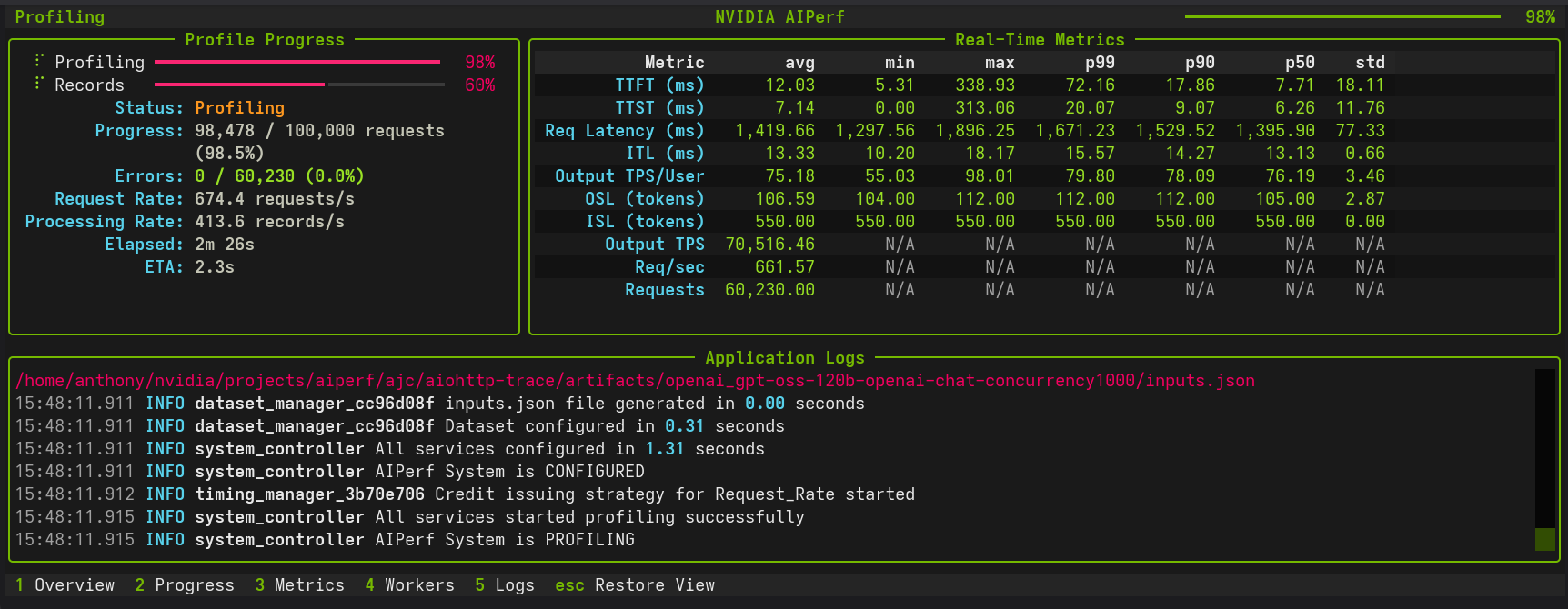
AIPerf is a comprehensive benchmarking tool that measures the performance of generative AI models served by your preferred inference solution. It provides detailed metrics using a command line display as well as extensive benchmark performance reports.
Quick Start
This quick start guide leverages Ollama via Docker Desktop.
Setting up a Local Server
In order to set up an Ollama server, run granite4:350m using the following commands:
docker run -d \
  --name ollama \
  -p 11434:11434 \
  -v ollama-data:/root/.ollama \
  ollama/ollama:latest
docker exec -it ollama ollama pull granite4:350m
Basic Usage
Create a virtual environment and install AIPerf:
python3 -m venv venv
source venv/bin/activate
pip install aiperf
Optional integrations:
pip install "aiperf[mlflow]"enables MLflow uploads and live telemetry streamingpip install "aiperf[otel]"enables OpenTelemetry metric streamingpip install "aiperf[wandb]"enables Weights & Biases result uploadspip install "aiperf[mlflow,otel,wandb]"installs all telemetry extras
To run a simple benchmark against your Ollama server:
aiperf profile \
  --model "granite4:350m" \
  --streaming \
  --endpoint-type chat \
  --tokenizer ibm-granite/granite-4.0-micro \
  --url http://localhost:11434 \
  --request-count 10
Example with Custom Configuration
aiperf profile \
  --model "granite4:350m" \
  --streaming \
  --endpoint-type chat \
  --tokenizer ibm-granite/granite-4.0-micro \
  --url http://localhost:11434 \
  --concurrency 5 \
  --request-count 10
Example output:
NOTE: The example performance is reflective of a CPU-only run and does not represent an official benchmark.
                                               NVIDIA AIPerf | LLM Metrics
┏━━━━━━━━━━━━━━━━━━━━━━━━━━━━━━━━━━━━━━┳━━━━━━━━━━━┳━━━━━━━━━━┳━━━━━━━━━━━┳━━━━━━━━━━━┳━━━━━━━━━━━┳━━━━━━━━━━━┳━━━━━━━━━━┓
┃                               Metric ┃       avg ┃      min ┃       max ┃       p99 ┃       p90 ┃       p50 ┃      std ┃
┡━━━━━━━━━━━━━━━━━━━━━━━━━━━━━━━━━━━━━━╇━━━━━━━━━━━╇━━━━━━━━━━╇━━━━━━━━━━━╇━━━━━━━━━━━╇━━━━━━━━━━━╇━━━━━━━━━━━╇━━━━━━━━━━┩
│             Time to First Token (ms) │  7,463.28 │ 7,125.81 │  9,484.24 │  9,295.48 │  7,596.62 │  7,240.23 │   677.23 │
│            Time to Second Token (ms) │     68.73 │    32.01 │    102.86 │    102.55 │     99.80 │     67.37 │    24.95 │
│      Time to First Output Token (ms) │  7,463.28 │ 7,125.81 │  9,484.24 │  9,295.48 │  7,596.62 │  7,240.23 │   677.23 │
│                 Request Latency (ms) │ 13,829.40 │ 9,029.36 │ 27,905.46 │ 27,237.77 │ 21,228.48 │ 11,338.31 │ 5,614.32 │
│             Inter Token Latency (ms) │     65.31 │    53.06 │     81.31 │     81.24 │     80.64 │     63.79 │     9.09 │
│     Output Token Throughput Per User │     15.60 │    12.30 │     18.85 │     18.77 │     18.08 │     15.68 │     2.05 │
│                    (tokens/sec/user) │           │          │           │           │           │           │          │
│      Output Sequence Length (tokens) │     95.20 │    29.00 │    295.00 │    283.12 │    176.20 │     63.00 │    77.08 │
│       Input Sequence Length (tokens) │    550.00 │   550.00 │    550.00 │    550.00 │    550.00 │    550.00 │     0.00 │
│ Output Token Throughput (tokens/sec) │      6.85 │      N/A │       N/A │       N/A │       N/A │       N/A │      N/A │
│    Request Throughput (requests/sec) │      0.07 │      N/A │       N/A │       N/A │       N/A │       N/A │      N/A │
│             Request Count (requests) │     10.00 │      N/A │       N/A │       N/A │       N/A │       N/A │      N/A │
└──────────────────────────────────────┴───────────┴──────────┴───────────┴───────────┴───────────┴───────────┴──────────┘

CLI Command: aiperf profile --model 'granite4:350m' --streaming --endpoint-type 'chat' --tokenizer 'ibm-granite/granite-4.0-micro' --url 'http://localhost:11434'
Benchmark Duration: 138.89 sec
CSV Export: /home/user/aiperf/artifacts/granite4:350m-openai-chat-concurrency1/profile_export_aiperf.csv
JSON Export: /home/user/Code/aiperf/artifacts/granite4:350m-openai-chat-concurrency1/profile_export_aiperf.json
Log File: /home/user/Code/aiperf/artifacts/granite4:350m-openai-chat-concurrency1/logs/aiperf.log
Features
- Scalable multiprocess architecture with 10 services communicating via ZMQ
- 3 UI modes:
dashboard(real-time TUI),simple(progress bars),none(headless) - Multiple benchmarking modes: concurrency, request-rate, request-rate with max concurrency, trace replay
- Extensible plugin system for endpoints, datasets, transports, and metrics
- Public dataset support including ShareGPT and custom formats
Supported APIs
- OpenAI chat completions, completions, embeddings, audio, images
- NIM embeddings, rankings
Tutorials and Feature Guides
Getting Started
- Basic Tutorial - Profile Qwen3-0.6B with vLLM
- Comprehensive Benchmarking Guide - 5 real-world use cases
- Interactive Chat Sanity Checks - Talk to an endpoint with
aiperf chatand see per-turn TTFT/TPS/ITL - YAML Configuration Files - Drive AIPerf from a config file instead of CLI flags
- Sampling Distributions in YAML Configs - Fixed, Normal, Log-normal, Multimodal, and Empirical shapes for ISL/OSL/turns/etc.
- User Interface - Dashboard, simple, or headless
- Hugging Face TGI - Profile Hugging Face TGI models
- OpenAI Text Endpoints - Profile OpenAI-compatible text APIs
Load Control and Timing
- Request Rate with Max Concurrency - Dual request control
- Arrival Patterns - Constant, Poisson, gamma traffic
- Prefill Concurrency - Memory-safe long-context benchmarking
- Adaptive Scale - Single-run SLA boundary discovery and sustain
- Gradual Ramping - Smooth ramp-up of concurrency and request rate
- Warmup Phase - Eliminate cold-start effects
- User-Centric Timing - Per-user rate limiting for KV cache benchmarking
- Request Cancellation - Timeout and resilience testing
- Multi-URL Load Balancing - Distribute across servers
Workloads and Data
- Trace Benchmarking - Deterministic workload replay
- Bailian Traces - Bailian production trace replay
- Baseten Traces - Baseten Parquet production trace replay
- BurstGPT Traces - BurstGPT real-world bursty traffic trace replay
- SageMaker Data Capture - Replay production traffic from SageMaker endpoints
- Custom Prompt Benchmarking - Send exact prompts as-is
- Custom Dataset - Custom dataset formats
- Inline Datasets - Embed records directly in the YAML config (single_turn, multi_turn, multi-pool random_pool, traces)
- ShareGPT Dataset - Profile with ShareGPT dataset
- AIMO Dataset - Profile with AIMO math reasoning datasets (NuminaMath-TIR, NuminaMath-CoT, NuminaMath-1.5, AIME)
- MMStar Dataset - Profile vision language models with MMStar visual QA benchmark
- MMVU Dataset - Profile video language models with MMVU expert-level video understanding benchmark
- VisionArena Dataset - Profile with real-world vision conversations from Chatbot Arena
- LLaVA-OneVision Dataset - Profile with diverse multimodal instruction-following data
- SPEED-Bench Dataset - Profile speculative decoding with SPEED-Bench
- Per-Request Spec-Decode Metrics - Inline per-request acceptance length, draft rate, and pooled histogram from a normal profile run
- InstructCoder Dataset - Profile with InstructCoder code generation dataset
- SpecBench Dataset - Profile with SpecBench speculative decoding dataset
- Blazedit Dataset - Profile with Blazedit code editing dataset
- ASR Datasets - Profile ASR models with LibriSpeech, VoxPopuli, GigaSpeech, AMI, and SPGISpeech
- Synthetic Dataset Generation - Generate synthetic datasets
- Agentic Code Generator - Generate multi-turn coding-agent traces for KV cache benchmarking
- Weka Traces - Replay real agentic coding sessions with KV-cache-aware Weka traces
- AgentX scenarios - InferenceX defaults (
--scenario agentx) and the original MVP benchmark (--scenario inferencex-agentx-mvp) - Fixed Schedule - Precise timestamp-based execution
- Time-based Benchmarking - Duration-based testing
- Sequence Distributions - Mixed ISL/OSL pairings
- Prefix Synthesis - Prefix data synthesis for KV cache testing
- Reproducibility - Deterministic datasets with
--random-seed - Template Endpoint - Custom Jinja2 request templates
- Multi-Turn Conversations - Multi-turn conversation benchmarking
- Raw Payload Replay - Verbatim JSONL payload replay (single file or directory)
- Inputs JSON Replay - Verbatim multi-turn replay of AIPerf inputs.json artifacts
- Local Tokenizer - Use local tokenizers without HuggingFace
Endpoint Types
- Embeddings - Profile embedding models
- Rankings - Profile ranking models
- OpenAI Responses API - Profile OpenAI Responses API endpoints
- Audio - Profile audio language models
- NIM Image Retrieval - Profile NIM image retrieval models
- Vision - Profile vision language models
- Image Generation - Benchmark any OpenAI-compatible image generation API
- SGLang Image Edit - Benchmark OpenAI-compatible image-to-image (image edit) endpoints
- SGLang Video Generation - Video generation benchmarking
- Synthetic Video - Synthetic video generation
Analysis and Monitoring
- Timeslice Metrics - Per-timeslice performance analysis
- Goodput - SLO-based throughput measurement
- Parameter Sweeps - YAML reference for grid/zip/scenarios sweeps + multi-run, with picker for choosing a sweep mode
- Adaptive Search - Bayesian-optimization walkthrough (single-objective + multi-objective Pareto)
- Adaptive Scale - Single-run SLA boundary discovery and sustain
- Search Recipes - Named recipe catalog including
pareto-sweep,max-throughput-ttft-sla,max-concurrency-under-sla - HTTP Trace Metrics - DNS, TCP/TLS, TTFB timing
- Multi-Run Confidence - Confidence intervals across repeated runs
- Profile Exports - Post-processing with Pydantic models
- Visualization and Plotting - PNG charts and multi-run comparison
- Auto-Plot After Profile - Run
aiperf plotautomatically afteraiperf profile - GPU Telemetry - DCGM metrics collection
- OTel + MLflow Live Telemetry - Stream metrics to OTel and MLflow in real time
- Weights & Biases Export - Upload results tables and artifacts to wandb
- Server Metrics - Prometheus-compatible metrics
Documentation
| Document | Purpose |
|---|---|
| Architecture | Three-plane architecture, core components, credit system, data flow |
| CLI Options | Complete command and option reference |
| Metrics Reference | All metric definitions, formulas, and requirements |
| Environment Variables | All AIPERF_* configuration variables |
| Plugin System | Plugin architecture, 25+ categories, creation guide |
| Creating Plugins | Step-by-step plugin tutorial |
| Accuracy Benchmarks | Accuracy evaluation against MMLU, AIME, and other benchmarks |
| Benchmark Modes | Trace replay and timing modes |
| Server Metrics | Prometheus-compatible server metrics collection |
| Tokenizer Auto-Detection | Pre-flight tokenizer detection |
| Conversation Context Mode | How conversation history accumulates in multi-turn |
| Dataset Synthesis API | Synthesis module API reference |
| Code Patterns | Code examples for services, models, messages, plugins |
| Migrating from Genai-Perf | Migration guide and feature comparison |
| Design Proposals | Enhancement proposals and discussions |
Contributing
See CONTRIBUTING.md for development setup, coding conventions, and contribution guidelines.
Known Issues
- Output sequence length constraints (
--output-tokens-mean) cannot be guaranteed unless you passignore_eosand/ormin_tokensvia--extra-inputsto an inference server that supports them. - Very high concurrency settings (typically >15,000) may lead to port exhaustion on some systems. Adjust system limits or reduce concurrency if connection failures occur.
- Startup errors caused by invalid configuration settings can cause AIPerf to hang indefinitely. Terminate the process and check configuration settings.
- Copying selected text may not work reliably in the dashboard UI. Use the
ckey to copy all logs.
1 maintainer

Metadata
1 maintainer
Release files for agentx-harness 1.0.12
For a detailed explanation of source distributions (sdists) and built distributions (wheels), please see the package formats documentation.
Source distribution (sdist)
| File | Size | Uploaded | Provenance | Actions |
|---|---|---|---|---|
| agentx_harness-1.0.12.tar.gz | 14.3 MB | With provenance | Details for agentx_harness-1.0.12.tar.gz |
Built distribution (wheel)
| File | Interpreter | ABI | Platform | Actions Reset |
|---|---|---|---|---|
| agentx_harness-1.0.12-py3-none-any.whl | Python 3 | none | any | Details for agentx_harness-1.0.12-py3-none-any.whl |
Total release size: 19.5 MB
Release files / agentx_harness-1.0.12.tar.gz
| Download URL | agentx_harness-1.0.12.tar.gz |
|---|---|
| Size | 14.3 MB |
| Tags | Source |
|
SHA-256 checksum How to use checksums |
3514b16905406d16f85432b0207df1cb5eea6147862dde97a8d1e6bdb80dedf4
|
|
BLAKE2b-256 checksum How to use checksums |
542f45004a01fa7c8d07c5637d1550a946fd51ff2dc5f7d4026a47ad76aff965
|
| Upload date | |
|
Uploaded using Trusted Publishing? What is trusted publishing? |
Yes |
| Uploaded via |
twine/7.0.0 CPython/3.13.14
|
Provenance
Provenance describes where a file came from. On PyPI, provenance is shared via attestations, which provide a verifiable record of the build or publishing details. View details, limitations and caveats.


PyPI Publish Attestation
PyPI verified that this artifact, at this checksum, originated from the publisher listed below.
Signed by GitHub Actions, verified by PyPI on Oct 19, 2026.
Transparency logRelease files / agentx_harness-1.0.12-py3-none-any.whl
| Download URL | agentx_harness-1.0.12-py3-none-any.whl |
|---|---|
| Size | 5.1 MB |
| Tags | Python 3 |
|
SHA-256 checksum How to use checksums |
3d1f06f941bace12ab26c112bb6b5b1727dc160241c696851604e5269d874835
|
|
BLAKE2b-256 checksum How to use checksums |
bee564e737e33784b481fabb0a1f49468982074bd332f34552ee572322267f63
|
| Upload date | |
|
Uploaded using Trusted Publishing? What is trusted publishing? |
Yes |
| Uploaded via |
twine/7.0.0 CPython/3.13.14
|
Provenance
Provenance describes where a file came from. On PyPI, provenance is shared via attestations, which provide a verifiable record of the build or publishing details. View details, limitations and caveats.
PyPI Publish Attestation
PyPI verified that this artifact, at this checksum, originated from the publisher listed below.
Signed by GitHub Actions, verified by PyPI on Oct 19, 2026.
Transparency logSecurity for agentx-harness 1.0.12
Provenance
Provenance describes where a file came from. On PyPI, provenance is shared via attestations, which provide a verifiable record of the build or publishing details. View details, limitations and caveats.
Full provenance
Both files in this release have been uploaded with provenance metadata.
Attestation for agentx_harness-1.0.12.tar.gz
PyPI Publish Attestation
PyPI verified that this artifact, at this checksum, originated from the publisher listed below.
Signed by GitHub Actions, verified by PyPI on Oct 19, 2026.
Transparency logA note on package security
PyPI is a repository for distributing packages, not a service for auditing them. While third-party security researchers and our staff do their best to detect and remove malicious packages, PyPI cannot guarantee the quality, security or suitability of any given package.
To learn more about protecting yourself from malicious actors, visit our package security documentation.














