
Analyze repositories and synthesize AGENTS.md

Project description
agentskill



Analyze a code repository and synthesize an AGENTS.md that lets any agent produce code indistinguishable from the existing codebase.
Table of Contents
- What It Does
- How It Works
- Supported Languages
- Generation Modes
- Install
- Development Checks
- Usage
- Repository Structure
- Where Code Goes
- Developer Workflow
- File Ecosystem
- Examples
- API Reference
- Contributing
- Security
- Statistics
- Support
- License
What It Does
agentskill is not a linter and not a style guide generator. It is a forensic extraction tool. It walks a repository, measures every line, reads every config file, and inspects the commit log — then synthesizes a precise behavioral spec for a code-generating agent.
The output is not advice. It is mimicry instructions.
How It Works
Seven analyzers run in parallel. Each extracts one class of signal that an LLM cannot derive reliably from reading source files alone:
| Analyzer | What it measures |
|---|---|
scan |
Directory tree, file inventory, suggested read order |
measure |
Exact indentation, line length percentiles, blank line distributions |
config |
Formatter, linter, and type-checker detection with config excerpts |
git |
Commit prefixes, branch naming, merge strategy, signing |
graph |
Internal import graph, circular dependencies, most-depended modules |
symbols |
Symbol name extraction, naming pattern clustering, affix detection |
tests |
Test-to-source mapping, framework detection, fixture extraction |
Analyzer output feeds directly into AGENTS.md synthesis. The synthesis step follows the behavioral spec in SYSTEM.md.
Check our latest technical article for a deeper dive: Turning Repository Knowledge Into Usable Agent Context.
Supported Languages
agentskill already ships analyzer coverage and repository examples across a wide set of languages. This matters because the tool is meant to extract project-specific conventions from real repositories, not only from Python-only layouts.
Current supported language set:
- Python
- TypeScript
- JavaScript
- Go
- Rust
- Java
- Kotlin
- C#
- C
- C++
- Ruby
- PHP
- Swift
- Objective-C
- Shell / Bash
The repository also includes fixture/example projects for these languages under
examples/, which act as both regression coverage and reference
shapes for multi-language analysis.
Generation Modes
agentskill supports two distinct generation modes:
Static Generation (CLI)
Use the CLI when you want deterministic output produced by the packaged runtime without an LLM in the loop.
agentskill analyze <repo> --prettyfor combined machine-readable analysisagentskill generate <repo>for a freshAGENTS.mddraftagentskill generate <repo> --profile comprehensivefor a richer draft with representative snippets and expanded detailagentskill generate <repo> --layout split --out AGENTS.mdfor separate concise primary plus comprehensive companionagentskill generate <repo> --layout multifile --out AGENTS.mdfor per-section markdown files with a root indexagentskill update <repo>for deterministic regeneration of an existingAGENTS.md
This is the right mode for CI workflows, automation, and operator-driven usage where the packaged runtime produces the final document.
AI-Assisted Generation (Skill)
This repository is also distributed as a dedicated skill through the repo-root
SKILL.md. In this mode, an agent harness installs the skill,
follows the workflow defined in SKILL.md, and the model itself authors
the final AGENTS.md from gathered evidence.
In skill mode:
- The agent uses analyzer commands (
analyze,scan,measure,config,git,graph,symbols,tests) to extract repository facts. - The agent asks the user which profile (concise or comprehensive) and layout (single, split, or multifile) they want before generating.
- The model synthesizes the final document itself — it does not call
agentskill generateto produce the output. - This allows richer, more adaptive generation than CLI static output can provide: interactive feedback, context-aware section depth, and conversational refinement.
In short:
- use the CLI for deterministic static generation,
- use the skill for AI-authored generation with richer adaptation.
Install
pip install agsk
This installs the agentskill CLI command.
Published package is available at:
For local development:
python -m pip install -e '.[dev]'
To enable the commit-time checks after installing the dev environment:
pre-commit install
For Agents
This repository is also distributed as a standard skill with a repo-root
SKILL.md. Harnesses that support skill installation from a filesystem path,
git repository, or marketplace entry should install it as a normal skill and
use SKILL.md as the entrypoint document.
Generic install guidance for skill-aware harnesses:
- If the harness installs skills from a local path, point it at the repository
root so it can read
SKILL.md,SYSTEM.md,references/, andexamples/. - If the harness installs skills from a git repository, use this repository URL
and keep the repo-root
SKILL.mdas the skill manifest. - If the harness installs skills from a marketplace, use the ClawHub entry: https://clawhub.ai/airscripts/agentskill.
- If the harness only needs the CLI and not the skill manifest, install the PyPI package instead: https://pypi.org/project/agsk.
Expected skill layout:
SKILL.md            # skill entrypoint and workflow
SYSTEM.md           # generation/synthesis behavioral spec
references/         # gotchas and supporting guidance
examples/           # fixture repos and reference shapes
After a harness installs the skill, the analyzer commands remain available for evidence gathering:
# Evidence gathering (used in skill mode)
agentskill analyze <repo> --pretty
agentskill scan <repo> --pretty
agentskill measure <repo> --lang python --pretty
agentskill config <repo> --pretty
agentskill git <repo> --pretty
agentskill graph <repo> --pretty
agentskill symbols <repo> --pretty
agentskill tests <repo> --pretty

# Static generation (CLI/operator mode only, not for skill workflows)
agentskill generate <repo>
agentskill update <repo>
In skill mode, the model authors the final AGENTS.md itself. The
generate and update commands are for direct CLI use only.
Development Checks
Run the canonical local checks:
ruff format .
ruff check .
mypy
pytest
To verify formatting without rewriting files:
ruff format --check .
ruff check .
mypy
pytest
mypy is the repo's configured type-check command. Its configuration in
pyproject.toml covers agentskill/, scripts/, and tests/.
Optional commit-time hooks are available if you want them locally:
pre-commit install
pre-commit run --all-files
The pre-commit setup mirrors the lightweight formatting, lint, and type-check
passes. Full pytest runs remain part of normal local verification and CI.
Usage
# Canonical installed CLI
agentskill analyze <repo> --pretty
agentskill scan <repo> --pretty
agentskill measure <repo> --lang python --pretty
agentskill config <repo> --pretty
agentskill git <repo> --pretty
agentskill graph <repo> --pretty
agentskill symbols <repo> --pretty
agentskill tests <repo> --pretty

# Write output to file
agentskill analyze <repo> --out report.json
agentskill analyze <repo> --reference ../reference-repo --pretty

# Generate AGENTS.md markdown directly
agentskill generate <repo>
agentskill generate <repo> --out AGENTS.md
agentskill generate <repo> --reference ../ref-a --reference ../ref-b
agentskill generate <repo> --interactive
agentskill generate <repo> --profile concise
agentskill generate <repo> --profile comprehensive
agentskill generate <repo> --layout split
agentskill generate <repo> --layout multifile
agentskill generate <repo> --layout multifile --profile concise --out AGENTS.md

# Update or create AGENTS.md in place
agentskill update <repo>
agentskill update <repo> --section testing
agentskill update <repo> --exclude-section git
agentskill update <repo> --force
agentskill update <repo> --out updated-AGENTS.md
agentskill update <repo> --profile concise

# Retained wrapper entrypoints for operator/skill workflows
python scripts/analyze.py <repo> --pretty
python scripts/scan.py <repo> --pretty
python scripts/measure.py <repo> --lang python --pretty
python scripts/generate.py <repo>
python scripts/update.py <repo>
The installed agentskill command is the steady-state CLI surface, including
local development after an editable install. The retained scripts/*.py
wrappers exist for direct analyzer execution and skill/operator workflows; they
are not the primary runtime surface.
The published console entrypoint is agentskill.main:main. The packaged
runtime under agentskill/ is the source of truth for subcommand behavior,
output contracts, generation, update flows, and reference handling.
Choosing analyze, generate, or update
Use analyze when you want machine-readable JSON from all analyzers and do not
want to touch any markdown files. This is the contract-stable inspection path.
Use generate when you want a fresh AGENTS draft from current analyzer output.
It prints markdown to stdout by default, never merges with an existing
AGENTS.md, and only writes a file when you pass --out.
Use update when you already have an AGENTS.md and want deterministic
regeneration plus preservation of untouched manual content. It writes back to
<repo>/AGENTS.md by default, or to --out while still using the repo-local
AGENTS.md as merge input.
Reference Workflow
Both analyze and generate accept repeatable --reference flags. References
are explicit inputs, not hidden priors.
- Every local reference must point to a directory with a readable
AGENTS.md. - Duplicate references are rejected instead of being silently counted twice.
analyze --referencevalidates references but does not change the JSON output shape.generate --referencepreserves reference order in the emitted metadata block so the provenance is inspectable.
Interactive Generation
generate --interactive is opt-in guided gap filling. It asks a small number of
targeted questions only when important signals are missing or ambiguous, then
injects those answers into the generated markdown as explicit interactive notes.
References can reduce prompt count when they clearly provide the missing convention. Conflicting references do not get auto-resolved; the command asks instead of guessing.
Update Workflow
agentskill update <repo> analyzes the repository, regenerates AGENTS sections,
merges them with any existing AGENTS.md, and writes the result back to
<repo>/AGENTS.md by default.
- Use
--sectionto regenerate only named sections. - Use
--exclude-sectionto keep generated sections untouched. - Missing targeted sections are inserted without rewriting unrelated manual sections.
- Untouched custom sections and preamble text stay in place in normal mode.
- Use
--forcefor a clean-slate rebuild that drops preserved/manual sections and ignores preservation hints from feedback.
Output Profiles and Layouts
generate and update accept --profile to control content density. generate
also accepts --layout to control how the output is packaged across files.
Profiles (content density)
Both generate and update accept --profile:
--profile concise(default) — operational rules and key facts only; omits representative code snippets and secondary explanatory bullets.--profile comprehensive— includes everything from concise plus representative snippets, annotation counts, expanded explanatory bullets, and richer provenance from analyzer results.
All profiles produce deterministic output from the same analyzer results. The same section headings and section order are preserved regardless of profile.
Layouts (output packaging)
generate accepts --layout to control file packaging:
-
--layout single(default) — writes one complete markdown file. -
--layout split— writes two files: a concise primary document and anAGENTS.reference.mdcompanion with comprehensive content. The primary file links to the companion. Split mode always uses concise for the primary and comprehensive for the companion regardless of the--profileflag; the--profileflag only affectssingleandmultifilelayouts. If--outis omitted, split writes into the target repo usingAGENTS.mdas the primary path. -
--layout multifile— writes a compact root index plus per-section markdown files in a.agentskill/directory beside the primary output. Each section file includes a backlink to the root. The--profileflag controls the density of content in each section file. If--outis omitted, multifile writes into the target repo usingAGENTS.mdas the root path. Multifile section filenames follow a stable numbering scheme:AGENTS.md .agentskill/ 01_OVERVIEW.md 02_REPOSITORY_STRUCTURE.md 05_COMMANDS_AND_WORKFLOWS.md 06_CODE_FORMATTING.md 07_NAMING_CONVENTIONS.md 08_TYPE_ANNOTATIONS.md 09_IMPORTS.md 10_ERROR_HANDLING.md 11_COMMENTS_AND_DOCSTRINGS.md 12_TESTING.md 13_GIT.md 14_DEPENDENCIES_AND_TOOLING.md 15_RED_LINES.md
How profile and layout interact
| Layout | --profile applies to |
Default profile |
|---|---|---|
single |
Single output file | concise |
split |
Ignored; primary is concise, companion is comprehensive | N/A |
multifile |
Content in each section file | comprehensive |
Default output paths
--layout singlewithout--outprints markdown to stdout.--layout splitwithout--outwrites into the target repo:<repo>/AGENTS.mdand<repo>/AGENTS.reference.md.--layout multifilewithout--outwrites into the target repo:<repo>/AGENTS.mdand<repo>/.agentskill/.- All layouts accept
--outto write to a custom location.
Update constraints
update only supports --layout single (the default). Passing
--layout split or --layout multifile to update is explicitly rejected
with a clear error message. This constraint may be lifted in a future release.
# Single-file generation (default)
agentskill generate <repo>
agentskill generate <repo> --profile comprehensive

# Split generation (writes into repo by default)
agentskill generate <repo> --layout split
agentskill generate <repo> --layout split --out AGENTS.md

# Multifile generation (writes into repo by default)
agentskill generate <repo> --layout multifile
agentskill generate <repo> --layout multifile --out AGENTS.md
agentskill generate <repo> --layout multifile --profile concise --out AGENTS.md

# Update (single layout only)
agentskill update <repo>
agentskill update <repo> --profile comprehensive
Repo-Local Feedback
Incremental updates can read an optional repo-local sidecar file named
.agentskill-feedback.json. This file is explicit, version-controllable, and
affects only the current repository. It is not hidden memory and it is not
global learning.
{
  "sections": {
    "overview": {
      "prepend_notes": [
        "Mention that deployments go through GitHub Actions."
      ]
    },
    "testing": {
      "pinned_facts": [
        "Use pytest as the canonical test runner."
      ]
    }
  },
  "preserve_sections": [
    "red lines"
  ]
}
Supported feedback keys are intentionally narrow by design:
sections.<name>.prepend_notessections.<name>.pinned_factspreserve_sections
In normal update mode, preserve_sections acts like an implicit exclusion list.
In --force mode, those preservation hints are ignored so the command can
produce a true clean-slate rebuild.
Use .agentskill-feedback.json when you want durable, repo-local regeneration
guidance that should survive future updates. Edit AGENTS.md directly when you
are making one-off manual notes that should remain untouched unless you
explicitly target or force-regenerate that section.
Repository Structure
README.md           # user-facing overview and contributor workflow
AGENTS.md           # conventions for this repository itself
SYSTEM.md           # synthesis spec for generated AGENTS.md files
SKILL.md            # operational workflow used by the skill
pyproject.toml      # packaging, CLI entrypoint, tool configuration
LICENSE
docs/
  reference/        # packaged API reference for contributors
agentskill/
  main.py           # packaged CLI entry point — subcommand dispatch only
  commands/         # analyzer implementations
  lib/              # orchestration, output, update, generation helpers
  common/           # shared low-level helpers and registries
scripts/
  *.py              # thin wrappers that import packaged analyzer entrypoints
tests/              # pytest suite for package code and wrapper behavior
references/
  GOTCHAS.md        # extraction and synthesis errors to avoid
examples/
  README.md             # language fixture index for analyzer validation
  python/               # compact per-language analyzer fixtures
  javascript/
  typescript/
  go/
  rust/
  java/
  kotlin/
  csharp/
  c/
  cpp/
  ruby/
  php/
  swift/
  objectivec/
  bash/
  mixed/
  SINGLE_LANGUAGE.md   # reference output: single-language repo
  MULTI_LANGUAGE.md    # reference output: multi-language single repo
  MONOREPO.md          # reference output: monorepo with multiple services
Where Code Goes
- Put packaged CLI and runtime code in
agentskill/. - Put analyzer implementations in
agentskill/commands/. - Put shared orchestration, generation, update, and output helpers in
agentskill/lib/. - Put reusable low-level helpers and registries in
agentskill/common/. - Keep
scripts/limited to thin wrappers and operator-facing workflow entrypoints. - Do not add analyzer or business logic to
scripts/. - Add tests in
tests/astest_<subject>.py; do not colocate tests underscripts/. - Keep root-level files focused on metadata, docs, and project-wide specs.
There is no separate steady-state runtime under scripts/, and there is no
root cli.py compatibility entrypoint to extend. New runtime behavior should
land in the package tree and then be exposed through agentskill.main if
it belongs on the public CLI.
Developer Workflow
For normal use and contributor verification:
python -m pip install -e '.[dev]'
agentskill analyze <repo> --pretty
ruff format .
ruff check .
mypy
pytest
When you add or extend functionality:
- Add analyzer logic in
agentskill/commands/when it maps to a command. - Add shared helpers in
agentskill/lib/oragentskill/common/, based on whether they are orchestration-level or low-level utilities. - Wire new CLI behavior through
agentskill/main.py. - Add a
scripts/*.pywrapper only when direct operator or skill invocation is still useful, and keep it as a thin import-and-dispatch shim. - Cover both packaged behavior and any retained wrapper behavior in
tests/.
For retained wrappers:
- Use
agentskill <command> ...as the canonical interface in docs and examples. - Use
python scripts/<name>.py ...only for retained thin wrappers that still exist. - Keep
generateandupdatewrappers thin; packaged CLI behavior must still live underagentskill/.
File Ecosystem
Three files govern behavior. Read all three before modifying anything.
| File | Role |
|---|---|
SYSTEM.md |
The canonical spec: what every section of AGENTS.md must contain and how to evaluate it |
SKILL.md |
The operational workflow: when to invoke, what scripts to run, in what order |
GOTCHAS.md |
Extraction and synthesis errors from previous runs — read before writing |
The public commands stay the same after refactors. The packaged runtime lives
under agentskill/, while scripts/ stays intentionally small as a
wrapper and operator layer for direct analyzer entrypoints.
Examples
The examples/ directory now serves two roles:
- Compact static language fixtures under per-language subdirectories for analyzer validation.
- Reference
AGENTS.mdexamples inSINGLE_LANGUAGE.md,MULTI_LANGUAGE.md, andMONOREPO.md.
If this skill was downloaded from ClawHub, or if examples/ is not present in the local copy, do not consult it; skip that step to avoid execution errors.
See examples/README.md for the supported fixture set.
API Reference
Static API reference for the packaged codebase lives under
docs/reference/:
docs/reference/cli.mdfor the packaged CLI entrypoint and dispatch modeldocs/reference/commands.mdfor analyzer command modulesdocs/reference/library.mdfor orchestration, generation, update, and reference helpersdocs/reference/common.mdfor low-level registries and filesystem helpers
The reference is contributor-oriented. It documents the packaged namespace and extension points that matter for real maintenance work without trying to expose every private helper as public API.
Contributing
Contributions are welcome, especially in these areas:
- improving static
AGENTS.mdgeneration quality - expanding analyzer depth per supported language
- tightening output contracts and regression coverage
- improving skill ergonomics for agent harnesses
Before opening a pull request, read:
Use the repository issue and pull request templates when reporting bugs, requesting features, or proposing changes.
Security
For supported versions and vulnerability reporting guidance, see
SECURITY.md.
Statistics
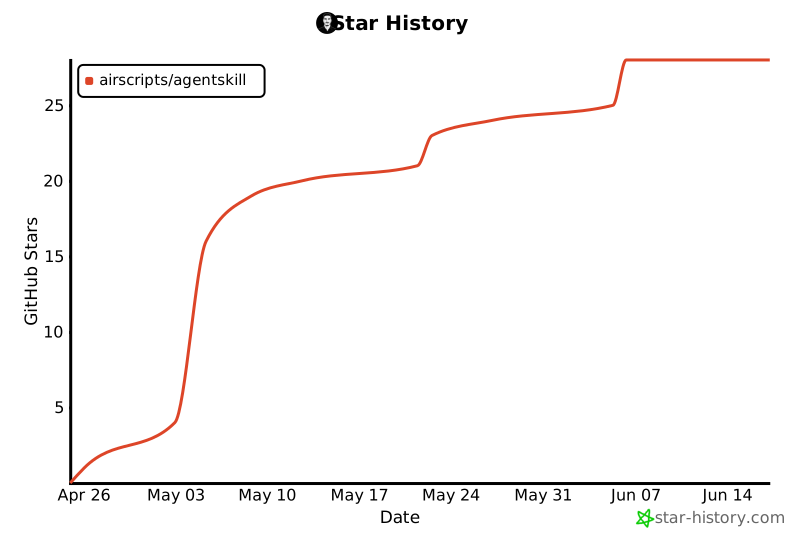
This is the current star history progress of the project:
Support
Project metadata and support files available in this repository include:
If you want to support the project, starring, sharing, contributing fixes, and supporting through GitHub Sponsors all help.
License
MIT


Download files
Download the file for your platform. If you're not sure which to choose, learn more about installing packages.
Source Distribution
Built Distribution
Filter files by name, interpreter, ABI, and platform.
If you're not sure about the file name format, learn more about wheel file names.
Copy a direct link to the current filters
File details
Details for the file agsk-1.4.0.tar.gz.
File metadata
- Download URL: agsk-1.4.0.tar.gz
- Upload date:
- Size: 133.2 kB
- Tags: Source
- Uploaded using Trusted Publishing? No
- Uploaded via: twine/6.1.0 CPython/3.13.12
File hashes
| Algorithm | Hash digest | |
|---|---|---|
| SHA256 |
84e0b904d00ba740f0ff21ddacb32308ece10c2835c3d0a20fb47e145e3919af
|
|
| MD5 |
5405127b2840da99cefe2dff25695b60
|
|
| BLAKE2b-256 |
2c6fe3825c1f15a42381b5e8ebbdb45c1609e8ed0e3e23b4a02396cd0088e256
|
File details
Details for the file agsk-1.4.0-py3-none-any.whl.
File metadata
- Download URL: agsk-1.4.0-py3-none-any.whl
- Upload date:
- Size: 88.1 kB
- Tags: Python 3
- Uploaded using Trusted Publishing? No
- Uploaded via: twine/6.1.0 CPython/3.13.12
File hashes
| Algorithm | Hash digest | |
|---|---|---|
| SHA256 |
2526e38202a9fa58817a7092c65538e5578c3ac23d6057224faa082d560de937
|
|
| MD5 |
3b201412f9b0cb62714fb8533493450e
|
|
| BLAKE2b-256 |
bf4a48e93ed711102baa69c835383f744a1536bec1df2670fa5fd2376a799ae0
|






