
AI对冲基金项目-uv分支 , An AI-powered hedge fund that uses multiple agents to make trading decisions

Project description
AI Hedge Fund
This is a proof of concept for an AI-powered hedge fund. The goal of this project is to explore the use of AI to make trading decisions. This project is for educational purposes only and is not intended for real trading or investment.
This system employs several agents working together:
- Ben Graham Agent - The godfather of value investing, only buys hidden gems with a margin of safety
- Bill Ackman Agent - An activist investors, takes bold positions and pushes for change
- Cathie Wood Agent - The queen of growth investing, believes in the power of innovation and disruption
- Charlie Munger Agent - Warren Buffett's partner, only buys wonderful businesses at fair prices
- Michael Burry Agent - The Big Short contrarian who hunts for deep value
- Peter Lynch Agent - Practical investor who seeks "ten-baggers" in everyday businesses
- Phil Fisher Agent - Meticulous growth investor who uses deep "scuttlebutt" research
- Stanley Druckenmiller Agent - Macro legend who hunts for asymmetric opportunities with growth potential
- Warren Buffett Agent - The oracle of Omaha, seeks wonderful companies at a fair price
- Valuation Agent - Calculates the intrinsic value of a stock and generates trading signals
- Sentiment Agent - Analyzes market sentiment and generates trading signals
- Fundamentals Agent - Analyzes fundamental data and generates trading signals
- Technicals Agent - Analyzes technical indicators and generates trading signals
- Risk Manager - Calculates risk metrics and sets position limits
- Portfolio Manager - Makes final trading decisions and generates orders
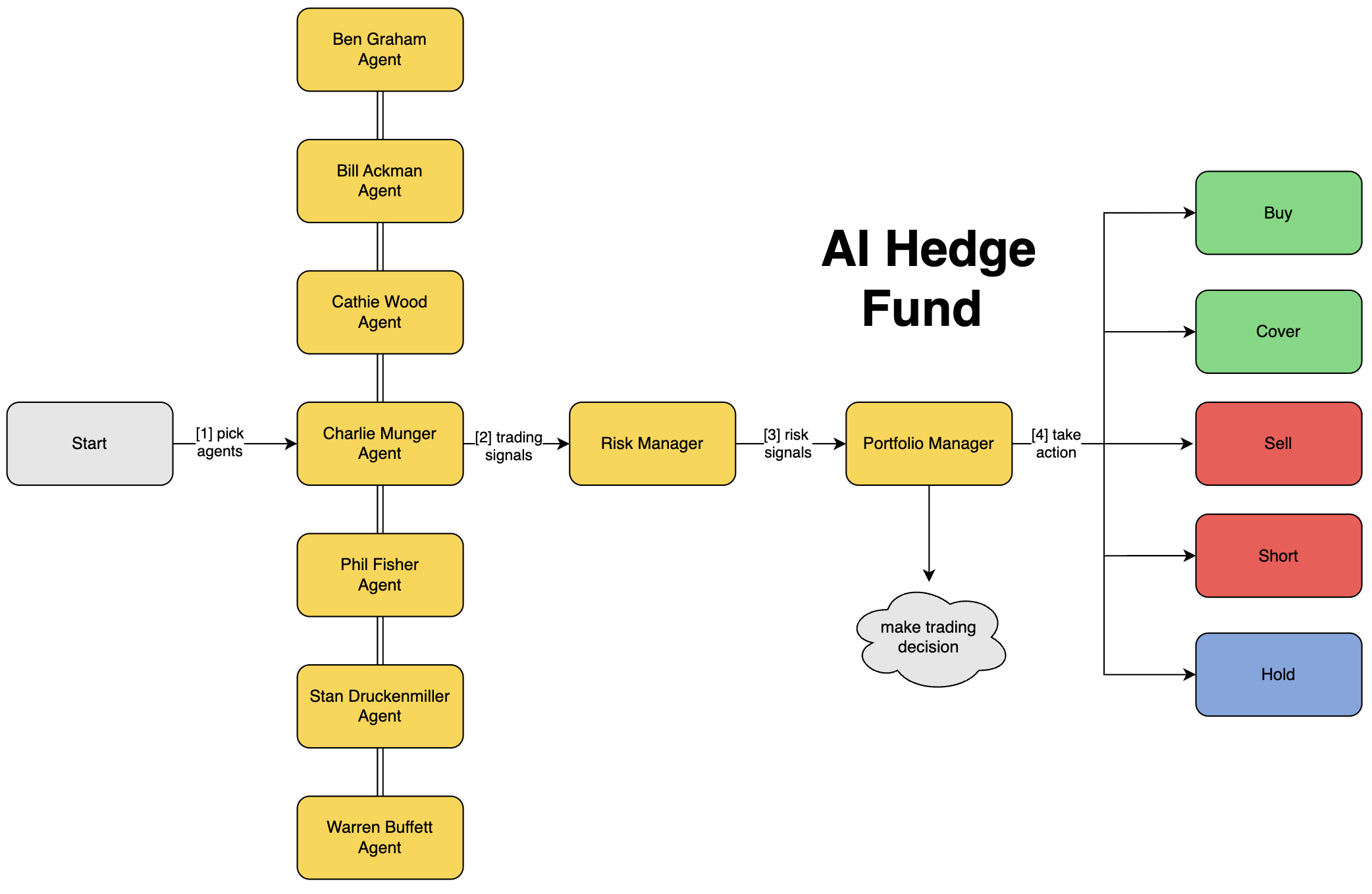
Note: the system simulates trading decisions, it does not actually trade.

Disclaimer
This project is for educational and research purposes only.
- Not intended for real trading or investment
- No warranties or guarantees provided
- Past performance does not indicate future results
- Creator assumes no liability for financial losses
- Consult a financial advisor for investment decisions
By using this software, you agree to use it solely for learning purposes.
Table of Contents
Setup
Using Poetry
Clone the repository:
git clone https://github.com/virattt/ai-hedge-fund.git
cd ai-hedge-fund
- Install Poetry (if not already installed):
curl -sSL https://install.python-poetry.org | python3 -
- Install dependencies:
poetry install
- Set up your environment variables:
# Create .env file for your API keys
cp .env.example .env
- Set your API keys:
# For running LLMs hosted by openai (gpt-4o, gpt-4o-mini, etc.)
# Get your OpenAI API key from https://platform.openai.com/
OPENAI_API_KEY=your-openai-api-key

# For running LLMs hosted by groq (deepseek, llama3, etc.)
# Get your Groq API key from https://groq.com/
GROQ_API_KEY=your-groq-api-key

# For getting financial data to power the hedge fund
# Get your Financial Datasets API key from https://financialdatasets.ai/
FINANCIAL_DATASETS_API_KEY=your-financial-datasets-api-key
Using Docker
-
Make sure you have Docker installed on your system. If not, you can download it from Docker's official website.
-
Clone the repository:
git clone https://github.com/virattt/ai-hedge-fund.git
cd ai-hedge-fund
- Set up your environment variables:
# Create .env file for your API keys
cp .env.example .env
-
Edit the .env file to add your API keys as described above.
-
Build the Docker image:
# On Linux/Mac:
./run.sh build

# On Windows:
run.bat build
Important: You must set OPENAI_API_KEY, GROQ_API_KEY, ANTHROPIC_API_KEY, or DEEPSEEK_API_KEY for the hedge fund to work. If you want to use LLMs from all providers, you will need to set all API keys.
Financial data for AAPL, GOOGL, MSFT, NVDA, and TSLA is free and does not require an API key.
For any other ticker, you will need to set the FINANCIAL_DATASETS_API_KEY in the .env file.
Usage
Running the Hedge Fund
With Poetry
poetry run python src/main.py --ticker AAPL,MSFT,NVDA
With Docker
# On Linux/Mac:
./run.sh --ticker AAPL,MSFT,NVDA main

# On Windows:
run.bat --ticker AAPL,MSFT,NVDA main
Example Output:

You can also specify a --ollama flag to run the AI hedge fund using local LLMs.
# With Poetry:
poetry run python src/main.py --ticker AAPL,MSFT,NVDA --ollama

# With Docker (on Linux/Mac):
./run.sh --ticker AAPL,MSFT,NVDA --ollama main

# With Docker (on Windows):
run.bat --ticker AAPL,MSFT,NVDA --ollama main
You can also specify a --show-reasoning flag to print the reasoning of each agent to the console.
# With Poetry:
poetry run python src/main.py --ticker AAPL,MSFT,NVDA --show-reasoning

# With Docker (on Linux/Mac):
./run.sh --ticker AAPL,MSFT,NVDA --show-reasoning main

# With Docker (on Windows):
run.bat --ticker AAPL,MSFT,NVDA --show-reasoning main
You can optionally specify the start and end dates to make decisions for a specific time period.
# With Poetry:
poetry run python src/main.py --ticker AAPL,MSFT,NVDA --start-date 2024-01-01 --end-date 2024-03-01

# With Docker (on Linux/Mac):
./run.sh --ticker AAPL,MSFT,NVDA --start-date 2024-01-01 --end-date 2024-03-01 main

# With Docker (on Windows):
run.bat --ticker AAPL,MSFT,NVDA --start-date 2024-01-01 --end-date 2024-03-01 main
Running the Backtester
With Poetry
poetry run python src/backtester.py --ticker AAPL,MSFT,NVDA
With Docker
# On Linux/Mac:
./run.sh --ticker AAPL,MSFT,NVDA backtest

# On Windows:
run.bat --ticker AAPL,MSFT,NVDA backtest
Example Output:
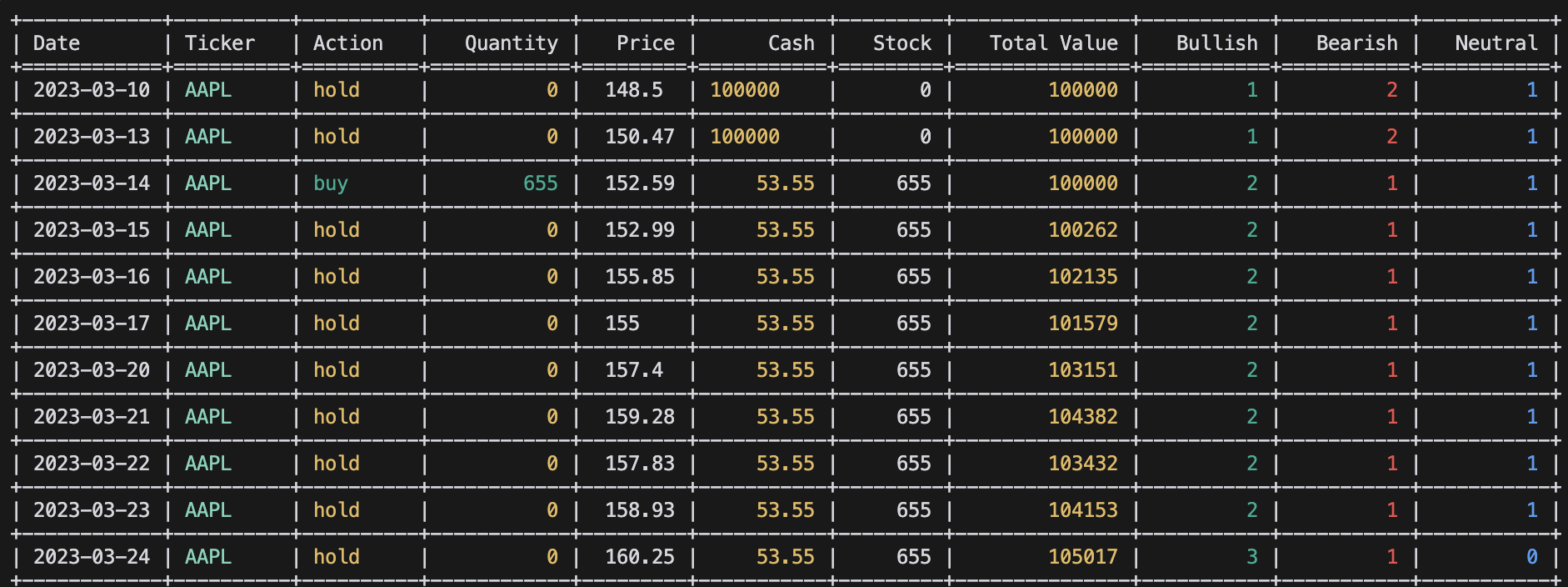
You can optionally specify the start and end dates to backtest over a specific time period.
# With Poetry:
poetry run python src/backtester.py --ticker AAPL,MSFT,NVDA --start-date 2024-01-01 --end-date 2024-03-01

# With Docker (on Linux/Mac):
./run.sh --ticker AAPL,MSFT,NVDA --start-date 2024-01-01 --end-date 2024-03-01 backtest

# With Docker (on Windows):
run.bat --ticker AAPL,MSFT,NVDA --start-date 2024-01-01 --end-date 2024-03-01 backtest
You can also specify a --ollama flag to run the backtester using local LLMs.
# With Poetry:
poetry run python src/backtester.py --ticker AAPL,MSFT,NVDA --ollama

# With Docker (on Linux/Mac):
./run.sh --ticker AAPL,MSFT,NVDA --ollama backtest

# With Docker (on Windows):
run.bat --ticker AAPL,MSFT,NVDA --ollama backtest
Project Structure
ai-hedge-fund/
├── src/
│   ├── agents/                   # Agent definitions and workflow
│   │   ├── bill_ackman.py        # Bill Ackman agent
│   │   ├── fundamentals.py       # Fundamental analysis agent
│   │   ├── portfolio_manager.py  # Portfolio management agent
│   │   ├── risk_manager.py       # Risk management agent
│   │   ├── sentiment.py          # Sentiment analysis agent
│   │   ├── technicals.py         # Technical analysis agent
│   │   ├── valuation.py          # Valuation analysis agent
│   │   ├── ...                   # Other agents
│   │   ├── warren_buffett.py     # Warren Buffett agent
│   ├── tools/                    # Agent tools
│   │   ├── api.py                # API tools
│   ├── backtester.py             # Backtesting tools
│   ├── main.py # Main entry point
├── pyproject.toml
├── ...
Contributing
- Fork the repository
- Create a feature branch
- Commit your changes
- Push to the branch
- Create a Pull Request
Important: Please keep your pull requests small and focused. This will make it easier to review and merge.
Feature Requests
If you have a feature request, please open an issue and make sure it is tagged with enhancement.
License
This project is licensed under the MIT License - see the LICENSE file for details.
Release history Release notifications | RSS feed


Download files
Download the file for your platform. If you're not sure which to choose, learn more about installing packages.
Source Distribution
Built Distribution
Filter files by name, interpreter, ABI, and platform.
If you're not sure about the file name format, learn more about wheel file names.
Copy a direct link to the current filters
File details
Details for the file ahfu-0.1.0.tar.gz.
File metadata
- Download URL: ahfu-0.1.0.tar.gz
- Upload date:
- Size: 138.2 kB
- Tags: Source
- Uploaded using Trusted Publishing? No
- Uploaded via: uv/0.6.14
File hashes
| Algorithm | Hash digest | |
|---|---|---|
| SHA256 |
edf24a04bbee3d5e7fa12e08f1e5408bb19821d42d46191cb5dcbd75dd864a5a
|
|
| MD5 |
58a38ac1b3ae221787063ba0ac991be4
|
|
| BLAKE2b-256 |
a762067f85220450c30de7f57790996e508ee6e19822accd93778cb5de762045
|
File details
Details for the file ahfu-0.1.0-py3-none-any.whl.
File metadata
- Download URL: ahfu-0.1.0-py3-none-any.whl
- Upload date:
- Size: 103.6 kB
- Tags: Python 3
- Uploaded using Trusted Publishing? No
- Uploaded via: uv/0.6.14
File hashes
| Algorithm | Hash digest | |
|---|---|---|
| SHA256 |
3fe94ad4ebd6927f0bac5fab03618ab3ecb2df0bd56810bae1e2a364d15b27c9
|
|
| MD5 |
a2d6aff3caa6c4dfccd4718a40a9253e
|
|
| BLAKE2b-256 |
07cd74f1f7a682f600a69106979211277860faf2cc8d23b4d4c79109f0743188
|






