
AI Atlas Nexus provides tooling to help bring together disparate resources related to governance of foundation models.

Project description
AI Atlas Nexus




👉 (Jun-2025) Our HF spaces demo site has been updated to show related benchmarks!
👉 (Jun-2025) The demo projects repository showcases implementations of AI Atlas Nexus.
Overview
AI Atlas Nexus provides tooling to help bring together resources related to governance of foundation models. We support a community-driven approach to curating and cataloguing resources such as datasets, benchmarks and mitigations. Our goal is to turn abstract risk definitions into actionable workflows that streamline AI governance processes. By connecting fragmented resources, AI Atlas Nexus seeks to fill a critical gap in AI governance, enabling stakeholders to build more robust, transparent, and accountable systems. AI Atlas Nexus builds on the IBM AI Risk Atlas making this educational resource a nexus of governance assets and tooling. An AI System's Knowledge Graph is used to provide a unified structure that links and contextualize the very heterogeneous domain data.
Our intention is to create a starting point for an open AI Systems ontology whose focus is on risk and that the community can extend and enhance. This ontology serves as the foundation that unifies innovation and tooling in the AI risk space. By lowering the barrier to entry for developers, it fosters a governance-first approach to AI solutions, while also inviting the broader community to contribute their own tools and methodologies to expand its impact.
Features
- 🏗️ An ontology that combines the AI risk view (taxonomies, risks, actions) with an AI model view (AI systems, AI models, model evaluations) into one coherent schema
- 📚 AI Risks collected from IBM AI Risk Atlas, IBM Granite Guardian, MIT AI Risk Repository, NIST Artificial Intelligence Risk Management Framework: Generative Artificial Intelligence Profile, the AI Risk Taxonomy (AIR 2024), the AILuminate Benchmark, Credo's Unified Control Framework, and OWASP Top 10 for Large Language Model Applications
- 🔗 Mappings are proposed between the taxonomies and between risks and actions
- 🐍 Use the python library methods to quickly explore available risks, relations and actions
- 🚨 Use the python library methods to detect potential risks in your usecase
- 📤 Download an exported graph populated with data instances
- ✨ Example use-case of auto-assistance in compliance questionnaires using CoT examples and AI Atlas Nexus
- 🔧 Tooling to convert the LinkML schema and instance data into a Cypher representation to populate a graph database
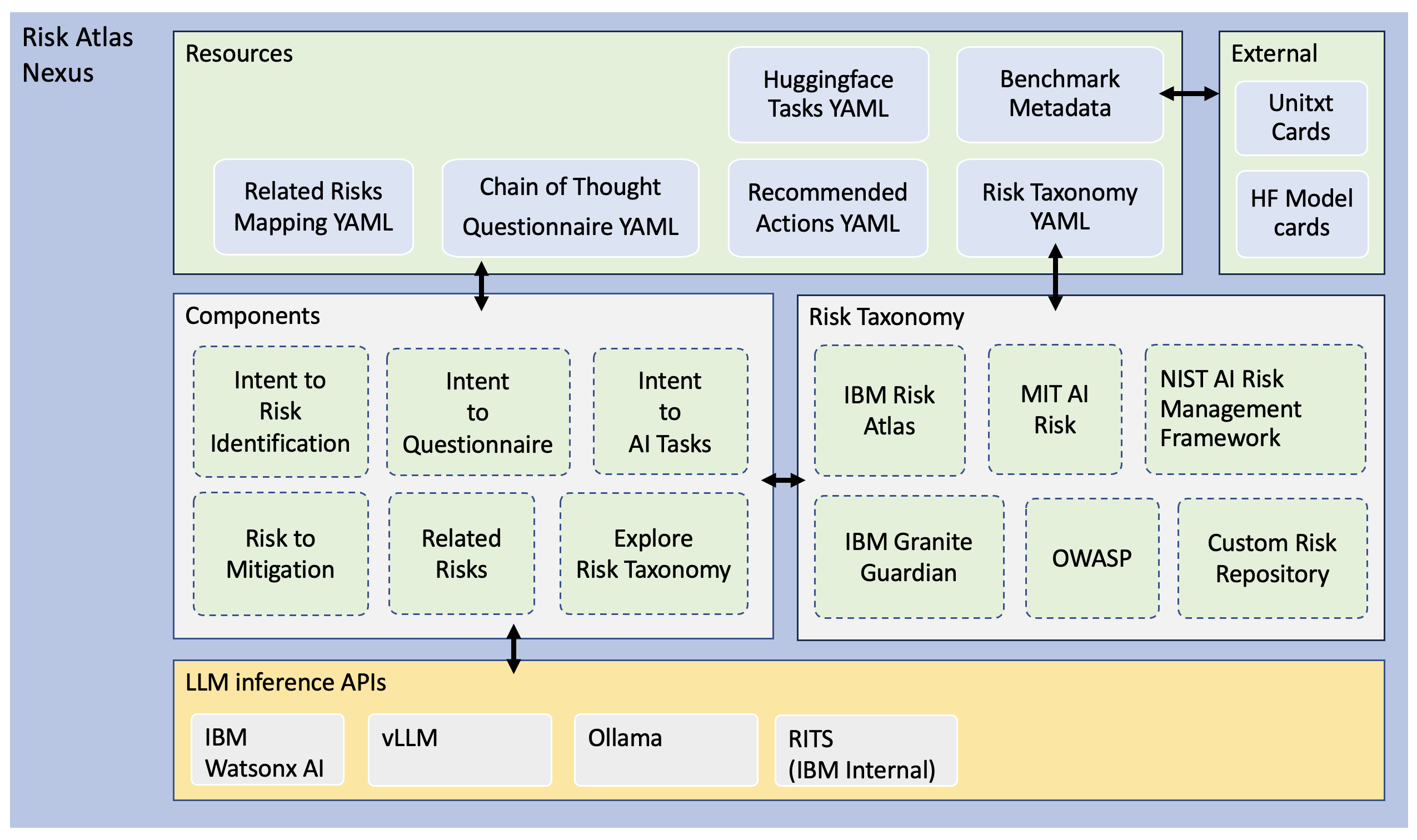
Architecture
Links
- AI Risk Ontology
- Notebooks:
- AI Atlas Nexus Quickstart Overview of library functionality
- Risk identification Uncover risks related to your usecase
- Auto assist questionnaire Auto-fill questionnaire using Chain of Thought or Few-Shot Examples
- AI Tasks identification Uncover ai tasks related to your usecase
- AI Domain identification Uncover ai domain from your usecase
- Risk Categorization Assess and categorize the severity of risks associated with an AI system usecase.
- Risk to ARES Evaluation ARES Integration for AI Atlas Nexus allows you to run AI robustness evaluations on AI Systems derived from use cases.
- Additional Resources:
Installation
This project targets python version ">=3.11, <3.12". You can download specific versions of python here: https://www.python.org/downloads/
Note: Replace INFERENCE_LIB with one of the LLM inference library [ollama, vllm, wml, rits] as explained here
To install the current release
pip install "ai-atlas-nexus[INFERENCE_LIB]"
To install the latest code
git clone git@github.com:IBM/ai-atlas-nexus.git
cd ai-atlas-nexus
python -m venv v-ai-atlas-nexus
source v-ai-atlas-nexus/bin/activate
pip install -e ".[INFERENCE_LIB]"
Install for inference APIs
AI Atlas Nexus uses Large Language Models (LLMs) to infer risks and risks data. Therefore, requires access to LLMs to inference or call the model. The following LLM inference APIs are supported:
- IBM Watsonx AI (Watson Machine Learning)
- Ollama
- vLLM
- RITS (IBM Internal Only)
IBM Watsonx AI (WML)
When using the WML platform, you need to:
- Add configuration to
.envfile as follows. Please follow this documentation on obtaining WML credentials.
WML_API_KEY=<WML api key goes here>
WML_API_URL=<WML url key goes here>
WML_PROJECT_ID=<WML project id goes here, Optional>
WML_SPACE_ID=<WML space id goes here, Optional>
Either 'WML_PROJECT_ID' or 'WML_SPACE_ID' need to be specified.
- Install WML dependencies as follows:
pip install -e ".[wml]"
Ollama
When using the Ollama inference, you need to:
- Install Ollama dependencies as follows:
pip install -e ".[ollama]"
-
Please follow the quickstart guide to start Ollama LLM server. Server will start by default at http://localhost:11434
-
When selecting Ollama engine in AI Atlas Nexus, use the server address
localhost:11434as theapi_urlin the credentials or set the environment variableOLLAMA_API_URLwith this value.
vLLM
When using the vLLM inference, you need to:
-
For Mac users, follow the instuctions here. Users need to build from the source vLLM to natively run on macOS.
-
For Linux users, install vLLM dependencies as follows:
pip install -e ".[vllm]"
Above package is enough to run vLLM in once-off offline mode. When selecting vLLM execution from AI Atlas Nexus, credentials should be passed as None to use vLLM offline mode.
- (Optional) To run vLLM on an OpenAI-Compatible vLLM Server, execute the command:
vllm serve ibm-granite/granite-3.1-8b-instruct --max_model_len 4096 --host localhost --port 8000 --api-key <CUSTOM_API_KEY>
The CUSTOM_API_KEY can be any string that you choose to use as your API key. Above command will start vLLM server at http://localhost:8000. The server currently hosts one model at a time. Check all supported APIs at http://localhost:8000/docs
Note: When selecting vLLM engine in AI Atlas Nexus, pass api_url as host:port and given api_key to credentials with values from the vllm serve command above.
RITS (IBM Internal Only)
When using the RITS platform, you need to:
- Add configuration to
.envfile as follows:
RITS_API_KEY=<RITS api key goes here>
RITS_API_URL=<RITS url key goes here>
- Install RITS dependencies as follows:
pip install -e ".[rits]"
Compatibility
- View the releases changelog.
Referencing the project
If you use AI Atlas Nexus in your projects, please consider citing the following:
@article{airiskatlas2025,
      title={AI Risk Atlas: Taxonomy and Tooling for Navigating AI Risks and Resources},
      author={Frank Bagehorn and Kristina Brimijoin and Elizabeth M. Daly and Jessica He and Michael Hind and Luis Garces-Erice and Christopher Giblin and Ioana Giurgiu and Jacquelyn Martino and Rahul Nair and David Piorkowski and Ambrish Rawat and John Richards and Sean Rooney and Dhaval Salwala and Seshu Tirupathi and Peter Urbanetz and Kush R. Varshney and Inge Vejsbjerg and Mira L. Wolf-Bauwens},
      year={2025},
      eprint={2503.05780},
      archivePrefix={arXiv},
      primaryClass={cs.CY},
      url={https://arxiv.org/abs/2503.05780}
}
License
AI Atlas Nexus is provided under Apache 2.0 license.
Contributing
- Get started by checking our contribution guidelines.
- Read the wiki for more technical and design details.
- If you have any questions, just ask!
- Contribute your own taxonomy files and CoT templates
Tip: Use the makefile provided to regenerate artifacts provided in the repository by running make in this repository.
Find out more
- Try out a quick demo at the HF spaces demo site
- Read the publication AI Risk Atlas: Taxonomy and Tooling for Navigating AI Risks and Resources
- Explore IBM's AI Risk Atlas on the IBM documentation site
- View the demo projects repository showcasing implementations of AI Atlas Nexus.
- Read the the IBM AI Ethics Board publication Foundation models: Opportunities, risks and mitigations which goes into more detail about the risk taxonomy, and describes the point of view of IBM on the ethics of foundation models.
- 'Usage Governance Advisor: From Intent to AI Governance' presents a system for semi-structured governance information, identifying and prioritising risks according to the intended use case, recommending appropriate benchmarks and risk assessments and proposing mitigation strategies and actions.
IBM ❤️ Open Source AI
AI Atlas Nexus has been brought to you by IBM.


Download files
Download the file for your platform. If you're not sure which to choose, learn more about installing packages.
Source Distribution
Built Distribution
Filter files by name, interpreter, ABI, and platform.
If you're not sure about the file name format, learn more about wheel file names.
Copy a direct link to the current filters
File details
Details for the file ai_atlas_nexus-1.1.0.tar.gz.
File metadata
- Download URL: ai_atlas_nexus-1.1.0.tar.gz
- Upload date:
- Size: 274.1 kB
- Tags: Source
- Uploaded using Trusted Publishing? No
- Uploaded via: twine/6.2.0 CPython/3.12.0
File hashes
| Algorithm | Hash digest | |
|---|---|---|
| SHA256 |
1e4d5b0758b5d70c029d0d538f0acd039f85c0e1dc321d482639921def06564c
|
|
| MD5 |
e0c39954fedf43396a7ba766e2e1cad3
|
|
| BLAKE2b-256 |
74039a0dd71738a5c51a5ffc1f2a7f7d77d3d9517ce167c9a05436369f4f667d
|
File details
Details for the file ai_atlas_nexus-1.1.0-py3-none-any.whl.
File metadata
- Download URL: ai_atlas_nexus-1.1.0-py3-none-any.whl
- Upload date:
- Size: 314.2 kB
- Tags: Python 3
- Uploaded using Trusted Publishing? No
- Uploaded via: twine/6.2.0 CPython/3.12.0
File hashes
| Algorithm | Hash digest | |
|---|---|---|
| SHA256 |
6e062a71022fd6e6f7d4596277034b763542379c69122e632af361e74bc7c5db
|
|
| MD5 |
06860ed12b7df63dcbc2dd3eb54beb95
|
|
| BLAKE2b-256 |
0651d0569d1126dae64dfd8ce5a0b17552dca235f33e4a9a6f97f54264ae6489
|






