

An AI-powered git commit message generator written in python. Inspired by @Nutlope




Description
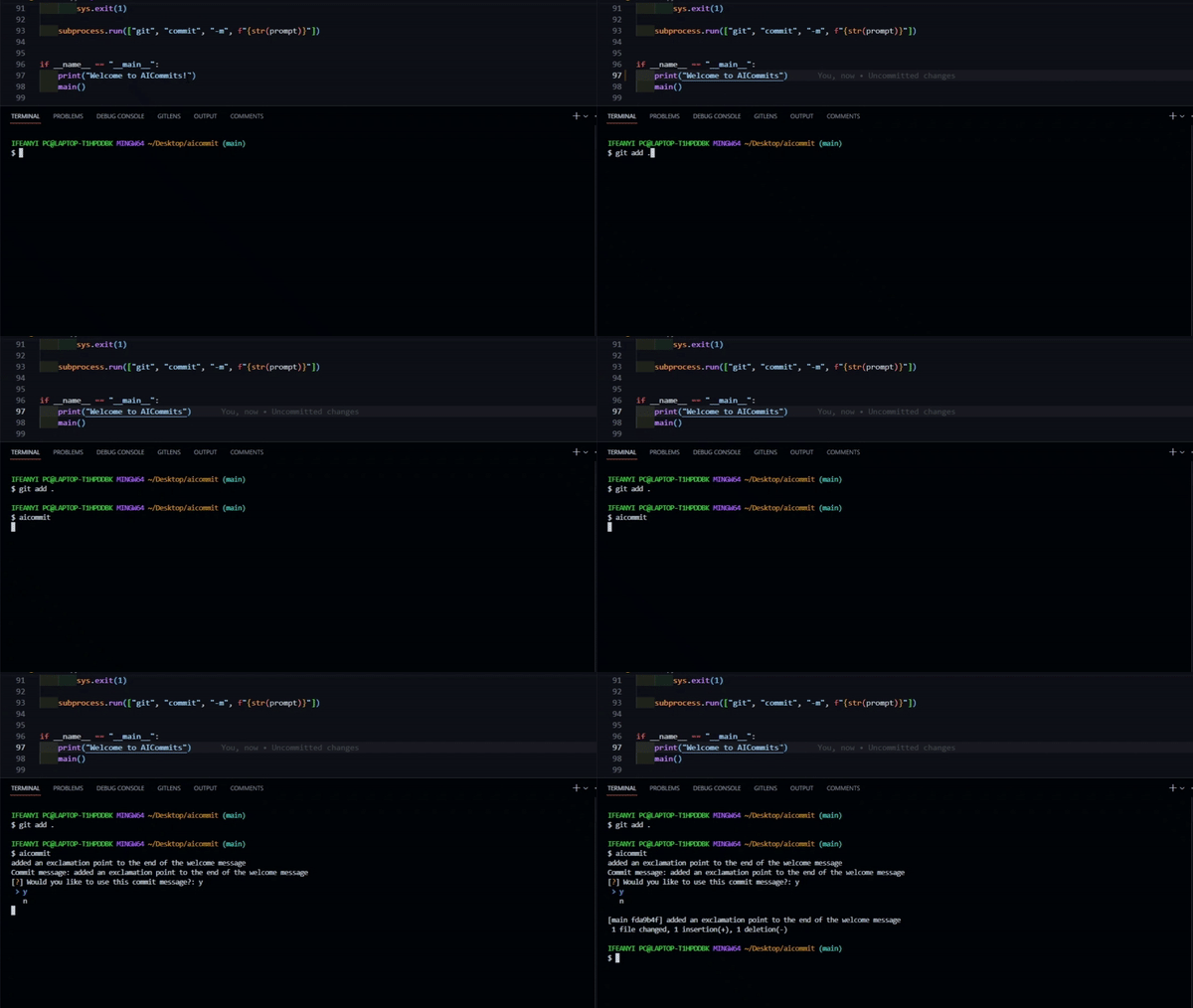
AICommits is a Python script that generates a git commit message using OpenAI's GPT-3 language model. The script takes the git diff of the staged changes and generates a commit message using GPT-3.
The generated commit message is presented to the user who has the option to accept or reject it. If the user accepts the commit message, the script commits the changes using the generated message.
The script requires an OpenAI API key, which can be obtained from the OpenAI website.
Dependencies
Python 3.6 or higher
openai 0.10.2
inquirer 3.7.0
python-dotenv 0.19.1
Features
In this version, AICommit provides the following features:
-
Automatic generation of commit messages based on the diff of staged changes.
-
Support for conventional commit messages.
-
Language selection for generated commit messages.
-
User selection of generated commit messages.
-
Support for specifying diff per file.
Installation and Usage
To use AICommits, do the following:
- Export your OpenAI API key as an environment variable by running:
export OPENAI_API_KEY=YOUR_API_KEY
- install aicommit from pypi by running:
pip install ai_commits
Then, run the script using the command aicommit.
This will prompt AICOMMIT to generate up to 5 commit messages based on the diff of staged changes. The user can then select one of the generated commit messages to use as the commit message for their changes.
If the --diff-per-file flag is included, AICOMMIT will generate separate commit messages for each file.
If the --conventional flag is included, AICOMMIT will generate commit messages in conventional commit format.
If the --language flag is included, AICOMMIT will generate commit messages in the specified language.
Install from Source
To install AICommits from source, follow these steps:
-
Clone the repository using the command git clone https://github.com/nneji123/aicommit.git.
-
Navigate to the project directory using the command
cd aicommit. -
Install the required dependencies by running pip install -r requirements.txt.
-
Set your OpenAI API key as an environment variable by running export OPENAI_API_KEY=YOUR_API_KEY.
-
Run the script using the command
python "src/ai_commits.py".
The script will prompt you to confirm the generated commit message. If you accept the message, the changes will be committed using the generated message.
Changelog
v1.0.0 (2023-02-16)
-
Added support for generating commit messages in multiple languages
-
Improved performance when generating commit messages for large diffs
-
Added ability to select from multiple generated commit messages using the inquirer library
-
Fixed various bugs and improved error handling
v0.0.5 (2023-02-15)
- Fixed a bug that caused the script to fail when no changes were staged
v0.0.4 [Initial Release] (2023-02-15)
- Initial release of aicommits
- Supports generating conventional commit messages
- Supports generating commit messages based on the changes in the staged files
- Uses OpenAI's GPT-3 to generate commit messages
Contributing
Open an issue or submit a pull request if you want to contribute to the project.
License
1 maintainer

Metadata
1 maintainer
Release files for ai-commits 1.0.1
For a detailed explanation of source distributions (sdists) and built distributions (wheels), please see the package formats documentation.
Source distribution (sdist)
| File | Size | Uploaded | Provenance | Actions |
|---|---|---|---|---|
| ai_commits-1.0.1.tar.gz | 4.3 kB | Without provenance | Details for ai_commits-1.0.1.tar.gz |
Built distribution (wheel)
| File | Interpreter | ABI | Platform | Actions Reset |
|---|---|---|---|---|
| ai_commits-1.0.1-py3-none-any.whl | Python 3 | none | any | Details for ai_commits-1.0.1-py3-none-any.whl |
Total release size: 8.3 kB
Release files / ai_commits-1.0.1.tar.gz
| Download URL | ai_commits-1.0.1.tar.gz |
|---|---|
| Size | 4.3 kB |
| Tags | Source |
|
SHA-256 checksum How to use checksums |
b649df7f819690fbaf4652204bb50c354214a06a18eaf86ac75c9c8f7691e436
|
|
BLAKE2b-256 checksum How to use checksums |
550b777d2a41aa2c34fa4acde1a86d4ccc554eb964a074fbb26f14a8f5b8b550
|
| Upload date | |
|
Uploaded using Trusted Publishing? What is trusted publishing? |
No |
| Uploaded via |
twine/4.0.2 CPython/3.8.10
|
Release files / ai_commits-1.0.1-py3-none-any.whl
| Download URL | ai_commits-1.0.1-py3-none-any.whl |
|---|---|
| Size | 4.0 kB |
| Tags | Python 3 |
|
SHA-256 checksum How to use checksums |
c20097a9eba07e887478f7c7d55aa1200327c1af9976c9665326fa9cf2690e33
|
|
BLAKE2b-256 checksum How to use checksums |
01bfc4d065201c308e30f687d8ea74f3445534d4a1896892d42c89503a6771a2
|
| Upload date | |
|
Uploaded using Trusted Publishing? What is trusted publishing? |
No |
| Uploaded via |
twine/4.0.2 CPython/3.8.10
|
Security for ai-commits 1.0.1
Provenance
Provenance describes where a file came from. On PyPI, provenance is shared via attestations, which provide a verifiable record of the build or publishing details. View details, limitations and caveats.
No provenance found
None of the files in this release were uploaded with provenance metadata.
A note on package security
PyPI is a repository for distributing packages, not a service for auditing them. While third-party security researchers and our staff do their best to detect and remove malicious packages, PyPI cannot guarantee the quality, security or suitability of any given package.
To learn more about protecting yourself from malicious actors, visit our package security documentation.














