
MCP Server
这是一个 Model Context Protocol (MCP) 服务器,提供对 AiCore 知识管理 API 的访问。
快速开始
推荐直接参考 MCP配置说明,无需进行以下操作。
1. 安装依赖
pip install -r requirements.txt
2. 配置环境变量
# Linux/macOS
export AI_CORE_BASE_URL="http://localhost:8080/api/v1"
export AI_CORE_API_KEY="your_api_key_here"

# Windows PowerShell
$env:AI_CORE_BASE_URL="http://localhost:8080/api/v1"
$env:AI_CORE_API_KEY="your_api_key_here"

# Windows CMD
set AI_CORE_BASE_URL=http://localhost:8080/api/v1
set AI_CORE_API_KEY=your_api_key_here
3. 运行服务器
推荐方式 - 使用主入口点:
python main.py
其他运行方式:
# 使用原始启动脚本
python run_server.py

# 使用便捷脚本
python run.py

# 直接运行服务器模块
python ai_core_mcp_server.py

# 作为 Python 模块运行
python -m ai_core_mcp_server
4. 命令行选项
python main.py --help                 # 显示帮助信息
python main.py --check-only           # 仅检查环境配置
python main.py --verbose              # 启用详细日志
python main.py --version              # 显示版本信息
安装为 Python 包
开发模式安装
pip install -e .
安装后可以使用命令行工具:
ai-core-mcp-server
# 或
ai-core-server
生产模式安装
pip install .
构建分发包
# 使用 setuptools
python setup.py sdist bdist_wheel

# 使用现代构建工具
pip install build
python -m build
测试模组
运行测试脚本验证模组是否正常工作:
python test_module.py
功能特性
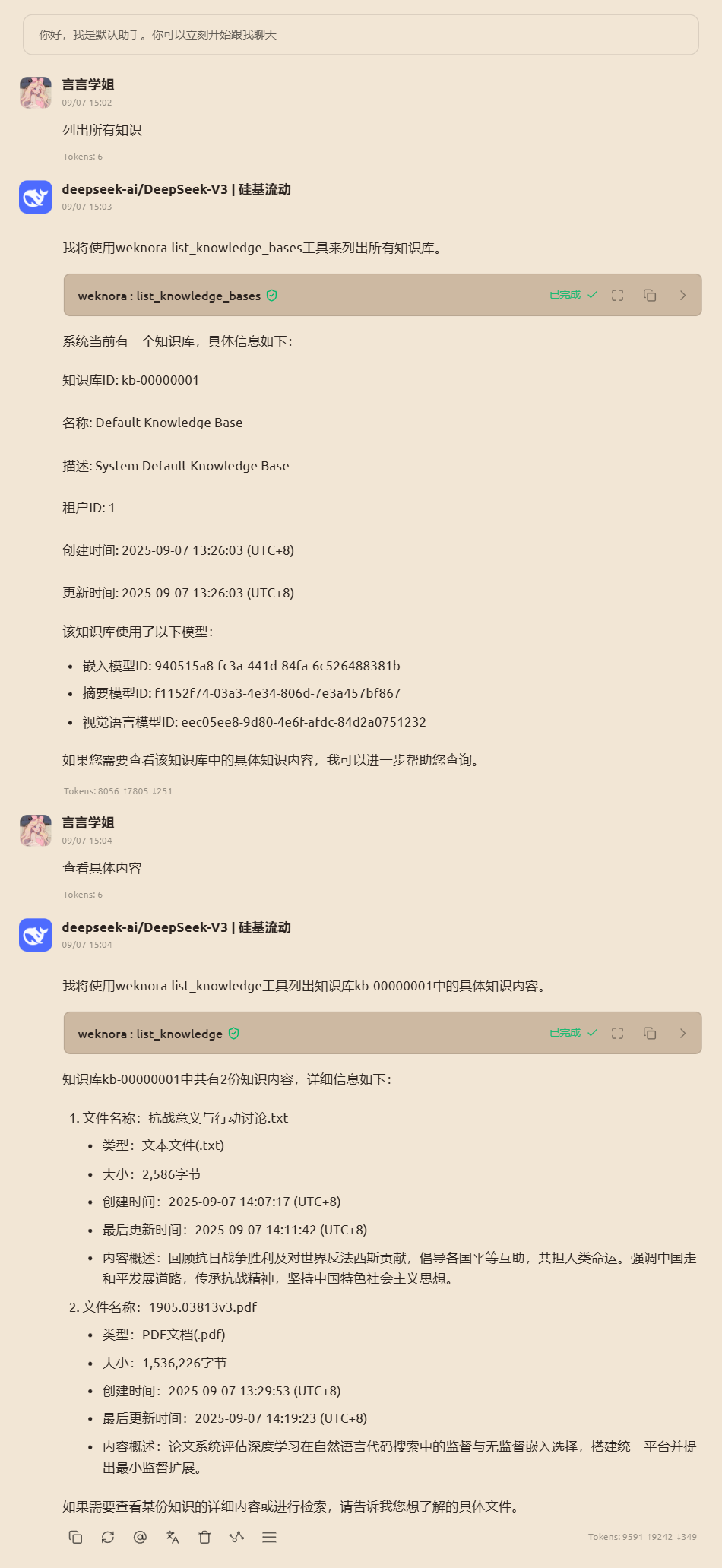
该 MCP 服务器提供以下工具:
空间管理
create_tenant- 创建新空间list_tenants- 列出所有空间
知识库管理
create_knowledge_base- 创建知识库list_knowledge_bases- 列出知识库get_knowledge_base- 获取知识库详情delete_knowledge_base- 删除知识库hybrid_search- 混合搜索
知识管理
create_knowledge_from_url- 从 URL 创建知识list_knowledge- 列出知识get_knowledge- 获取知识详情delete_knowledge- 删除知识
模型管理
create_model- 创建模型list_models- 列出模型get_model- 获取模型详情
会话管理
create_session- 创建聊天会话get_session- 获取会话详情list_sessions- 列出会话delete_session- 删除会话
聊天功能
chat- 发送聊天消息
块管理
list_chunks- 列出知识块delete_chunk- 删除知识块
故障排除
如果遇到导入错误,请确保:
- 已安装所有必需的依赖包
- Python 版本兼容(推荐 3.10+)
- 没有文件名冲突(避免使用
mcp.py作为文件名)
调用效果
1 maintainer

Release files for ai-core-mcp-server 1.0.0
For a detailed explanation of source distributions (sdists) and built distributions (wheels), please see the package formats documentation.
Source distribution (sdist)
| File | Size | Uploaded | |
|---|---|---|---|
| ai_core_mcp_server-1.0.0.tar.gz | 30.2 kB | Details |
Built distribution (wheel)
| File | Interpreter | ABI | Platform | Reset |
|---|---|---|---|---|
| ai_core_mcp_server-1.0.0-py3-none-any.whl | Python 3 | none | any | Details |
Total release size: 57.4 kB
Release files / ai_core_mcp_server-1.0.0.tar.gz
| Download URL | ai_core_mcp_server-1.0.0.tar.gz |
|---|---|
| Size | 30.2 kB |
| Tags | Source |
|
SHA-256 checksum How to use checksums |
4604cc5609e8b5a11d23562ebf041a304c47be5c3c666b1e642eb397c0df2134
|
|
BLAKE2b-256 checksum How to use checksums |
48538827cdf58ae4f8be1fb903ef69afc44c62ea657d83dece97f5b0059b4f10
|
| Upload date | |
|
Uploaded using Trusted Publishing? What is trusted publishing? |
No |
| Uploaded via |
uv/0.9.21 {"installer":{"name":"uv","version":"0.9.21","subcommand":["publish"]},"python":null,"implementation":{"name":null,"version":null},"distro":{"name":"macOS","version":null,"id":null,"libc":null},"system":{"name":null,"release":null},"cpu":null,"openssl_version":null,"setuptools_version":null,"rustc_version":null,"ci":null}
|
Release files / ai_core_mcp_server-1.0.0-py3-none-any.whl
| Download URL | ai_core_mcp_server-1.0.0-py3-none-any.whl |
|---|---|
| Size | 27.1 kB |
| Tags | Python 3 |
|
SHA-256 checksum How to use checksums |
b4093616fabf68b0324745d6fd7af2326d9b33f4a37d8f0ff1f910d7e5534998
|
|
BLAKE2b-256 checksum How to use checksums |
2ed3e44ed16b84f91ce7bad709538bcbfe172b220bcaeeacf67d4c694796a68d
|
| Upload date | |
|
Uploaded using Trusted Publishing? What is trusted publishing? |
No |
| Uploaded via |
uv/0.9.21 {"installer":{"name":"uv","version":"0.9.21","subcommand":["publish"]},"python":null,"implementation":{"name":null,"version":null},"distro":{"name":"macOS","version":null,"id":null,"libc":null},"system":{"name":null,"release":null},"cpu":null,"openssl_version":null,"setuptools_version":null,"rustc_version":null,"ci":null}
|













