
AI Control Plane — a local web UI for browsing AI agent session logs and tool configurations (GitHub Copilot, Claude Code, VS Code Chat).
Verified details
These details have been verified by PyPIProject links
GitHub Statistics
Maintainers

Project description

AI Control Plane
A local web UI for browsing GitHub Copilot, Claude Code, and VS Code Chat agent session logs and tool configurations — all in one place.


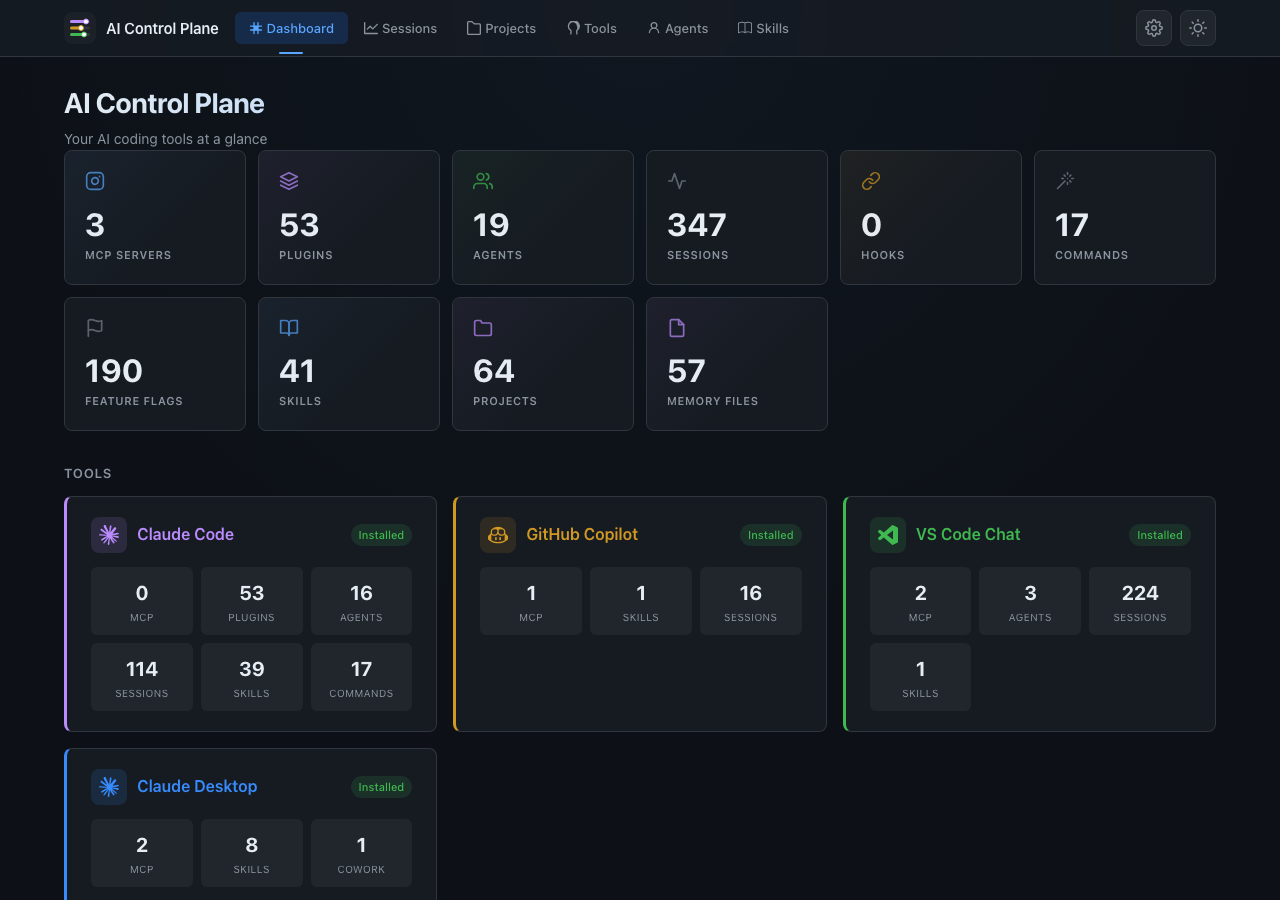
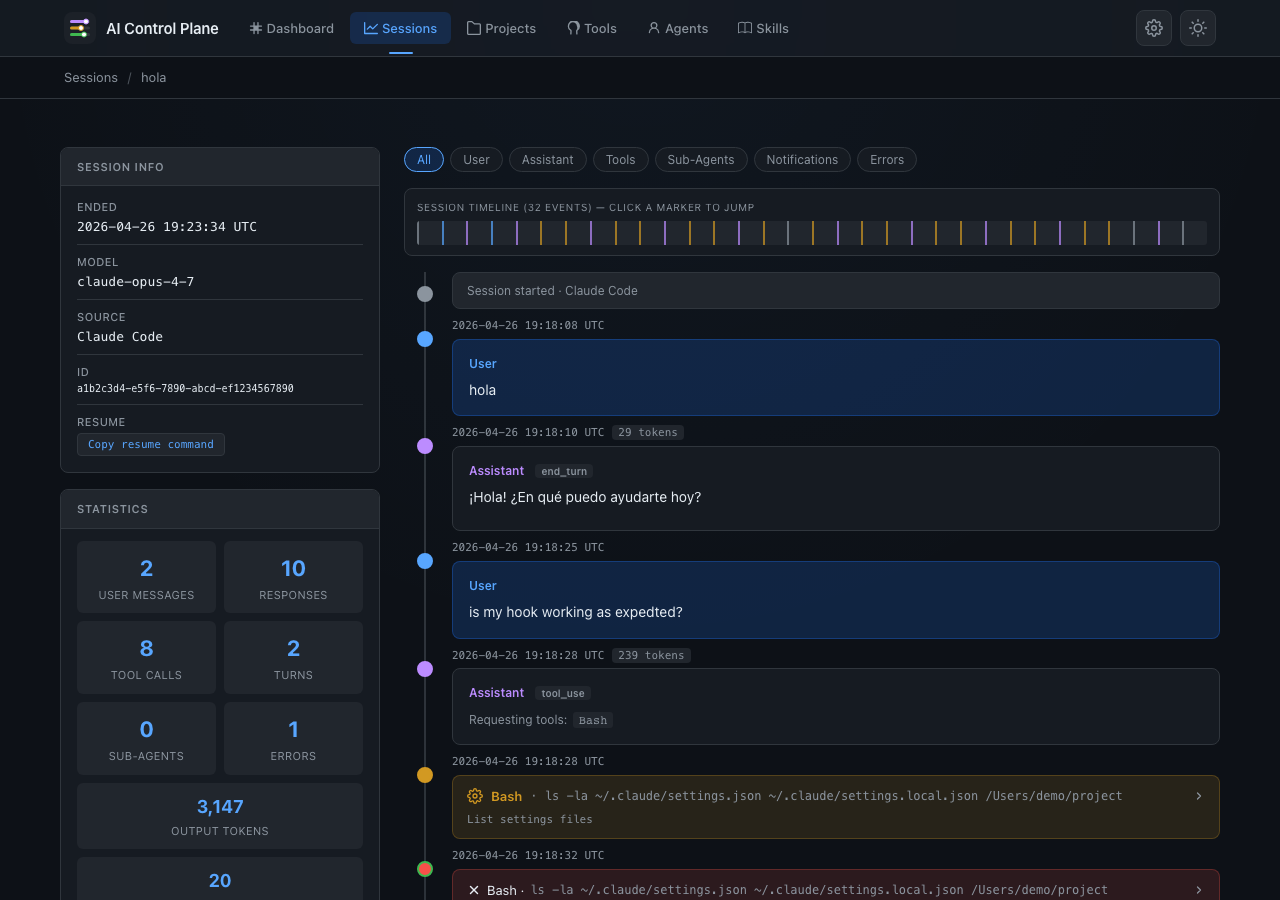
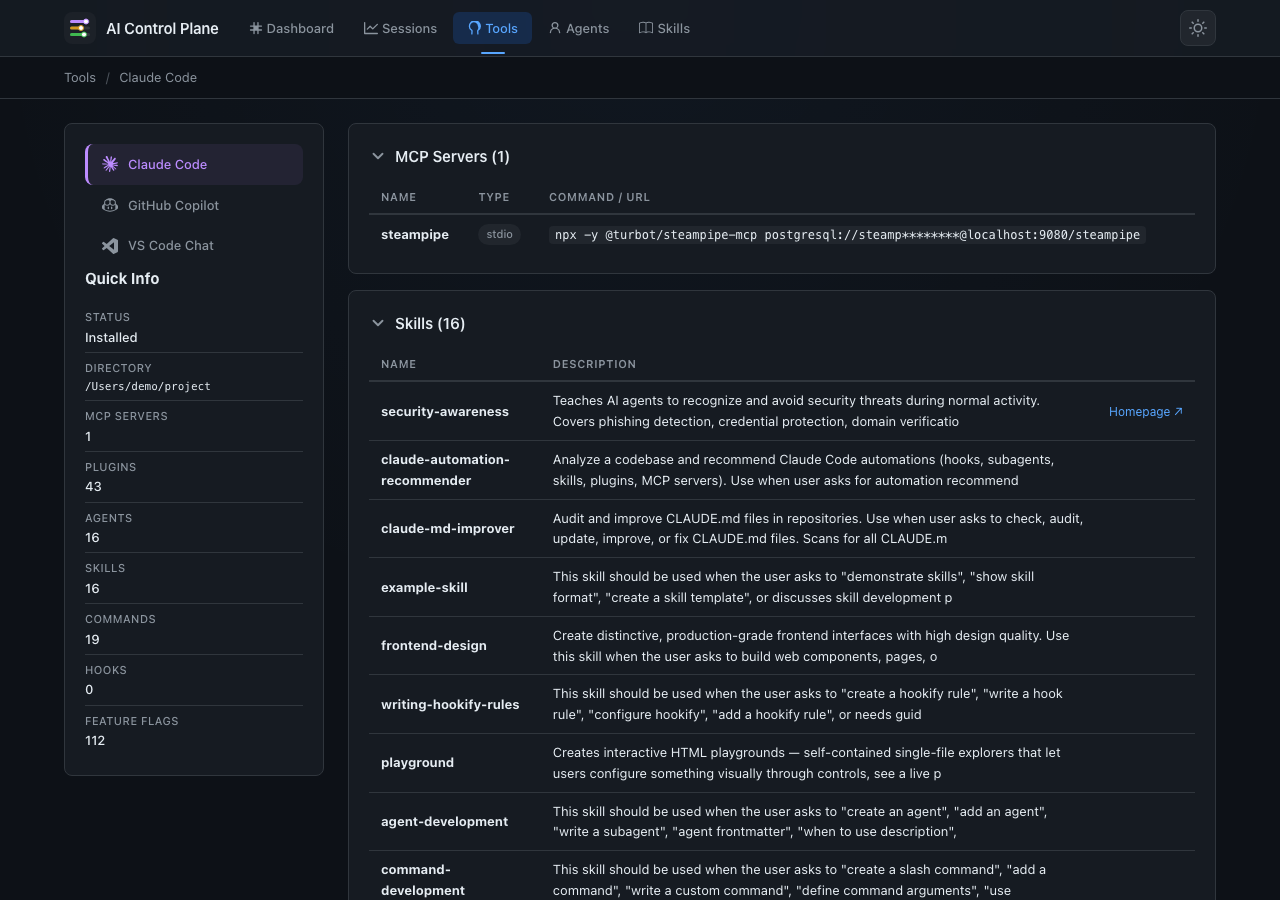
AI coding agents produce rich session logs and configuration files. This tool turns those raw files into a readable, interactive dashboard so you can review sessions (prompts, reasoning, tool calls, sub-agents, errors) and inspect tool configurations (MCP servers, plugins, agents, skills, slash commands, hooks, feature flags) — all in one place.
| Dashboard | Session Timeline |
|
|
| Tool Configuration | Agents |
|
|
Features
Dashboard & Navigation
- Metrics dashboard — aggregated counts for MCP servers, plugins, agents, slash commands, hooks, feature flags, and sessions across all tools.
- Tool cards — at-a-glance status for Claude Code, GitHub Copilot, and VS Code Chat with key stats per tool.
- Shared navbar — sticky navigation with brand SVG icons, breadcrumbs, and dark/light theme toggle.
Session Browser
- Multi-source support — browse sessions from GitHub Copilot, Claude Code, and VS Code Chat side by side, with color-coded source badges.
- Search & filters — full-text search across session names, branches, directories, and models; filter by source on the sessions page, by event type in timelines.
- Interactive timeline — color-coded conversation view with:
- User messages (with file attachments)
- Assistant responses (rendered Markdown, expandable reasoning/thinking)
- Tool calls & results (expandable arguments / output)
- Sub-agent launches & completions (expandable prompt / result)
- System notifications, hooks, file snapshots, model changes
- Errors and warnings
- Statistics sidebar — message counts, token usage (input/output/cache), tool breakdown with visual bars, MCP tool usage, rewind snapshots.
Tool Configuration Inspector
- Claude Code — MCP servers, plugins (official + external), agents, skills (standalone + plugin-bundled), slash commands, hooks, feature flags (including GrowthBook server-side flags with toggle), settings, policy limits.
- GitHub Copilot — MCP servers, configuration, recent commands, skills.
- VS Code Chat — MCP servers, agents, skills, AI settings, language models.
- Vertical tool navigation — switch between tools from the sidebar.
Agents
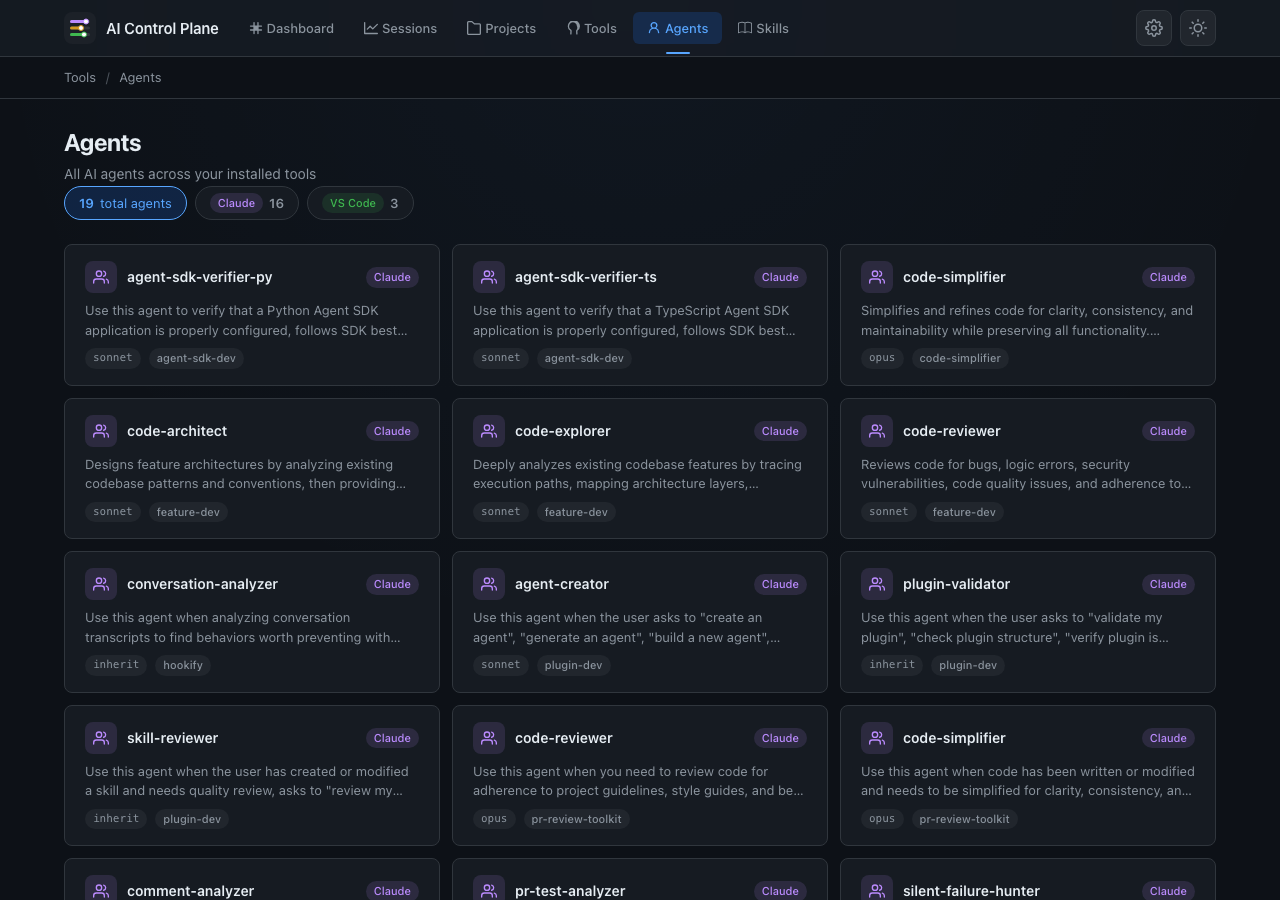
- Aggregated agents page — view all agents across Claude Code and VS Code in one place.
- Clickable source filters — filter agents by tool (Claude / VS Code) with pill-style toggle buttons.
Skills
- Skills browser (
/skills) — deduplicated list of all installed skills across Claude Code, GitHub Copilot, and VS Code Chat, with source badges showing which tools each skill is installed in. - Skill detail page (
/skills/<name>) — full rendered SKILL.md content with metadata sidebar (author, version, license, tools, homepage).
General
- Dark / Light mode — toggle with one click; persisted in
localStorage. - JSON API — programmatic access at
/api/sessions,/api/session/<id>/events,/api/tools, and/api/tools/<tool>. - Security — UUID & backup-hash validation, path-traversal protection, Content-Security-Policy headers, localhost-only by default.
Quick start
Install from source
git clone https://github.com/l-teles/ai-control-plane.git
cd ai-control-plane
pip install .
Install from PyPI
pip install ai-ctrl-plane
Run
# Auto-detect default directories for all sources
ai-ctrl-plane

# Specify directories explicitly
ai-ctrl-plane --copilot-dir ~/.copilot/session-state/ --claude-dir ~/.claude/projects/ --vscode-dir "~/Library/Application Support/Code/User/"

# Or use the module directly
python -m ai_ctrl_plane
Then open http://127.0.0.1:5000 in your browser.
Default directories
| Source | macOS / Linux default | Windows default | Override flag | Env variable |
|---|---|---|---|---|
| GitHub Copilot | ~/.copilot/session-state/ |
%LOCALAPPDATA%\github-copilot\session-state |
--copilot-dir |
COPILOT_LOG_DIR |
| Claude Code | ~/.claude/projects/ |
%LOCALAPPDATA%\claude\projects |
--claude-dir |
CLAUDE_LOG_DIR |
| VS Code Chat | ~/Library/Application Support/Code/User/ (macOS) / ~/.config/Code/User/ (Linux) |
%APPDATA%\Code\User |
--vscode-dir |
VSCODE_LOG_DIR |
Options
usage: ai-ctrl-plane [-h] [--copilot-dir DIR] [--claude-dir DIR]
                             [--vscode-dir DIR] [-p PORT] [--host HOST]
                          [--debug] [-V] [log_dir]

positional arguments:
  log_dir               Directory containing Copilot session log folders
                        (default: ~/.copilot/session-state/)

options:
  --copilot-dir DIR     Directory containing Copilot session log folders
                        (overrides positional arg)
  --claude-dir DIR      Directory containing Claude Code session logs
                        (default: ~/.claude/projects/)
  --vscode-dir DIR      Directory containing VS Code Chat session logs
                        (default: platform-dependent)
  -p, --port PORT       Port to listen on (default: 5000)
  --host HOST           Host to bind to (default: 127.0.0.1)
  --debug               Run in Flask debug mode (local development only)
  -V, --version         Show version and exit
Expected directory layouts
GitHub Copilot (~/.copilot/session-state/)
session-state/
├── 4e71aaa0-f131-41fd-aeee-8bcaa5efb315/
│   ├── workspace.yaml          # Session metadata
│   ├── events.jsonl            # Conversation event stream
│   ├── checkpoints/
│   │   └── index.md
│   └── rewind-snapshots/
│       ├── index.json          # Snapshot manifest
│       └── backups/            # File content snapshots
│           ├── ff627b50b0554488-1773312027139
│           └── ...
├── 8b3c9d7d-60f7-4e4c-a442-eb2ee7ee68e2/
│   └── ...
└── ...
Claude Code (~/.claude/projects/)
projects/
├── -Users-you-project-alpha/
│   ├── a1b2c3d4-e5f6-7890-abcd-ef1234567890.jsonl
│   ├── d4c3b2a1-f6e5-0987-dcba-0987654321fe.jsonl
│   └── ...
├── -Users-you-project-beta/
│   └── ...
└── ...
Each .jsonl file is a single session containing user/assistant/system events
with tool calls, thinking blocks, and usage metadata.
VS Code Chat (~/Library/Application Support/Code/User/)
User/
├── workspaceStorage/
│   ├── abc123hash/
│   │   ├── workspace.json            # Maps to project folder
│   │   └── chatSessions/
│   │       ├── 88ca1adb-bf72-4478-9982-6886cb99785e.json
│   │       └── ...
│   └── ...
└── globalStorage/
    └── emptyWindowChatSessions/
        ├── 3a9ae123-2cbe-4c1d-b5af-3d4cd1f0ad2e.jsonl
        └── ...
Each .json file is a single chat session with user messages, assistant responses,
tool call rounds, and timing metadata.
Development
# Install with dev dependencies
pip install -e ".[dev]"

# Lint
ruff check src/ tests/

# Test
pytest
Security
- Localhost only — binds to
127.0.0.1by default; never expose to the public internet without authentication. - Input validation — session IDs must be valid UUIDs; backup hashes are validated against a strict pattern.
- Path-traversal protection — resolved file paths are verified via
Path.relative_to()to stay within the configured log directory. - HTML sanitization — Markdown output is sanitized to strip dangerous tags
(
<script>,<iframe>, etc.) and event handler attributes. - Security headers —
X-Content-Type-Options,X-Frame-Options,Referrer-Policy, andContent-Security-Policyare set on every response. - No debug in production — debug mode is off by default and must be explicitly
enabled via
--debug. - Dependency monitoring — Dependabot is configured for automated security updates.
License
Project details
Verified details
These details have been verified by PyPIProject links
GitHub Statistics
Maintainers


Download files
Download the file for your platform. If you're not sure which to choose, learn more about installing packages.
Source Distribution
Built Distribution
Filter files by name, interpreter, ABI, and platform.
If you're not sure about the file name format, learn more about wheel file names.
Copy a direct link to the current filters
File details
Details for the file ai_ctrl_plane-0.5.0.tar.gz.
File metadata
- Download URL: ai_ctrl_plane-0.5.0.tar.gz
- Upload date:
- Size: 99.0 kB
- Tags: Source
- Uploaded using Trusted Publishing? Yes
- Uploaded via: twine/6.1.0 CPython/3.13.7
File hashes
| Algorithm | Hash digest | |
|---|---|---|
| SHA256 |
1b7648f24ee2b24ebd90e4a72dfa84b6fb8fab9ff3c6847a3338f04b2da8858e
|
|
| MD5 |
4c7c766e4ee4146c906308abdca6cb17
|
|
| BLAKE2b-256 |
cd30a2a69ea8ace81fe778bb3c328f752898b087090270d7f12b1d3f571875c1
|
Provenance
The following attestation bundles were made for ai_ctrl_plane-0.5.0.tar.gz:
Publisher:
publish.yml on l-teles/ai-control-plane
-
Statement:
-
Statement type:
https://in-toto.io/Statement/v1 -
Predicate type:
https://docs.pypi.org/attestations/publish/v1 -
Subject name:
ai_ctrl_plane-0.5.0.tar.gz -
Subject digest:
1b7648f24ee2b24ebd90e4a72dfa84b6fb8fab9ff3c6847a3338f04b2da8858e - Sigstore transparency entry: 1115252997
- Sigstore integration time:
-
Permalink:
l-teles/ai-control-plane@6ffe094f8a4cfbb17a49e4abda444fd26f5b8631 -
Branch / Tag:
refs/tags/v0.5.0 - Owner: https://github.com/l-teles
-
Access:
public
-
Token Issuer:
https://token.actions.githubusercontent.com -
Runner Environment:
github-hosted -
Publication workflow:
publish.yml@6ffe094f8a4cfbb17a49e4abda444fd26f5b8631 -
Trigger Event:
release
-
Statement type:
File details
Details for the file ai_ctrl_plane-0.5.0-py3-none-any.whl.
File metadata
- Download URL: ai_ctrl_plane-0.5.0-py3-none-any.whl
- Upload date:
- Size: 93.9 kB
- Tags: Python 3
- Uploaded using Trusted Publishing? Yes
- Uploaded via: twine/6.1.0 CPython/3.13.7
File hashes
| Algorithm | Hash digest | |
|---|---|---|
| SHA256 |
029b5c10338483610aff7e613d3d82f558745789dbac62c1774994a36b40475d
|
|
| MD5 |
6a44f32c73fe5dcb4417923d636b7d24
|
|
| BLAKE2b-256 |
18bb962a7c794afb5fc2534a38e582128f512ce298d93755a54d0be20918c707
|
Provenance
The following attestation bundles were made for ai_ctrl_plane-0.5.0-py3-none-any.whl:
Publisher:
publish.yml on l-teles/ai-control-plane
-
Statement:
-
Statement type:
https://in-toto.io/Statement/v1 -
Predicate type:
https://docs.pypi.org/attestations/publish/v1 -
Subject name:
ai_ctrl_plane-0.5.0-py3-none-any.whl -
Subject digest:
029b5c10338483610aff7e613d3d82f558745789dbac62c1774994a36b40475d - Sigstore transparency entry: 1115253043
- Sigstore integration time:
-
Permalink:
l-teles/ai-control-plane@6ffe094f8a4cfbb17a49e4abda444fd26f5b8631 -
Branch / Tag:
refs/tags/v0.5.0 - Owner: https://github.com/l-teles
-
Access:
public
-
Token Issuer:
https://token.actions.githubusercontent.com -
Runner Environment:
github-hosted -
Publication workflow:
publish.yml@6ffe094f8a4cfbb17a49e4abda444fd26f5b8631 -
Trigger Event:
release
-
Statement type:






