
This release is a pre-release and may not be stable for production use.
AI Dev Workspace
Your assistant remembers work between sessions in Markdown you own. Shared, durable task memory for developers who switch between Claude Code, Codex, and other assistants.


Quick start
Try offline before connecting a repo: ws demo · 5-minute tutorial · Claude Code + Codex guide · remove it
pipx install ai-dev-workspace --pip-args='--pre'  # beta; omit --pip-args after a stable release
cd ~/code/myapp && ws start
No pipx? brew install pipx, or python3 -m venv ~/.ws && ~/.ws/bin/pip install --pre ai-dev-workspace; put its bin directory on PATH before ws start.
Prefer a Claude Code plugin? Preview. Not yet listed in Anthropic's official plugin directory; install from our GitHub marketplace:
/plugin marketplace add Alenroyfeild/ai-dev-workspace
/plugin install ai-dev-workspace@ai-dev-workspace
Live-checked on beta.5 (2026-10-22). See the plugin preview.
ws start previews every file and writes nothing until you confirm. Generated assistant hooks and configs stay local (.git/info/exclude), task memory lives outside the repo in ~/.ai-dev-workspace/<repo-name>, and ws start --undo cleanly removes repo wiring.
Watch (videos for 0.1.0b6)
- Watch the 2-minute explainer
- Under the hood: real commands, real output
- Feature shorts: Switch assistants · Resume the next step · Dead ends · Skills · Team workspace (Preview) · Guards · Assistants · Install as a plugin (Preview)
- Earlier editions: 0.1.0b5
Use cases
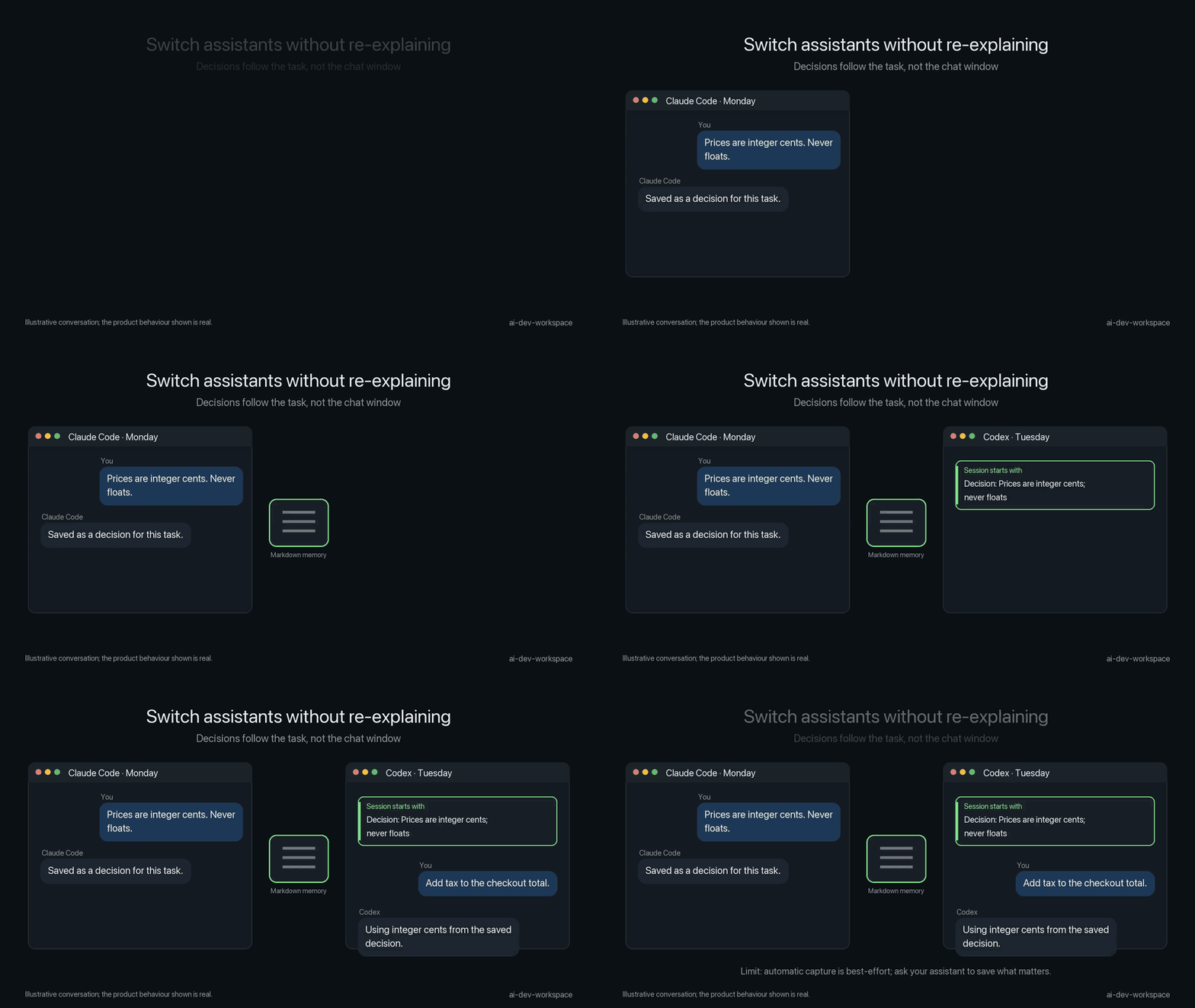
- Switch Claude Code ↔ Codex mid-task: Start in Claude Code, save a checkpoint, and continue in Codex with the exact same brief and task memory (guide).
- Resume tomorrow without re-explaining: Inject active tasks, recent decisions, and blockers directly into context at session start (tutorial).
- Stop retrying failed approaches: Dead ends appear under
Do not redo:in every fresh session brief (guide). - Keep verified corrections: Record decisions or constraints with
ws rememberso fresh sessions follow earlier rulings (commands). - Block risky commands and leaks: Opt-in
guardspack denies dangerous shell operations and secrets in commands or written files (packs). - Share domain notes with a team (preview): Share approved knowledge via private git repository with consent-based previews (team).
Example
Session 1 — You: “Empty email returns missing_email; leave signup unchanged.”
Assistant: “I’ll trace login and keep the decision with this task.”
You: “Save a checkpoint and stop here.”

Session 2 — You: “Continue the login fix.”
Assistant: “The saved note says return missing_email and leave signup unchanged.”
You: “Yes, continue.”
Features
| Feature | Status | What it does | Docs link |
|---|---|---|---|
| Session brief | Stable | Injects bounded task memory, decisions, and blockers at session start | Overview |
| Decisions & handoffs | Stable | Saves status, next action, and explicit rulings (ws checkpoint, ws remember) |
Commands |
| Dead ends | Stable | Records failed approaches and displays them as Do not redo: |
Concepts |
| Lessons | Stable | Captures reusable cross-task takeaways and guidance (ws lesson) |
Commands |
| MCP server | Stable | Exposes 7 core tools by default; others by name on request via stdio | MCP |
| Guards pack | Stable | PreToolUse hook denies risky commands and secrets before execution | Packs |
| Discipline pack | Stable | Advisory nudge when the same command fails repeatedly in a session | Packs |
ws digest |
Stable | Compresses verbose terminal output into focused markdown notes | Commands |
| Native imports | Stable | Reads existing Claude and Codex memory files (ws import native) |
Commands |
ws import claude-mem |
Preview | Fixture-tested SQLite copy import; newer upstream schemas may not import | Advanced |
ws audit |
Stable | Read-only stack/wiring suggestions from bounded local manifests; no login or live-client proof | Commands |
ws demo |
Stable | Creates an isolated sandbox repo to test commands safely | Tutorial |
| Claude Code plugin | Preview | Hooks + MCP; needs CLI + ws start; not in Anthropic directory; Windows untested |
Advanced |
| Codex plugin | Preview | Hooks need a trusted manual desktop install; no MCP; hooks not live-tested | Advanced |
| Cursor plugin | Preview | Fixture-tested only; not submitted; no verified install command | Advanced |
| Worker fallback chain | Preview | Only declared providers and read-only roles run; timeout is a failed attempt | Advanced |
| Gateway provider | Preview | Local fake-server tests only; sends a redacted brief to configured base_url, without tools | Advanced |
| Compact MCP recall | Stable | Bounded note cards and explicit untrusted detail; CLI snippets unchanged | Advanced |
| Lesson promotion | Stable | Repeated-note similarity suggests a draft; no automatic rule installation | Advanced |
digest_file MCP tool |
Preview | Opt-in size-only advice; scoped file summaries, no automatic compression | Packs |
| Behavior pack | Stable | Opt-in engineering guidelines; advice, not enforcement or learned session patterns | Packs |
| Skills packaging | Stable | Format checked; third-party installer not verified; CLI and setup still required | Skills |
| Team sharing | Preview | Private git-backed knowledge repo with consent-based pulls and previews | Team |
| MCP Registry | Preview | Pre-configured server.json catalog entry for MCP client discovery |
MCP |
How it works
Claude Code / Codex / Cursor / Copilot / Gemini / Antigravity
        │ (session startup & capture hooks)
        ▼
~/.ai-dev-workspace/<repo-name>/           (private, outside repo)
  ├── workspace.json                       (settings, active task, packs)
  └── vault/
      ├── Tasks/<id>.md                    (status, next action, decisions, blockers)
      └── Learnings.md                     (reusable cross-task lessons & dead ends)
        ▲
        │ (MCP stdio connection: 7 core tools by default; others by name)
  Local Assistant (MCP client)
Memory storage makes no background model calls. ws delegate --run starts only declared assistant CLIs or sends a redacted brief to an explicitly configured gateway; output is unverified. Task memory is plain Markdown you own.
Results
Measured in bench/README.md across independent paired investigations (Codex gpt-6-luna, n=5 per cohort):
| Arm | Pass (October 11) | Pass (October 10) |
|---|---|---|
| Fresh baseline (no memory) | 0/5 | 0/5 |
| Workspace (automatic brief) | 2/5 | 1/5 |
| Plain Markdown handoff | 5/5 | 4/5 |
The latest controlled runs show the plain Markdown handoff beating the workspace (5/5 and 4/5 against 2/5 and 1/5), with the automatic-capture release gate still unmet. The win for the workspace is structure, cross-assistant handoff, and avoiding manual file management. Details and earlier runs: bench/README.md and docs/MEASUREMENTS.md.
Compared with
- Built-in memory files (CLAUDE.md, AGENTS.md): Plain instructions per assistant;
ai-dev-workspaceadds cross-assistant handoffs, active task state, andDo not redo:constraints. - A plain HANDOFF.md: Works well for manual notes (and beat automatic workspace capture in latest benchmark cohorts: 5/5 vs 2/5);
ai-dev-workspaceadds cross-assistant automation, structured brief injection, and staleness warnings. - claude-mem: Captures tool use through hooks and compresses it with AI into SQLite + vector search (upstream docs), providing automatic memory capture without explicit commands;
ai-dev-workspacekeeps explicit Markdown you own, makes no background model calls for memory (explicit delegation can call declared CLIs or a configured gateway), and focuses on durable handoffs with next steps and dead ends (guide).
Compatibility
| Assistant | Status | Test proof |
|---|---|---|
| Claude Code | supported, tested live on macOS | CI-tested |
| Codex | supported, tested live on macOS | CI-tested |
| Cursor | supported, fixture-tested; live reports welcome | CI-tested |
| Copilot (VS Code) | supported, fixture-tested; live reports welcome | CI-tested |
| Gemini CLI | supported, fixture-tested; live reports welcome | CI-tested |
| Antigravity | Preview, fixture-tested; rules, MCP, SessionStart/PreToolUse hooks; no automatic capture | CI-tested |
Testers on Cursor, Copilot (VS Code), Gemini CLI, or Antigravity: please share problems through Something broke.
Known limits
- Client coverage: Claude Code and Codex are live-tested on macOS; Linux and Windows are CI-tested only. Cursor, Copilot (VS Code), Gemini CLI, and Antigravity are fixture-tested.
- Capture is best-effort: Explicit CLI commands (
ws remember,ws checkpoint) are deterministic; automatic transcript cue-word capture is best-effort. - Guards are a safety net: Pattern matching blocks common risky commands and secrets in commands or written files, but is not an unbypassable security boundary.
- Team sharing: Multi-user flow tested on one Mac over a local HTTPS Git server: three separate profiles, sharing in both directions, generated Claude Code and Codex hook output. A hosted GitHub check and live assistant sessions are pending. (Roadmap)
Privacy & safety
- Private by default: Memory is stored outside checkout paths in
~/.ai-dev-workspace/<repo-name>. Team sharing requires an explicit private repo (ws team init) with manual confirmation. - Redaction is best-effort:
wsmasks known API keys, tokens, and private spans (<private>...</private>), but regex redaction is best-effort and does not replace operational secret hygiene. - Guards are a safety net: The
guardsPreToolUse hook blocks known risky shell patterns and secrets in commands or written files, but it is a safety net, not an unbypassable security boundary.
Coming next
- Common Agent Plugins manifest (PLG3): parked and unavailable until Codex can load the root manifest without losing plugin hooks.
- Codex plugin MCP through roots (PLG5): parked and unavailable for Codex; codex-cli 0.155.1 offers no roots and cannot expand plugin MCP paths, so use
ws startfor MCP. Clients that offer roots get the beta.7 Preview.
Documentation
- Start: 5-minute tutorial · Setup guide · Demo walkthrough · Cross-client guide
- Use: CLI commands · Packs catalog · Skills distribution · MCP server · Advanced usage
- Guides: Keep decisions without background AI · Stop retrying dead ends
- Team: Team use · Team workspace setup
- Reference: Overview · Architecture · Benchmark measurements · Client verification · Windows support · Roadmap
Status & contributing
ai-dev-workspace is in public beta (v0.1.0-beta.6 on PyPI). Planned improvements are tracked in the Roadmap. Bug reports and feedback are welcome through Something broke.
Released under the MIT License.
1 maintainer

Metadata
1 maintainer
Release files for ai-dev-workspace 0.1.0b7
For a detailed explanation of source distributions (sdists) and built distributions (wheels), please see the package formats documentation.
Source distribution (sdist)
| File | Size | Uploaded | Provenance | Actions |
|---|---|---|---|---|
| ai_dev_workspace-0.1.0b7.tar.gz | 313.2 kB | Without provenance | Details for ai_dev_workspace-0.1.0b7.tar.gz |
Built distribution (wheel)
| File | Interpreter | ABI | Platform | Actions Reset |
|---|---|---|---|---|
| ai_dev_workspace-0.1.0b7-py3-none-any.whl | Python 3 | none | any | Details for ai_dev_workspace-0.1.0b7-py3-none-any.whl |
Total release size: 679.5 kB
Release files / ai_dev_workspace-0.1.0b7.tar.gz
| Download URL | ai_dev_workspace-0.1.0b7.tar.gz |
|---|---|
| Size | 313.2 kB |
| Tags | Source |
|
SHA-256 checksum How to use checksums |
77d05a52f95e7d4c3b872af9e6bf48babf096b73a9a54c69d4e5f17f5d39affe
|
|
BLAKE2b-256 checksum How to use checksums |
4817ebeb6108fffdcc90c4256283eba454b0ed400cd3a89f625d1289991076dc
|
| Upload date | |
|
Uploaded using Trusted Publishing? What is trusted publishing? |
No |
| Uploaded via |
twine/6.2.0 CPython/3.9.6
|
Release files / ai_dev_workspace-0.1.0b7-py3-none-any.whl
| Download URL | ai_dev_workspace-0.1.0b7-py3-none-any.whl |
|---|---|
| Size | 366.3 kB |
| Tags | Python 3 |
|
SHA-256 checksum How to use checksums |
b08a689b127251de4c8d81457f7a8907bd5b7e4257c5e5c6778e377ecbc5dfd1
|
|
BLAKE2b-256 checksum How to use checksums |
23fbd5854e842b833b2ec8817b89dc0fdf0d5e720c37f7f547d35c47dced1309
|
| Upload date | |
|
Uploaded using Trusted Publishing? What is trusted publishing? |
No |
| Uploaded via |
twine/6.2.0 CPython/3.9.6
|
Security for ai-dev-workspace 0.1.0b7
Provenance
Provenance describes where a file came from. On PyPI, provenance is shared via attestations, which provide a verifiable record of the build or publishing details. View details, limitations and caveats.
No provenance found
None of the files in this release were uploaded with provenance metadata.
A note on package security
PyPI is a repository for distributing packages, not a service for auditing them. While third-party security researchers and our staff do their best to detect and remove malicious packages, PyPI cannot guarantee the quality, security or suitability of any given package.
To learn more about protecting yourself from malicious actors, visit our package security documentation.














