
AI generated commit messages!
Verified details
These details have been verified by PyPIProject links
GitHub Statistics
Maintainers

Project description
🐙 AI Commit Generator
Use AI to generate commit message for your staged changes.
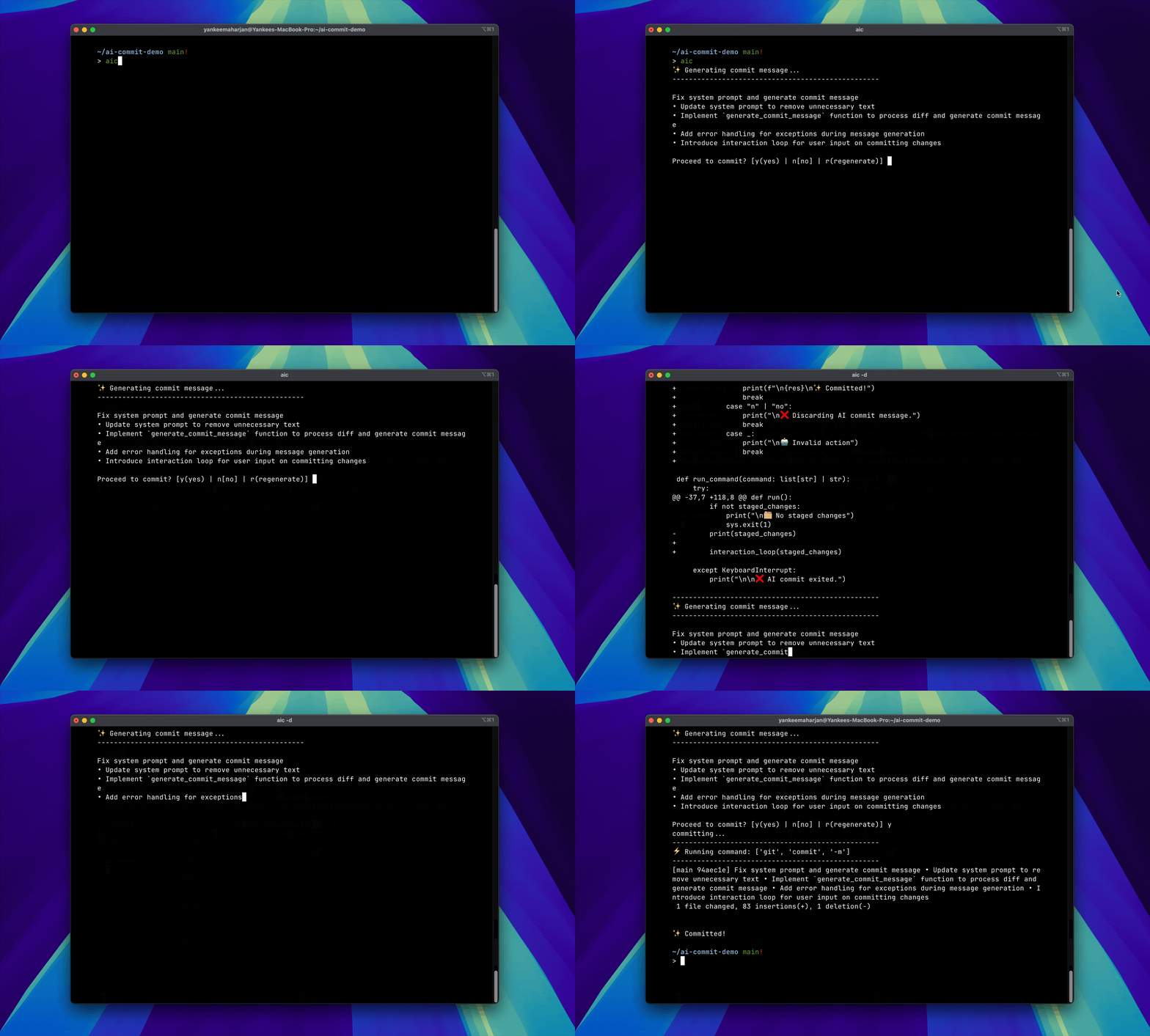
⚡️ Features
- Use local models (via Ollama) or remote models (with OpenAI API compatible providers like:
openai,groq,gemini,togetherai,deepseek,qwen) or your custom provider. - Regenerate commit messages until you find the perfect one
- In-place editing of generated commit
- Define your custom commit message format
- Simple CLI interface with debug mode
⚡️ Install
pip install ai-gen-commit
✨ Generate Commit messages
In any git directory with staged changes, run:
aic
🔍 Run in debug mode
aic -d
🦙 Local Mode [Specify model to use]
aic -m <model-name>

aic -m "llama3.2:3b"

# OR

export OLLAMA_MODEL="llama3.2:3b"
🛜 Remote Mode
To run in remote mode, export your API keys as:
export OPENAI_API_KEY=<your-api-key>
Specify which remote provider to use:
export AI_COMMIT_PROVIDER="gemini" or "openai" or "togetherai" or "groq" or "deepseek" or "mistral"
then enable remote mode:
aic -r
Specify the model to use based on the provider:
export AI_COMMIT_PROVIDER="groq"
export AI_COMMIT_MODEL="qwen-2.5-32b" # pass the model as env var
aic -r

# ---

export AI_COMMIT_PROVIDER="openai"
aic -r -m "gpt-4o-2024-11-20" # pass the model as flag

# ---

export AI_COMMIT_PROVIDER="gemini"
aic -r -m "gemini-1.5-flash"
✨ Bring your own Provider
You can use any OPEN AI compatible provider/server for commit generation.
export AI_COMMIT_PROVIDER=custom # should be set to custom
export AI_COMMIT_MODEL=llama3.2:3b # example
export AI_COMMIT_PROVIDER_BASE_URL=http://localhost:11434/v1 # example
export OPENAI_API_KEY=<your-api-key> # if your custom provider requires one
📝 In-place Editing
Set your editor environment variable:
export EDITOR=vim
export EDITOR=nvim

# For VSCode
export EDITOR='code --wait'
After commit message is generated, press e to edit using the defined $EDITOR.
Defaults to using vi.
🤖 Custom commit message format
Users can generate commit messages based on the format and instructions defined in the system prompt.
To define system prompt on project level
- Create a
.ai-commitfile in your git repository's root directory (same location as the.gitfolder) - Add your system prompt to this file
To define a global system prompt
- Create a file on
~/.$HOME/.ai-commit - Add your system prompt to this file
| Project-level System Prompt > Global System Prompt > Built-in system prompt.
Getting Help
aic -h
🔨 Development
👀 Prerequisites Local mode [default]
🚀 Setting up
make setup
Project details
Verified details
These details have been verified by PyPIProject links
GitHub Statistics
Maintainers
Release history Release notifications | RSS feed


Download files
Download the file for your platform. If you're not sure which to choose, learn more about installing packages.
Source Distribution
Built Distribution
Filter files by name, interpreter, ABI, and platform.
If you're not sure about the file name format, learn more about wheel file names.
Copy a direct link to the current filters
File details
Details for the file ai_gen_commit-0.1.1.tar.gz.
File metadata
- Download URL: ai_gen_commit-0.1.1.tar.gz
- Upload date:
- Size: 8.8 kB
- Tags: Source
- Uploaded using Trusted Publishing? Yes
- Uploaded via: twine/6.1.0 CPython/3.12.9
File hashes
| Algorithm | Hash digest | |
|---|---|---|
| SHA256 |
4426f76b71ff550d8498e4ffb39e6edc4b66ec3742be2ade755e2fa6027589c8
|
|
| MD5 |
84fcb46224c787b7c1effd92888c9d6f
|
|
| BLAKE2b-256 |
88c023817981d3a822e782d050a07b3a10f776dd0d23da0810b2995de059eb9b
|
Provenance
The following attestation bundles were made for ai_gen_commit-0.1.1.tar.gz:
Publisher:
release.yml on yankeexe/ai-gen-commit
-
Statement:
-
Statement type:
https://in-toto.io/Statement/v1 -
Predicate type:
https://docs.pypi.org/attestations/publish/v1 -
Subject name:
ai_gen_commit-0.1.1.tar.gz -
Subject digest:
4426f76b71ff550d8498e4ffb39e6edc4b66ec3742be2ade755e2fa6027589c8 - Sigstore transparency entry: 291460862
- Sigstore integration time:
-
Permalink:
yankeexe/ai-gen-commit@3b3b8e6ba7a13c01ed14f3ed28837bf53b1e57ae -
Branch / Tag:
refs/tags/0.1.1 - Owner: https://github.com/yankeexe
-
Access:
public
-
Token Issuer:
https://token.actions.githubusercontent.com -
Runner Environment:
github-hosted -
Publication workflow:
release.yml@3b3b8e6ba7a13c01ed14f3ed28837bf53b1e57ae -
Trigger Event:
push
-
Statement type:
File details
Details for the file ai_gen_commit-0.1.1-py3-none-any.whl.
File metadata
- Download URL: ai_gen_commit-0.1.1-py3-none-any.whl
- Upload date:
- Size: 10.3 kB
- Tags: Python 3
- Uploaded using Trusted Publishing? Yes
- Uploaded via: twine/6.1.0 CPython/3.12.9
File hashes
| Algorithm | Hash digest | |
|---|---|---|
| SHA256 |
f7ba665c4b956d06060cfeaef17d42485ca2c4128bb08d8d64d311a1076fe777
|
|
| MD5 |
138121149ce4618c1d1e8a9bca75d440
|
|
| BLAKE2b-256 |
810e3c9c007593de3db94c63cd55f44ddde58639d4cc6bedcaca1568b37bf240
|
Provenance
The following attestation bundles were made for ai_gen_commit-0.1.1-py3-none-any.whl:
Publisher:
release.yml on yankeexe/ai-gen-commit
-
Statement:
-
Statement type:
https://in-toto.io/Statement/v1 -
Predicate type:
https://docs.pypi.org/attestations/publish/v1 -
Subject name:
ai_gen_commit-0.1.1-py3-none-any.whl -
Subject digest:
f7ba665c4b956d06060cfeaef17d42485ca2c4128bb08d8d64d311a1076fe777 - Sigstore transparency entry: 291460880
- Sigstore integration time:
-
Permalink:
yankeexe/ai-gen-commit@3b3b8e6ba7a13c01ed14f3ed28837bf53b1e57ae -
Branch / Tag:
refs/tags/0.1.1 - Owner: https://github.com/yankeexe
-
Access:
public
-
Token Issuer:
https://token.actions.githubusercontent.com -
Runner Environment:
github-hosted -
Publication workflow:
release.yml@3b3b8e6ba7a13c01ed14f3ed28837bf53b1e57ae -
Trigger Event:
push
-
Statement type:






