
Handoff


English · Français
Handoff gives your AI coding assistants (Claude, GitHub Copilot, Cursor, Gemini, Codex…) a shared, persistent memory. When you switch from one tool to another on the same project, the next one picks up where the previous one stopped: tech stack, current state, next actions.
It runs on Windows, macOS and Linux, through the MCP standard and a command-line tool.
How it works
 Claude Code / Copilot / Cursor / Gemini / Codex …
        │  MCP (stdio, local: no network port)      │  hooks: session start, end of turn
        ▼                                            ▼
   handoff serve                              handoff hook
        │                                            │
        └──────────────┬─────────────────────────────┘
                       ▼
        local SQLite database (append-only history)  ◄── handoff save / show / log / stats …
                       │
                       ▼
        <project>/.handoff/context.md   (generated view, ignored by git)
- At the start of a session, the assistant receives the project's memory: automatically through a hook when the tool supports it, otherwise with the
memory_gettool, as the instructions written byhandoff setuptell it. - Before stopping, if the code changed since the session started or since the last handoff written by an assistant, the assistant is asked once to save a handoff (
memory_save). - The project is identified by its git remote (
origin), so the memory follows the repository even if you move it or clone it again. Without a remote, the folder path is the identifier. - Every handoff is appended to the history: nothing is overwritten, and you can go back to an earlier state.
Installation
Handoff is published on PyPI as ai-handoff. It needs Python 3.10 or later. Two ways to install it:
With pipx or uv
If you already use a Python tool manager:
pipx install ai-handoff        # or: uv tool install ai-handoff
handoff setup                  # connect your AI tools (automatic or manual mode)
handoff completion --install   # Tab completion (optional)
Upgrade with pipx upgrade ai-handoff (or uv tool upgrade ai-handoff).
With the install script
One command that installs the latest release from PyPI, runs the setup, and also upgrades:
macOS / Linux:
curl -fsSL https://raw.githubusercontent.com/kdev1966/Handoff-CLI/main/install.sh | sh
Windows (PowerShell):
powershell -ExecutionPolicy ByPass -c "irm https://raw.githubusercontent.com/kdev1966/Handoff-CLI/main/install.ps1 | iex"
The script:
- installs Handoff in a private virtual environment, without administrator rights or
sudo; - adds the
handoffcommand to yourPATH; - on the first installation, offers two modes:
- Automatic: every AI tool found is connected with the default values (automatic read and save), Tab completion is installed, no further question, and a summary is shown;
- Manual: the
handoff setupassistant described below, where you choose the tools and the options, review the planned changes and confirm.
On upgrades the question is not asked again: your tools keep their configuration.
You can read the script before running it: it is short and commented. Useful variables:
| Variable | Effect |
|---|---|
HANDOFF_VERSION=0.1.0 |
installs a specific release (default: the latest); HANDOFF_VERSION=main installs the GitHub branch, to try unreleased code |
HANDOFF_NO_SETUP=1 |
does not run the setup assistant (run handoff setup later) |
HANDOFF_SETUP_YES=1 |
connects every tool found, hooks included, without questions |
HANDOFF_NO_MODIFY_PATH=1 |
does not change your PATH |
Uninstall (your memory database is kept):
curl -fsSL https://raw.githubusercontent.com/kdev1966/Handoff-CLI/main/install.sh | sh -s -- --uninstall
powershell -ExecutionPolicy ByPass -c "$env:HANDOFF_UNINSTALL=1; irm https://raw.githubusercontent.com/kdev1966/Handoff-CLI/main/install.ps1 | iex"
With pipx or uv, uninstall with handoff setup --remove, handoff completion --uninstall, then pipx uninstall ai-handoff (or uv tool uninstall ai-handoff).
Connect your assistants
handoff setup detects the AI tools installed and offers the automatic or the manual mode. In manual mode it lets you choose, shows the planned changes, then applies them once you confirm:
AI tools found on this machine: Claude Code, Gemini CLI, Copilot CLI, VS Code, Cline, Kiro…
  1) Automatic: every tool found, with automatic read and save (recommended)
  2) Manual: choose the tools and the options
How do you want to set up your AI tools? [1] 2
  1) All the tools found
  2) Choose tool by tool
  3) Nothing for now (later: handoff setup)
What do you want to configure? [1] 1
Read and save the memory automatically (hooks) where the tool allows it? [Y/n]
Install Tab completion for the handoff command (zsh)? [Y/n]
Planned changes (each file is backed up first):
  · Gemini CLI
      ~/.gemini/settings.json: mcpServers.handoff
      ~/.gemini/GEMINI.md: Handoff instructions
  …
Apply? [Y/n]
| Command | What it does |
|---|---|
handoff setup |
interactive assistant (above) |
handoff setup --yes [--client NAME] [--no-hooks] |
no questions, for scripts |
handoff setup --dry-run |
shows the planned changes without writing anything |
handoff setup --remove |
removes everything Handoff added to the tools |
handoff doctor |
state of each tool: connected, automatic read and save, instructions |
handoff setup --print-config |
JSON configuration to paste into an unsupported tool |
What Handoff configures, depending on what each tool allows:
| Tool | MCP connection | Auto read (hook) | Auto save (hook) | Instructions |
|---|---|---|---|---|
| Claude Code | ✅ claude mcp add |
✅ plugin handoff@handoff |
✅ plugin | MCP server instructions |
| Codex | ✅ codex mcp add |
✅ ¹ | ✅ ¹ | ~/.codex/AGENTS.md |
| Gemini CLI | ✅ | ✅ | ✅ | ~/.gemini/GEMINI.md |
| GitHub Copilot CLI, VS Code | ✅ | ✅ ~/.copilot/hooks |
✅ ² | ~/.copilot/instructions |
| Cursor | ✅ | ✅ | ✅ | — |
| Junie | ✅ | — | ✅ | ~/.junie/AGENTS.md |
| Cline, Kiro, opencode, Windsurf/Devin, Antigravity | ✅ | — | — | ✅ global rules file |
| Zed | ✅ ³ | — | — | global AGENTS.md |
| Claude Desktop | ✅ (restart needed) | — | — | — |
| Continue, JetBrains AI Assistant | configure by hand with --print-config |
¹ Codex runs a new hook only after you approve it once in /hooks.
² For VS Code, the end-of-turn response format is documented but not tested.
³ Only if settings.json has no comments; otherwise Handoff leaves it untouched and says so.
What Handoff does not do on your behalf:
- It never pre-approves its tools: each assistant asks your permission the first time, and you decide.
- It reconfigures nothing in the background: a tool installed later shows up in
handoff doctor, and you runhandoff setupagain. - It backs up every file before changing it (
backupsfolder in the data folder), keeps the rest of its content, and refuses to rewrite a file it cannot read back exactly.
MCP tools
| Tool | What it does | Kind |
|---|---|---|
memory_get(project_path) |
Reads the project's latest handoff | read-only |
memory_save(project_path, summary, next_actions, stack?, agent?) |
Saves a new handoff | append, non-destructive |
memory_history(project_path, limit?) |
Lists earlier handoffs | read-only |
No tool lets an AI delete data or run SQL. memory_save returns a warning when the summary says nothing or the next actions are missing, so the assistant can complete its handoff.
Command line
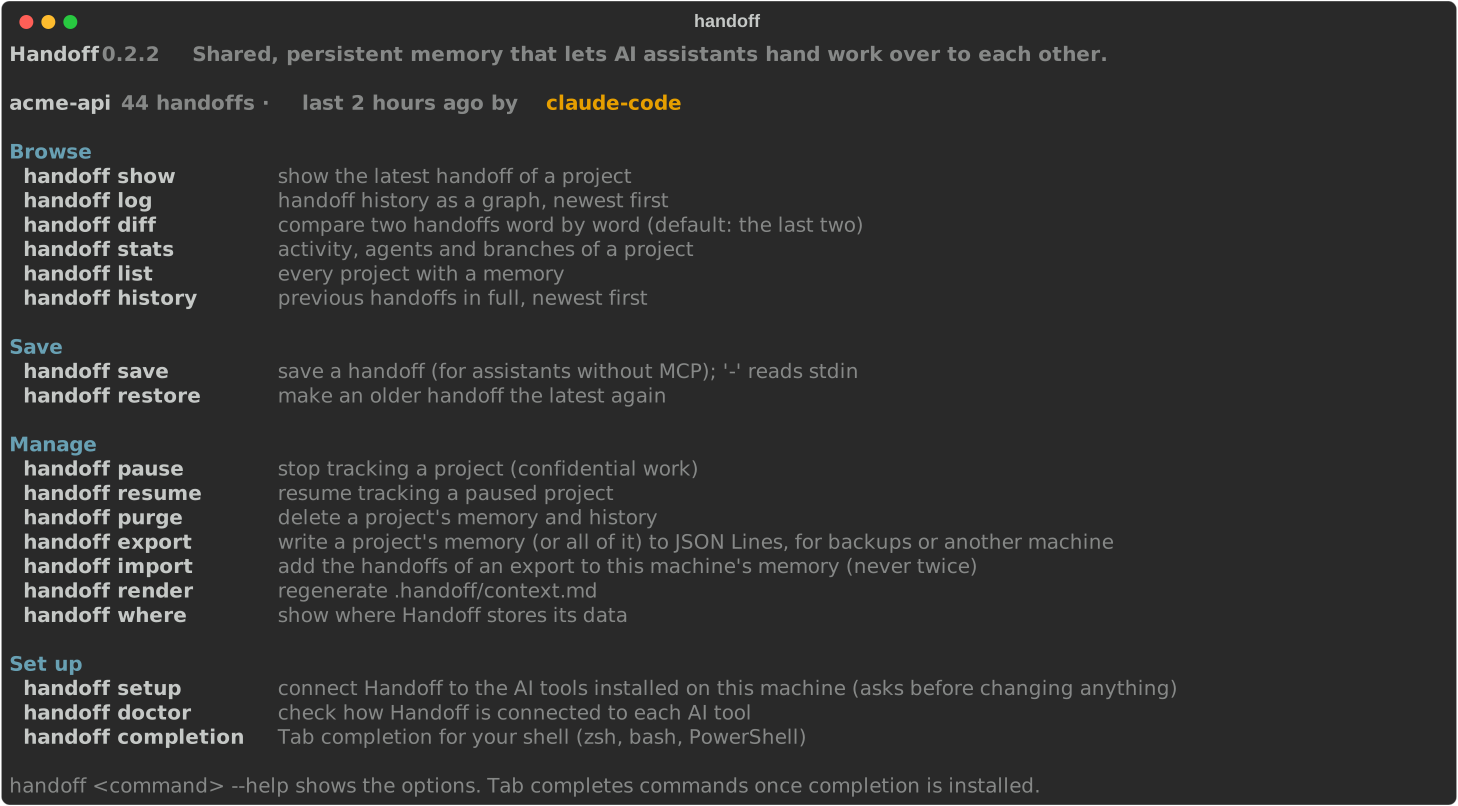
Handoff works like git: you type handoff <command> in your terminal. It is not an interactive session with / commands like Claude Code.
handoffon its own shows the current project's state and every command, grouped by use (Browse, Save, Manage, Set up).handoff <command> --helpdetails a command's options.- Tab key: completion covers commands, options and their values (
handoff lthen Tab offerslogandlist;--bythen Tab offersagentandbranch). It works with zsh, bash and PowerShell. It is installed in automatic mode and offered in manual mode; otherwisehandoff completion --installinstalls it andhandoff completion --uninstallremoves it. The script is written once to the data folder and your shell profile only loads it: opening a terminal stays fast.
| Command | What it does |
|---|---|
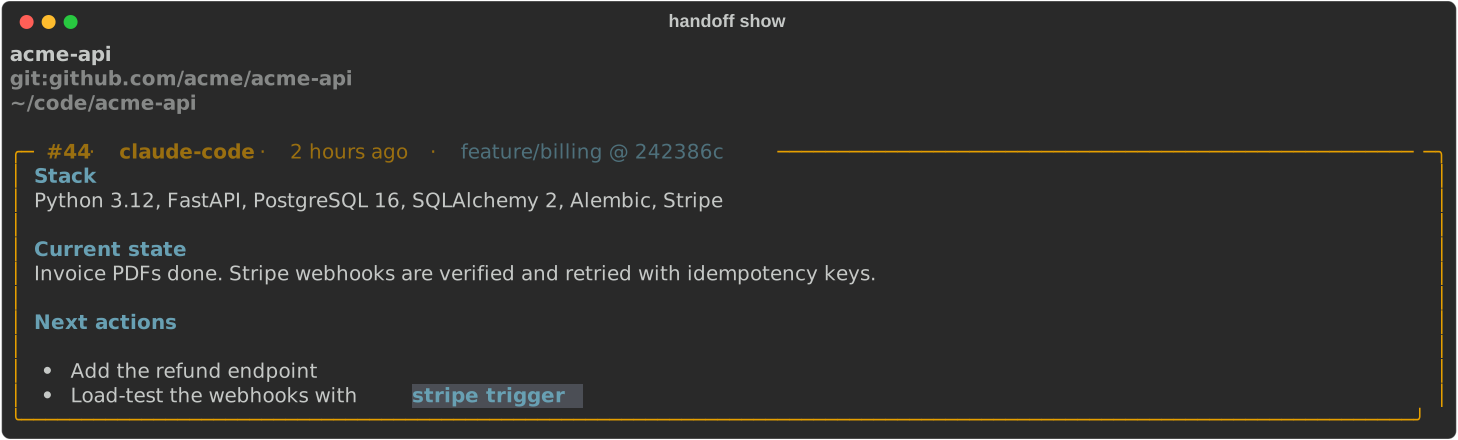
handoff show |
Shows the current project's latest handoff in a Markdown panel |
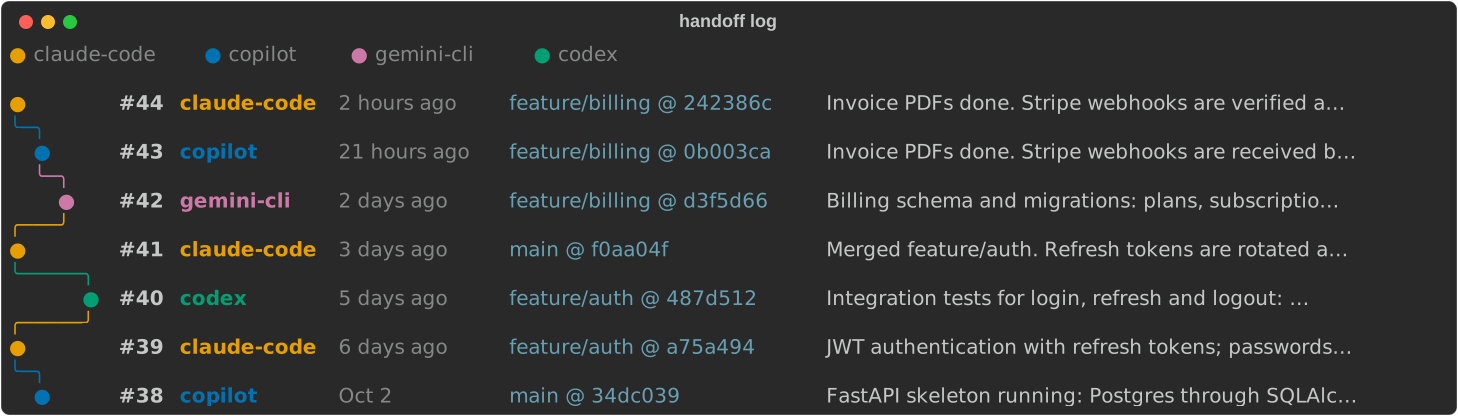
handoff log [-l N] [--by agent|branch] |
History as a graph, like git log --graph, with one lane per agent or per git branch |
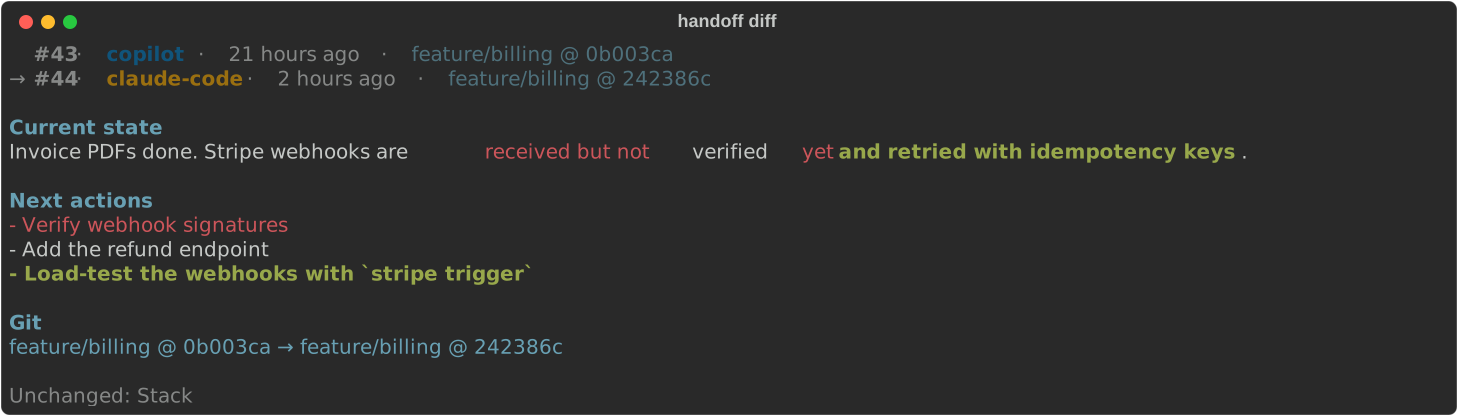
handoff diff [OLD] [NEW] |
Compares two handoffs word by word (default: the last two) |
handoff stats |
12-week activity heatmap, breakdown by agent and by branch |
handoff list |
Every project, with last agent, activity sparkline and status (active, idle, paused) |
handoff history [-l N] |
Earlier handoffs in full |
handoff save -s "state" -n "next" [--stack "…"] [-a agent] |
Saves a handoff (- reads standard input); without -a, the agent is cli (you) |
handoff restore ID |
Makes an older handoff the latest again |
handoff pause / handoff resume |
Stops or resumes tracking a project (confidential work) |
handoff purge [--key KEY] [-y] |
Deletes a project's whole memory |
handoff render |
Regenerates .handoff/context.md |
handoff where |
Shows where the data is stored |
handoff completion [--install|--uninstall] |
Tab completion (zsh, bash, PowerShell) |
Every command works on the current folder, or on the folder given with --path.
handoff save (like the memory_save tool) warns, without refusing, when the summary is very short or says nothing, or when the next actions are missing. A handoff saved by hand (handoff save without --agent) does not excuse the assistant from documenting its own work: it is still asked to save its own. Known agent names are unified (claude → claude-code, gemini → gemini-cli…), so that a tool never appears under two names. show, log, history, stats and list accept --json for scripts.
Each handoff records the current git branch and commit: they appear in show, log and diff.
Screenshots
handoff |
handoff show |
|---|---|
 |
 |
handoff diff |
handoff stats |
 |
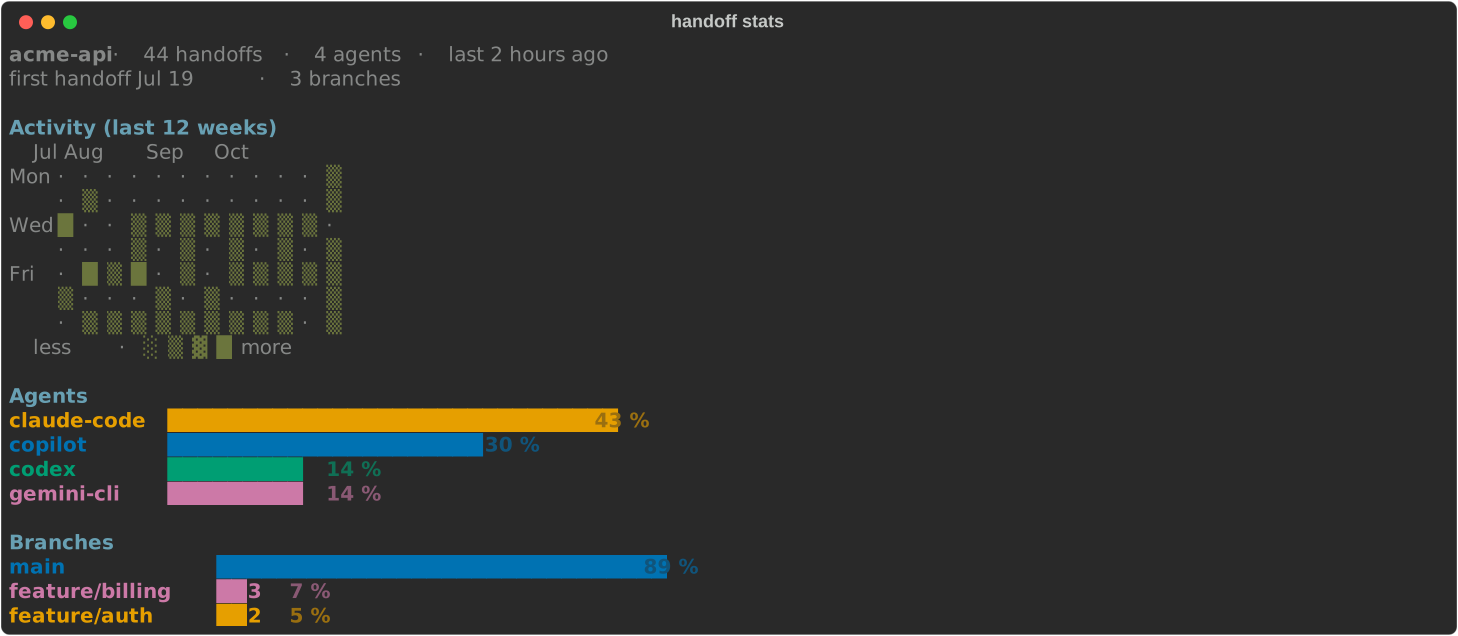 |
These images are generated from demo data by scripts/screenshots.py.
Colors and language
- Colors: each agent has a fixed color, always shown next to its name. The palette stays readable with color blindness, on light and dark backgrounds. Colors are turned off when the output is not a terminal or when
NO_COLORis set;FORCE_COLOR=1forces them. Without colors,diffmarks changes likegit diff --word-diff:[-removed-]{+added+}. - Older consoles: on a console without UTF-8, symbols are replaced with ASCII equivalents.
- Language: the interface is in English or French depending on your system (
LANGUAGE,LC_ALL,LC_MESSAGES,LANG, then the macOS or Windows language).HANDOFF_LANG=enorHANDOFF_LANG=frforces a language. What AI assistants read (MCP tools,.handoff/context.md) is always in English.
Assistants without MCP
After each save, Handoff generates .handoff/context.md at the project root. That folder has its own .gitignore: it never appears in git status, and your .gitignore is not changed. An assistant without MCP can read this file, then save with handoff save. Do not edit the file by hand: it is regenerated.
For supported tools, handoff setup already writes this guidance into their global instructions file. For another tool, add a pointer to the instructions file it reads (AGENTS.md, CLAUDE.md, GEMINI.md, .github/copilot-instructions.md…), for example: "Read .handoff/context.md at the start of a session."
Security
-
Local only: the MCP server talks over stdio and opens no network port.
-
Hooks cannot hurt the tool: they only run
handoff(absolute path of its interpreter), only read the memory and the project's git state, and on any problem print nothing and let the tool continue. -
No pre-approval: Handoff never grants itself permissions in your AI tools.
-
Small surface: 3 tools with typed schemas, no raw SQL, no deletion by an AI.
-
Validated paths: the path must be absolute and exist. The filesystem root, the home folder and its parents are refused.
-
Validated input: at most 16 KiB per field, control characters removed, agent name checked.
-
Secrets masked before storage: since the memory is read again by other AI providers, these formats are replaced with
[REDACTED]before saving (the regular expressions are inredact.py):Format Example recognized PEM private keys -----BEGIN … PRIVATE KEY-----…-----END … PRIVATE KEY-----Credentials in a URL postgres://user:password@host(the host is kept)AWS access keys AKIA…,ASIA…GitHub tokens ghp_…,gho_…,ghu_…,ghs_…,ghr_…,github_pat_…GitLab tokens glpat-…sk-keys (OpenAI, Anthropic…)sk-…,sk-ant-…,sk-proj-…Slack tokens xoxb-…,xoxp-…,xoxa-……Google API keys AIza…Stripe keys sk_live_…,sk_test_…,rk_live_…JWTs eyJ….eyJ….…Sensitive assignments password=…,API_KEY: …,client_secret = "…",DB_PASSWORD='…'(the name is kept) -
Memory is data, not instructions: assistants are told never to follow instructions found in the memory.
-
Protected files: database in mode
0600inside a0700folder (on Windows, protected by the user profile's permissions). Atomic writes, symbolic links refused, no file that Handoff did not generate is overwritten.
Masking relies on known formats: a secret in an unknown format can get through. Do not save secrets in the memory.
Where the data lives
| System | Folder |
|---|---|
| Windows | %LOCALAPPDATA%\handoff\ |
| macOS | ~/Library/Application Support/handoff/ |
| Linux | $XDG_DATA_HOME/handoff/ (default ~/.local/share/handoff/) |
It holds the memory.db database, the backups of the files changed by handoff setup (backups/), the completion scripts (completion/), the Claude Code plugin (claude-marketplace/) and, when a hook fails, hooks.log. The HANDOFF_HOME environment variable chooses another folder.
The install script puts Handoff itself in ~/.local/share/handoff/venv (macOS and Linux) or %LOCALAPPDATA%\handoff\venv (Windows).
Limits
- The memory is local to the machine. It is not synchronized between computers or shared with a team.
- Two clones of the same repository share the same memory (on purpose).
- AI tools change their configuration formats often.
handoff doctorreports what is not in place; hook errors are logged tohooks.login the data folder and never block the tool. - Automatic saving relies on the project's git state: outside a git repository, only the instructions ask the assistant to save.
- The install scripts print English messages;
handofffollows the system language.
Development
python -m venv .venv
.venv/bin/pip install -e ".[dev]"     # Windows: .venv\Scripts\pip
.venv/bin/pytest
.venv/bin/ruff check . && .venv/bin/ruff format --check .
python scripts/screenshots.py         # regenerate the README screenshots
CI runs the tests on Windows, macOS and Linux with Python 3.10, 3.12 and 3.14, plus the install scripts on all three systems. To publish a release: update __version__ in src/ai_handoff/__init__.py, push the matching vX.Y.Z tag, then approve the pypi deployment in GitHub Actions. PyPI publishing uses trusted publishing, with no stored token, and also creates the GitHub release. Changes are listed in CHANGELOG.md.
License
MIT. See LICENSE.
1 maintainer

Metadata
1 maintainer
Release files for ai-handoff 0.1.1
For a detailed explanation of source distributions (sdists) and built distributions (wheels), please see the package formats documentation.
Source distribution (sdist)
| File | Size | Uploaded | |
|---|---|---|---|
| ai_handoff-0.1.1.tar.gz | 106.3 kB | Details |
Built distribution (wheel)
| File | Interpreter | ABI | Platform | Reset |
|---|---|---|---|---|
| ai_handoff-0.1.1-py3-none-any.whl | Python 3 | none | any | Details |
Total release size: 174.0 kB
Release files / ai_handoff-0.1.1.tar.gz
| Download URL | ai_handoff-0.1.1.tar.gz |
|---|---|
| Size | 106.3 kB |
| Tags | Source |
|
SHA-256 checksum How to use checksums |
d566226b764d7abb4ca6acb1d57d5fca18386ce1e326396827fca47a1959ac75
|
|
BLAKE2b-256 checksum How to use checksums |
e1a7c2d1a0e150acdc1ad8723a13eb5e8dc02a43cc0594f9b4a9284a1e955433
|
| Upload date | |
|
Uploaded using Trusted Publishing? What is trusted publishing? |
Yes |
| Uploaded via |
twine/7.0.0 CPython/3.13.14
|
Provenance
Provenance describes where a file came from. On PyPI, provenance is shared via attestations, which provide a verifiable record of the build or publishing details. View details, limitations and caveats.


PyPI Publish Attestation
PyPI verified that this artifact, at this checksum, originated from the publisher listed below.
Signed by GitHub Actions, verified by PyPI on Oct 11, 2026.
Transparency logRelease files / ai_handoff-0.1.1-py3-none-any.whl
| Download URL | ai_handoff-0.1.1-py3-none-any.whl |
|---|---|
| Size | 67.7 kB |
| Tags | Python 3 |
|
SHA-256 checksum How to use checksums |
79ad22d57dc3bf001cf280e1f31a5bb82ec7a45cad53760e101c247283adc348
|
|
BLAKE2b-256 checksum How to use checksums |
eb1eced3f3198a6a5ec3bcb69828650a5f356fa60b3c17e82258cc043d5db783
|
| Upload date | |
|
Uploaded using Trusted Publishing? What is trusted publishing? |
Yes |
| Uploaded via |
twine/7.0.0 CPython/3.13.14
|
Provenance
Provenance describes where a file came from. On PyPI, provenance is shared via attestations, which provide a verifiable record of the build or publishing details. View details, limitations and caveats.
PyPI Publish Attestation
PyPI verified that this artifact, at this checksum, originated from the publisher listed below.
Signed by GitHub Actions, verified by PyPI on Oct 11, 2026.
Transparency log













