
AI Model Integration for python

Project description
ai_integration

Purpose
Wrap your AI model up as a python function - then expose it under a consistent interface so that you can run the model under a variety of integration modes and hosting platforms - all working seamlessly, automatically, with no code changes.
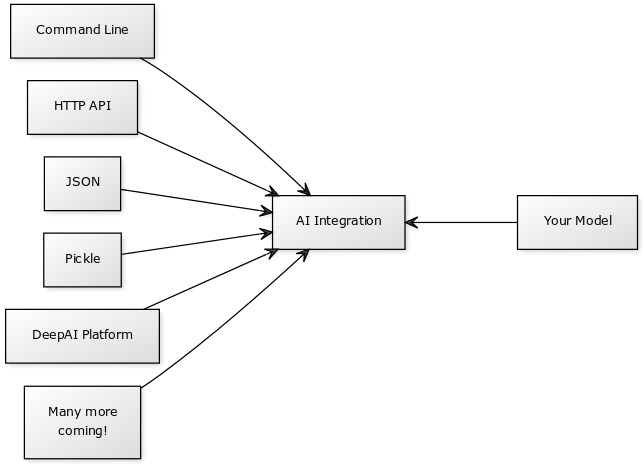
Built-In Integration Modes
There are several built-in modes for testing:
- Command Line using argparse (command_line)
- HTTP Web UI / multipart POST API using Flask (http)
- Pipe inputs dict as JSON (test_inputs_dict_json)
- Pipe inputs dict as pickle (test_inputs_pickled_dict)
- Pipe single image for models that take a single input named image (test_single_image)
- Test single image models with a built-in solid gray image (test_model_integration)
Example Models
Entrypoint Shims
Your docker entrypoint should be a simple python file (so small we call it a shim)
- imports start_loop from this library
- passes your inference function to it
- passes your inputs schema to it
The library handles everything else.
Example Shim
If your inference function matches the specification, this would be the only code you have to write.
Assume that you put your model in a file called pretend_model.
from ai_integration.public_interface import start_loop

from pretend_model import initialize_model, infer

initialize_model()

start_loop(inference_function=infer, inputs_schema={
    "image": {
        "type": "image"
    }
} )
Finished Model Container Requirements:
-
Working directory has your entrypoint shim in it. Set with WORKDIR
-
You install this library with pip (or pip3)
-
CMD is used in the your model dockerfile to specify the entrypoint as your shim.
-
No command line arguments will be passed to your entrypoint. (Unless using the command line interface mode)
-
To test your finished container's integration, run:
- nvidia-docker run --rm -it -e MODE=test_model_integration YOUR_DOCKER_IMAGE_NAME
- use docker instead of nvidia-docker if you aren't using NVIDIA...
- You should see a bunch of happy messages. Any sad messages or exceptions indicate an error.
- It will try inference a few times. If you don't see this happening, something is not integrated right.
Inference Function Specification
inference_function is a function that takes a single argument:
- inputs: dict()
- keys are input names (typically image, or style, content)
- values are the data itself. Either byte array of JPEG data (for images) or text string.
- any model options are also passed here and may be strings or numbers. best to accept either strings/numbers in the model.
inference_function should return a dict():
{
    'content-type': 'application/json', # or image/jpeg
    'data': "{JSON data or image data as byte buffer}",
    'success': True,
    'error': 'the error message (only if failed)'
}
Error Handling
If there's an error that you can catch:
- set content-type to text/plain
- set success to False
- set data to None
- set error to the best description of the error (perhaps the output of traceback.format_exc())
inference_function should never intentionally throw exceptions.
- If an error occurs, set success to false and set the error field.
- If your inference function throws an Exception, the library will assume it is a bad issue and restart the script, so that the framework, CUDA, and everything else can reinitialize.
Inputs Schema
An inputs schema is a simple python dict {} that documents the inputs required by your inference function.
Not every integration mode looks at the inputs schema - think of it as a hint for telling the mode what data it needs to provide your function.
All mentioned inputs are assumed required by default.
The keys are names, the values specify properties of the input.
Schema Data Types
- image
- text
- Suggest other types to add to the specification!
Schema Examples
Single Image
By convention, name your input "image" if you accept a single image input
{
    "image": {
        "type": "image"
    }
}
Multi-Image
For example, imagine a style transfer model that needs two input images.
{
    "style": {
        "type": "image"
    },
    "content": {
        "type": "image"
    },
}
Text
{
    "sentence": {
        "type": "text"
    }
}
Creating Integration Modes
A mode is a function that lives in a file in the modes folder of this library.
To create a new mode:
-
Add a python file in this folder
-
Add a python function to your file that takes two args:
def http(inference_function=None, inputs_schema=None):
-
Attach a hint to your function
-
At the end of the file, declare the modes from your file (each python file could export multiple modes), for example:
MODULE_MODES = {
    'http': http
}
Your mode will be called with the inference function and inference schema, the rest is up to you!
The sky is the limit, you can integrate with pretty much anything.
See existing modes for examples.
Release history Release notifications | RSS feed


Download files
Download the file for your platform. If you're not sure which to choose, learn more about installing packages.
Source Distribution
Built Distribution
Filter files by name, interpreter, ABI, and platform.
If you're not sure about the file name format, learn more about wheel file names.
Copy a direct link to the current filters
File details
Details for the file ai_integration-1.0.2.tar.gz.
File metadata
- Download URL: ai_integration-1.0.2.tar.gz
- Upload date:
- Size: 7.7 kB
- Tags: Source
- Uploaded using Trusted Publishing? No
- Uploaded via: twine/1.13.0 pkginfo/1.5.0.1 requests/2.21.0 setuptools/40.4.3 requests-toolbelt/0.9.1 tqdm/4.31.1 CPython/2.7.15
File hashes
| Algorithm | Hash digest | |
|---|---|---|
| SHA256 |
777ec05ef9e14e375fa57b8919f1278978d27a43edd82c8eb7a8d3f30ed430b9
|
|
| MD5 |
e7e6ef5b45f9a1a5fff379ed585d063a
|
|
| BLAKE2b-256 |
f0820da6fe03417b95c5cf1cad442e080af595d1607ec2fa7bfba9cd04386f06
|
File details
Details for the file ai_integration-1.0.2-py2-none-any.whl.
File metadata
- Download URL: ai_integration-1.0.2-py2-none-any.whl
- Upload date:
- Size: 13.7 kB
- Tags: Python 2
- Uploaded using Trusted Publishing? No
- Uploaded via: twine/1.13.0 pkginfo/1.5.0.1 requests/2.21.0 setuptools/40.4.3 requests-toolbelt/0.9.1 tqdm/4.31.1 CPython/2.7.15
File hashes
| Algorithm | Hash digest | |
|---|---|---|
| SHA256 |
d1ff5d0fd5959b358c887d10514ecce1994a0d90f1f6bc63ca604e901c9bb4f1
|
|
| MD5 |
218a95f178390a0a9e38c3ada924aba0
|
|
| BLAKE2b-256 |
32f14c9830be6cde5a80a471b42ae0bf6fb5ad7108321920c70f6b9f9cb86dc9
|






