
AI Launcher
Universal AI CLI launcher with local context management. Launch any AI coding assistant from a single entry point with persistent context across sessions.






Local-First Design - All context and data stays on your machine. No cloud dependencies.
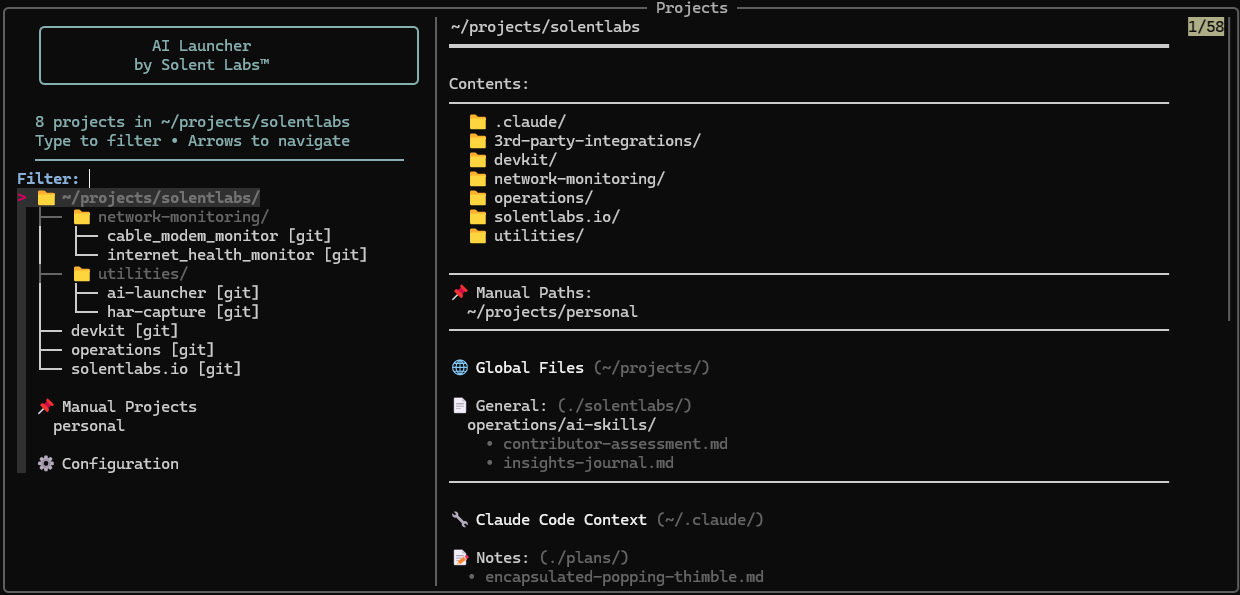
Interactive project selector with tree view and context preview
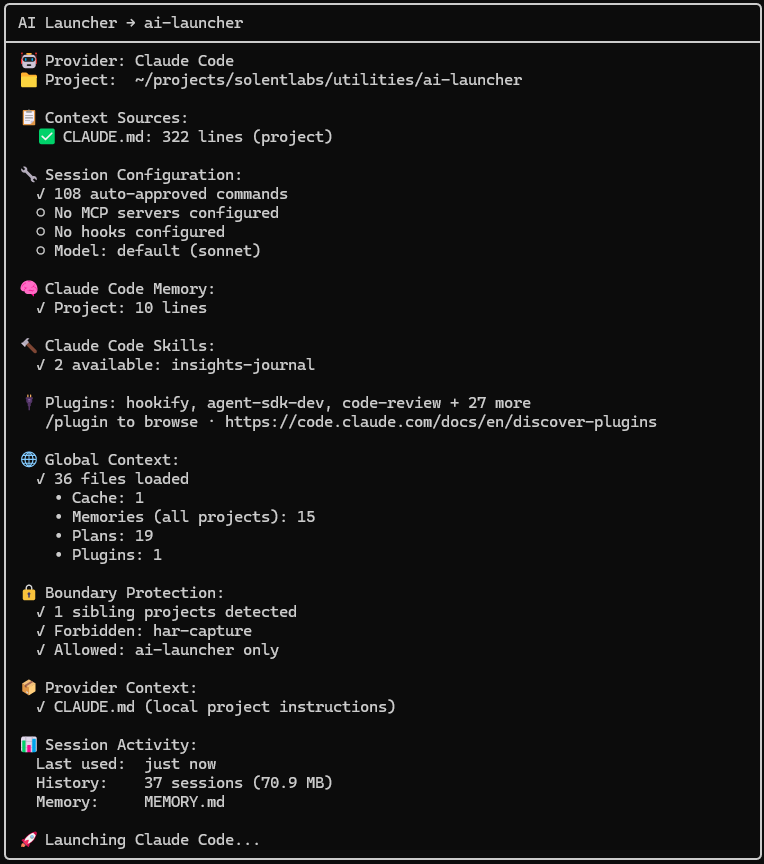
Startup transparency report showing context, plugins, and session details
What Is This?
A terminal-first launcher that:
- 🎯 Single Entry Point - One command to access all your AI coding tools
- 🧠 Context Management - Maintains persistent context across sessions
- 🔒 Local-Only - Everything stays on your machine
- 🔍 Project Switching - Fuzzy search across all your projects
- 🤖 Multi-Tool Support - Works with Claude Code, Gemini CLI, and more
- 👁️ Context Transparency - See exactly what files AI tools access
- 🖥️ Cross-Platform - Native support for Linux, macOS, WSL, and Windows
Install
Linux / macOS / WSL
# Install ai-launcher (fzf auto-downloads if missing)
pipx install ai-launcher
Windows (PowerShell)
# Install ai-launcher (fzf auto-downloads if missing)
pipx install ai-launcher

# Or with pip (use py -m to avoid launcher issues)
py -m pip install ai-launcher
From source
git clone https://github.com/solentlabs/ai-launcher.git
cd ai-launcher
pip install -e .
Use
Linux / macOS / WSL
ai-launcher claude ~/projects
Windows (PowerShell)
ai-launcher claude C:\Users\you\projects

# If ai-launcher is not in PATH
py -m ai_launcher claude C:\Users\you\projects
See what's available:
ai-launcher claude --discover ~/projects
ai-launcher claude --context
Select a project, and your AI tool opens with full context.
Features
Project Management
- 🔍 Fuzzy search - Type to filter projects instantly
- 📁 Tree navigation - See your project structure at a glance
- 📋 Preview pane - Git status, context files, directory contents
- ⚡ Last opened - Cursor starts on your most recent project
- ➕ Manual projects - Add non-git directories
- 🔗 Symlink support - Works with linked directories
Multi-Provider Support
- 🤖 Provider abstraction - Switch between Claude Code, Gemini, and more
- 🔧 Per-project configuration - Different AI tools for different projects
- 📊 Discovery mode - See what providers are installed
- 👁️ Context visualization - View what files AI tools access
- 🧠 Context awareness - Detects CLAUDE.md, GEMINI.md, and other context files
Project Scope
- 🔒 One session, one project - Claude Code is told which project it was launched in and flags a request meant for another project before starting
- ✋ Asks before cross-project writes - A write into another project under your scan folder
stops for your approval, even with broad allow rules like
Bash(*) - 📖 Reads stay free - Looking at other projects never prompts
- 📓 Shared folders -
--allow-writes ~/projects/journallets every session write to a folder they all share without asking (Claude Code and Gemini)
See Project Scope.
Terminal Window Title
- 📺 Auto title setting - Terminal shows "project → provider" for easy window identification
- 🎨 Customizable format - Configure your preferred title style
- 🪟 Multi-window workflow - Instantly identify which terminal has which project
- 🖥️ Broad compatibility - Works with xterm, iTerm2, GNOME Terminal, Windows Terminal, tmux, and more
Requirements
- Python 3.8+
- fzf (auto-downloaded if missing)
- An AI CLI tool (Claude Code, Gemini CLI, Cursor, Aider, or GitHub Copilot CLI)
Providers
Each AI tool is a subcommand:
ai-launcher claude ~/projects     # Anthropic's Claude Code
ai-launcher gemini ~/projects     # Google's Gemini CLI
ai-launcher cursor ~/projects     # Cursor IDE
ai-launcher aider ~/projects      # Aider pair programmer
ai-launcher copilot ~/projects    # GitHub Copilot CLI
See Configuration for all CLI options.
Why Local-Only?
Your code and context should stay on your machine. AI Launcher:
- Never sends data to external services
- Works offline
- Respects your privacy
- Gives you full control
Documentation
License
MIT - see LICENSE
Made by Solent Labs™ - Building tools for developers who value privacy and local-first software.
1 maintainer

Metadata
1 maintainer
Release files for ai-launcher 0.6.0
For a detailed explanation of source distributions (sdists) and built distributions (wheels), please see the package formats documentation.
Source distribution (sdist)
| File | Size | Uploaded | |
|---|---|---|---|
| ai_launcher-0.6.0.tar.gz | 163.1 kB | Details |
Built distribution (wheel)
| File | Interpreter | ABI | Platform | Reset |
|---|---|---|---|---|
| ai_launcher-0.6.0-py3-none-any.whl | Python 3 | none | any | Details |
Total release size: 268.8 kB
Release files / ai_launcher-0.6.0.tar.gz
| Download URL | ai_launcher-0.6.0.tar.gz |
|---|---|
| Size | 163.1 kB |
| Tags | Source |
|
SHA-256 checksum How to use checksums |
09657476becfaac1f833470ff481076b62830c75f9870b031a44047788f53a41
|
|
BLAKE2b-256 checksum How to use checksums |
fd95ff2bc914f9c07b43a5d908aad03e0ae026637d1c321293b8fbf82cb5a8b0
|
| Upload date | |
|
Uploaded using Trusted Publishing? What is trusted publishing? |
Yes |
| Uploaded via |
twine/7.0.0 CPython/3.13.14
|
Provenance
Provenance describes where a file came from. On PyPI, provenance is shared via attestations, which provide a verifiable record of the build or publishing details. View details, limitations and caveats.


PyPI Publish Attestation
PyPI verified that this artifact, at this checksum, originated from the publisher listed below.
Signed by GitHub Actions, verified by PyPI on Sep 29, 2026.
Transparency logRelease files / ai_launcher-0.6.0-py3-none-any.whl
| Download URL | ai_launcher-0.6.0-py3-none-any.whl |
|---|---|
| Size | 105.7 kB |
| Tags | Python 3 |
|
SHA-256 checksum How to use checksums |
4d4abf9a340e57ecf916b06be28ee2cd54d8432f5921e1077f31738161348b4d
|
|
BLAKE2b-256 checksum How to use checksums |
e1da9009f04ff6d8c5583b50078821cdd51184dd9dbacac3e1c1393be24bae2b
|
| Upload date | |
|
Uploaded using Trusted Publishing? What is trusted publishing? |
Yes |
| Uploaded via |
twine/7.0.0 CPython/3.13.14
|
Provenance
Provenance describes where a file came from. On PyPI, provenance is shared via attestations, which provide a verifiable record of the build or publishing details. View details, limitations and caveats.
PyPI Publish Attestation
PyPI verified that this artifact, at this checksum, originated from the publisher listed below.
Signed by GitHub Actions, verified by PyPI on Sep 29, 2026.
Transparency log













