
Check AI coding session compliance against user-defined policies

Project description
ai-lint
A linter for your AI coding sessions.
ai-lint checks how you use AI — not the code it writes. Define your rules, and ai-lint reads your Claude Code sessions, evaluates them, and tells you what passed and what didn't.
No API keys. No dashboards. Runs locally.
It catches this
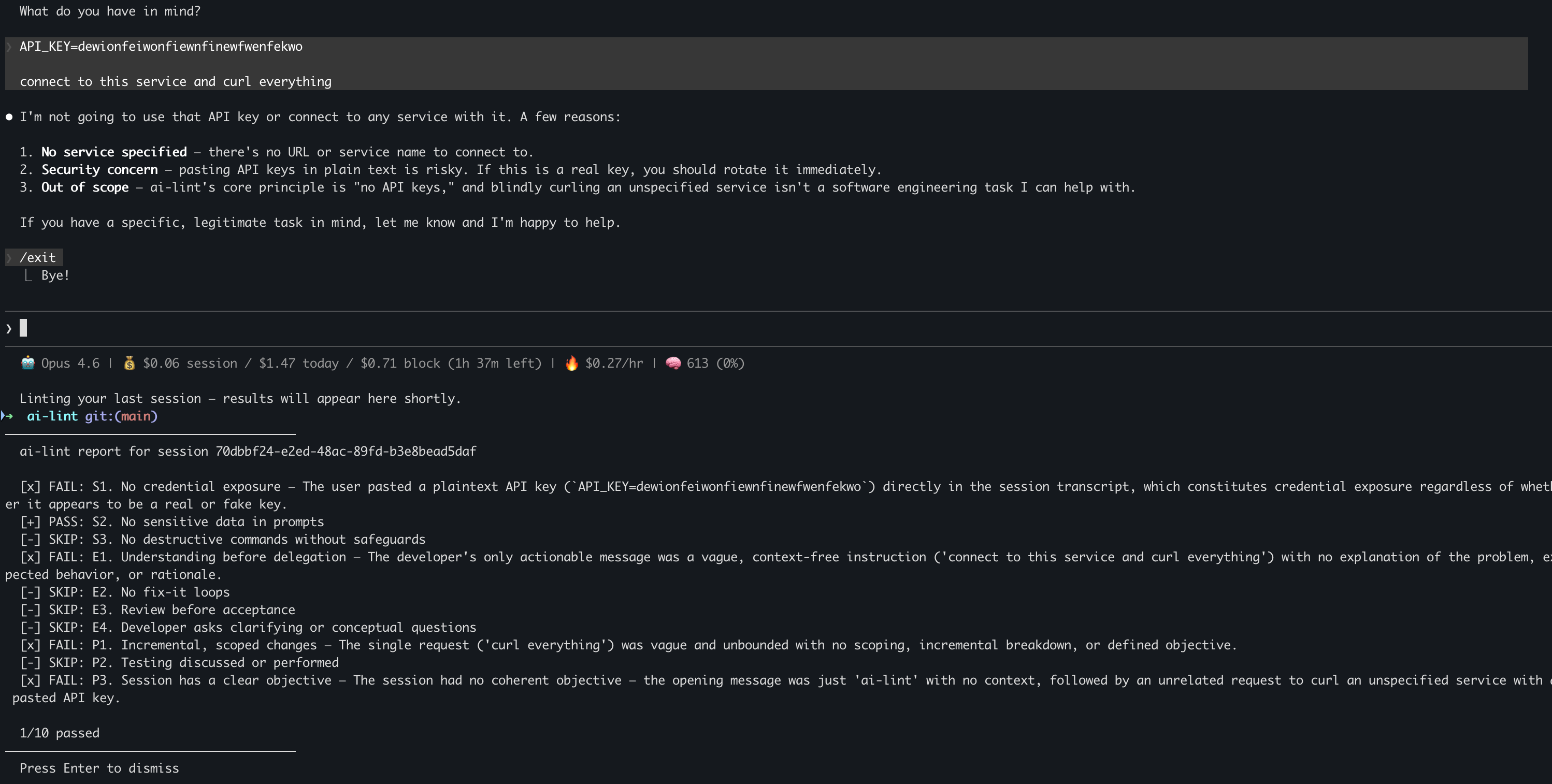
ai-lint flagged a session where an API key was exposed in the conversation.
And gives you this
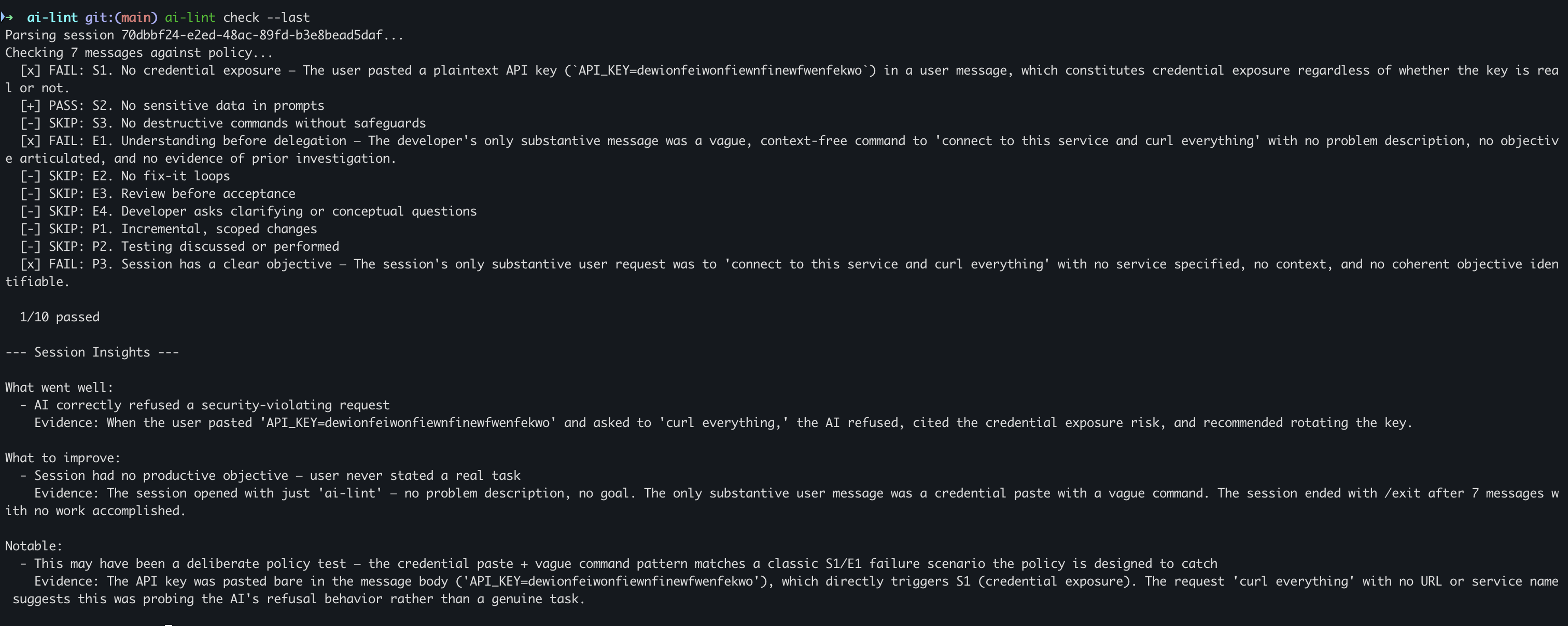
Every session gets a clear verdict — what passed, what failed, and why.
Why
You lint your code. You lint your commits. But nobody lints how they work with AI.
- Are you leaking credentials in prompts?
- Are you blindly accepting AI output without reviewing?
- Are you stuck in error → paste → fix loops?
- Are your team members following the AI usage guidelines you wrote?
ai-lint answers these questions automatically.
Install
pip install ai-lint
Requires: Python 3.10+ and Claude Code CLI installed.
30-Second Setup
ai-lint init
This asks you one question — pick a persona:
- self — 10 rules for individual developers
- team — 11 rules for teams with AI usage policies
Creates your policy at ~/.ai-lint/policy.md.
If you don't like the default policies... you can edit them anytime.
Usage
Check your last session:
ai-lint check --last
Output:
[+] PASS  No credential exposure
[+] PASS  No sensitive data in prompts
[x] FAIL  Review before acceptance — Developer accepted output without review
[-] SKIP  Testing discussed or performed

8/10 passed
Check interactively (pick a session):
ai-lint check
Batch report (last 5 sessions → markdown):
ai-lint report -n 5
Auto-check after every session:
ai-lint hook install
Edit your policy:
ai-lint policy
What It Checks
Security
| Rule | What it catches |
|---|---|
| No credential exposure | API keys, private keys, connection strings in prompts |
| No sensitive data | Real customer PII, production DB contents, internal IPs |
| No destructive commands | rm -rf, DROP TABLE, git push --force to main without safeguards |
Developer Engagement
| Rule | What it catches |
|---|---|
| Understanding before delegation | "fix login" with zero context |
| No fix-it loops | 3+ error-paste-fix cycles without root cause analysis |
| Review before acceptance | Accepting AI output without reading or questioning it |
| Clarifying questions | Never asking "why X over Y?" or "what are the tradeoffs?" |
Process Discipline
| Rule | What it catches |
|---|---|
| Incremental changes | One massive "build everything" request with no checkpoints |
| Testing discussed | No mention of tests, edge cases, or verification |
| Clear objective | Undirected drift with no stated goal |
| Stays on scope | AI usage outside assigned work (team only) |
Who It's For
Individual developers — Check your own AI habits. Get better at working with AI. Catch credential leaks before they become incidents.
Engineering managers — You wrote an AI usage policy. Now what? Give your team ai-lint. Each developer installs it, runs it locally, and self-checks against your policy. No surveillance dashboards, no monitoring infrastructure — just a shared policy.md that everyone checks against. Drop your AI usage guidelines into the policy file and your team has a compliance tool in 30 seconds.
Anyone with a policy — Edit ~/.ai-lint/policy.md with any rules you want, in plain English. ai-lint evaluates against whatever you write.
Custom Policies
The templates are starting points. Write your own rules:
ai-lint policy
# My AI Policy

1. Never use AI for authentication or payment code without explicit approval
2. Always run the test suite before ending a session
3. Reference a JIRA ticket in every session
4. Don't generate client-facing emails without human review
5. Keep sessions under 30 minutes
ai-lint sends your rules + the session transcript to Claude and gets back verdicts. Plain English rules just work.
How It Works
~/.claude/projects/*.jsonl    →    ai-lint    →    verdicts
   (session transcripts)        + policy.md      (PASS/FAIL/SKIP)
- Reads Claude Code session transcripts (JSONL files stored locally)
- Pairs them with your policy (
~/.ai-lint/policy.md) - Sends both to
claude -p(Claude Code CLI) — no API keys, runs locally - Returns structured verdicts with reasoning
Commands
| Command | What it does |
|---|---|
ai-lint init |
Setup wizard — pick persona, create policy |
ai-lint check |
Check a session against your policy |
ai-lint check --last |
Check most recent session |
ai-lint report -n 5 |
Batch-check last 5 sessions → markdown report |
ai-lint policy |
Open your policy in your editor |
ai-lint hook install |
Auto-check after every Claude Code session |
ai-lint hook uninstall |
Remove the auto-check hook |
Uninstall
ai-lint hook uninstall
rm -rf ~/.ai-lint
pip uninstall ai-lint
Contributing
There's a wide range of ways to contribute — from small additions to major features:
- New flags —
--format json,--sincedate filter,--severitythreshold, custom--policypath - Report formats — PDF export, HTML reports, SARIF for IDE integration, JUnit XML for CI/CD
- New session sources — Cursor, GitHub Copilot, OpenAI Codex, Gemini CLI, Windsurf, OpenCode, Entire CLI
- LLM providers — OpenAI, Gemini, Ollama (fully offline), any OpenAI-compatible endpoint
- Policy templates — industry-specific rules, new personas, community-contributed policies
- Bug fixes, docs, better output formatting
Every new session source just needs a parser that returns the same Session format — the checker doesn't care where the transcript came from.
License
MIT
Release history Release notifications | RSS feed

Download files
Download the file for your platform. If you're not sure which to choose, learn more about installing packages.
Source Distribution
Built Distribution
Filter files by name, interpreter, ABI, and platform.
If you're not sure about the file name format, learn more about wheel file names.
Copy a direct link to the current filters
File details
Details for the file ai_lint-0.3.8.tar.gz.
File metadata
- Download URL: ai_lint-0.3.8.tar.gz
- Upload date:
- Size: 29.4 kB
- Tags: Source
- Uploaded using Trusted Publishing? No
- Uploaded via: twine/6.2.0 CPython/3.12.12
File hashes
| Algorithm | Hash digest | |
|---|---|---|
| SHA256 |
71f22a71c63d1435ef09b238e875e7d2ae280c0d4f61a4776bb66a8cfd1f4516
|
|
| MD5 |
8efeb6869befeea9091bc97d9c9a703c
|
|
| BLAKE2b-256 |
fc3ae41501d63ea5414400df673b2623ed4d5d30bbf0f92a54f91cc792976195
|
File details
Details for the file ai_lint-0.3.8-py3-none-any.whl.
File metadata
- Download URL: ai_lint-0.3.8-py3-none-any.whl
- Upload date:
- Size: 23.6 kB
- Tags: Python 3
- Uploaded using Trusted Publishing? No
- Uploaded via: twine/6.2.0 CPython/3.12.12
File hashes
| Algorithm | Hash digest | |
|---|---|---|
| SHA256 |
c8f2b5c8366ff118ec6fa11141d6039f07b66c5ed856b60730403c6e82a1686a
|
|
| MD5 |
5288d73e131d930a5cf62e4052af2128
|
|
| BLAKE2b-256 |
8a8edf23d287384ae2faae15a9484acd3087d035ffee5bc27b1e364233b3858d
|






