
This project has been archived by its maintainers, and is no longer receiving any updates.

AI Product Photo Sorter
Turn raw product shoots into a reviewed, SKU-aware catalog workflow.
Desktop GUI + CLI · Cloud & local vision · Review + SKU matching · Shopify drafts · MCP automation · Watched folders









Features · Installation · Automation & MCP · Benchmark · Roadmap · Limitations
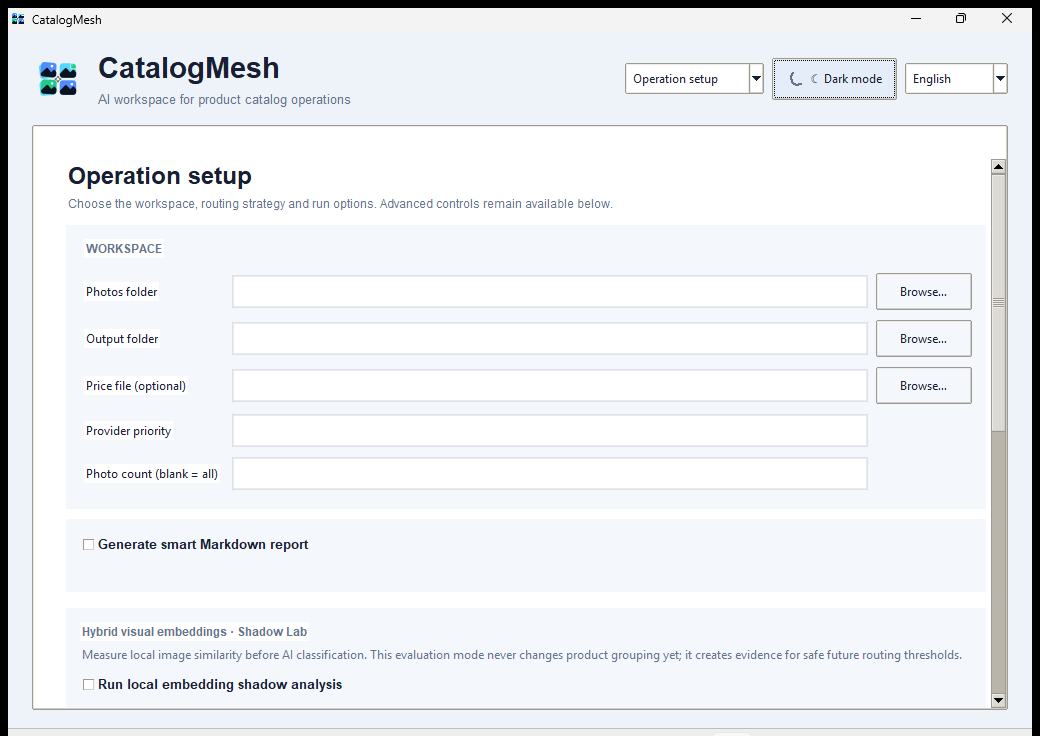
AI Product Photo Sorter starts with the messy part of commerce photography: a chronological folder containing front, back, side, packaging, and detail photos. It groups the shoot into tentative products, lets a human review the groups, proposes catalog/SKU matches, and can prepare safe Shopify/PIM outputs without modifying the original photos.
The stable v3.2.0 release adds local-first catalog automation, MCP tooling, a
persistent watched-folder daemon, missing-asset audits, and dedicated automation
commands while preserving mandatory human confirmation before catalog identity
or external publication is accepted.
Quick demo
Features
| Capability | What it provides |
|---|---|
| Product-shoot grouping | Groups chronological multi-angle product photos while preserving original files. |
| Multi-provider vision | Gemini, OpenAI, and Anthropic pools with ordered fallback and key rotation. |
| Local-first vision | First-class Ollama provider, local-only operation, and local-first/cloud-fallback modes. |
| Hybrid evidence | Optional local image embeddings, OCR, barcode evidence, threshold calibration, and routing simulation. |
| Review Center | Non-destructive merge/split/move, metadata corrections, approval state, and append-only audit history. |
| SKU/catalog matching | Ranked deterministic candidates using approved groups and optional local evidence; human confirmation is mandatory. |
| Catalog exports | Offline Shopify draft and neutral PIM exports from fully confirmed matches only. |
| Guarded Shopify workflow | Query-only preview, explicit draft staging, SKU collision protection, idempotency state, separately confirmed publication, and rollback to DRAFT. |
| Missing Asset Audit | Finds SKUs with no image reference and conservatively checks for same-stem local image candidates. |
| Watched folders | Persistent polling daemon with crash-safe checkpoints and deterministic added/changed/removed events. |
| Automation CLI | Scriptable scan → audit → candidate proposal → confirmed Shopify draft workflow. |
| MCP server | Optional stdio server for compatible AI/automation hosts; no publish tool is exposed. |
| Benchmark Center | Real-pipeline timing, throughput, provider/model metrics, cost estimates, hardware evidence, JSON history, and optional ground truth. |
| Desktop workflow | Multilingual Tkinter GUI with light/dark themes, progress/ETA, Environment Center, Report Center, and benchmark workspace. |
| Cross-platform delivery | Windows x64, Linux x64/DEB, native macOS arm64/x64, PyPI wheel, and source distribution. |
How it works
flowchart LR
    A[Raw shoot folder] --> B[Vision / local evidence]
    B --> C[Tentative product groups]
    C --> D[Human Review Center]
    D --> E[SKU candidate proposals]
    E --> F[Human SKU confirmation]
    F --> G[Shopify draft / PIM export]
    G --> H[Separate publish approval]
    A -. watched folder .-> I[Automation events]
    I -. MCP / CLI .-> B
The core sorter analyzes overlapping batches and commits successful progress to SQLite immediately, so interrupted operations can resume instead of restarting. Review and catalog stages are intentionally separate: an AI grouping result is not treated as verified catalog identity.
Installation
PyPI
Requires Python 3.10 or newer.
python -m pip install --upgrade ai-product-photo-sorter
Available commands:
product-sorter             normal CLI
product-sorter-gui         desktop GUI
product-sorter-setup       guided provider/configuration setup
product-sorter-automation  safe catalog automation CLI
product-sorter-watch       watched-folder daemon
Optional MCP support
MCP dependencies stay opt-in so normal desktop/CLI installs remain lightweight:
python -m pip install --upgrade "ai-product-photo-sorter[mcp]"
product-sorter-mcp
See MCP_AUTOMATION.md for the tool contract and host configuration model.
Ready-to-run desktop builds
| Platform | Download | Start |
|---|---|---|
| Windows x64 | ProductSorterPro-windows-x64.zip |
Extract and run ProductSorterPro.exe. |
| Linux x64 (Debian/Ubuntu) | product-sorter-pro_3.2.0_all.deb |
sudo apt install ./product-sorter-pro_3.2.0_all.deb |
| Linux x64 (standalone) | ProductSorterPro-linux-x64.tar.gz |
Extract and run ProductSorterPro. |
| macOS Apple Silicon | ProductSorterPro-macos-arm64.zip |
Extract and open ProductSorterPro.app. |
| macOS Intel | ProductSorterPro-macos-x64.zip |
Extract and open ProductSorterPro.app. |
Release assets also contain the Python wheel, source archive, and
SHA256SUMS.txt integrity manifest.
Desktop binaries are not yet code-signed or Apple-notarized. Windows SmartScreen or macOS Gatekeeper may show a first-launch warning.
Build from source
git clone https://github.com/mhmdwaelanwr/ai-product-photo-sorter.git
cd ai-product-photo-sorter
python -m venv .venv
# activate the environment, then:
python -m pip install -e .
product-sorter-setup
product-sorter-gui
For local embeddings/evidence or MCP, install the matching optional extras from
pyproject.toml.
Catalog automation and MCP
The automation surface deliberately stops before external publication.
product-sorter-automation scan ./shoot
product-sorter-automation missing-assets ./catalog.xlsx
product-sorter-automation missing-local ./catalog.xlsx ./shoot
product-sorter-automation propose-matches ./approved_groups.csv ./catalog.xlsx --top-k 5
product-sorter-automation prepare-shopify-draft ./sku_matching/sku_match_manifest.json
product-sorter-automation watch ./shoot --state ./.product-sorter-watch.json --interval 5
A compatible MCP host can orchestrate the same safe flow:
scan shoot
  → show missing SKUs
  → propose matches
  → human review / SKU confirmation
  → prepare Shopify draft
MCP tools in v3.2.0:
scan_shootshow_missing_skusshow_missing_local_skuspropose_matchesprepare_shopify_draft
There is deliberately no publish tool in the MCP or automation CLI
surface. prepare_shopify_draft delegates to the existing fail-closed catalog
exporter, so pending SKU matches block draft preparation.
The watched-folder daemon stores a JSON checkpoint using atomic, per-write temp
files and emits deterministic added, changed, and removed events. It never
moves or renames source images.
Local-first catalog pipeline
The current strategic pipeline is:
Local/Ollama vision
→ optional local embeddings/OCR/barcode evidence
→ product grouping
→ Review Center
→ SKU candidate ranking
→ human confirmation
→ Shopify/PIM draft
→ separately confirmed publication
Local embedding routing remains conservative: Shadow Mode, calibration, and the Hybrid Routing Lab provide measurable evidence before local decisions are ever promoted into production routing. See:
- LOCAL_AI.md
- Hybrid embeddings
- Threshold calibration
- Hybrid Routing Lab
- Local evidence
- Review Center
- SKU matching
- Catalog exports
- Shopify publishing
Safety by design
- Originals are never deleted, moved, renamed, or overwritten by sorting/review/automation stages.
- SKU proposals are suggestions until a human explicitly confirms a catalog row.
- Offline Shopify draft preparation performs zero network calls.
- External Shopify publication remains separately confirmed and audited.
- Exact-SKU collision protection and local idempotency state guard remote staging.
- API keys are masked in the GUI and can use the operating-system keyring.
.env, credentials, runtime databases, output folders, and logs are excluded from Git.- Product images are sent only to the selected provider; local Ollama mode can operate without public internet.
Benchmark Center
Benchmark mode measures the same production sorting path in a fresh isolated run:
product-sorter --source ./Products --output ./Sorted_Products --limit 100 --benchmark
A run writes human- and machine-readable evidence under
Sorted_Products/benchmarks/, including BENCHMARK_REPORT.md, benchmark.json,
status/usage data, and reproducibility metadata. Add --ground-truth expected.csv
to include measured classification accuracy.
The project intentionally does not publish guessed performance numbers. See BENCHMARK.md for methodology and comparison rules.
Desktop GUI
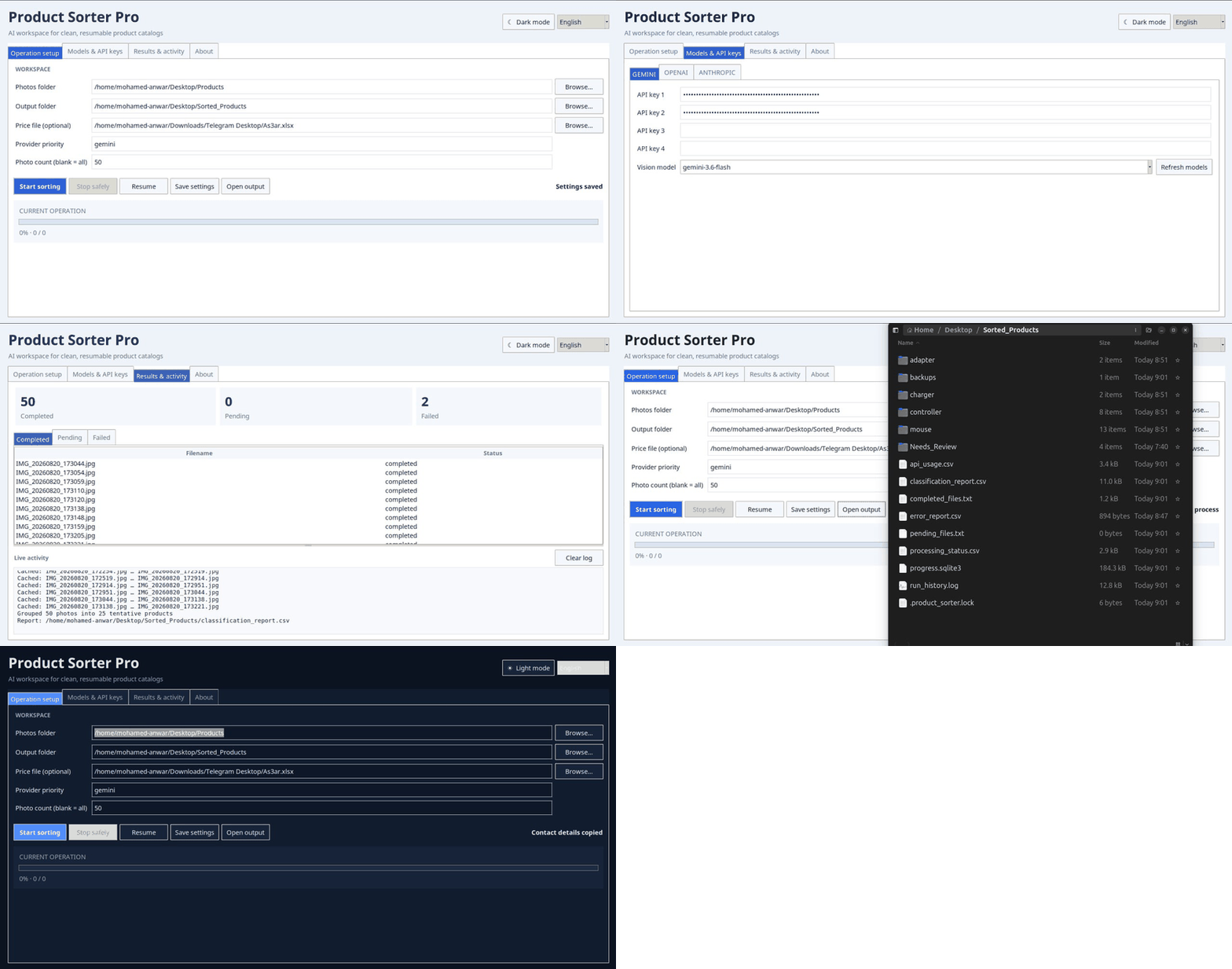
The packaged Windows interface is continuously smoke-tested from the real PyInstaller executable.
| Workspace | Light | Dark |
|---|---|---|
| Operation setup |  |
 |
| Models & API keys |  |
 |
| Results & activity |  |
 |
| Benchmark |  |
 |
| Environment |  |
 |
| Reports |  |
 |
| About |  |
 |
See GUI_AUTOMATION.md for the packaged-GUI evidence contract.
Provider and API configuration
Use the GUI Environment/Models workspaces or product-sorter-setup. Cloud keys
can be configured for Gemini, OpenAI, and Anthropic, with up to four keys per
provider and safe quota/rate-limit rotation. Ollama does not require a cloud API
key.
A minimal cloud configuration looks like:
AI_PROVIDERS=gemini,openai,anthropic
GEMINI_API_KEY_1=your_key
OPENAI_API_KEY_1=your_key
ANTHROPIC_API_KEY_1=your_key
Live model discovery validates the models visible across a configured key pool before processing starts.
Outputs
Normal sorting keeps resumable operation state and review evidence alongside the organized output. Catalog stages create their own review/matching/export manifests rather than silently mutating the raw shoot.
Typical operation evidence includes:
Sorted_Products/
├── <category>/<product>/
├── Needs_Review/
├── classification_report.csv
├── processing_status.csv
├── error_report.csv
├── api_usage.csv
├── run_history.log
└── progress.sqlite3
Additional Review Center, SKU matching, Shopify/PIM export, benchmark, and audit
artifacts are documented in the corresponding files under docs/.
Tests and release verification
python -m unittest discover -s tests -t . -v
python -m compileall -q src product_sorter.py product_sorter_gui.py set_data.py scripts
CI validates Linux, Windows, and macOS on supported Python versions, CodeQL, local-evidence smoke tests, synthetic benchmarks, Shopify publication safety, release packaging, artifact downloads, and the packaged Windows GUI.
Stable promotion builds Windows x64, Linux x64/DEB, macOS arm64, macOS x64, wheel, sdist, and SHA-256 checksums before GitHub Release publication. PyPI uses OIDC Trusted Publishing.
Architecture
The canonical runtime lives under src/ai_product_photo_sorter/. Important
public workflow modules include:
src/ai_product_photo_sorter/
├── core.py                 shared sorter facade
├── gui.py                  desktop facade
├── benchmark.py            benchmark instrumentation
├── local_ai.py             local/Ollama integration
├── hybrid_embeddings.py    local visual evidence
├── local_evidence.py       OCR/barcode evidence
├── review_center.py        non-destructive review state
├── sku_matching.py         candidate ranking + human confirmation
├── catalog_exports.py      offline Shopify/PIM exports
├── shopify_publishing.py   guarded remote Shopify workflow
├── ingestion.py            shoot snapshot primitives
├── missing_assets.py       missing-image audits
├── automation_cli.py       safe automation commands
├── watch_daemon.py         persistent watched folders
└── mcp_server.py           optional MCP stdio surface
The automation layer composes these existing modules instead of duplicating the catalog logic. Human confirmation and remote-write boundaries remain authoritative regardless of whether the caller is the GUI, CLI, or an MCP host.
Documentation
- Roadmap
- Known limitations
- Production checklist
- MCP / automation
- Catalog automation contract
- Benchmark methodology
- Security policy
- Contributing
Developer
Mohamed Anwar
Developer & Maintainer of AI Product Photo Sorter



License
Released under the MIT License. See LICENSE for details.
1 maintainer

Metadata
1 maintainer
Release files for ai-product-photo-sorter 3.2.0
For a detailed explanation of source distributions (sdists) and built distributions (wheels), please see the package formats documentation.
Source distribution (sdist)
| File | Size | Uploaded | |
|---|---|---|---|
| ai_product_photo_sorter-3.2.0.tar.gz | 257.4 kB | Details |
Built distribution (wheel)
| File | Interpreter | ABI | Platform | Reset |
|---|---|---|---|---|
| ai_product_photo_sorter-3.2.0-py3-none-any.whl | Python 3 | none | any | Details |
Total release size: 499.1 kB
Release files / ai_product_photo_sorter-3.2.0.tar.gz
| Download URL | ai_product_photo_sorter-3.2.0.tar.gz |
|---|---|
| Size | 257.4 kB |
| Tags | Source |
|
SHA-256 checksum How to use checksums |
4422aebbf64b049e54c88b003ae2853b3eda16b415f24cb4839751cc9aa799fc
|
|
BLAKE2b-256 checksum How to use checksums |
209849a4a0924915db0f9cdbabae7bb4fd71fe733d3b99560d7fe5356a46024b
|
| Upload date | |
|
Uploaded using Trusted Publishing? What is trusted publishing? |
Yes |
| Uploaded via |
twine/7.0.0 CPython/3.13.14
|
Provenance
Provenance describes where a file came from. On PyPI, provenance is shared via attestations, which provide a verifiable record of the build or publishing details. View details, limitations and caveats.


PyPI Publish Attestation
PyPI verified that this artifact, at this checksum, originated from the publisher listed below.
Signed by GitHub Actions, verified by PyPI on Sep 3, 2026.
Transparency logRelease files / ai_product_photo_sorter-3.2.0-py3-none-any.whl
| Download URL | ai_product_photo_sorter-3.2.0-py3-none-any.whl |
|---|---|
| Size | 241.7 kB |
| Tags | Python 3 |
|
SHA-256 checksum How to use checksums |
fd992cfd1b31d10119c6440f2f9c77bd12091edf3ca6adb9532e5cc9b909ed37
|
|
BLAKE2b-256 checksum How to use checksums |
4310171509ddc59c8a2f792f907847f90417c0e99f66529f640835ee7d4c64ee
|
| Upload date | |
|
Uploaded using Trusted Publishing? What is trusted publishing? |
Yes |
| Uploaded via |
twine/7.0.0 CPython/3.13.14
|
Provenance
Provenance describes where a file came from. On PyPI, provenance is shared via attestations, which provide a verifiable record of the build or publishing details. View details, limitations and caveats.
PyPI Publish Attestation
PyPI verified that this artifact, at this checksum, originated from the publisher listed below.
Signed by GitHub Actions, verified by PyPI on Sep 3, 2026.
Transparency log













