
AI Session Search (aise)
Ultra-fast Rust-based search of your local AI coding sessions, reindexing on the fly. Reads Claude Code, Claude Desktop, ChatGPT Codex, Cursor, Antigravity, Pi, Prime Agent, Google AI Studio, and Gemini CLI, on macOS, Linux, and Windows.




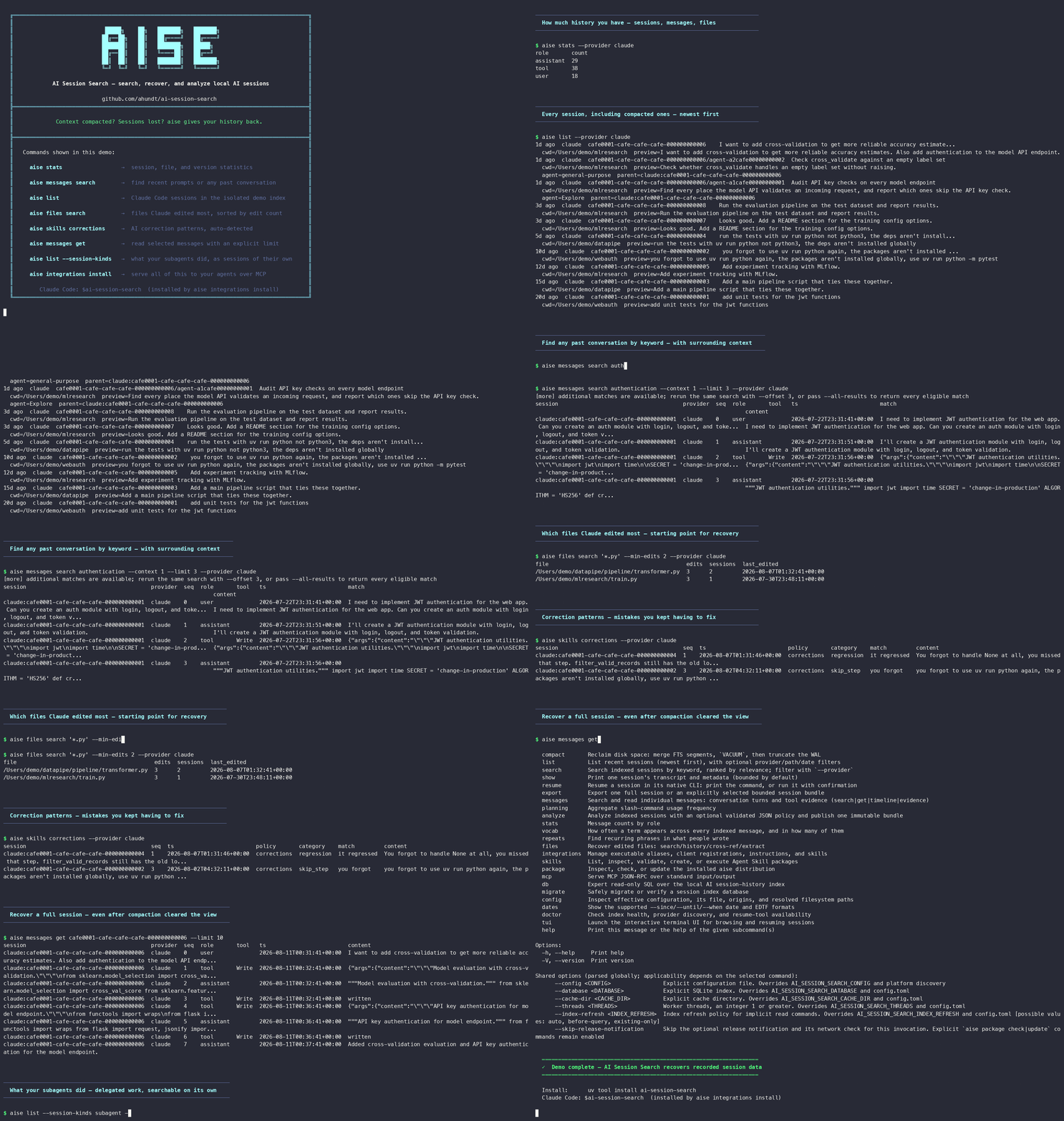
Search nine harnesses from one index
Useful AI coding history is already on disk. It is just hard to find, and in a range of totally different formats.
aise parses all nine formats into one index and searches it efficiently. Your fixes from last
month, the files an agent overwrote, and the record of why a run failed become instantly findable.
Query that index from the command line, a Rust crate, a Python package, or an MCP server your coding agent calls mid-conversation.
Install
Install the global aise command with uv (recommended):
uv tool install ai-session-search && aise integrations install
or with Rust's cargo:
cargo install ai-session-search --locked && aise integrations install
Both install the newest stable release. The second command is the one that touches your tools: it
registers the MCP server and writes guidance for each detected harness, and --dry-run previews
every write.
Common tasks
| Do this | Command |
|---|---|
| Find the session where something happened | aise search "auth refactor" |
| Search individual messages across every agent | aise messages search "permission denied" |
| Recover a file an agent wrote or edited | aise files extract src/app.py |
| See every version of a file, across sessions | aise files history src/app.py |
| Read a past session, then jump back into it | aise show SESSION_ID then aise resume SESSION_ID |
| Find why an agent stopped, looped, or was blocked | aise messages search "" --kinds harness-notice |
| See what a subagent was asked and what it found | aise list --session-kinds subagent |
| Find where you had to correct the agent | aise skills corrections |
| Recover context after a compaction | aise messages evidence SESSION_ID |
| Browse and fuzzy-search interactively | aise tui |
| Export a session to Markdown | aise export SESSION_ID --format markdown |
| Check index health and effective paths | aise doctor, aise config paths |
Stop-hook feedback, a PreToolUse block, a local-command caveat, a task notification come from the
harness, so ordinary results leave them out. They are usually why an agent stopped mid-task;
--kinds harness-notice searches them.
A subagent's work lives in its own session, so the parent transcript shows only that it ran.
--session-kinds subagent lists those sessions, and --parent-session narrows to one run's
children.
Quick start
# Optional: build the index now rather than on your first query
aise reindex

# What have I been working on?
aise list
aise search "database migration" --provider codex

# Find a specific moment, then read around it
aise messages search "permission denied" --role user
aise show SESSION_ID
aise resume SESSION_ID

# Get a file back, into a .recovered sibling that never overwrites what is there
aise files history src/app.py
aise files extract src/app.py --restore
aise COMMAND --help documents every parameter and default. Date bounds accept ISO, EDTF,
durations, and common natural-language forms; aise dates lists each accepted family with
examples.
MCP server
Ask Claude Code why last Tuesday's run stopped, or which version of a file it wrote before the refactor, and it queries this index and answers inline without you leaving the conversation. The server is a subcommand of the same executable, so there is nothing else to install.
aise integrations install    # register the server with every detected harness
aise integrations status
aise mcp serve               # direct stdio use by a client
The server exposes search_sessions, search_messages, list_sessions, get_session,
get_resume_command, get_index_status, run_skill_capability, and query_session_index for
read-only SQL.
What a harness receives depends on what it can read, in the format and location it expects.
--client limits the install to named harnesses, and no harness gets hooks.
| Harness | Receives |
|---|---|
| Claude Code, Claude Desktop | MCP config, CLAUDE.md guidance, skill |
| ChatGPT Codex desktop and CLI/IDE | MCP config, managed AGENTS.md block, skill |
| OpenCode | MCP config, managed AGENTS.md block |
| Gemini CLI, Antigravity App/IDE/CLI | MCP config, shared ~/.gemini/GEMINI.md block, skill |
| Pi, Prime Agent | Skill and native AGENTS.md only: Pi has no MCP client, and Prime's kernel currently takes remote HTTP MCP integrations |
| Cursor, Windsurf, VS Code, Zed, OpenClaw, legacy KiloCode | MCP config |
No MCP tool changes your sessions or configuration, and publishing a bundle stays a CLI and
library operation. A query does refresh the index, writing aise's own state;
--index-refresh existing-only opens SQLite read-only. Tool inputs are closed schemas, so a
misspelled field fails with its exact argument path.
A failed install rolls back what it had already written, and when it cannot finish the rollback
it keeps the receipt and prints the exact aise integrations recover command.
aise integrations status reads every target under the installer's own transaction lock, so it
never shows you a half-applied state.
Speed
Measured on macOS with Apple silicon against an index of roughly 2.5 million messages, best of
three warm runs. Each command also carried --index-refresh existing-only --format json, so
the numbers are query cost with no refresh in the path:
| Command | Time |
|---|---|
aise list --limit 20 |
48 ms |
aise files search "*.rs" --limit 50 |
121 ms |
aise messages search "ECONNRESET|socket hang" --query-mode regex --limit 50 |
0.3 s |
aise messages search "permission denied" --limit 50 |
1.4 s |
Startup accounts for 43 ms of that first row, so aise list spends nearly all its time
launching. Parsing, indexing, and querying are native code with no Python interpreter in the
path; cargo install puts that binary straight on your PATH, while the uv install reaches it
through a small Python console script.
Indexing is incremental. A refresh over this index walked 6,324 source files in 13 s and
reparsed only the 6 sessions whose bytes had changed, so steady-state cost follows new data.
Refresh runs on access by default, including when an MCP client asks a question, and
--index-refresh existing-only skips it when you want the query cost alone.
A scoped query costs less than these rows (filters and scopes), and your index is probably smaller than this one, so treat these timings as a ceiling.
Session sources
Everything is read from local files on your own machine. Cloud-only ChatGPT, Claude, and Antigravity conversations are never copied from a vendor account, and are not searchable here.
| Session source | Provider ID | Native resume |
|---|---|---|
| Claude Code CLI/Desktop | claude |
yes |
| Claude Desktop local agent | claude-desktop |
no; use show/export |
| ChatGPT Codex desktop and Codex CLI/IDE | codex |
yes |
| Cursor | cursor |
no; use show/export |
| Antigravity App/IDE/CLI | antigravity |
no; use show/export |
| Pi coding agent | pi |
yes |
| Prime Agent | prime-agent |
yes |
| Google AI Studio | aistudio |
no; use show/export |
| Gemini CLI | gemini-cli |
no; use show/export |
Prime Agent is built on Pi but keeps its own root and child-run transcripts under
~/.prime/agent, so --provider pi never returns Prime sessions and the two keep separate IDs
and resume commands. Codex desktop and Codex CLI/IDE share ~/.codex, so they index together.
The codex provider reads that local transcript format only. It does not parse Chat/Work
browser state or sync cloud history, which OpenAI documents as
separate histories in the merged desktop app.
These IDs are the TOML keys in provider configuration, and aise config paths prints each
source's enabled state and effective roots.
Filters and scopes
# Narrow a search to one tool, one project, and one week at once
aise list --provider claude-desktop --path ~/source/project --since 7d

# Get the newest session in this directory or a descendant directory
aise list --path ~/source/project --limit 1

# Find what you asked for, without the compaction summaries repeating it back
aise messages search "regression" --role user --include-compaction false

# Find which tool call touched a file, by searching the argument rather than the prose
aise messages search "Cargo.toml" --field tool-argument --argument-path /path --tool-name-contains Edit

# Skim a long result page: keep each message's first 5 lines, or its last 5 with -5
aise messages get SESSION_ID --role user --lines-per-message 5

# Read the 75 most recent user turns. --order picks which 75; they print oldest-first
aise messages get SESSION_ID --role user --limit 75 --order newest

# Walk a long session in non-overlapping chunks instead of growing --limit
aise messages get SESSION_ID --seq-from 0 --seq-to 499
aise messages get SESSION_ID --seq-from 500 --seq-to 999

# Get every version of a file the session can account for, one JSON object per version
aise files extract path/to/file.rs --all --format jsonl

# See which setting or default decided a surprising result
aise messages search "database lock" --query-mode fuzzy --limit 20 --receipt-level full --format json
Date bounds test a session's span, created_at through updated_at: --since needs it to end
on or after the bound, --until to start on or before, --when to overlap it. Spans can contain
gaps, so a week-long match may hold one edit. Message, file, and event analytics use each event's
timestamp.
With no configured operation or purpose default, omitting the limit on a Rust, CLI, or Python
message search returns every literal, regex, or no-text match; --all-results says so explicitly
in a script. Session-level and MCP searches
page instead, so a client is never flooded. Fuzzy search always needs a finite page, and
--limit 0 means the whole corpus only where that command's help says so.
Line windows share one sign convention: positive keeps the first N lines, negative the last N,
0 everything. aise show --transcript-lines windows a whole rendered transcript;
--lines-per-message caps each returned message on its own. Both shorten what prints and nothing
else, so a long page stays skimmable with no hit lost: matching, ranking, result count,
pagination, and context membership are unaffected.
The index only narrows the scan: exact and regex modes recheck your pattern on every candidate,
so indexing cannot change your results. --receipt-level summary shows how a surprising query
was planned; full adds where each unpassed value came from. MCP returns the same receipt as
structured data.
Generated message-search defaults
Search indexed AI-session messages while separating result selection, context, presentation, optional payloads, and receipts.
| Caller surface | Omitted non-fuzzy result extent | Context | Lines per message | Field view | Match view | Includes / receipt |
|---|---|---|---|---|---|---|
| rust | all results; offset 0 | 0 before / 0 after | 0 | {"kind":"no_char_limit"} |
{"kind":"max_chars","max_chars":220} |
[] / none |
| cli | all results; offset 0 | 0 before / 0 after | 0 | {"kind":"no_char_limit"} |
{"kind":"max_chars","max_chars":220} |
[] / none |
| mcp | page of 15; offset 0 | 0 before / 0 after | 0 | {"kind":"max_chars","max_chars":220} |
{"kind":"max_chars","max_chars":220} |
["normalized_session_metadata"] / none |
| python | all results; offset 0 | 0 before / 0 after | 0 | {"kind":"no_char_limit"} |
{"kind":"max_chars","max_chars":220} |
[] / none |
These are shipped defaults from an empty configuration. aise messages search --describe --describe-surface cli|mcp|python|rust resolves the same contract with the active configuration. Positive limit counts result rows; signed lines_per_message selects the beginning, end, or complete text of each already-selected message.
Export and analysis
# One session as Markdown you can paste into an issue; json and text also work
aise export SESSION_ID --format markdown

# Keep last week's sessions as files, before a harness rotates them away
aise export --since 7d --output-dir ./week

# What the whole corpus holds, as index.md, taxonomy.md, knowledge-graph.md; scopes narrow it
aise analyze --output ./analysis

# The same analysis, defined once as a reusable JSON policy
aise analyze --policy ./analysis-policy.json --output ./policy-analysis
A bundle destination must not already exist, so a run never merges into or replaces one you
already have. aise publishes the complete directory in one atomic step and returns a receipt,
so an interruption leaves no half-written bundle.
Python and Rust APIs
Use these to build on the index instead of shelling out to aise and parsing its output.
import ai_session_search as aise

search = aise.SessionSearch()
search.refresh()
messages = search.search_messages(
    "authentication",
    aise.MessageSearchRequest(role="user", limit=50),
)
use ai_session_search::service::SessionSearch;

fn main() -> Result<(), Box<dyn std::error::Error>> {
    let app = SessionSearch::load()?;
    let status = app.index().status()?;
    println!("{} repairs pending", status.repair_commands.len());
    Ok(())
}
A long refresh or search releases the GIL, so it will not block your other Python threads. The Rust crate keeps MCP, SQLite row, and PyO3 types out of its public contracts, so you work with provider-neutral types. The library guide has the full API, feature flags, and concurrency semantics.
Configuration
Nothing needs configuring: with no file, every provider is enabled at its platform-default paths.
Google AI Studio is the exception, shipping no default root, so set [providers.aistudio].paths
to search it. aise config init writes ~/.ai-session-search/config.toml with every setting
commented out but the database and cache paths, so later releases' defaults keep applying to
whatever you leave alone. aise config example previews it first.
aise config show      # effective settings
aise config origins   # where each setting came from
aise config paths     # resolved paths and per-source roots
| Variable | Selects |
|---|---|
AI_SESSION_SEARCH_CONFIG |
TOML configuration file |
AI_SESSION_SEARCH_DATABASE |
SQLite index file |
AI_SESSION_SEARCH_CACHE_DIR |
Disposable cache directory |
AI_SESSION_SEARCH_THREADS |
Positive worker-thread count |
Precedence runs from CLI argument, to environment variable, to TOML, to the platform default.
Search is unrestricted by default. To keep an agent out of your other projects, [search.scope]
confines it to absolute roots you list, the invocation directory, and live MCP client roots. That
mode refuses free-form aise db query SQL throughout, and when no authoritative root resolves it
fails and names the fix instead of searching wider. See
search access scope. Legacy settings
import through aise migrate config.
Index maintenance
Never copy a live SQLite index by hand, because the file alone omits its WAL state.
aise migrate database takes an online backup, verifies it, and publishes the destination
atomically, never overwriting a path that already exists.
aise migrate database --help   # copy an index to a new location safely
aise migrate verify --help     # check a source and destination against the receipt
aise migrate recover --help    # finish or roll back an interrupted migration
aise doctor reports exact allocated and reclaimable bytes, and names aise compact when
reclaiming them is worth an exclusive lock and temporary disk space. Migration never vacuums the
source, so run aise compact against the published destination.
Command reference
aise COMMAND --help documents each one in full.
| Command group | What it covers |
|---|---|
aise list, search, show, resume |
Find, read, and re-enter sessions |
aise messages search|get|timeline|evidence |
Query normalized turns and tool evidence |
aise files search|history|cross-ref|extract |
Locate and reconstruct edited files |
aise skills corrections, aise planning, aise stats |
Deterministic message classification and indexed behavioral summaries |
aise skills list|show|validate|create|update|restore|run |
Inspect, author, repair, and run skill packages |
aise vocab, aise repeats |
How often a term appears, and in how many messages (vocab --prefix TERM for one term); or recurring phrases |
aise export |
Render one session, or publish an explicitly selected bundle |
aise analyze |
Apply a validated policy and publish an immutable analysis bundle |
aise reindex, compact, doctor |
Maintain and diagnose the index |
aise migrate database|config|verify|recover |
Verified, reversible migration |
aise config file|example|init|show|origins|paths |
Inspect or initialize TOML configuration and resolved paths |
aise package status|check|update |
Package ownership, release checks, and manager-driven updates |
aise integrations install|status|uninstall|recover, aise mcp serve |
Aliases, MCP registrations, owned instructions and skills, and the MCP transport |
aise db schema|query |
Read-only SQL. aise db schema prints the tables; aise db query --help lists the columns whose stored values differ from the CLI's spelling, where a wrong guess returns no rows and no error |
aise tui |
Interactive browser: typeahead search, preview scroll, and filter keys (p provider, f class, s window, w warnings) |
aise dates |
The accepted date and duration families, with examples |
Architecture
One Rust implementation backs the CLI, the MCP server, the Rust crate, and the Python package, over one index lifecycle and one provider registry, so a new provider becomes searchable on all four at once.
Rust owns parsing, querying, migration, and filesystem publication. Filtering by provider,
session, path, date, role, message kind,
tool, sequence, or canonical tool-argument JSON pointer runs inside the index, and one --kinds
filter owns message-class selection.
Reconstruction holds one version at a time, so --all never accumulates them;
files extract --restore writes a .recovered sibling and never overwrites; export and analysis
bundles publish atomically and are never replaced, and analysis bundles checksum every artifact.
Install details and uninstalling
Other paths to the same build: uvx --from ai-session-search aise --help runs it once without
installing, uv add ai-session-search adds a project dependency, and
python -m pip install ai-session-search also works.
Wheels cover CPython 3.12 through 3.14 on manylinux2014 x86_64 and aarch64, macOS x86_64 and arm64, and Windows x86_64. Building from source needs Rust 1.88 or newer and a C compiler, because SQLite is built from bundled C.
Installing the package never touches your configuration: no aliases, no MCP client edits, no
instruction files or skills, and not one transcript read. aise integrations install is the
second step that does all of that, adds the aisearch and ai_session_search aliases, and
starts building the index in the background. Run aise doctor afterward for readiness and
recovery guidance.
After an upgrade, the first aise command brings the skill and instructions it installed up to
date. Set [integrations] refresh_after_upgrade = false to turn that off.
To remove it, take the integrations out before the executable, because the uninstaller is what knows which entries are its own:
aise integrations uninstall
uv tool uninstall ai-session-search    # or: cargo uninstall ai-session-search
Uninstalling removes what aise installed and leaves your index, configuration, and session
files alone. The installation guide covers source builds,
per-component flags, custom destinations, updates through aise package update, and recovery.
Development
uv sync --locked --all-extras
uv run maturin develop --uv    # required: Python tests import the compiled extension
./run_ci_local.sh              # authoritative gate; run before proposing a commit
The gate builds isolated config, cache, and database state, so it never touches a real user
index. Run it with no environment prefix: prefixing RUSTC_WRAPPER= disables
sccache and forces a cold rebuild.
While iterating:
cargo test -p ai-session-search <test name>
uv run pytest tests/<file>.py -k <test name>
cargo clippy --workspace --all-targets --all-features --locked -- -D warnings
uv run ruff check . && uv run mypy ai_session_search tests
uv run python -m mypy.stubtest ai_session_search --concise --ignore-disjoint-bases
CHANGELOG.md records what changed in each release. CONTRIBUTING.md covers review expectations, and the documentation index separates user guides from maintainer and migration records.
License
Apache License 2.0. Third-party dependencies keep their own licenses, and release artifacts ship dependency inventories and software bills of materials.
1 maintainer

Metadata
1 maintainer
Release files for ai-session-search 1.0.0
For a detailed explanation of source distributions (sdists) and built distributions (wheels), please see the package formats documentation.
Source distribution (sdist)
| File | Size | Uploaded | Provenance | Actions |
|---|---|---|---|---|
| ai_session_search-1.0.0.tar.gz | 1.2 MB | With provenance | Details for ai_session_search-1.0.0.tar.gz |
Built distributions (wheels)
| File | Actions Reset | |||
|---|---|---|---|---|
| ai_session_search-1.0.0-cp312-abi3-win_amd64.whl | CPython 3.12 | abi3 | Windows x86-64 | Details for ai_session_search-1.0.0-cp312-abi3-win_amd64.whl |
| ai_session_search-1.0.0-cp312-abi3-manylinux_2_17_x86_64.manylinux2014_x86_64.whl | CPython 3.12 | abi3 | Linux glibc 2.17+ x86-64 | Details for ai_session_search-1.0.0-cp312-abi3-manylinux_2_17_x86_64.manylinux2014_x86_64.whl |
| ai_session_search-1.0.0-cp312-abi3-manylinux_2_17_aarch64.manylinux2014_aarch64.whl | CPython 3.12 | abi3 | Linux glibc 2.17+ ARM64 | Details for ai_session_search-1.0.0-cp312-abi3-manylinux_2_17_aarch64.manylinux2014_aarch64.whl |
| ai_session_search-1.0.0-cp312-abi3-macosx_11_0_arm64.whl | CPython 3.12 | abi3 | macOS 11.0+ ARM64 | Details for ai_session_search-1.0.0-cp312-abi3-macosx_11_0_arm64.whl |
| ai_session_search-1.0.0-cp312-abi3-macosx_10_12_x86_64.whl | CPython 3.12 | abi3 | macOS 10.12+ x86-64 | Details for ai_session_search-1.0.0-cp312-abi3-macosx_10_12_x86_64.whl |
Total release size: 44.4 MB
Release files / ai_session_search-1.0.0.tar.gz
| Download URL | ai_session_search-1.0.0.tar.gz |
|---|---|
| Size | 1.2 MB |
| Tags | Source |
|
SHA-256 checksum How to use checksums |
8746e1fc4e1d3ddb5e4024c6727f33fc4a1bd9e65574e220aacf1723099df18c
|
|
BLAKE2b-256 checksum How to use checksums |
cf2d2ba50fa3d92e6d8b2047ba9d90c332dd9cef9bc6a69f02f044006fdc3975
|
| Upload date | |
|
Uploaded using Trusted Publishing? What is trusted publishing? |
Yes |
| Uploaded via |
twine/7.0.0 CPython/3.13.14
|
Provenance
Provenance describes where a file came from. On PyPI, provenance is shared via attestations, which provide a verifiable record of the build or publishing details. View details, limitations and caveats.


PyPI Publish Attestation
PyPI verified that this artifact, at this checksum, originated from the publisher listed below.
Signed by GitHub Actions, verified by PyPI on Nov 6, 2026.
Transparency logRelease files / ai_session_search-1.0.0-cp312-abi3-win_amd64.whl
| Download URL | ai_session_search-1.0.0-cp312-abi3-win_amd64.whl |
|---|---|
| Size | 8.1 MB |
| Tags | CPython 3.12 Windows x86-64 abi3 |
|
SHA-256 checksum How to use checksums |
c9984a4289c5405951fe00b93883949440915e08489a8b46003c7c0e43404876
|
|
BLAKE2b-256 checksum How to use checksums |
59d1fd34ad61e13d8d98d0af183fdfe502ad049ee5b4b1a1dee8377839243cbf
|
| Upload date | |
|
Uploaded using Trusted Publishing? What is trusted publishing? |
Yes |
| Uploaded via |
twine/7.0.0 CPython/3.13.14
|
Provenance
Provenance describes where a file came from. On PyPI, provenance is shared via attestations, which provide a verifiable record of the build or publishing details. View details, limitations and caveats.
PyPI Publish Attestation
PyPI verified that this artifact, at this checksum, originated from the publisher listed below.
Signed by GitHub Actions, verified by PyPI on Nov 6, 2026.
Transparency logRelease files / ai_session_search-1.0.0-cp312-abi3-manylinux_2_17_x86_64.manylinux2014_x86_64.whl
| Download URL | ai_session_search-1.0.0-cp312-abi3-manylinux_2_17_x86_64.manylinux2014_x86_64.whl |
|---|---|
| Size | 9.1 MB |
| Tags | CPython 3.12 Linux glibc 2.17+ x86-64 abi3 |
|
SHA-256 checksum How to use checksums |
da6a8054860da2461cb6caa5c85c5eea129402f646a871cb65fd47d22697182d
|
|
BLAKE2b-256 checksum How to use checksums |
3c7671bf2284a1635c86bfaed21bab1b5814eecf96d5b4a2289ae43484533950
|
| Upload date | |
|
Uploaded using Trusted Publishing? What is trusted publishing? |
Yes |
| Uploaded via |
twine/7.0.0 CPython/3.13.14
|
Provenance
Provenance describes where a file came from. On PyPI, provenance is shared via attestations, which provide a verifiable record of the build or publishing details. View details, limitations and caveats.
PyPI Publish Attestation
PyPI verified that this artifact, at this checksum, originated from the publisher listed below.
Signed by GitHub Actions, verified by PyPI on Nov 6, 2026.
Transparency logRelease files / ai_session_search-1.0.0-cp312-abi3-manylinux_2_17_aarch64.manylinux2014_aarch64.whl
| Download URL | ai_session_search-1.0.0-cp312-abi3-manylinux_2_17_aarch64.manylinux2014_aarch64.whl |
|---|---|
| Size | 9.2 MB |
| Tags | CPython 3.12 Linux glibc 2.17+ ARM64 abi3 |
|
SHA-256 checksum How to use checksums |
fb0d13d3bc9cc9386432894d2cbe8fa727b795b30d58eba62d8243a798193c50
|
|
BLAKE2b-256 checksum How to use checksums |
a9aff3d4dcc9621b6f9431ec617e01301197ac8f7b404eb40f413ec7ea4f332b
|
| Upload date | |
|
Uploaded using Trusted Publishing? What is trusted publishing? |
Yes |
| Uploaded via |
twine/7.0.0 CPython/3.13.14
|
Provenance
Provenance describes where a file came from. On PyPI, provenance is shared via attestations, which provide a verifiable record of the build or publishing details. View details, limitations and caveats.
PyPI Publish Attestation
PyPI verified that this artifact, at this checksum, originated from the publisher listed below.
Signed by GitHub Actions, verified by PyPI on Nov 6, 2026.
Transparency logRelease files / ai_session_search-1.0.0-cp312-abi3-macosx_11_0_arm64.whl
| Download URL | ai_session_search-1.0.0-cp312-abi3-macosx_11_0_arm64.whl |
|---|---|
| Size | 8.2 MB |
| Tags | CPython 3.12 abi3 macOS 11.0+ ARM64 |
|
SHA-256 checksum How to use checksums |
4826bda7cdaead06bb7e2effea8dc695a611ae0dc0489c477a6995f161494858
|
|
BLAKE2b-256 checksum How to use checksums |
baa02dcd277b8104f54b6141d897dc56e078c2e7734dc6606980d884620359a5
|
| Upload date | |
|
Uploaded using Trusted Publishing? What is trusted publishing? |
Yes |
| Uploaded via |
twine/7.0.0 CPython/3.13.14
|
Provenance
Provenance describes where a file came from. On PyPI, provenance is shared via attestations, which provide a verifiable record of the build or publishing details. View details, limitations and caveats.
PyPI Publish Attestation
PyPI verified that this artifact, at this checksum, originated from the publisher listed below.
Signed by GitHub Actions, verified by PyPI on Nov 6, 2026.
Transparency logRelease files / ai_session_search-1.0.0-cp312-abi3-macosx_10_12_x86_64.whl
| Download URL | ai_session_search-1.0.0-cp312-abi3-macosx_10_12_x86_64.whl |
|---|---|
| Size | 8.6 MB |
| Tags | CPython 3.12 abi3 macOS 10.12+ x86-64 |
|
SHA-256 checksum How to use checksums |
0d90a6dd23414e97fc8b3e50b27503c409e710a96449abeb89ff1b7440af9d6c
|
|
BLAKE2b-256 checksum How to use checksums |
9ca1da433ece4be3a95e862a0c3cb750e1c04220bfb5e3c36ff73d60d59002d2
|
| Upload date | |
|
Uploaded using Trusted Publishing? What is trusted publishing? |
Yes |
| Uploaded via |
twine/7.0.0 CPython/3.13.14
|
Provenance
Provenance describes where a file came from. On PyPI, provenance is shared via attestations, which provide a verifiable record of the build or publishing details. View details, limitations and caveats.
PyPI Publish Attestation
PyPI verified that this artifact, at this checksum, originated from the publisher listed below.
Signed by GitHub Actions, verified by PyPI on Nov 6, 2026.
Transparency logSecurity for ai-session-search 1.0.0
Provenance
Provenance describes where a file came from. On PyPI, provenance is shared via attestations, which provide a verifiable record of the build or publishing details. View details, limitations and caveats.
Full provenance
All 6 files in this release have been uploaded with provenance metadata.
Attestation for ai_session_search-1.0.0.tar.gz
PyPI Publish Attestation
PyPI verified that this artifact, at this checksum, originated from the publisher listed below.
Signed by GitHub Actions, verified by PyPI on Nov 6, 2026.
Transparency logA note on package security
PyPI is a repository for distributing packages, not a service for auditing them. While third-party security researchers and our staff do their best to detect and remove malicious packages, PyPI cannot guarantee the quality, security or suitability of any given package.
To learn more about protecting yourself from malicious actors, visit our package security documentation.














