
Analyze and organize AI sessions from Claude Code, AI Studio, and Gemini CLI
Verified details
These details have been verified by PyPIProject links
GitHub Statistics
Maintainers

Project description
AI Session Tools - aise
Search, analyze, and organize AI sessions from Claude Code, AI Studio, and Gemini CLI.
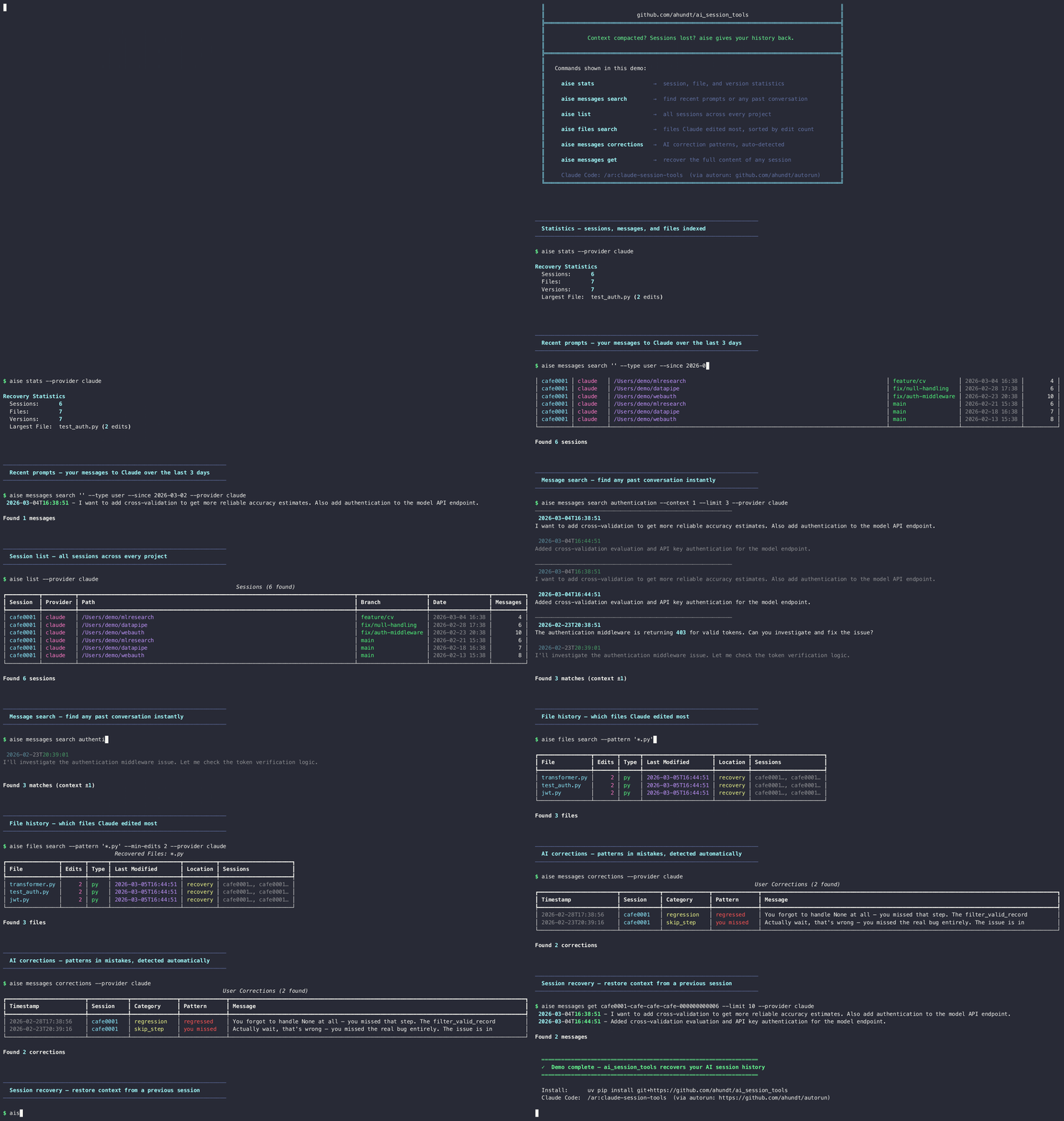
The problem
AI tools save conversations in raw files — Claude Code uses JSONL with UUID names, AI Studio uses unnamed JSON exports, Gemini CLI stores sessions under hashed temp directories. If you want to find "that Python file Claude wrote last week," search across hundreds of sessions, or build a structured knowledge base from thousands of AI Studio conversations, you'd have to manually parse JSON and dig through dozens of folders.
What this tool does
aise reads directly from your session files and gives you these capabilities:
| Capability | Command |
|---|---|
| List sessions with metadata (project, branch, date, message count) | aise list |
| Filter by provider: Claude Code, AI Studio, or Gemini CLI | aise list --provider claude |
| Find source files Claude wrote or edited | aise files search --pattern "*.py" |
| Inspect file version history | aise files history cli.py |
| Extract a file version to stdout or disk | aise files extract cli.py |
| Cross-reference session edits against a current file | aise files cross-ref ./cli.py |
| Search conversation messages full-text | aise messages search "auth bug" |
| Search tool invocations (Bash, Edit, Write, Read, …) | aise tools search Write "login" |
| Read all messages from one session | aise get ab841016 |
| Find user correction messages | aise messages corrections |
| Count slash command usage | aise messages planning |
| List slash command invocations with metadata | aise commands list --since 14d |
| See context after a slash command | aise commands context /ar:plannew |
| Pipe session IDs for composable workflows | aise list --ids-only | xargs ... |
| Export one session to markdown | aise export session ab841016 |
| Export recent sessions to markdown | aise export recent 7 --output week.md |
| Manage session source directories | aise source list / aise source add <path> |
| Run full analysis pipeline | aise analyze |
| View / create the config file | aise config show / aise config init |
| Summary statistics across all sources | aise stats |
Works as a CLI tool (aise) and as an importable Python library (from ai_session_tools import ...).
Claude Code integration via autorun
autorun is a Claude Code plugin that adds
slash commands, hooks, and autonomous task workflows to your editor. It ships
with a built-in /ar:ai-session-tools skill (also available as
/ar:claude-session-tools for backward compatibility) that exposes aise as a
first-class Claude Code command, so you can search and recover session history
without leaving the editor or switching to a terminal.
What the integration adds:
/ar:ai-session-tools(or/ar:claude-session-tools): natural-language skill. Describe what you want ("find the auth bug I fixed last week","show recent Python files") and Claude runs the appropriateaisecommands and surfaces the results inline- Full access to all
aisecapabilities (search, file history, corrections, stats, export) from within a Claude Code conversation - Useful after context compaction: ask Claude to recover the previous session context directly inside the new conversation
Install:
# 1. Install autorun (one-time)
git clone https://github.com/ahundt/autorun ~/.claude/plugins/autorun
# Follow autorun's README for Claude Code plugin activation

# 2. Install ai-session-tools (already done if you followed Install above)
uv tool install git+https://github.com/ahundt/ai_session_tools

# 3. Use inside Claude Code
# /ar:ai-session-tools find files I edited yesterday
See autorun's README for full setup and the complete list of available slash commands.
Install
uv tool install git+https://github.com/ahundt/ai_session_tools
This gives two equivalent commands: aise (short) and ai_session_tools (long).
To use as a library instead:
uv add git+https://github.com/ahundt/ai_session_tools
Quick start
# 1. List sessions from all auto-detected sources (Claude Code, AI Studio, Gemini CLI)
aise list

# 2. Filter to one provider
aise list --provider claude      # Claude Code sessions only
aise list --provider aistudio    # AI Studio sessions only
aise list --provider gemini      # Gemini CLI sessions only

# 3. Search messages across all sources
aise messages search "authentication"

# 4. Run the full analysis pipeline (AI Studio / Gemini sessions)
aise analyze

# 5. Show statistics per source
aise stats
Claude Code file recovery
# See all files Claude ever wrote or edited
aise files search

# Find a specific file
aise files search --pattern "*session*"

# Check its version history
aise files history session_manager.py

# Print the latest version to stdout
aise files extract session_manager.py

# Redirect to a file
aise files extract session_manager.py > session_manager.py
Source management
aise auto-detects session sources from standard install locations:
| Source | Auto-detected path |
|---|---|
| Claude Code | ~/.claude/projects/ (always included) |
| Gemini CLI | ~/.gemini/tmp/ (if dir exists and non-empty) |
| AI Studio | ~/Downloads/Google AI Studio/ (if exists) |
| AI Studio | ~/Downloads/drive-download-*/Google AI Studio/ (glob match) |
For non-standard locations, add them explicitly:
# See what's currently active
aise source list

# Scan standard locations for new sources
aise source scan

# Add a custom directory
aise source add ~/Documents/aistudio_exports
aise source add ~/.gemini/tmp --type gemini

# Remove a directory
aise source remove ~/Documents/old_sessions
Source directories are saved to config.json and persist across runs.
Use as a Python Library
import ai_session_tools as aise
from ai_session_tools import AISession, FilterSpec

# RECOMMENDED: zero-config RAII, auto-detects Claude, AI Studio, and Gemini CLI
with AISession() as session:

    # Context recovery — most common use case, one call
    ctx = session.get_latest_session_context(message_limit=10)
    if ctx:
        info, messages = ctx
        print(info.project_display, info.timestamp_last)

    # List recent sessions
    sessions = session.get_sessions(since="7d")
    for s in sessions:
        print(s.project_display, s.timestamp_first, s.message_count)

    # Search messages across all sources (with surrounding context)
    matches = session.search_messages("authentication", context=3)

    # Search files with composable filters (Claude Code sessions)
    files = session.search_files(
        "*.py",
        FilterSpec()
            .with_since("30d")
            .with_extensions(include={"py", "ts"})
            .with_edit_range(min_edits=3),
    )

    # Session statistics
    stats = session.get_statistics(since="7d")

    # EDTF date range: matches CLI --when
    q1_files = session.search_files("*.py", FilterSpec().with_when("2026-01/2026-03"))

    # Composable file filters with OR logic
    from ai_session_tools.filters import SearchFilter
    py_or_ts = SearchFilter().by_extension("py") | SearchFilter().by_extension("ts")
    files = session.search_files("*", py_or_ts)

    # Bulk export recent sessions to markdown
    markdowns = session.export_sessions_markdown(since="1d")

# Full API reference: help(aise.AISession)
CLI reference
List sessions
# All sessions from all sources, newest first
aise list

# Filter by provider
aise list --provider claude
aise list --provider aistudio
aise list --provider gemini
aise list --provider all       # explicit all (default)

# Filter by project directory substring
aise list --project myproject

# Sessions since a date
aise list --since 2026-01-15

# JSON output
aise list --format json

# Limit to 10
aise list --limit 10
Statistics
aise stats
Recovery Statistics
  Sessions:      1360
    aistudio       1167
    gemini_cli      193
  Files:          318
  Versions:      1205
  Largest File:  engine.py (47 edits)
Find source files (Claude Code)
# All files (shows edits, sessions, last modified)
aise files search

# Only Python files
aise files search --pattern "*.py"

# Files edited 5+ times
aise files search --min-edits 5

# Python and Markdown, after a date
aise files search -i py,md --since 2026-01-15

# Exclude compiled files
aise files search -x pyc,tmp,o

# JSON output
aise files search --format json

# 'find' is an alias for 'search'
aise files find --pattern "*.py"
Inspect file version history (Claude Code)
# Show a read-only version table (version#, lines, Δlines, timestamp, session)
aise files history cli.py

# Narrow to one session
aise files history cli.py --session ab841016

# Export all versions to disk as cli_v1.py, cli_v2.py, …
aise files history cli.py --export

# Preview without touching disk
aise files history cli.py --export --dry-run

# Dump all versions to stdout (for piping to AI tools)
aise files history cli.py --stdout
files history is read-only by default — no disk writes unless you pass --export.
Extract file content (Claude Code)
# Print latest version to stdout
aise files extract cli.py

# Specific version
aise files extract cli.py --version 2

# Pipe to clipboard
aise files extract cli.py | pbcopy

# Limit to one session
aise files extract cli.py --session ab841016

# Write to a directory
aise files extract cli.py --output-dir ./backup

# Preview without I/O
aise files extract cli.py --output-dir ./backup --dry-run
File content goes to stdout; status messages go to stderr — keeps piping clean.
Cross-reference session edits (Claude Code)
# Show which edits Claude made to cli.py are present in the current file
aise files cross-ref ./cli.py

# Limit to one session
aise files cross-ref ./cli.py --session ab841016

# JSON output
aise files cross-ref ./cli.py --format json
Search conversation messages
# Full-text search across all sources (literal match, case-insensitive)
aise messages search "authentication"

# Regex search (use --regex for | OR, .* wildcards, etc.)
aise messages search "forgot|missed|deleted" --regex

# Narrow to one provider
aise messages search "error" --provider claude
aise messages search "error" --provider aistudio

# Only user messages (not assistant)
aise messages search "error" --type user

# Only slash command messages
aise messages search "" --type slash --since 14d

# Exclude compaction summaries
aise messages search "error" --no-compaction

# Asymmetric context windows
aise messages search "bug" --context-before 2 --context-after 5

# Filter by tool type (show only Write/Edit/Bash calls)
aise messages search "" --tool Write --since 7d

# More results with truncation
aise messages search "TODO" --limit 50 --max-chars 200

# JSON output
aise messages search "refactor" --format json

# 'find' is an alias for 'search'
aise messages find "authentication"
Search tool invocations (Claude Code)
Find the actual tool calls Claude made — what files it wrote, what commands it ran:
# All Write tool calls
aise tools search Write

# Bash calls containing "git commit"
aise tools search Bash "git commit"

# Edit calls to cli.py
aise tools search Edit "cli.py"

# JSON output
aise tools search Write --format json

# 'find' is an alias for 'search'
aise tools find Write

# Also works via messages search with --tool flag
aise messages search "*" --tool Write
Read messages from a session
# Read all messages (positional session ID)
aise get ab841016

# Read only your messages
aise get ab841016 --type user --limit 50

# JSON output
aise get ab841016 --format json

# Same via messages subcommand
aise messages get ab841016
Find session IDs with aise list.
Find user corrections (Claude Code)
Detects messages where you corrected Claude's behavior:
# Show all correction messages (categorized as regression/skip_step/misunderstanding/incomplete)
aise messages corrections

# Filter by project or session
aise messages corrections --project myproject
aise messages corrections --session ab841016

# Session IDs only (for piping to other commands)
aise messages corrections --since 14d --ids-only

# More results
aise messages corrections --limit 50

# JSON output
aise messages corrections --format json
Slash command usage (Claude Code)
Count slash commands you've invoked across all sessions:
# Auto-discover ALL slash commands (no config needed)
aise messages planning

# Filter by project or date range
aise messages planning --project myproject --since 2026-01-01

# JSON output
aise messages planning --format json

# Use specific regex patterns instead of auto-discovery
aise messages planning --commands "/ar:plannew,/ar:pn"
The default discovery mode finds every message that starts with /command — /ar:plannew,
/commit, /help, whatever you've used. No configuration required.
Slash command invocations (Claude Code)
List every individual slash command invocation with timestamp, session, and arguments:
# List all slash command invocations
aise commands list --since 14d

# Filter to a specific command
aise commands list --command /ar:plannew --since 14d

# Session IDs only (for piping)
aise commands list --command /ar:plannew --ids-only

# JSON output
aise commands list --format json --since 14d
Slash command context (Claude Code)
See what Claude did after each invocation of a command:
# Show 5 messages after each /ar:plannew invocation
aise commands context /ar:plannew --context-after 5

# JSON output
aise commands context /ar:plannew --format json

# Limit content length
aise commands context /ar:plannew --max-chars 500
Export to markdown
# Export one session to stdout
aise export session ab841016

# Redirect to a file
aise export session ab841016 > session.md

# Write to a file explicitly
aise export session ab841016 --output session.md

# Preview without writing
aise export session ab841016 --dry-run

# Export all sessions from the last 7 days to a single file
aise export recent --output week.md

# Last 14 days, filtered by project
aise export recent 14 --project myproject --output week.md
System messages ([Request interrupted, <task-notification>, <system-reminder>) are filtered
out automatically.
Search across files and messages at once
# Find Python files AND messages mentioning "error" in one command
aise search --pattern "*.py" --query "error"

# Tool calls with a query (auto-routes to messages)
aise search --tool Write --query "login"
aise search tools --tool Bash --query "git"

# 'find' is an alias for 'search'
aise find files --pattern "*.py"
aise find --tool Write --query "login"
Analysis pipeline
aise analyze runs a full qualitative coding, provenance graphing, and taxonomy organization
pipeline over all configured AI session sources. Designed for research and knowledge-base
building workflows.
# Run the full pipeline (idempotent — skips stages with no changes)
aise analyze

# Show which stages are stale vs current
aise analyze --status

# Force re-run all stages
aise analyze --force

# Narrow to one provider
aise analyze --provider aistudio

# Override output directory
aise analyze --org-dir ~/my_org_dir

# Run only one pipeline stage (advanced)
aise analyze --step analyze    # coding + scoring → session_db.json
aise analyze --step graph      # provenance graph → SESSION_GRAPH.json
aise analyze --step organize   # taxonomy symlinks + INDEX.md + SESSIONS_FULL.md
aise analyze --step vocab      # standalone vocabulary analysis
Pipeline stages
| Stage | Input | Output |
|---|---|---|
analyze |
All session files | session_db.json, VOCABULARY_ANALYSIS.md |
graph |
session_db.json |
SESSION_GRAPH.json |
organize |
session_db.json + SESSION_GRAPH.json |
Symlink taxonomy, INDEX.md, SESSIONS_FULL.md |
instruction-history |
Gemini CLI session (if configured) | USER_INSTRUCTIONS_CLEAN.md |
Requires org_dir to be set in config (see Configuration below). Run aise config init first
if this is your first time.
Analysis methodology
- Qualitative coding (Hsieh & Shannon 2005 Directed Content Analysis): sessions coded against
CODEBOOK.mdmarkers for technique, role, and task categories - Empirical scoring (Wei et al. 2022 Chain-of-Thought): utility scores based on detected technique markers, expert role signals, and session complexity
- Provenance graphing: session lineage detection via filename patterns (
Branch of X,Copy of X,Name vN) and TF-IDF similarity - Vocabulary mining: n-gram analysis of recurring prompt patterns across all user turns
Configuration
aise works out of the box for Claude Code — no config file required. The config lets you add AI
Studio and Gemini CLI sources, customize the analysis pipeline, and override detection patterns.
Config file location
| Priority | Source |
|---|---|
| 1 | --config /path/to/config.json CLI flag |
| 2 | AI_SESSION_TOOLS_CONFIG environment variable |
| 3 | macOS default: ~/Library/Application Support/ai_session_tools/config.json |
| 3 | Linux default: ~/.config/ai_session_tools/config.json |
Config commands
# Show the config file path (whether or not it exists)
aise config path

# Show current configuration (file contents + source)
aise config show
aise config show --format json

# Create a starter config.json with documented defaults
aise config init

# Overwrite an existing config file
aise config init --force
Config file format
{
  "source_dirs": {
    "aistudio": [
      "~/Downloads/Google AI Studio",
      "~/Downloads/drive-download-20260220T174026Z/Google AI Studio"
    ],
    "gemini_cli": "~/.gemini/tmp"
  },
  "org_dir": "~/Downloads/aistudio_sessions/organized",
  "vocab_output_filename": "VOCABULARY_ANALYSIS.md",
  "gemini_org_task_session": "session-2026-02-23T04-07-bd7e3697",
  "scoring_weights": {
    "technique": 20,
    "role": 15,
    "thinking_budget": 30,
    "anti_ai": 35,
    "version_multiplier": 10,
    "corrected_bonus": 5,
    "descendant_boost": 15,
    "tfidf_similarity_threshold": 0.70,
    "min_session_text_len": 50,
    "min_ngram_freq": 3
  },
  "taxonomy_dimensions": [
    {
      "name": "01_by_project",
      "match": "keyword_map",
      "keyword_map": "project_map",
      "prefer_for_links": true
    }
  ],
  "correction_patterns": [
    "regression:you deleted",
    "regression:you removed",
    "skip_step:you forgot",
    "misunderstanding:that's wrong",
    "incomplete:also need"
  ],
  "planning_commands": [
    "/ar:plannew",
    "/ar:planrefine"
  ]
}
source_dirs.aistudio — list of paths to AI Studio session directories. Strings or list of
strings.
source_dirs.gemini_cli — path to the Gemini CLI tmp directory (usually ~/.gemini/tmp).
org_dir — output directory for the analysis pipeline. Must be set before running
aise analyze.
scoring_weights — configurable weights for the empirical scoring stage. All keys are
optional; missing keys fall back to the built-in defaults shown above.
taxonomy_dimensions — list of taxonomy dimension configs controlling how sessions are
organized into symlink subdirectories by aise analyze --step organize. Each dimension has:
name: directory name underorg_dirmatch:"keyword_map","field", or"list_field"keyword_map: name of JSON keyword map file inorg_dir(formatch: keyword_map)field: field name onSessionRecord(formatch: field)scalar:trueif the field is a single string (not a list)exclude: list of values to skip (e.g.[""]to skip empty strings)fallback: category name for unmatched sessions (omit to skip unmatched)prefer_for_links:trueto use this dimension for INDEX.md links
correction_patterns — list of "CATEGORY:KEYWORD" strings for correction detection.
Overrides built-in patterns when set.
gemini_org_task_session — session filename stem for the Gemini CLI instruction-history
extraction stage (e.g. "session-2026-02-23T04-07-bd7e3697"). Only needed for the
instruction-history pipeline step.
Priority chain
Every setting follows: CLI flag > environment variable > config file > built-in default
Environment variables
| Variable | Default | Description |
|---|---|---|
CLAUDE_CONFIG_DIR |
~/.claude |
Base Claude config directory |
AI_SESSION_TOOLS_PROJECTS |
~/.claude/projects |
Path to Claude session folders |
AI_SESSION_TOOLS_RECOVERY |
~/.claude/recovery |
Recovery output path |
AI_SESSION_TOOLS_CONFIG |
OS config dir | Config file path |
# Use an external drive
aise --claude-dir /Volumes/External/.claude files search

# Point at a non-default projects directory
AI_SESSION_TOOLS_PROJECTS=/data/claude-sessions aise list
Command ordering
Both orderings are equivalent — use whichever reads more naturally:
aise search files --pattern "*.py"     # "search" then narrow to "files"
aise files search --pattern "*.py"     # start in "files" then "search"

aise search messages --query "error"   # "search" then "messages"
aise messages search "error"           # "messages" then "search" (positional query)

aise find files --pattern "*.py"       # "find" is a root alias for "search"
aise files find --pattern "*.py"       # "find" in files subapp

aise tools search Write                # tools subapp with positional tool name
aise search --tool Write               # root search with --tool flag (equivalent)
The --provider flag works at the root level or per-command:
aise --provider claude list            # global flag before subcommand
aise list --provider claude            # per-command flag (same result)
Python library usage
from pathlib import Path
from ai_session_tools import SessionRecoveryEngine, FilterSpec

engine = SessionRecoveryEngine(
    Path.home() / ".claude" / "projects",
    Path.home() / ".claude" / "recovery",
)

# List sessions (since= is the canonical date flag; --after is a hidden alias)
sessions = engine.get_sessions(project_filter="myproject", since="2026-01-01")
for s in sessions:
    print(f"{s.session_id[:16]}  {s.git_branch}  {s.message_count} messages")

# List all files Claude ever wrote or edited
all_files = engine.search("*")
for f in all_files:
    print(f"{f.name}  ({f.edits} edits, last modified {f.last_modified})")

# Filter to heavily-edited Python files
filters = FilterSpec(min_edits=5)
filters.with_extensions(include={"py"})
results = engine.search("*", filters)

# Search conversation text
matches = engine.search_messages("authentication")
for msg in matches:
    print(f"[{msg.type.value}] {msg.session_id}: {msg.content[:100]}")

# Search tool invocations
write_calls = engine.search_messages("", tool="Write")
bash_git = engine.search_messages("git commit", tool="Bash")

# Find user corrections
corrections = engine.find_corrections(project_filter="myproject", limit=20)
for c in corrections:
    print(f"{c.category}: {c.matched_pattern} — {c.content[:80]}")

# Count slash command usage (auto-discovery)
planning = engine.analyze_planning_usage()  # discovers all /command patterns
for p in planning:
    print(f"{p.command}: {p.count} uses across {len(p.session_ids)} sessions")

# Cross-reference session edits against current file
current = Path("cli.py").read_text()
refs = engine.cross_reference_session("cli.py", current)
for r in refs:
    mark = "+" if r["found_in_current"] else "-"
    print(f"{mark} {r['tool']} {r['timestamp'][:10]}: {r['content_snippet'][:60]}")

# Export a session to markdown
md = engine.export_session_markdown("ab841016")
Path("session.md").write_text(md)

# Get all recorded versions of a file
versions = engine.get_versions("cli.py")
for v in versions:
    print(f"v{v.version_num}: {v.line_count} lines  {v.timestamp}  session {v.session_id[:16]}")

# Summary statistics
stats = engine.get_statistics()
print(f"{stats.total_sessions} sessions, {stats.total_files} files, {stats.total_versions} versions")
Multi-source usage
from ai_session_tools import get_session_backend, AiStudioSource, GeminiCliSource

# Auto-detect all configured sources (Claude Code, AI Studio, Gemini CLI)
backend = get_session_backend()

# List sessions from all sources
sessions = backend.get_sessions()

# Date filtering — same flags as CLI (since/until/EDTF patterns supported)
recent = backend.get_sessions(since="7d")           # last 7 days
decade = backend.get_sessions(since="202X")         # EDTF: whole 2020s decade

# Narrow to one source
aistudio_backend = get_session_backend(source="aistudio")
sessions = aistudio_backend.get_sessions()

# Search messages across all sources
results = backend.search_messages("transcription")

# Use AiStudioSource and GeminiCliSource directly
ai_source = AiStudioSource([Path("~/Downloads/Google AI Studio").expanduser()])
for session_info in ai_source.stream_sessions():
    messages = ai_source.read_session(session_info)
    print(f"{session_info.session_id}: {len(messages)} messages")
Date parsing utility
from ai_session_tools import parse_date_input

# All the same formats the CLI accepts
parse_date_input("2026-01-15")        # → "2026-01-15T00:00:00" (start mode)
parse_date_input("7d")                # → ISO datetime 7 days ago
parse_date_input("202X", mode="end")  # → "2029-12-31T23:59:59" (end of decade)
parse_date_input("2026-01/2026-03")   # → ("2026-01-01T00:00:00", "2026-03-31T23:59:59")
Configuration API
from ai_session_tools import load_config, write_config, get_config_path

# Read current config (respects --config flag > AI_SESSION_TOOLS_CONFIG env > OS default)
cfg = load_config()

# Add an AI Studio source directory
cfg.setdefault("source_dirs", {})["aistudio"] = ["/path/to/Google AI Studio"]
write_config(cfg)

# Check where the config file lives
print(get_config_path())  # e.g. ~/Library/Application Support/ai_session_tools/config.json
Key classes
| Class | Description |
|---|---|
SessionRecoveryEngine |
Claude Code engine — search, extract, and analysis methods |
AiStudioSource |
AI Studio session reader (JSON + legacy .md) |
GeminiCliSource |
Gemini CLI session reader |
SessionBackend |
Unified multi-source interface; wraps any backend |
FilterSpec |
Build filters for file search: edits, date range, extensions, sessions |
SessionInfo |
One session: session_id, project_dir, git_branch, cwd, message_count |
RecoveredFile |
One source file: name, edits, last_modified, sessions |
FileVersion |
One file version: version_num, line_count, timestamp, session_id |
SessionMessage |
One conversation message: type (user/assistant), content, timestamp |
CorrectionMatch |
One correction: category, matched_pattern, content, session_id |
PlanningCommandCount |
One slash command: command, count, session_ids, project_dirs |
RecoveryStatistics |
Aggregate counts: total_sessions, total_files, total_versions |
Project structure
ai_session_tools/
├── __init__.py          # Public API — all exports listed here
├── engine.py            # SessionRecoveryEngine, MultiSourceEngine, SessionBackend
├── config.py            # Canonical config loader (respects --config flag)
├── models.py            # Data classes: SessionInfo, SessionMessage, RecoveredFile, etc.
├── filters.py           # SearchFilter chain and filter predicates
├── formatters.py        # Output as table, JSON, CSV, or plain text
├── types.py             # Protocol interfaces (Storage, Searchable, etc.)
├── cli.py               # CLI commands (thin wrappers over the engine)
├── sources/
│   ├── __init__.py
│   ├── aistudio.py      # AiStudioSource: AI Studio JSON + legacy .md sessions
│   └── gemini_cli.py    # GeminiCliSource: Gemini CLI ~/.gemini/tmp sessions
└── analysis/
    ├── __init__.py
    ├── analyzer.py       # Qualitative coding + empirical scoring pipeline
    ├── codebook.py       # CODEBOOK.md loader, n-gram helpers, scoring utilities
    ├── extract.py        # Gemini CLI instruction-history extraction
    ├── graph.py          # Session provenance graph builder
    ├── orchestrator.py   # Taxonomy symlinks, INDEX.md, SESSIONS_FULL.md
    ├── pipeline_state.py # Idempotent pipeline change detection
    └── vocab.py          # Standalone vocabulary mining
Development
git clone https://github.com/ahundt/ai_session_tools.git
cd ai_session_tools

# Install with dev dependencies
uv sync --all-extras

# Run tests (integration tests require ~/.claude/projects/)
uv run pytest                    # unit tests only (fast)
uv run pytest -m ""             # all tests including integration

# Lint and format
uv run ruff check ai_session_tools/
uv run ruff format ai_session_tools/

# Type check
uv run mypy ai_session_tools/
License
Apache License 2.0 — Copyright (c) 2026 Andrew Hundt
Project details
Verified details
These details have been verified by PyPIProject links
GitHub Statistics
Maintainers
Release history Release notifications | RSS feed


Download files
Download the file for your platform. If you're not sure which to choose, learn more about installing packages.
Source Distribution
Built Distribution
Filter files by name, interpreter, ABI, and platform.
If you're not sure about the file name format, learn more about wheel file names.
Copy a direct link to the current filters
File details
Details for the file ai_session_tools-0.3.0.tar.gz.
File metadata
- Download URL: ai_session_tools-0.3.0.tar.gz
- Upload date:
- Size: 292.6 kB
- Tags: Source
- Uploaded using Trusted Publishing? Yes
- Uploaded via: twine/6.1.0 CPython/3.13.7
File hashes
| Algorithm | Hash digest | |
|---|---|---|
| SHA256 |
7f968f29975ed67c8a290d671510adc6cf61396e18aa19f3dd0867c57c903fc2
|
|
| MD5 |
fe70cb3f81b8312d1718e25413b2abe0
|
|
| BLAKE2b-256 |
db1dbbe697f86eff398b24670972f1b35e88fa6a9134fa2017f7562af9ad64ed
|
Provenance
The following attestation bundles were made for ai_session_tools-0.3.0.tar.gz:
Publisher:
publish.yml on ahundt/ai_session_tools
-
Statement:
-
Statement type:
https://in-toto.io/Statement/v1 -
Predicate type:
https://docs.pypi.org/attestations/publish/v1 -
Subject name:
ai_session_tools-0.3.0.tar.gz -
Subject digest:
7f968f29975ed67c8a290d671510adc6cf61396e18aa19f3dd0867c57c903fc2 - Sigstore transparency entry: 1069230911
- Sigstore integration time:
-
Permalink:
ahundt/ai_session_tools@10325977d4cde75050b91e4acac12ee65924dc94 -
Branch / Tag:
refs/tags/v0.3.0 - Owner: https://github.com/ahundt
-
Access:
public
-
Token Issuer:
https://token.actions.githubusercontent.com -
Runner Environment:
github-hosted -
Publication workflow:
publish.yml@10325977d4cde75050b91e4acac12ee65924dc94 -
Trigger Event:
push
-
Statement type:
File details
Details for the file ai_session_tools-0.3.0-py3-none-any.whl.
File metadata
- Download URL: ai_session_tools-0.3.0-py3-none-any.whl
- Upload date:
- Size: 153.3 kB
- Tags: Python 3
- Uploaded using Trusted Publishing? Yes
- Uploaded via: twine/6.1.0 CPython/3.13.7
File hashes
| Algorithm | Hash digest | |
|---|---|---|
| SHA256 |
b0c57d8fb154feb5239ea6d4504677dfd611590a1681d1fc40562d7453df4699
|
|
| MD5 |
1d21d5d49252f243a48877fb8be006fc
|
|
| BLAKE2b-256 |
eba37d2632c83688880764e7b39f46a896a9c72f4da9728cc74419ba036cff4a
|
Provenance
The following attestation bundles were made for ai_session_tools-0.3.0-py3-none-any.whl:
Publisher:
publish.yml on ahundt/ai_session_tools
-
Statement:
-
Statement type:
https://in-toto.io/Statement/v1 -
Predicate type:
https://docs.pypi.org/attestations/publish/v1 -
Subject name:
ai_session_tools-0.3.0-py3-none-any.whl -
Subject digest:
b0c57d8fb154feb5239ea6d4504677dfd611590a1681d1fc40562d7453df4699 - Sigstore transparency entry: 1069230947
- Sigstore integration time:
-
Permalink:
ahundt/ai_session_tools@10325977d4cde75050b91e4acac12ee65924dc94 -
Branch / Tag:
refs/tags/v0.3.0 - Owner: https://github.com/ahundt
-
Access:
public
-
Token Issuer:
https://token.actions.githubusercontent.com -
Runner Environment:
github-hosted -
Publication workflow:
publish.yml@10325977d4cde75050b91e4acac12ee65924dc94 -
Trigger Event:
push
-
Statement type:






