
AI9414
ai9414 is a Python teaching toolkit for interactive artificial intelligence demos. It opens small browser-based visualisations for search, logic, uncertainty, constraint satisfaction, planning, and foundation models, with simple installed commands that are easy to use in class.
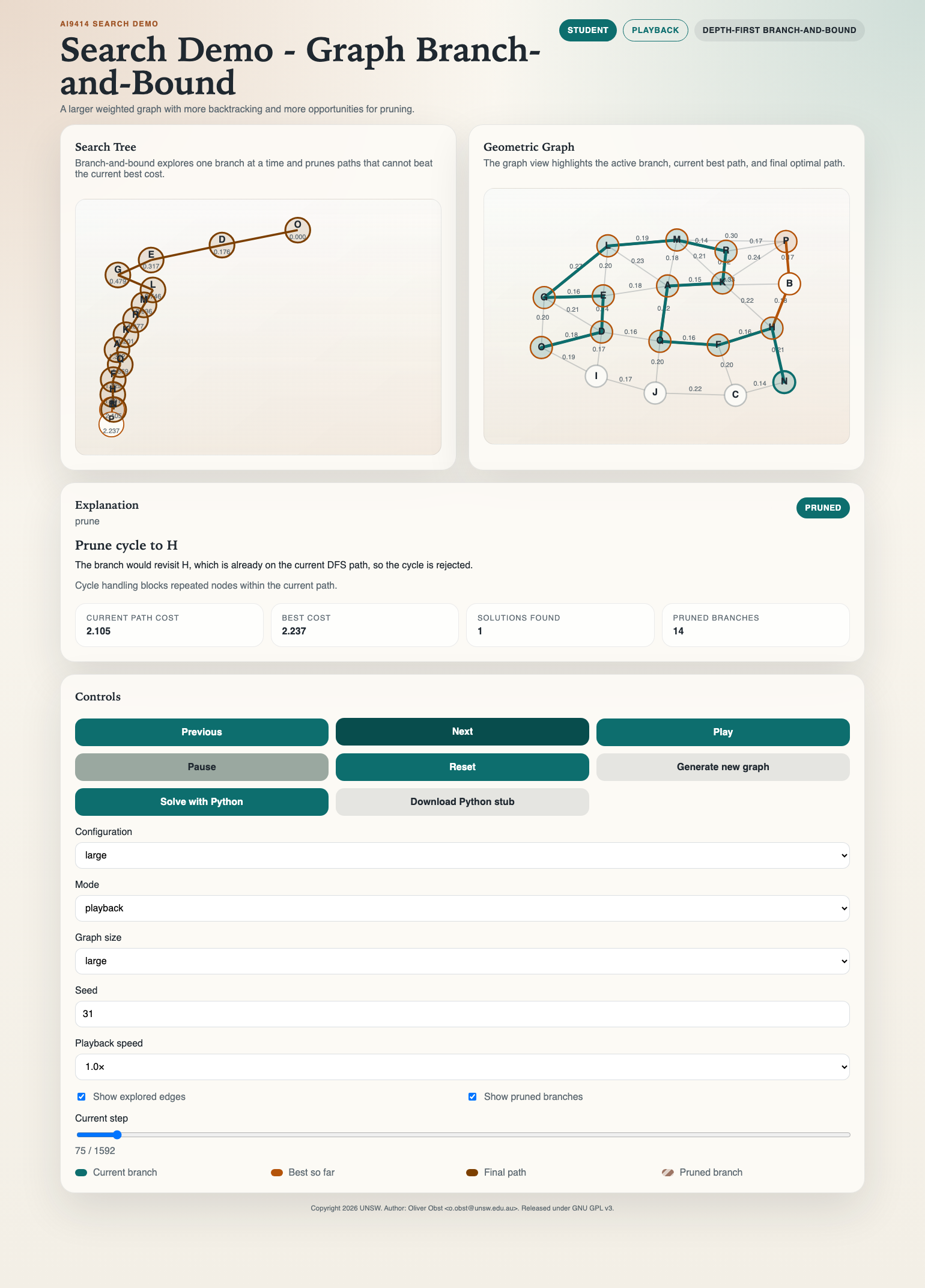
It currently includes seventeen ready-to-run demos:
- labyrinth DFS search
- office delivery DFS search
- spatial graph DFS search
- spatial graph BFS search
- spatial graph greedy best-first search
- spatial graph A* search
- spatial graph uniform-cost search
- spatial graph branch-and-bound search
- propositional logic DPLL
- propositional resolution/refutation
- reasoning with uncertainty belief-state explorer
- foundation models tokenisation explorer
- foundation models next-token decoding explorer
- CSP map colouring
- CSP delivery time-slot assignment
- STRIPS planning
- Blocks World planning
Available demos
labyrinth DFS searchStart withai9414 demo labyrinthoffice delivery DFS searchStart withai9414 demo delivery. This demo has fixed office layouts and an action-order control for DFS.spatial graph DFS searchStart withai9414 demo graph-dfsspatial graph BFS searchStart withai9414 demo graph-bfsspatial graph greedy best-first searchStart withai9414 demo graph-gbfsspatial graph A* searchStart withai9414 demo graph-astarspatial graph uniform-cost searchStart withai9414 demo graph-ucsspatial graph branch-and-bound searchStart withai9414 demo graph-bnbpropositional logic DPLLStart withai9414 demo logic-dpllpropositional resolution/refutationStart withai9414 demo logic-resolutionreasoning with uncertainty belief-state explorerStart withai9414 demo uncertaintyfoundation models tokenisation explorerStart withai9414 demo foundation-models-tokenisationfoundation models next-token decoding explorerStart withai9414 demo foundation-models-decodingCSP map colouringStart withai9414 demo csp-mapCSP delivery time-slot assignmentStart withai9414 demo csp-deliverySTRIPS planningStart withai9414 demo stripsBlocks World planningStart withai9414 demo blocksworld
Why use it
- one installed package with a small command-line interface:
ai9414 ... - browser-based visualisations with packaged frontend assets and no separate web build step
- curated examples for search, logic, uncertainty, CSP, planning, tokenisation, and decoding
- graph-search examples use conventional
SandGlabels for start and goal nodes - Python APIs for loading custom problems and launching demos directly from code
- replayable traces for classroom walkthroughs and static solution export
- automated tests plus contributor documentation
Quick start
Install from PyPI:
uvx ai9414 demo graph-bnb
Install directly from this repository:
uv sync
uv run ai9414 list
uv run ai9414 demo graph-bnb
If your environment does not put console scripts on PATH, the module entry point works too:
uv run python -m ai9414 demo graph-bnb
To see the curated example names for a demo:
uv run ai9414 list --examples graph-dfs
For contributors
uv sync --extra dev
uv run pytest
uv build
uv run ai9414 demo graph-bnb
Direct example scripts
The scripts under examples/ are still useful when working directly in the repository, but they are no longer the main installed interface.
To start the labyrinth example directly from the repository:
uv run python examples/labyrinth_demo.py
To start the delivery DFS example directly from the repository:
uv run python examples/delivery_demo.py
To start the spatial graph DFS example directly from the repository:
uv run python examples/graph_dfs_demo.py
To start the spatial graph BFS example directly from the repository:
uv run python examples/graph_bfs_demo.py
To start the spatial graph greedy best-first example directly from the repository:
uv run python examples/graph_gbfs_demo.py
To start the spatial graph A* example directly from the repository:
uv run python examples/graph_astar_demo.py
To start the spatial graph uniform-cost example directly from the repository:
uv run python examples/graph_ucs_demo.py
To start the spatial graph branch-and-bound example directly from the repository:
uv run python examples/graph_branch_and_bound_demo.py
To start the DPLL logic example directly from the repository:
uv run python examples/logic_dpll_demo.py
To start the resolution/refutation example directly from the repository:
uv run python examples/resolution_demo.py
To start the reasoning-with-uncertainty example directly from the repository:
uv run python examples/uncertainty_demo.py
To start the foundation models tokenisation example directly from the repository:
uv run python examples/foundation_models_demo.py
To start the foundation models decoding example:
uv run ai9414 demo foundation-models-decoding
To start the CSP map-colouring example directly from the repository:
uv run python examples/csp_demo.py
To start the CSP delivery scheduling example directly from the repository:
uv run python examples/delivery_csp_demo.py
To start the STRIPS planning example directly from the repository:
uv run python examples/strips_demo.py
To start the Blocks World planning example directly from the repository:
uv run python examples/blocksworld_demo.py
The same install is enough for the labyrinth live-Python stub as well. The
student download now uses the built-in ai9414.search.run_labyrinth_solver(...)
wrapper, so no separate Flask setup is required.
To export a backend-free replay bundle:
PYTHONPATH=src uv run python - <<'PY'
from pathlib import Path
from ai9414.search import SearchDemo

app = SearchDemo()
output_dir = app.export_solution_bundle(Path("build/search-solution"))
print(output_dir)
PY
Student-facing examples
Labyrinth example:
from ai9414.labyrinth import LabyrinthDemo

app = LabyrinthDemo()
app.load_example("small")
app.show()
Spatial graph DFS example:
from ai9414.graph_dfs import GraphDfsDemo

app = GraphDfsDemo()
app.load_example("small")
app.show()
Spatial graph BFS example:
from ai9414.graph_bfs import GraphBfsDemo

app = GraphBfsDemo()
app.load_example("small")
app.show()
Spatial graph greedy best-first example:
from ai9414.graph_gbfs import GraphGbfsDemo

app = GraphGbfsDemo()
app.load_example("small")
app.show()
Spatial graph A* example:
from ai9414.graph_astar import GraphAStarDemo

app = GraphAStarDemo()
app.load_example("small")
app.show()
Spatial graph branch-and-bound example:
from ai9414.search import SearchDemo

app = SearchDemo()
app.load_example("small")
app.set_options(playback_speed=1.0)
app.show()
Spatial graph uniform-cost example:
from ai9414.graph_ucs import GraphUcsDemo

app = GraphUcsDemo()
app.load_example("small")
app.show()
Visual DPLL example:
from ai9414.logic import DpllDemo

app = DpllDemo()
app.load_example("unit_chain")
app.show()
Reasoning with uncertainty example:
from ai9414.uncertainty import BayesFilterDemo

app = BayesFilterDemo.example("two_doors")
app.show()
In the browser, click Sense door, Move right, then Sense no door. The final belief has two equally likely locations, cells 3 and 7. Reset clears the interactive history and restores the initial belief and random stream.
Download Python stub supplies the three Bayes-filter functions to implement.
Run the downloaded script to start the local solver, then click Solve with
Python to replay its result. The same script supports --check and --demo
for standalone work. See the uncertainty exercise guide
for the complete workflow.
Set up a custom corridor:
from ai9414.uncertainty import BayesFilterDemo

app = BayesFilterDemo(
    cells=10,
    landmarks={"door": [2, 6]},
    initial_belief="uniform",
)
app.show()
Foundation models tokenisation example:
from ai9414.foundation_models import TokenisationExplorer

app = TokenisationExplorer()
app.load_example("simple_sentence")
app.show()
Custom tokenisation text:
from ai9414.foundation_models import TokenisationExplorer

app = TokenisationExplorer()
app.load_corpus("office_messages")
app.learn_merges(12)
app.set_text("Deliver parcel to Office A before 10:30.")
app.show()
Foundation models decoding example:
from ai9414.foundation_models import DecodingExplorer

app = DecodingExplorer()
app.load_example("lecture_activity")
app.show()
Visual CSP example:
from ai9414.csp import CSPDemo

app = CSPDemo(example="australia")
app.set_algorithm("backtracking_forward_checking")
app.show()
Custom CSP map:
from ai9414.csp import CSPDemo

app = CSPDemo()
app.load_map_problem(
    regions=["a", "b", "c", "d"],
    adjacency={
        "a": ["b", "c"],
        "b": ["a", "c", "d"],
        "c": ["a", "b", "d"],
        "d": ["b", "c"],
    },
    colours=["red", "green", "blue"],
)
app.set_variable_ordering("mrv")
app.show()
Delivery scheduling CSP example:
from ai9414.delivery_csp import DeliveryCSPDemo

app = DeliveryCSPDemo(example="weekday_schedule")
app.set_algorithm("backtracking_forward_checking")
app.show()
Custom delivery scheduling CSP:
from ai9414.delivery_csp import DeliveryCSPDemo

app = DeliveryCSPDemo()
app.load_delivery_problem(
    deliveries=[
        {"id": "a", "label": "Delivery A", "short_label": "A", "colour": "#c75b4a"},
        {"id": "b", "label": "Delivery B", "short_label": "B", "colour": "#4d79ab"},
    ],
    slots=[
        {"id": "slot_1", "label": "09:00", "order": 0},
        {"id": "slot_2", "label": "11:00", "order": 1},
    ],
    rooms=[
        {"id": "dock", "label": "Dock"},
    ],
    values=[
        {"id": "slot_1_dock", "slot": "slot_1", "room": "dock", "label": "09:00 @ Dock"},
        {"id": "slot_2_dock", "slot": "slot_2", "room": "dock", "label": "11:00 @ Dock"},
    ],
    domains={
        "a": ["slot_1_dock", "slot_2_dock"],
        "b": ["slot_2_dock"],
    },
    constraints=[
        {
            "kind": "precedence",
            "left": "a",
            "right": "b",
            "label": "A before B",
            "description": "Delivery A must happen before delivery B.",
        }
    ],
)
app.set_variable_ordering("mrv")
app.show()
Visual STRIPS planning example:
from ai9414.strips import StripsDemo

app = StripsDemo()
app.load_example("canonical_delivery")
app.show()
Visual Blocks World planning example:
from ai9414.strips import BlocksworldDemo

app = BlocksworldDemo()
app.load_example("sussman_anomaly")
app.show()
Custom STRIPS problem:
from ai9414.strips import StripsDemo, StripsProblem

problem = StripsProblem(
    rooms=["corridor", "mail_room", "office_a", "office_b", "lab"],
    robot_start="corridor",
    parcel_start="mail_room",
    keycard_start="office_a",
    locked_edge=("corridor", "lab"),
    door_locked=True,
    goal=[("at", "parcel", "lab")],
)

app = StripsDemo(problem=problem)
app.solve()
app.show()
Suggested STRIPS exercises:
- Move the keycard from office A to office B and predict how the plan changes.
- Start the robot in the mail room and explain why collecting the parcel too early is a bad idea.
- Unlock the lab door at the start and identify which action disappears from the plan.
- Move the locked door to the office B connection and compare the new plan structure.
Suggested Blocks World exercises:
- Compare the 3-, 4-, and 5-block tower examples and count how many temporary moves are needed.
- Use the Sussman anomaly example to explain why solving one goal first can force the planner to undo work.
- Compare the 5- and 6-disc Hanoi examples and relate the STRIPS actions to disc moves.
Custom CNF with DPLL:
from ai9414.logic import DpllDemo

app = DpllDemo()
app.load_cnf([
    ["A", "B"],
    ["~A", "C"],
    ["~B", "C"],
])
app.show()
Entailment with DPLL:
from ai9414.logic import DpllDemo

app = DpllDemo(mode="entailment")
app.load_kb(
    formulas=["A -> B", "B -> C", "A"],
    query="C",
)
app.show()
Curated Wumpus entailment examples:
from ai9414.logic import DpllDemo

app = DpllDemo(mode="entailment", example="wumpus_no_breeze")
app.show()

app = DpllDemo(mode="entailment", example="wumpus_forced_pit")
app.show()
Resolution/refutation proof attempts:
from ai9414.resolution import ResolutionDemo

app = ResolutionDemo(example="chain_refutation")
app.load_proof_attempt(
    clauses=[["~A", "B"], ["A"], ["~B"]],
    steps=[
        {"left": 1, "right": 2, "pivot": "A"},
        {"left": 4, "right": 3, "pivot": "B"},
    ],
)
app.show()
Live labyrinth solver wrapper:
from typing import Any
from ai9414.search import run_labyrinth_solver


def solve_dfs(labyrinth: dict[str, Any]) -> dict[str, Any]:
    ...


if __name__ == "__main__":
    run_labyrinth_solver(solve_dfs)
Live graph solver wrapper:
from typing import Any
from ai9414.search import run_graph_solver


def solve_dfs(graph: dict[str, Any]) -> dict[str, Any]:
    ...


if __name__ == "__main__":
    run_graph_solver(solve_dfs)
Live graph BFS solver wrapper:
from typing import Any
from ai9414.search import run_graph_bfs_solver


def solve_bfs(graph: dict[str, Any]) -> dict[str, Any]:
    ...


if __name__ == "__main__":
    run_graph_bfs_solver(solve_bfs)
Live graph A* solver wrapper:
from typing import Any
from ai9414.search import run_graph_astar_solver


def solve_astar(graph: dict[str, Any]) -> dict[str, Any]:
    ...


if __name__ == "__main__":
    run_graph_astar_solver(solve_astar)
Live graph UCS solver wrapper:
from typing import Any
from ai9414.search import run_graph_ucs_solver


def solve_ucs(graph: dict[str, Any]) -> dict[str, Any]:
    ...


if __name__ == "__main__":
    run_graph_ucs_solver(solve_ucs)
Live graph greedy best-first solver wrapper:
from typing import Any
from ai9414.search import run_graph_gbfs_solver


def solve_gbfs(graph: dict[str, Any]) -> dict[str, Any]:
    ...


if __name__ == "__main__":
    run_graph_gbfs_solver(solve_gbfs)
Live spatial graph branch-and-bound solver wrapper:
from typing import Any
from ai9414.search import run_weighted_graph_solver


def solve_dfbb(graph: dict[str, Any]) -> dict[str, Any]:
    ...


if __name__ == "__main__":
    run_weighted_graph_solver(solve_dfbb)
Live DPLL solver wrapper:
from typing import Any
from ai9414.logic import run_dpll_solver


def solve_dpll(problem: dict[str, Any], options: dict[str, Any]) -> dict[str, Any]:
    ...


if __name__ == "__main__":
    run_dpll_solver(solve_dpll)
Repository structure
src/ai9414/
  core/
  demo/
  graph_bfs/
  graph_dfs/
  graph_astar/
  graph_gbfs/
  graph_ucs/
  labyrinth/
  logic/
  search/
  frontend/
examples/
tests/
docs/
Acknowledgements
Thanks to Yi Luo yi.luo7@student.unsw.edu.au for reporting the uncertainty demo reset-state bug fixed in version 0.2.1.
1 maintainer

Metadata
1 maintainer
Release files for ai9414 0.2.1
For a detailed explanation of source distributions (sdists) and built distributions (wheels), please see the package formats documentation.
Source distribution (sdist)
| File | Size | Uploaded | Provenance | Actions |
|---|---|---|---|---|
| ai9414-0.2.1.tar.gz | 1.0 MB | With provenance | Details for ai9414-0.2.1.tar.gz |
Built distribution (wheel)
| File | Interpreter | ABI | Platform | Actions Reset |
|---|---|---|---|---|
| ai9414-0.2.1-py3-none-any.whl | Python 3 | none | any | Details for ai9414-0.2.1-py3-none-any.whl |
Total release size: 1.4 MB
Release files / ai9414-0.2.1.tar.gz
| Download URL | ai9414-0.2.1.tar.gz |
|---|---|
| Size | 1.0 MB |
| Tags | Source |
|
SHA-256 checksum How to use checksums |
0a44d42e7c57c6754f722b4f5473546d288b96896cd3127f8712f05e7c5f275e
|
|
BLAKE2b-256 checksum How to use checksums |
69f71cd934ee97ccbf683e49f0a81f01f8237068d5945c5e37f0c9cfb3cd304d
|
| Upload date | |
|
Uploaded using Trusted Publishing? What is trusted publishing? |
Yes |
| Uploaded via |
twine/7.0.0 CPython/3.13.16
|
Provenance
Provenance describes where a file came from. On PyPI, provenance is shared via attestations, which provide a verifiable record of the build or publishing details. View details, limitations and caveats.


PyPI Publish Attestation
PyPI verified that this artifact, at this checksum, originated from the publisher listed below.
Signed by GitHub Actions, verified by PyPI on Oct 26, 2026.
Transparency logRelease files / ai9414-0.2.1-py3-none-any.whl
| Download URL | ai9414-0.2.1-py3-none-any.whl |
|---|---|
| Size | 357.1 kB |
| Tags | Python 3 |
|
SHA-256 checksum How to use checksums |
6c3fa4f99d96e245fb79c633227e55efa9d7a6ae1c5af5d731d54bc3437d2aba
|
|
BLAKE2b-256 checksum How to use checksums |
2d7bbc955c2a97fdd34092824b4108848933cf003d839628bcae3c0b3cb7507a
|
| Upload date | |
|
Uploaded using Trusted Publishing? What is trusted publishing? |
Yes |
| Uploaded via |
twine/7.0.0 CPython/3.13.16
|
Provenance
Provenance describes where a file came from. On PyPI, provenance is shared via attestations, which provide a verifiable record of the build or publishing details. View details, limitations and caveats.
PyPI Publish Attestation
PyPI verified that this artifact, at this checksum, originated from the publisher listed below.
Signed by GitHub Actions, verified by PyPI on Oct 26, 2026.
Transparency logSecurity for ai9414 0.2.1
Provenance
Provenance describes where a file came from. On PyPI, provenance is shared via attestations, which provide a verifiable record of the build or publishing details. View details, limitations and caveats.
Full provenance
All 2 files in this release have been uploaded with provenance metadata.
Attestation for ai9414-0.2.1.tar.gz
PyPI Publish Attestation
PyPI verified that this artifact, at this checksum, originated from the publisher listed below.
Signed by GitHub Actions, verified by PyPI on Oct 26, 2026.
Transparency logA note on package security
PyPI is a repository for distributing packages, not a service for auditing them. While third-party security researchers and our staff do their best to detect and remove malicious packages, PyPI cannot guarantee the quality, security or suitability of any given package.
To learn more about protecting yourself from malicious actors, visit our package security documentation.














