
AI Agents for drug discovery, drug development, and other pharmaceutical R&D.

Project description

















Introduction
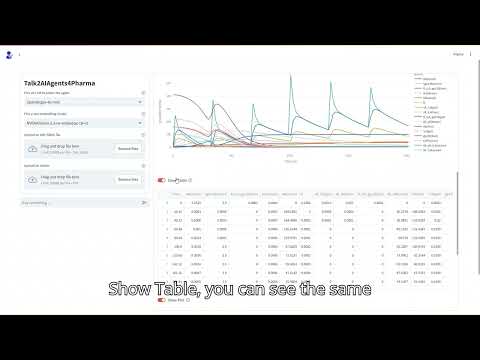
Welcome to AIAgents4Pharma – an open-source project by Team VPE that brings together AI-driven tools to help researchers and pharma interact seamlessly with complex biological data.
Our toolkit currently consists of the following agents:
- Talk2BioModels (v1 released; v2 in progress): Engage directly with mathematical models in systems biology.
- Talk2KnowledgeGraphs (v1 in progress): Access and explore complex biological knowledge graphs for insightful data connections.
- Talk2Scholars (v1 in progress): Get recommendations for articles related to your choice. Download, query, and write/retrieve them to your reference manager (currently supporting Zotero).
- Talk2Cells (v1 in progress): Query and analyze sequencing data with ease.
- Talk2AIAgents4Pharma (v1 in progress): Converse with all the agents above (currently supports T2B and T2KG)

News
- T2B and T2KG accepted at the MLGenX workshop during ICLR #2025 in Singapore. Read More
Getting Started
Installation
Option 1: Docker (stable-release)
We now have all the agents available on Docker Hub.
Choose your agent below for detailed Docker instructions:
Option 2: git (for developers and contributors)
- Clone the repository:
git clone https://github.com/VirtualPatientEngine/AIAgents4Pharma && cd AIAgents4Pharma
- Install dependencies:
We use Conda as our environment manager, Follow the official Quickstart install instructions provided by anaconda/miniconda.
conda create --name AIAgents4Pharma python=3.12 -y && conda activate AIAgents4Pharma && pip install --upgrade pip && pip install -r requirements.txt
- Initialize API Keys
export OPENAI_API_KEY=....          # Required for all agents
export NVIDIA_API_KEY=....          # Required for all agents
export ZOTERO_API_KEY=....          # Required for T2S
export ZOTERO_USER_ID=....          # Required for T2S
export LANGCHAIN_TRACING_V2=true    # Optional for all agents
export LANGCHAIN_API_KEY=...        # Optional for all agents
- Launch the app:
streamlit run app/frontend/streamlit_app_<agent>.py
Replace <agent> with the agent name you are interested to launch:
talk2aiagents4pharmatalk2biomodelstalk2knowledgegraphstalk2scholarstalk2cells
If your machine has NVIDIA GPU(s), please install the following this:
- nvidia-cuda-toolkit
- nvidia-container-toolkit (required for GPU support with Docker; enables containers to access NVIDIA GPUs for accelerated computing). After installing
nvidia-container-toolkit, please restart Docker to ensure GPU support is enabled.
To use the Agents, you need a free NVIDIA API key. Create an account and apply for free credits here.
Talk2Scholars and Talk2KnowledgeGraphs requires Milvus to be set up as the vector database — install Milvus depending on your setup by following the official instructions for CPU or GPU. You will also need a Zotero API key, which you can generate here. (The Zotero key is only required for Talk2Scholars; all other agents do not need it.)
By default,
talk2knowledgegraphsincludes a small subset of the PrimeKG knowledge graph, allowing users to start interacting with it out of the box. To switch to a different knowledge graph or use your own, refer to the deployment guide. Additionally on Windows, thepcst_fast 1.0.10library requires Microsoft Visual C++ 14.0 or greater. You can download the Microsoft C++ Build Tools here.
LangSmith support is optional. To enable it, create an API key here.
Please note that this will create a new tracing project in your Langsmith
account with the name T2X-xxxx, where X can be AA4P (Main Agent),
B (Biomodels), S (Scholars), KG (KnowledgeGraphs), or C (Cells).
If you skip the previous step, it will default to the name default.
xxxx will be the 4-digit ID created for the session.
Option 3: pip (beta-release)
pip install aiagents4pharma
Check out the tutorials on each agent for detailed instructions.
Contributing
We welcome your support to make AIAgents4Pharma even better.
All types of contributions are appreciated — whether you're fixing bugs, adding features, improving documentation, or helping with testing, every contribution is valuable.
How to contribute
- Star this repository to show your support.
- Fork the repository.
- Create a new branch for your work:
git checkout -b feat/your-feature-name
- Make your changes and commit them:
git commit -m "feat: add a brief description of your change"
- Push your branch:
git push origin feat/your-feature-name
- Open a Pull Request.
Areas where you can help
- Beta testing for Talk2BioModels and Talk2Scholars.
- Development work related to Python, bioinformatics, or knowledge graphs.
Contacts for contributions
- Talk2Biomodels: @lilijap, @gurdeep330
- Talk2Cells: @tAndreaniSanofi, @gurdeep330
- Talk2KnowledgeGraphs: @awmulyadi
- Talk2Scholars: @ansh-info, @gurdeep330
Please refer to our CONTRIBUTING.md for more detailed contribution guidelines.
Feedback
If you have questions, bug reports, feature requests, comments, or suggestions, we would love to hear from you.
Please open an issue or start a discussion
Release history Release notifications | RSS feed


Download files
Download the file for your platform. If you're not sure which to choose, learn more about installing packages.
Source Distribution
Built Distribution
Filter files by name, interpreter, ABI, and platform.
If you're not sure about the file name format, learn more about wheel file names.
Copy a direct link to the current filters
File details
Details for the file aiagents4pharma-1.44.0.tar.gz.
File metadata
- Download URL: aiagents4pharma-1.44.0.tar.gz
- Upload date:
- Size: 243.5 kB
- Tags: Source
- Uploaded using Trusted Publishing? No
- Uploaded via: twine/6.1.0 CPython/3.9.23
File hashes
| Algorithm | Hash digest | |
|---|---|---|
| SHA256 |
577d1edd10ba7f1b2214a4588eb37f47df129cea48f659e26724ec35b8333c79
|
|
| MD5 |
5e4f60745889597ec4d41f36dbdb26a2
|
|
| BLAKE2b-256 |
0addd1c8f59fb8dcbe4a3b6fe67a7925765c498e0f246475b341350e7cda6a00
|
File details
Details for the file aiagents4pharma-1.44.0-py3-none-any.whl.
File metadata
- Download URL: aiagents4pharma-1.44.0-py3-none-any.whl
- Upload date:
- Size: 386.5 kB
- Tags: Python 3
- Uploaded using Trusted Publishing? No
- Uploaded via: twine/6.1.0 CPython/3.9.23
File hashes
| Algorithm | Hash digest | |
|---|---|---|
| SHA256 |
7806ddd5edc5c4e9ce0bbf12f7b2013d31be05636ce658858bd1f2280503c937
|
|
| MD5 |
843ffab8abbea21c7fdf03db38bbcc60
|
|
| BLAKE2b-256 |
d371f1982d48383acd4fec250e848481cef0a46c6ea4d2c8a9ddeba32b53daea
|






