
AIBar/aibar (0.55.0)





Monitor AI usage and quota in one CLI.
AIBar aggregates usage metrics for Claude, OpenAI, OpenRouter, GitHub Copilot, Codex, GeminiAI, and Z.ai, with terminal output and a GNOME panel extension.
Quick Start | Requirements (uv) | Installation (uv) | Feature Highlights | Usage | Acknowledgments
🚧 DRAFT: Proof-of-Concept (PoC) Version 📝 - Work in Progress 🏗️ 🚧
⚠️ IMPORTANT NOTICE: Created with PI-useReq/pi-usereq 🤖✨ ⚠️
Feature Highlights
- Unified
showcommand for multiple providers (claude,openai,openrouter,copilot,codex,geminiai,zai). - Text output and machine output (
show --json) with stable top-level sections (payload,status,idle_time,freshness,extension,enabled_providers). - Per-run refresh override with
show --force(bypasses idle-time gating for that execution). - Interactive
setupfor provider enable/disable state, runtime throttling, Copilot overage pricing, provider currency symbols, GeminiAI OAuth/project settings, and logging flags. - Built-in lifecycle and observability flags:
--version|--ver,--upgrade,--upgrade --github,--uninstall,--enable-log,--disable-log,--enable-debug,--disable-debug. - Startup release preflight that can emit update notices or fetch diagnostics before normal command output.
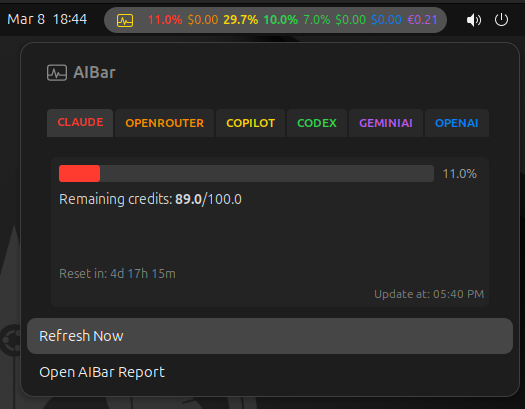
- GNOME Shell extension support via
gnome-install/gnome-uninstall, popupRefresh Now, and JSON-driven refresh/window metadata.
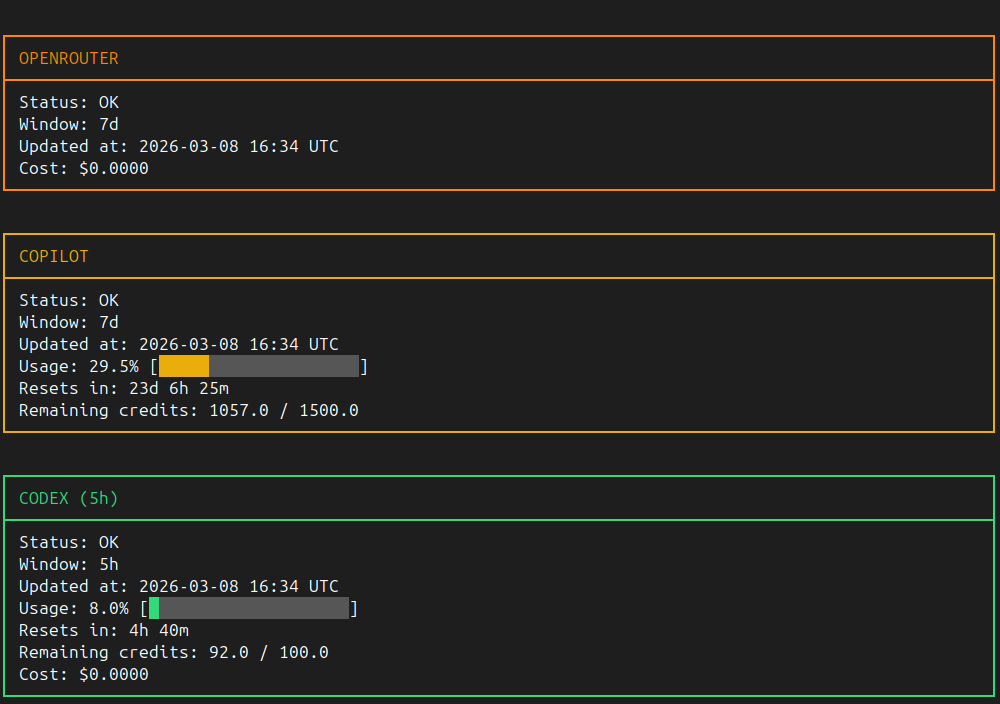
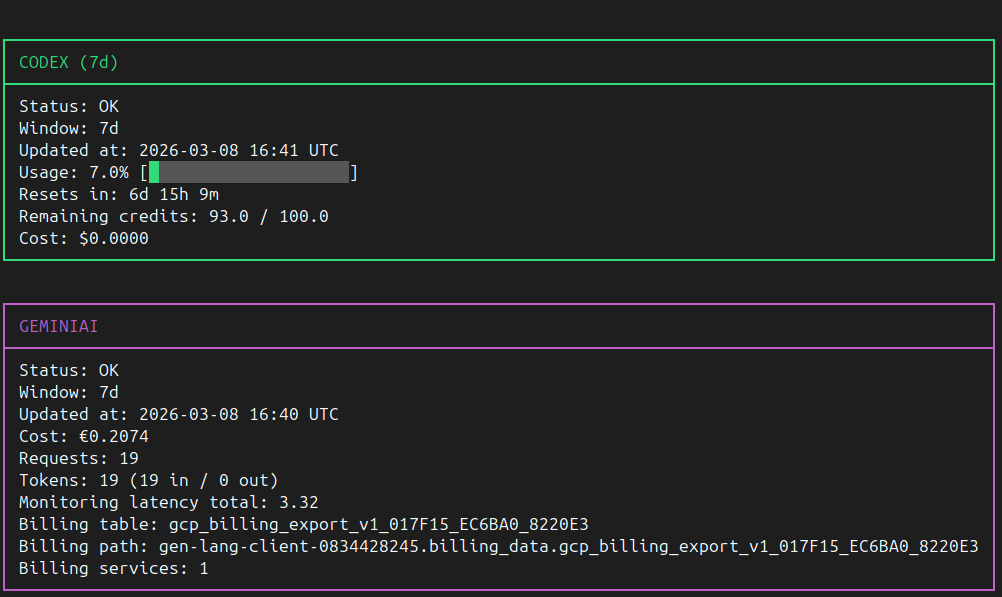
Screenshot

Quick Start
# 1) From the repository root, run the repository launcher
scripts/aibar.sh --help

# 2) Configure credentials and runtime settings
scripts/aibar.sh setup

# 3) Verify provider configuration and connectivity
scripts/aibar.sh doctor

# 4) Show usage
scripts/aibar.sh show
scripts/aibar.sh show --json
Requirements (uv)
AIBar requires Astral uv for all local launcher/runtime workflows.
Do not create or manage external virtual environments for repository execution.
AIBar requires Python >= 3.12; the repository pins the interpreter via .python-version
and uv run resolves a Python 3.12+ interpreter for every launcher execution.
Installation
AIBar is published on PyPI as aibar.
PyPI is the default source used by the program for version checks and self-upgrades (aibar --upgrade).
Intermediate and test releases are available on GitHub.
Install with pipx (primary)
Install pipx and use it to install AIBar in an isolated environment:
sudo apt install pipx
pipx ensurepath
pipx install aibar
After installation (and starting a new shell so pipx ensurepath takes effect) the aibar command is available system-wide:
aibar --help
aibar setup
aibar show
Install from PyPI with pip (alternative)
pip install aibar
Install with Astral uv / uvx (alternative)
uv is the recommended tool for repository-local launcher/runtime workflows and a fully supported alternative installer for the same PyPI package:
uv tool install aibar
Live execution without installation:
uvx aibar --help
uvx aibar show --json
Install from GitHub (alternative: intermediate and test releases)
Stable releases are distributed through PyPI. Intermediate and test releases are published on GitHub.
Install the latest GitHub version with uv:
uv tool install --force git+https://github.com/Ogekuri/AIBar
Upgrade an existing installation to the latest GitHub release:
aibar --upgrade --github
aibar --version reports the installed version plus the latest release
available on both PyPI and GitHub.
Live Execution from GitHub (no install)
Run AIBar directly from the repository without a local clone using uvx:
uvx --from "git+https://github.com/Ogekuri/AIBar.git" aibar --help
uvx --from "git+https://github.com/Ogekuri/AIBar.git" aibar show --json
uvx --from "git+https://github.com/Ogekuri/AIBar.git" aibar doctor
Export requirements.txt (optional)
uv export --format requirements-txt > requirements.txt
Uninstall
uv tool uninstall aibar
Usage
Core commands
# Show all configured providers
# (default flow renders dual windows for claude/codex when --window is not set)
aibar show

# Provider selection
# allowed values: claude, openai, openrouter, copilot, codex, geminiai, zai, all
aibar show --provider claude --window 5h

# JSON output for scripts/integrations
aibar show --json

# Force refresh for current execution (ignore idle-time gate)
aibar show --force

# Diagnostics and configuration
aibar doctor
aibar env
aibar setup

# Provider login helpers
aibar login --provider claude
aibar login --provider copilot
aibar login --provider geminiai

# GNOME extension lifecycle
aibar gnome-install
aibar gnome-uninstall
Providers disabled during aibar setup (stored under enabled_providers) are skipped by refresh/idle-time handling and omitted from show text and show --json output.
Global lifecycle and logging options
# Version
# aibar --version and aibar --ver are equivalent
aibar --version

# Package lifecycle helpers (Linux: executed directly; non-Linux: prints manual command)
aibar --upgrade
aibar --upgrade --github
aibar --uninstall

# Runtime logging flags
# execution log path: ~/.cache/aibar/aibar.log
aibar --enable-log
aibar --disable-log
aibar --enable-debug
aibar --disable-debug
- Startup behavior: every CLI invocation runs a latest-release preflight (PyPI) before command parsing. Notices and fetch diagnostics are idle-cached for about
300seconds;aibar --versionandaibar --verstill force one online check. --version/--verprint the installed version and the latest releases available on PyPI and GitHub.--upgradeupgrades from PyPI;--upgrade --githubupgrades from the latest GitHub release instead. Both execute only on Linux; on non-Linux platforms, AIBar prints the equivalent manualuvcommand.--uninstallexecutes only on Linux. On non-Linux platforms, AIBar prints the equivalent manualuvcommand.- Debug rows are emitted only when execution logging is enabled. For verbose API diagnostics, enable both
--enable-logand--enable-debug.
show window behavior
- Allowed windows:
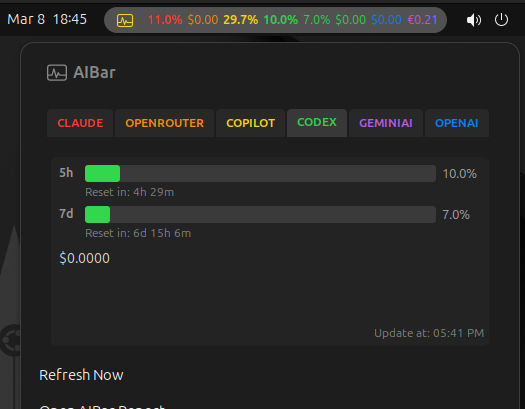
5h,7d,30d. claudeandcodexsupport dual-window rendering (5hand7d) in default text output when--windowis not explicitly set.- For
copilot,openrouter,openai,geminiai, andzai, the effective window is fixed to30deven if another--windowis provided.
Text output layout
- Each provider renders one colored panel in the canonical order
claude,openrouter,copilot,codex,openai,geminiai,zai; all panels share the same width. Statusis the first line on successful panels, and every panel ends with a right-alignedUpdated: <datetime>, Next: <datetime>freshness line.- Usage rows use
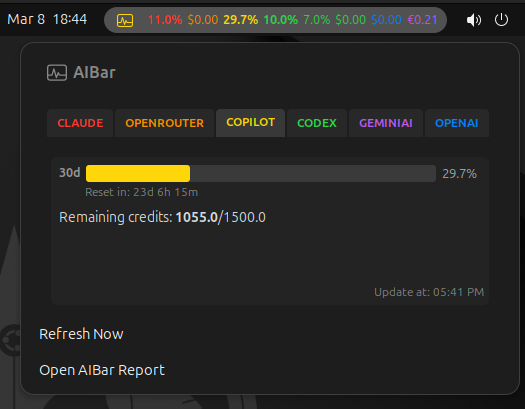
Usage: <window> <progress_bar> <percent>%forclaude,openrouter,copilot,codex, andzai;openaiandgeminiairenderUsage: <window> <percent>%without a bar. Remaining credits: <remaining> / <limit>is printed forclaude,codex, andcopilotwhen the status isOK.- Percentages above 100% render the over-limit segment with the 100% boundary marker.
- Failed providers render
Status: FAIL, the failureReason:, and theUpdated/Nextfreshness line instead of usage statistics.
OpenRouter
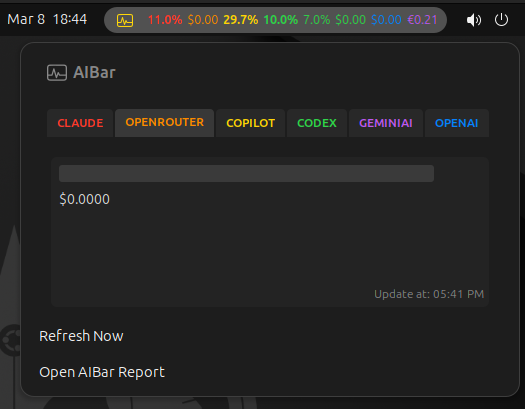
- The OpenRouter usage view is driven by the API key credit total returned by OpenRouter:
100%on the progress bar corresponds to the total credits on the key (current spend + remaining credit), and the bar shows current spend relative to that total. - No monthly budget needs to be configured. Spending beyond purchased credits renders the over-credit bar (
>100%) with the same over-limit marker used by other quota providers. aibar setupdoes not prompt for an OpenRouter budget, and no budget key is stored inconfig.json.- CLI and GNOME views also render
Total cost: <currency_symbol><total_cost>from the all-time API usage reported for the key (exposed asmetrics.total_costinshow --json). RequestsandTokensrows are not rendered for OpenRouter: the key API exposes no per-key request/token counters.
Z.ai
- Provider key
zai; the API key is read fromZAI_API_KEY(environment variable or~/.config/aibar/env) and can be entered duringaibar setup. - One quota request returns all quotas; the effective window is fixed to
30d. - Text output renders one progress bar per quota with the short labels
5h,1w, and1m(5-hour quota, weekly quota, and total monthly Web Search/Reader quota), each followed by its ownResets in: <duration>countdown. - Usage above 100% on any quota renders the shared over-limit bar segment with the 100% boundary marker.
- In the GNOME extension, Z.ai renders as the last provider tab/card (cyan accent): one progress bar per quota with
Reset in: <duration>, and the panel status bar shows the5hquota percentage followed by the bold1wquota percentage.
show --json contract
Top-level keys:
payload: normalized provider results keyed by provider id.status: per-provider, per-window fetch outcomes (OK/FAIL) and cached error metadata.idle_time: provider idle-time timestamps used for refresh gating.freshness: providerUpdated/Nexttimestamps used by CLI and GNOME views.extension: GNOME-facing metadata (gnome_refresh_interval_seconds,idle_delay_seconds,copilot_extra_premium_request_cost,window_labels).enabled_providers: normalized provider enable/disable map consumed by CLI and GNOME surfaces.
Setup persistence and config schema
aibar setup writes:
~/.config/aibar/env: credentials entered during setup.~/.config/aibar/config.json: runtime settings.
User-editable config.json keys surfaced by setup:
idle_delay_seconds(default300)api_call_delay_milliseconds(default100)api_call_timeout_milliseconds(default5000)default_retry_after_seconds(default3600)gnome_refresh_interval_seconds(default60)billing_data(defaultbilling_data)enabled_providers(missing provider keys default to enabled)copilot_extra_premium_request_cost(default0.04)currency_symbols(per-provider display symbol; setup choices$,£,€, default$)log_enableddebug_enabledgeminiai_project_id
GNOME extension behavior
- Installed path:
~/.local/share/gnome-shell/extensions/aibar@aibar.panel/. - Supported GNOME Shell versions:
45,46,47,48. - Scheduled refreshes run
aibar show --json. - Popup
Refresh Nowrunsaibar show --json --force. - Disabled providers from
aibar setupare hidden from panel labels, tabs, and cards. - Provider cards show
Updated: ..., Next: ...freshness labels. - Auto-refresh interval follows
gnome_refresh_interval_secondsfromaibar setup/config.json.
Repository helper scripts
# Repository launcher (delegates to uv run --project ... python -m aibar.cli)
scripts/aibar.sh --help

# Claude token refresh helper
scripts/claude_token_refresh.sh {start|stop|status|once|loop}

# Override refresh interval (seconds; default: 1800)
AIBAR_CLAUDE_REFRESH_INTERVAL_SECONDS=900 scripts/claude_token_refresh.sh start

# Helper state files
# log: ~/.config/aibar/claude_token_refresh.log
# pid: ~/.config/aibar/claude_token_refresh.pid

# GNOME nested-shell test helper
# runs gnome-install, then starts a nested Wayland GNOME Shell (1280x720)
scripts/test-gnome-extension.sh
GeminiAI prerequisites
To enable GeminiAI features, configure Google Cloud before running aibar setup:
- Create Desktop Client OAuth 2.0 credentials in the target Google Cloud project.
- In
aibar setup, configure GeminiAI OAuth client JSON (fileorpaste) or re-authorize withlogin, then authorize requested scopes:https://www.googleapis.com/auth/bigquery.readonlyhttps://www.googleapis.com/auth/monitoring.readhttps://www.googleapis.com/auth/cloud-platform
- Configure the Gemini project id in setup (
geminiai project id) or viaGEMINIAI_PROJECT_ID. - Set setup field
billing_datato the BigQuery dataset containing billing export tables (gcp_billing_export_v1_*, default dataset name:billing_data). - Ensure required Google APIs are enabled for the project used by OAuth credentials:
- Cloud Monitoring API
- BigQuery API
Acknowledgments
- Thanks to Shobhit Narayanan for creating GnomeCodexBar.
License
- This program is licensed under the terms in
LICENSE. - This project includes modified files from GnomeCodexBar; those files are covered by the license provided in
LICENSE_GnomeCodexBar, as required by the original license terms.
Screenshots
Claude
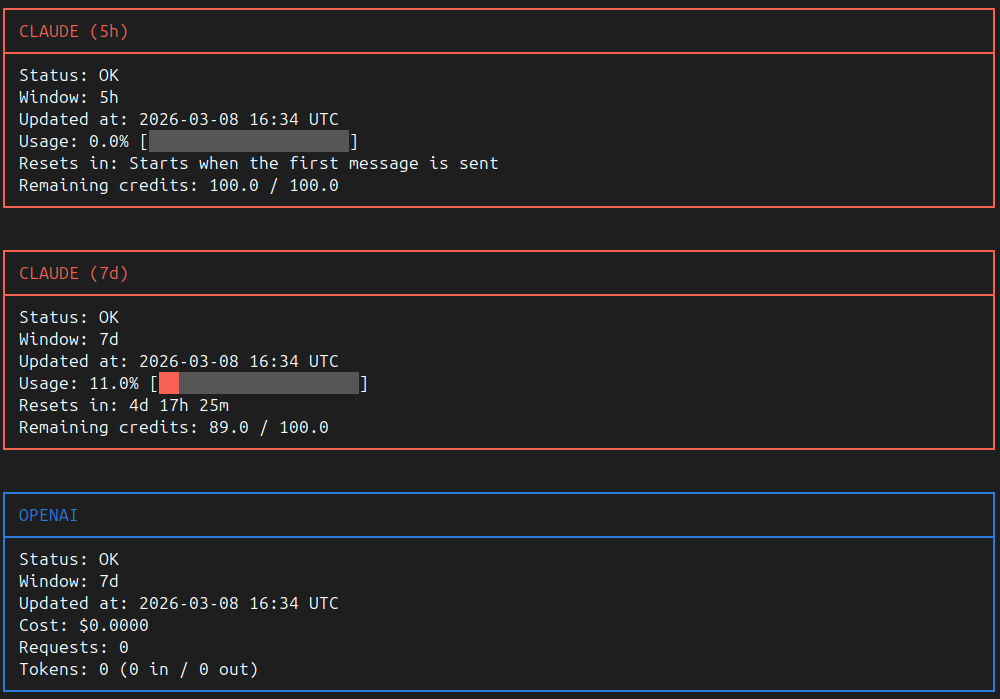
Claude (7d window)
OpenRouter
GitHub Copilot
OpenAI Codex
Gemini AI API

OpenAI API

1 maintainer

Metadata
1 maintainer
Release files for aibar 0.55.0
For a detailed explanation of source distributions (sdists) and built distributions (wheels), please see the package formats documentation.
Source distribution (sdist)
| File | Size | Uploaded | Provenance | Actions |
|---|---|---|---|---|
| aibar-0.55.0.tar.gz | 129.5 kB | With provenance | Details for aibar-0.55.0.tar.gz |
Built distribution (wheel)
| File | Interpreter | ABI | Platform | Actions Reset |
|---|---|---|---|---|
| aibar-0.55.0-py3-none-any.whl | Python 3 | none | any | Details for aibar-0.55.0-py3-none-any.whl |
Total release size: 270.6 kB
Release files / aibar-0.55.0.tar.gz
| Download URL | aibar-0.55.0.tar.gz |
|---|---|
| Size | 129.5 kB |
| Tags | Source |
|
SHA-256 checksum How to use checksums |
6f9f8132757615abf91d04fbe5ba5199626dc7086dbffc8a133ae1807a60acf9
|
|
BLAKE2b-256 checksum How to use checksums |
60f00d0d4891d5f963bd52ddffcaf5d0c2c9a77b1132a493a2565e1a4d10682d
|
| Upload date | |
|
Uploaded using Trusted Publishing? What is trusted publishing? |
Yes |
| Uploaded via |
twine/7.0.0 CPython/3.13.16
|
Provenance
Provenance describes where a file came from. On PyPI, provenance is shared via attestations, which provide a verifiable record of the build or publishing details. View details, limitations and caveats.


PyPI Publish Attestation
PyPI verified that this artifact, at this checksum, originated from the publisher listed below.
Signed by GitHub Actions, verified by PyPI on Nov 5, 2026.
Transparency logRelease files / aibar-0.55.0-py3-none-any.whl
| Download URL | aibar-0.55.0-py3-none-any.whl |
|---|---|
| Size | 141.1 kB |
| Tags | Python 3 |
|
SHA-256 checksum How to use checksums |
15865b0a5b75476c45fc5da716b7f6236f5a6ba6c34503ad58d40df22d3124fc
|
|
BLAKE2b-256 checksum How to use checksums |
0d3d341add65c70bdfca1a0881e47721b475e205ddb857a75ff1a8c8471b4ad4
|
| Upload date | |
|
Uploaded using Trusted Publishing? What is trusted publishing? |
Yes |
| Uploaded via |
twine/7.0.0 CPython/3.13.16
|
Provenance
Provenance describes where a file came from. On PyPI, provenance is shared via attestations, which provide a verifiable record of the build or publishing details. View details, limitations and caveats.
PyPI Publish Attestation
PyPI verified that this artifact, at this checksum, originated from the publisher listed below.
Signed by GitHub Actions, verified by PyPI on Nov 5, 2026.
Transparency logSecurity for aibar 0.55.0
Provenance
Provenance describes where a file came from. On PyPI, provenance is shared via attestations, which provide a verifiable record of the build or publishing details. View details, limitations and caveats.
Full provenance
All 2 files in this release have been uploaded with provenance metadata.
Attestation for aibar-0.55.0.tar.gz
PyPI Publish Attestation
PyPI verified that this artifact, at this checksum, originated from the publisher listed below.
Signed by GitHub Actions, verified by PyPI on Nov 5, 2026.
Transparency logA note on package security
PyPI is a repository for distributing packages, not a service for auditing them. While third-party security researchers and our staff do their best to detect and remove malicious packages, PyPI cannot guarantee the quality, security or suitability of any given package.
To learn more about protecting yourself from malicious actors, visit our package security documentation.














