
AICfg



Unified AI assistant configuration management.
Built in Python, consumable from both Python and Node.js projects.
Currently, AICfg has only one command: link.
Link Command
One source of truth per assistant. Pick any as your source.
What It Does
AI coding assistants each have their own config files — instructions, skills, rules, agents. Managing them across multiple tools means editing the same content in multiple places. aicfg link solves this by creating symlinks so all assistants point to a single source.
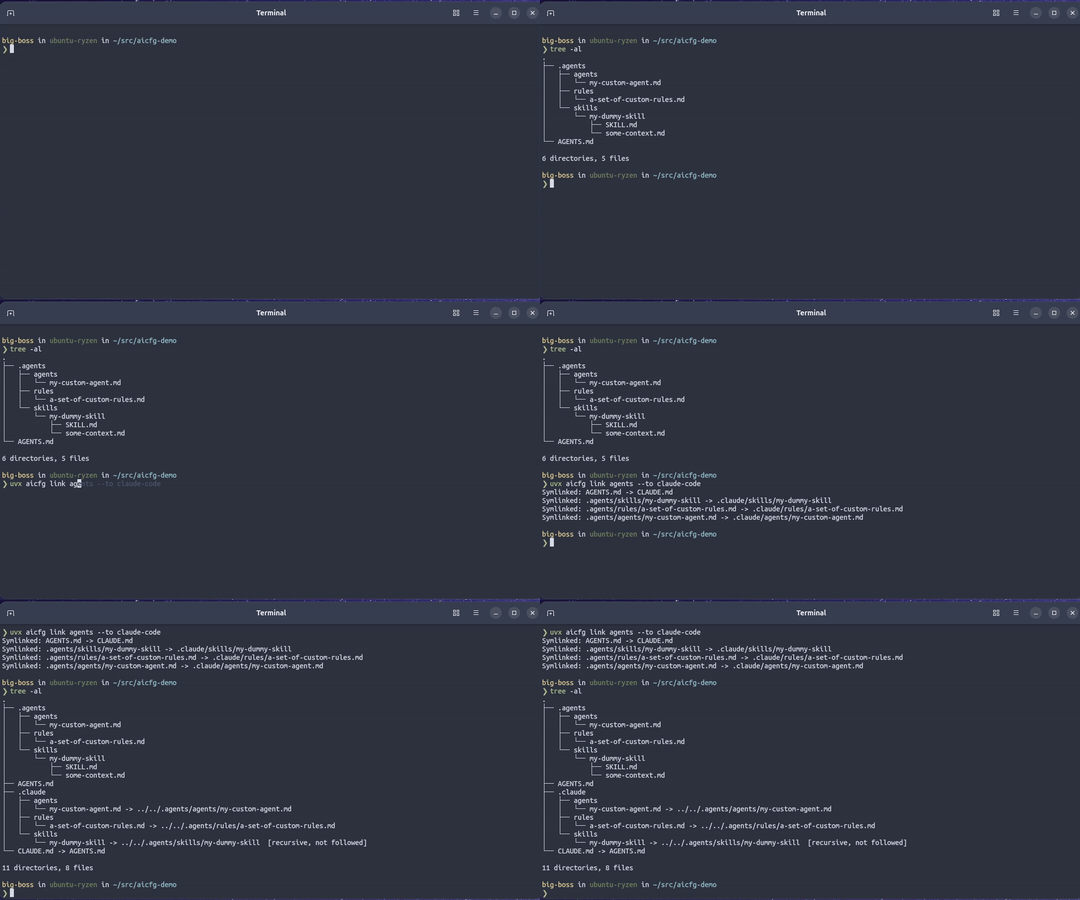
Note: you can pick any of the supported assistants as a source or a target.
Supported Assistants
| Name | Instructions | Skills | Rules | Agents |
|---|---|---|---|---|
| claude-code | CLAUDE.md |
.claude/skills/ |
.claude/rules/ |
.claude/agents/ |
| cursor | .cursorrules |
.cursor/skills/ |
.cursor/rules/ |
.cursor/agents/ |
| github-copilot | .github/copilot-instructions.md |
.github/skills/ |
.github/instructions/ |
.github/agents/ |
| agents | AGENTS.md |
.agents/skills/ |
.agents/rules/ |
.agents/agents/ |
| opencode | AGENTS.md |
.opencode/skills/ |
.opencode/rules/ |
.opencode/agents/ |
Usage
# Dry run — see what would happen without creating symlinks
uvx aicfg link github-copilot --to claude-code,cursor --dry-run

# Link github-copilot → claude-code and cursor
uvx aicfg link github-copilot --to claude-code,cursor

# Link to all assistants at once
uvx aicfg link agents --to claude-code,cursor,github-copilot,opencode

# Verbose output
uvx aicfg link cursor --to claude-code --verbose
Python projects — skip uvx: add aicfg to your project and run uv instead of uvx to reuse your existing environment:
uv add --dev aicfg
uv run aicfg link cursor --to claude-code
npm users — install Python 3.11+ first, then replace uvx with npx, or install globally with npm install -g aicfg.
Install with pip
# Install with pip
pip install aicfg

# Run installed
aicfg link agents --to claude-code
Pre-commit Hook
Add this to your .pre-commit-config.yaml:
- repo: https://github.com/TomerFi/aicfg
  rev: "0.2.0"
  hooks:
    - id: link
      args: ["cursor", "--to", "claude-code", "opencode"]
Choose a source from the table above as the first arg and your targets via --to.
GitHub Action
Add this to a GitHub Action to fail if symlinks drift:
- name: Ensure assistant files are linked
  uses: tomerfi/aicfg/link@0.2.0
  with:
    source: agents
    target: claude-code,opencode
    verbose: true
How It Works
aicfg link creates relative symlinks between assistants. For instructions, a file symlink is created at the target path pointing back to the source. For directory categories (skills, rules, agents), the target directory is created and each direct entry inside it is symlinked.
For directories, each entry (file or subdirectory) is symlinked as-is into the target directory. Files become file symlinks, directories become directory symlinks — the entries themselves are symlinked, not their individual contents. The source file acts as the single source of truth — edit it once and all targets receive your changes immediately.
Troubleshooting
Symlinks cloned as regular files — if your git checkout has symlinks as regular files instead of → links, your git config has core.symlinks=false. Fix it with:
git config core.symlinks true
git checkout -- <path>        # e.g. .claude/ .agents/
For future clones, run git config --global core.symlinks true beforehand. This is the default behavior for most modern git clients.
1 maintainer

Metadata
1 maintainer
Release files for aicfg 0.2.0
For a detailed explanation of source distributions (sdists) and built distributions (wheels), please see the package formats documentation.
Source distribution (sdist)
| File | Size | Uploaded | |
|---|---|---|---|
| aicfg-0.2.0.tar.gz | 213.4 kB | Details |
Built distribution (wheel)
| File | Interpreter | ABI | Platform | Reset |
|---|---|---|---|---|
| aicfg-0.2.0-py3-none-any.whl | Python 3 | none | any | Details |
Total release size: 220.3 kB
Release files / aicfg-0.2.0.tar.gz
| Download URL | aicfg-0.2.0.tar.gz |
|---|---|
| Size | 213.4 kB |
| Tags | Source |
|
SHA-256 checksum How to use checksums |
18a8e7377948323e2520ec26653391edd7e373f4b75ed4b6f0a725305890a8ee
|
|
BLAKE2b-256 checksum How to use checksums |
44500fa41a2a63b9b0eda0faa3bbd79bafc5cd7c7513118b08721d6d17a863d2
|
| Upload date | |
|
Uploaded using Trusted Publishing? What is trusted publishing? |
Yes |
| Uploaded via |
twine/7.0.0 CPython/3.13.14
|
Provenance
Provenance describes where a file came from. On PyPI, provenance is shared via attestations, which provide a verifiable record of the build or publishing details. View details, limitations and caveats.


PyPI Publish Attestation
PyPI verified that this artifact, at this checksum, originated from the publisher listed below.
Signed by GitHub Actions, verified by PyPI on Aug 17, 2026.
Transparency logRelease files / aicfg-0.2.0-py3-none-any.whl
| Download URL | aicfg-0.2.0-py3-none-any.whl |
|---|---|
| Size | 7.0 kB |
| Tags | Python 3 |
|
SHA-256 checksum How to use checksums |
861cea00fbc09969387f3864dd29d7ecf9dfcb821f49f94dc650909930eed0aa
|
|
BLAKE2b-256 checksum How to use checksums |
56f1c5d092cc535ad937a298b6545791f5a59a55198a4cc5698684eacd9b1d68
|
| Upload date | |
|
Uploaded using Trusted Publishing? What is trusted publishing? |
Yes |
| Uploaded via |
twine/7.0.0 CPython/3.13.14
|
Provenance
Provenance describes where a file came from. On PyPI, provenance is shared via attestations, which provide a verifiable record of the build or publishing details. View details, limitations and caveats.
PyPI Publish Attestation
PyPI verified that this artifact, at this checksum, originated from the publisher listed below.
Signed by GitHub Actions, verified by PyPI on Aug 17, 2026.
Transparency log













