
AI Commit (aicmt)
An AI-powered Git commit assistant that not only generates commit messages, but also automatically analyzes and splits your code changes into multiple well-organized commits following best practices.
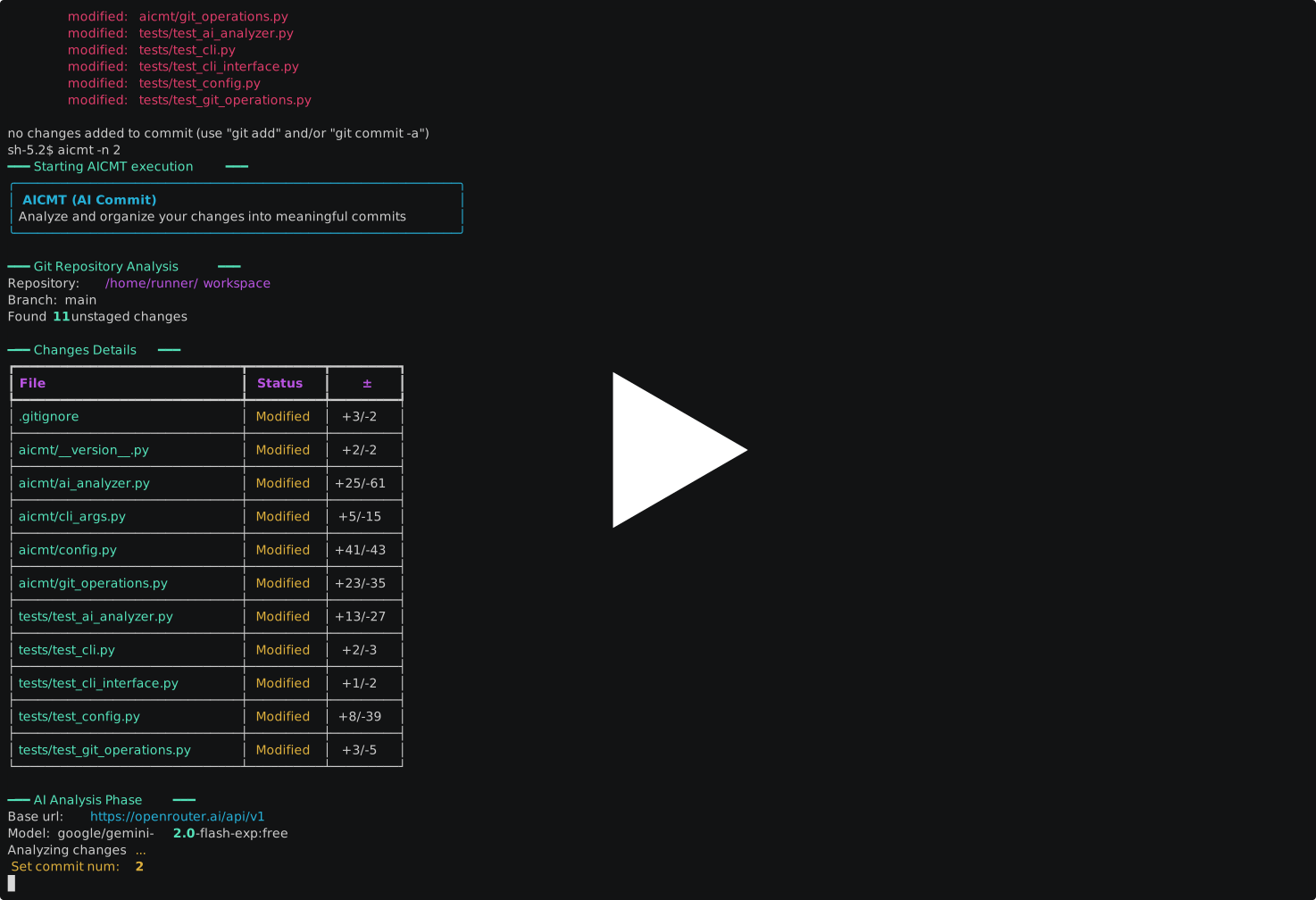
Features
- Intelligent Change Splitting: Unlike traditional commit message generators, aicmt analyzes your code changes and automatically splits them into logical, focused commits following Git best practices
- Flexible Control: You can let AI decide the optimal number of commits, or specify exactly how many commits you want
- Focus on Coding: Make all your changes freely, and let AI handle the commit organization - no need to worry about making perfect atomic commits while coding
Installation
Use pip to install (Python >=3.10)
pip install aicmt
or use brew to install
brew install versun/tap/aicmt
Quick Start
- Create configuration file
.aicmtrc
Reference the template file .aicmtrc.template and create .aicmtrc in your home directory.
cp .aicmtrc.template ~/.config/aicmt/.aicmtrc
You can also create .aicmtrc in the current directory, which will override the global configuration file (~/.config/aicmt/.aicmtrc)
cd /path/to/git/repo
touch .aicmtrc
-
Add OpenAI API and other information in the configuration file.
-
Enter your git repository directory and run the
aicmtcommand to automatically analyze changes and generate commit messages.
Help
$ aicmt -h
usage: aicmt [-h] [-v] [-n N]

<<< AICMT (AI Commit) - AI-powered Git commit assistant >>>

options:
  -h, --help           show this help message and exit
  -v, --version        show program's version number and exit
  -n, --num-commits N  Number of commits to generate (default: AI decides)
Development
- Clone the repository:
git clone https://github.com/versun/aicmt.git
- Install dependencies:
cd aicmt
pip install -e ".[dev]"
Having Issues?
All code in this project is AI-generated, so if you encounter any problems, please first try asking AI for solutions (preferably using the claude-3.5-sonnet model). If the issue persists, please submit an issue, and I will consult AI to resolve it.
Contributing
Pull requests are welcome! Please submit an issue before submitting a pull request, to avoid duplicate submissions.
A Big Thank You to My Sponsors
I am deeply grateful to my amazing supporters and sponsors who have made my open source journey possible.

Become a Sponser on Github / 爱发电 / 微信
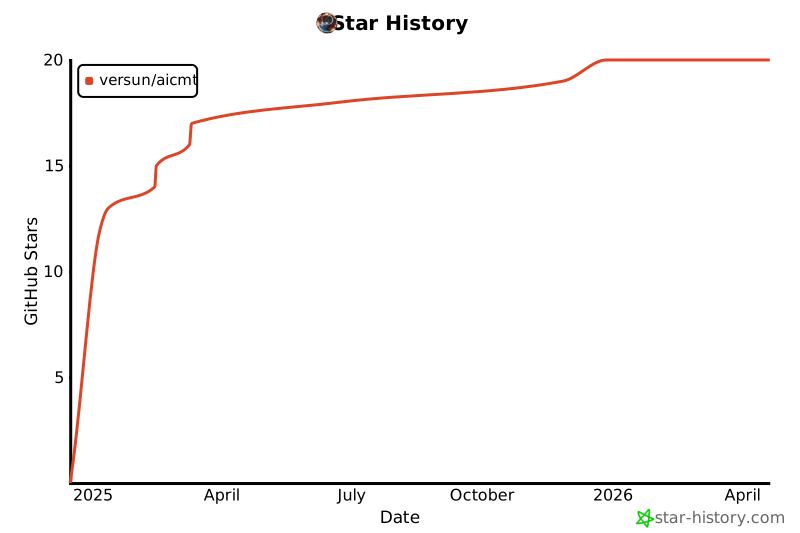
Star History
1 maintainer

Metadata
1 maintainer
Release files for aicmt 0.1.4
For a detailed explanation of source distributions (sdists) and built distributions (wheels), please see the package formats documentation.
Source distribution (sdist)
| File | Size | Uploaded | Provenance | |
|---|---|---|---|---|
| aicmt-0.1.4.tar.gz | 30.3 kB | With provenance | Details |
Built distribution (wheel)
| File | Interpreter | ABI | Platform | Reset |
|---|---|---|---|---|
| aicmt-0.1.4-py3-none-any.whl | Python 3 | none | any | Details |
Total release size: 48.9 kB
Release files / aicmt-0.1.4.tar.gz
| Download URL | aicmt-0.1.4.tar.gz |
|---|---|
| Size | 30.3 kB |
| Tags | Source |
|
SHA-256 checksum How to use checksums |
6c76e2a66b1403d9234ccd763a507d091e1950fe0eba15d0c09ac44bd1066547
|
|
BLAKE2b-256 checksum How to use checksums |
2e1dc53abeb4927f3d603c2f999d084c320b755f2a47efec84e341ce21360780
|
| Upload date | |
|
Uploaded using Trusted Publishing? What is trusted publishing? |
Yes |
| Uploaded via |
twine/6.0.1 CPython/3.12.8
|
Provenance
Provenance describes where a file came from. On PyPI, provenance is shared via attestations, which provide a verifiable record of the build or publishing details. View details, limitations and caveats.


PyPI Publish Attestation
PyPI verified that this artifact, at this checksum, originated from the publisher listed below.
Signed by GitHub Actions, verified by PyPI on Dec 28, 2024.
Transparency logRelease files / aicmt-0.1.4-py3-none-any.whl
| Download URL | aicmt-0.1.4-py3-none-any.whl |
|---|---|
| Size | 18.6 kB |
| Tags | Python 3 |
|
SHA-256 checksum How to use checksums |
603e888b756f6271732624662e6b915843cc9844224f683ad919bba3b28a2663
|
|
BLAKE2b-256 checksum How to use checksums |
01a9b72827eaf314f4ae8ae15d5cad531b7e6f40085dbe3c646b60b95b10ff73
|
| Upload date | |
|
Uploaded using Trusted Publishing? What is trusted publishing? |
Yes |
| Uploaded via |
twine/6.0.1 CPython/3.12.8
|
Provenance
Provenance describes where a file came from. On PyPI, provenance is shared via attestations, which provide a verifiable record of the build or publishing details. View details, limitations and caveats.
PyPI Publish Attestation
PyPI verified that this artifact, at this checksum, originated from the publisher listed below.
Signed by GitHub Actions, verified by PyPI on Dec 28, 2024.
Transparency logSecurity for aicmt 0.1.4
Provenance
Provenance describes where a file came from. On PyPI, provenance is shared via attestations, which provide a verifiable record of the build or publishing details. View details, limitations and caveats.
Full provenance
All 2 files in this release have been uploaded with provenance metadata.
Attestation for aicmt-0.1.4.tar.gz
PyPI Publish Attestation
PyPI verified that this artifact, at this checksum, originated from the publisher listed below.
Signed by GitHub Actions, verified by PyPI on Dec 28, 2024.
Transparency logA note on package security
PyPI is a repository for distributing packages, not a service for auditing them. While third-party security researchers and our staff do their best to detect and remove malicious packages, PyPI cannot guarantee the quality, security or suitability of any given package.
To learn more about protecting yourself from malicious actors, visit our package security documentation.















