
autocommit
AI-Generated Git Commit Messages
Includes two tools: commit.py and scan_repo.py
Install the aicommit command with pip install aicommit
commit
An interactive CLI tool that generates 5 commit message suggestions for all the changes in your current Git repo. After you pick and edit the commit message you want, it performs the commit.
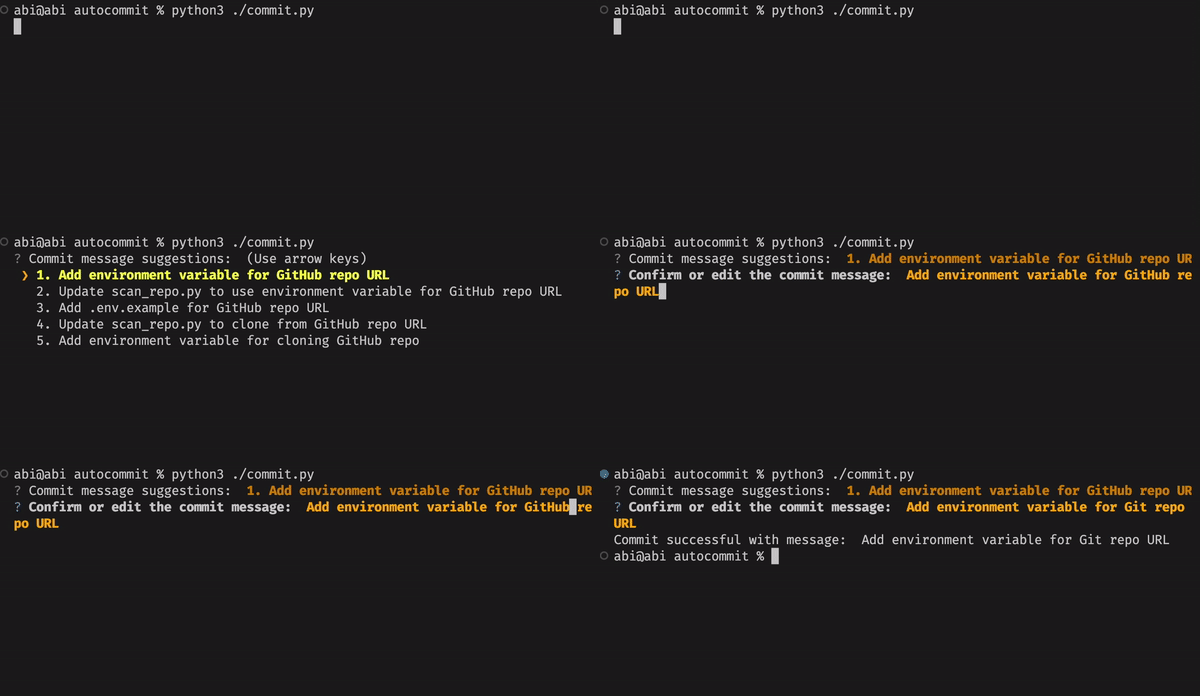
NOTE: it commits all changes, untracked and unstaged, in your current repo.
On first run, it will prompt you for your OpenAI API key. Sign up for OpenAI if you haven't. Grab your API key by going to the dropdown on the top right, selecting "View API Keys" and creating a new key. Copy this key.
scan_repo
scan_repo runs through all the commits in your repository to generate a CSV with AI-suggested commit messages side-by-side with your original commit messages.
To run scan_repo, copy .env.example to .env and add your OPENAI_KEY.
To update the repo it runs on, modify the GITHUB_REPO_URL variable at the top of scan_repo.py
Publishing to pip
Version bump and clear out dist/
python3 -m build
twine check dist/*
twine upload dist/* --verbose
1 maintainer

Metadata
1 maintainer
Release files for aicommit 0.1.0
For a detailed explanation of source distributions (sdists) and built distributions (wheels), please see the package formats documentation.
Source distribution (sdist)
| File | Size | Uploaded | Provenance | |
|---|---|---|---|---|
| aicommit-0.1.0.tar.gz | 7.9 kB | Without provenance | Details |
Built distribution (wheel)
| File | Interpreter | ABI | Platform | Reset |
|---|---|---|---|---|
| aicommit-0.1.0-py3-none-any.whl | Python 3 | none | any | Details |
Total release size: 15.4 kB
Release files / aicommit-0.1.0.tar.gz
| Download URL | aicommit-0.1.0.tar.gz |
|---|---|
| Size | 7.9 kB |
| Tags | Source |
|
SHA-256 checksum How to use checksums |
7369dea26d5594285e13c8b4b8297bf3d0992f1c7b3a09aa1273e9604afc536f
|
|
BLAKE2b-256 checksum How to use checksums |
12d262190b07724f7e18cb1d33b849ad55b0ca9ef318a266d7cdd8db1cb3cd4f
|
| Upload date | |
|
Uploaded using Trusted Publishing? What is trusted publishing? |
No |
| Uploaded via |
twine/4.0.2 CPython/3.9.13
|
Release files / aicommit-0.1.0-py3-none-any.whl
| Download URL | aicommit-0.1.0-py3-none-any.whl |
|---|---|
| Size | 7.5 kB |
| Tags | Python 3 |
|
SHA-256 checksum How to use checksums |
9d1a51d2b661fe745d4cdf7dcc174c3054092be0c7cd1439262bf70c80d59b0c
|
|
BLAKE2b-256 checksum How to use checksums |
6e2cc24c11c31d712a8ae1b5126d07fbf65faded10d5fdf671893a253416111c
|
| Upload date | |
|
Uploaded using Trusted Publishing? What is trusted publishing? |
No |
| Uploaded via |
twine/4.0.2 CPython/3.9.13
|
Security for aicommit 0.1.0
Provenance
Provenance describes where a file came from. On PyPI, provenance is shared via attestations, which provide a verifiable record of the build or publishing details. View details, limitations and caveats.
No provenance found
None of the files in this release were uploaded with provenance metadata.
A note on package security
PyPI is a repository for distributing packages, not a service for auditing them. While third-party security researchers and our staff do their best to detect and remove malicious packages, PyPI cannot guarantee the quality, security or suitability of any given package.














