
AI Cordon





Catch obvious prompt injections before they reach your model.
Picket scans large volumes of untrusted text locally, with near-zero false positives and no model inference: 100–200 documents a second on one CPU core, one false alarm per thousand clean texts. It is a rule — it reads the surface of the text and matches signatures — so there is no network, no GPU and no dependencies. It is the open-source signature layer of AI Cordon.
It works at both ends of an agent's input: an instruction planted in the material the model works on, and a jailbreak in the request a user types. It catches the obvious ones: 16.4% of the injections in an open corpus, 34.8% of forum jailbreaks it has never seen.
It is not a prefilter. Silence from a rule is not a verdict, which is why the API has no
is_safe field and never will. Its place is where a heavier check cannot go at all — a whole
corpus, an ingest path, a mail gateway, a repository — and in front of a model it adds a layer, it
does not replace one.
On this page
- What it catches, and what it costs
- Quick start
- Where it belongs, and why nothing leaves the process
- Measured: recall, false positives, speed
- What it covers
- Reports, triage and the library
- The base and its version
- Licensing
The two ends carry different attacks written in different words:
- material — text the model was given to work ON: a page, a mail body, a tool result, a retrieved chunk. An instruction hiding in it comes from whoever wrote that text, and the person in the session never asked for it;
- the request — the turn the model was asked to answer. A jailbreak here is the user's own, and it argues with the model's rules rather than hiding from them.
So the detector has two modes, and you say which one to run. The mode follows the ROLE the text plays in your prompt, not who wrote it or where it came from — and your code always knows that, because it puts the two in different places when it assembles the call:
mode |
what it detects | the text is there | for example |
|---|---|---|---|
ipi (default) |
indirect prompt injection | for the model to work on — it is the subject, not the ask | a RAG chunk, a page, an email body, a tool result, a file read from a repository |
dpi |
direct prompt injection, i.e. a jailbreak | as the ask itself — what the model is answering | the chat message, the prompt field of your API |
The two are separate detectors in one artifact, each measured on its own field. Running the wrong one is not a milder setting of the same check — it points a detector at a field it was never measured on.
What it catches, and what it costs
Indirect prompt injection--mode ipi (default) |
Direct prompt injection--mode dpi |
|
|---|---|---|
| catches | 16.4% of the injections in an open corpus | 34.8% of forum jailbreaks it has never seen |
| false alarms | 0.098% of clean documents | 0.101% of real user turns |
| measured on | Quadrat-IPI v1.0.1 — 16 800 injections, 63 000 clean documents | in-the-wild-jailbreak-prompts against WildChat user turns |
| the report | quadrat-ipi-v1.0.1.md | direct-jailbreaks-2026-08.md |
The two columns answer different questions on different corpora, so read the column heading with the row and never average them. Both corpora are public and so is every harness, so both columns can be reproduced rather than believed.
The rest of the working point is the same in either mode, and what carries to your machine is the
SHAPE rather than the constant: the cost is linear in the size of the document. On one CPU core
here that line is 1.85 ± 0.07 ms per 1000 characters through check(), 48.5 MB of RAM plus
0.27 MB per KB of the document, 105 ms to start the command and nothing per call, no GPU, no
network, no key, no dependencies.
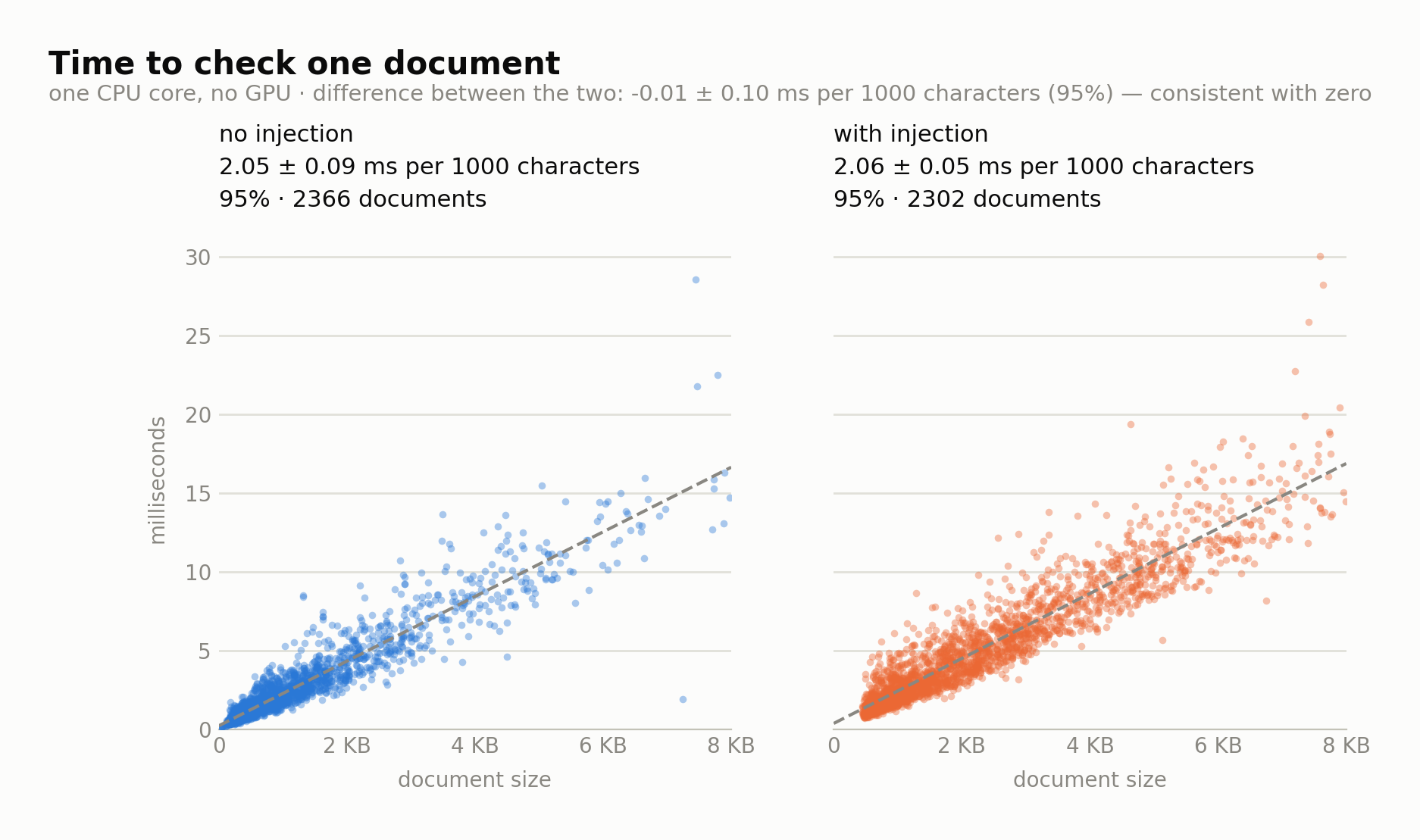
Two panels over 4 800 real documents, measured separately: 1.88 ± 0.08 ms per 1000 characters on the injected half, 1.69 ± 0.10 on the clean one. Both are straight lines; what difference there is belongs to the text and not to the verdict — the cost follows how many dictionary hits a corpus produces. How both figures were fitted, and what a check costs in memory: cost.md.
What an alarm from it is worth on your traffic: the pair, not the number.
Quick start
$ pip install aicordon
$ aicordon retrieved.md                          # material: a document, a page, a tool result
$ aicordon picket scan --jsonl documents.jsonl --field text --json
$ aicordon picket scan --mode dpi --jsonl turns.jsonl --field text   # the other end: typed turns
With one product installed the command fills in the rest: aicordon alone checks the current
directory with the only product that is ready, and says in the report that it chose for you.
A library first, a command second. The library is the product: it is what goes into an agent loop, an ingestion pipeline or a mail gateway, and the command is the same detector with a report attached to it.
from aicordon import picket

read  = picket.load()               # once per process — for text the agent RETRIEVES
typed = picket.load(mode="dpi")     # and one for the turns the user TYPES

# Both ends of the same loop, each with the rules that belong to it.
if typed.check(user_message).flagged:
    log.warning("jailbreak attempt in the user turn")

page = fetch(url)
rep = read.check(page)
if rep.flagged:
    log.warning("injection in tool output: %s at %s", rep.threats, rep.span)
    for f in reversed(rep.findings):    # from the end, so the offsets ahead stay valid
        lo, hi = f.span
        page = page[:lo] + page[hi:]    # or drop the page, or ask a human
Guarding both ends means two detectors, and each load() builds its own engine: budget about
22 MB for the second one. The full interface — batching, async, threads, JSON — is in
library.md.
Where it belongs, and why nothing leaves the process
The check runs where your code runs. No network call, no model download, no account, no key, no telemetry — the package contains no network code at all, so the document you check has nowhere to be sent even by accident. Mail, tickets, contracts, patient records, anything under GDPR: the question "where does this text go" has one answer, and it is "nowhere".
That property is worth more on the typed end than anywhere else. A jailbreak filter sits on every turn of every session, which means it reads every word your users write; a hosted one turns that into a second copy of your conversation log on somebody else's machine. This one cannot.
For most of the places this tool belongs — a mail gateway, a document archive, a repository, a chat front door — that is the first question, before speed. The full detector is built to keep the same property: on premises as well as over the API, so upgrading the detection does not mean giving up the boundary.
Measured: recall, false positives, speed
Two working points, one per mode, each on its own corpus. Catches is recall and false alarms is the false-positive rate; this page uses the plain words throughout so the two tables can be read side by side.
Indirect prompt injection — mode ipi, the material
The default. Text the model was given to work on: RAG chunks, pages, mail bodies, tool results.
| catches | 16.4% of 16 800 injections on Quadrat-IPI v1.0.1, counted by document · CI 15.8–17.0 |
| false alarms | 0.098% — 62 of 63 000 clean documents of the same corpus |
| size | a single file of a few hundred KB |
The corpus is open and so is the harness, so this row can be reproduced rather than believed: the report it comes from, with the 92-cell grid per carrier, is in docs/eval.
Direct prompt injection — mode dpi, the request
The turn the model is answering: the chat message, the prompt field of your API. Its own rule group, its own corpus, its own measurement.
| catches | 34.8% of the forum jailbreaks in in-the-wild-jailbreak-prompts — none of which it was built on, and near-copies of the ones it was built on were struck out first, so recognising a reworded DAN does not count |
| false alarms | 0.101% of real WildChat turns: about one per thousand messages your users send |
The detector ships one working point, the row above. A signature base has no threshold to turn, so the working point is settled when the base is built, and this one was settled at one alarm per thousand turns. It sits on a curve:
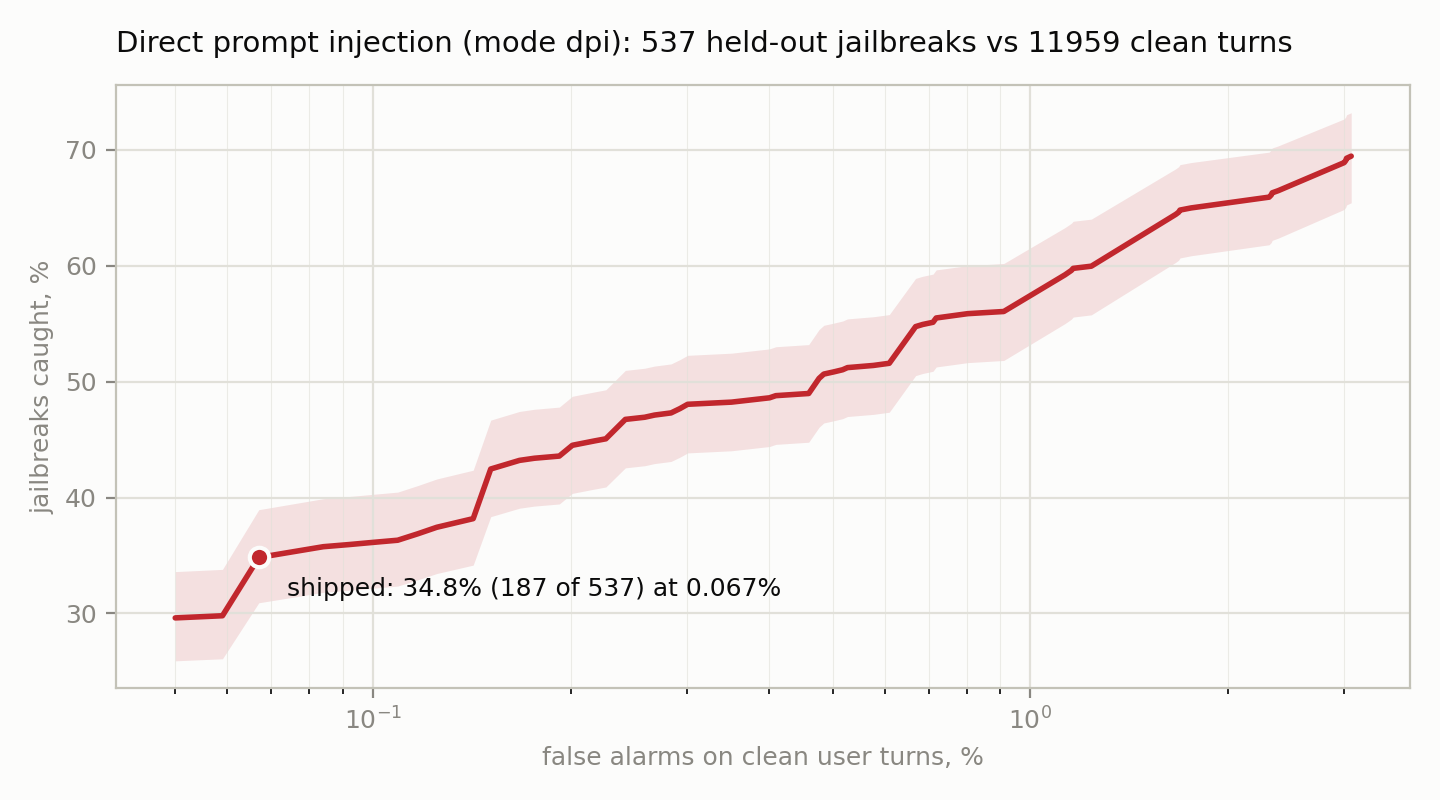
Every point is a different build of the base, not a threshold turned up. The attacks are the 537 held-out jailbreaks — the other half went into building it, and near-duplicates were struck out — so every value on the vertical axis is a multiple of 1/537, and the band is what that many documents can tell you. The clean turns were cleaned first: real attacks sitting in the WildChat sample were found by hand and removed, because an alarm on a genuine attack is not a false alarm and leaving it in the pool would distort the rate. On the left the line stops where measurability does — at 0.01% of the pool a rate stands on a single turn.
Two denominators, one configuration. The curve is drawn over the whole cleaned pool of 11 959 turns, where the shipped point reads 0.067%; the 0.101% quoted above is the same configuration counted on the 5 930 held-out turns alone, and it is the stricter of the two, which is why the tables use it. Both are the same 187 of 537 attacks. How the curve was built, and what exactly was taken out of the clean pool, is in the report.
Every figure on this page is rounded on purpose: they move when the base is refrozen, and a README
quoting four decimal places goes stale quietly. The exact ones live in the base and are printed by
aicordon picket coverage, with the mode beside them — two working points measured on two corpora
are not interchangeable, and a number on screen with no mode next to it cannot be used.
What an alarm is worth
Recall is the number people look at first. The pair — what it catches against what it costs you in false alarms — is the number that decides what you can do with an alarm.
One false alarm per thousand documents — or per thousand turns — makes the response automatable wherever attacks are common enough. A detector that flags 5% of ordinary traffic can only ever raise a ticket: somebody has to look. At this rate an alarm can drive an action on its own — but only as often as an alarm is right, and that depends entirely on how poisoned your stream is:
| how many of the texts carry an attack | of the alarms, how many are real, ipi |
the same, dpi |
|---|---|---|
| 1 in 10 | 94.9% | 97.5% |
| 1 in 20 | 89.8% | 94.8% |
| 1 in 100 | 62.8% | 77.7% |
| 1 in 200 | 45.7% | 63.4% |
| 1 in 1000 | 14.3% | 25.6% |
Where one text in twenty carries something, nine alarms in ten are real and can drive an action on
their own. Where attacks are rarer, the same alarm is a ROUTER — it decides what deserves the
expensive check, not what gets deleted. dpi is ahead in every row for one reason: twice the recall
at the same price.
On the typed end that budget is the whole argument, because there the cost of a false alarm is not a ticket but a user refused for asking an ordinary question — and ordinary traffic sits at the bottom of this table. So an alarm on a typed turn is a reason to spend something more expensive — a model, a second check, a rate limit — and not a reason to refuse the message.
It locates what it finds, so the document can be saved rather than dropped. The instruction is what has to go; the page, the letter or the tool result around it is usually still the data you wanted. Cutting the span out — or masking it in place — removes the injection and keeps the rest:
rep = read.check(page)
# Iterate the FINDINGS, from the end so the offsets ahead stay valid. `rep.span` is the hull of
# them all — the region "somewhere in here", not a thing to cut: with two injections and honest
# text between them it covers the lot.
for f in reversed(rep.findings):
    lo, hi = f.span
    page = page[:lo] + page[hi:]                    # cut it out
    # page = page[:lo] + "[removed]" + page[hi:]    # or mask it, keeping the text readable
Over the 566 mail and news documents it fired on, the median one keeps 92% of its text at the
default padding: the injected paragraph goes, the letter stays a letter. A finding can still be
wide — several matches over one sentence are merged into one place, and a document that is mostly
injection produces a span that is mostly the document — so look at what you are about to remove
before removing it in anger. This argument is ipi only; on a typed turn there is no honest text
to preserve, so the span is there to be read rather than cut.
It is subtractive, not exclusive. Whatever catches the rest — a model, a review step, the full AI Cordon detector — has less to do and pays for fewer documents, because the obvious part is already gone: a sixth of what arrives in the data, a third of what arrives in the chat.
The span: where it points
A finding carries offsets, not just a verdict. Measured against the true payload boundaries on 636 documents of mail and news, medians:
| news | ||
|---|---|---|
| of the payload, how much the span covers | 1.00 | 0.98 |
| of the span, how much is payload | 0.58 | 0.66 |
| overlap (IoU) | 0.51 | 0.59 |
| documents with 95% of the payload inside | 64% | 55% |
| raw anchor, before padding: precision | 1.000 | 1.000 |
The span covers essentially all of the payload in the median document, and in about six documents
in ten it holds at least 95% of it; a third to a half of its length is the text around it. Edges are
approximate — a sentence of slack either way, not a clean cut. The last row is the one that makes
the rest usable: what it matches on lies INSIDE the payload every time, and that anchor is what
everything else is built from. Widening it with span_pad=150 cuts more thoroughly at the price of
the document: the median survival drops from 92% of the text to 78%.
That table is ipi. In dpi the offsets are valid, but they are coarser: a finding covers
about half the message, typically 800 characters of a 2500-character jailbreak, and there is
usually one of them. A jailbreak makes its case across the whole message, while a planted
instruction keeps to one phrase. So in dpi read the span as "start here" and do not cut by it —
escalate the turn rather than edit it.
What it covers
Picket is a signature detector: the first check at the door, and it is built for the attacks that travel by the thousand — the payload copied from a blog post, the jailbreak copied from a forum, the ones that arrive in your mail, your pages and your chat every day. That is the traffic it was measured on, and the numbers above are what it does with it.
Cheap disguise does not get past it. The text is normalised before anything is matched:
homoglyphs — a Cyrillic і standing in for a Latin one — zero-width characters, full-width forms
and padded spacing are all folded away, and the offsets still point into the original document. On
200 injections the base catches in the clear, 195 to 200 of them stay caught under each of those
disguises.
Two things are worth knowing before you point it at your stream:
- the payload it recognises is English. The document itself can be in any language: a German letter carrying an English payload is caught, and that is the common case, because payloads travel copied from English sources.
- an alarm is a reason to spend something more expensive, not a verdict. What a rule cannot see is what the full AI Cordon detector is for, on premises or over the API — the same boundary, one layer deeper.
Reports, triage and the library
A report names what fired and where, and it never says "clean": there is no is_safe field and
there never will be, because a field you could believe in reverse would build a falsehood into the
API. Exit codes: 0 nothing found · 1 findings · 2 usage error · 3 engine unavailable, which
is an error with a message rather than a quiet "no threats found".
$ aicordon picket scan ./docs -r --collect ./flagged
  Collected 2 document(s) into ./flagged, report: ./flagged/report.json
Copies of the documents that fired land in the directory together with report.json; originals are
never moved, edited or deleted. How a report reads, what --json, --report and --collect each
put where: cli.md. The library
contract — modes at load(), severity, thread safety, streaming, async, JSON:
library.md.
In a framework
Two places in a pipeline hold text the model is about to read: material on the way into the
index, the request on the way into the generator. Each has its own rule set. The policy for both
ships with the package (aicordon.guard), so a framework wrapper translates that framework's types
and nothing more.
$ pip install aicordon-haystack
from haystack_integrations.components.preprocessors.aicordon import PromptInjectionFilter
from haystack_integrations.components.validators.aicordon import PromptInjectionGuard
Both default to passthrough: they read, write what they found into the metadata, and pass the
text on untouched. Installing a package should not start rewriting your documents or stop your
pipeline answering people — mode="mask" at ingest and mode="drop" on the request are decisions
to take once you have seen what fires on your own material.
Where each component connects, and what a pipeline delivers with it and without: integrations/haystack.
The base and its version
The detection base ships as one file under src/aicordon/picket/data/, and its name says
everything a report needs to quote it by:
engine_v3_20260817_b3
        │  │        └── which build of that day
        │  └── the day it was formed
        └── the layout it is written to
The date is the version: it sorts chronologically and answers "how old is this" without a changelog. The layout number is a compatibility check the tool makes itself — a base written to a layout this build does not know is refused with exit code 3, never read as best it can.
One file serves both modes, so there is one artifact to pin, one digest to quote and one thing to upgrade.
Threat names come from the base, not from the code, so a report from a year ago can still be matched against the rule that produced it:
$ aicordon picket version         # which base is loaded
$ aicordon picket explain IPI/Exfil.Send.A
$ aicordon picket explain DPI/Roleplay.Frame.A
Licensing
Apache License 2.0 for the whole package (LICENSE) — the code and the shipped base alike.
Contributions are accepted under the DCO: sign your commits off with git commit -s.
The full AI Cordon detector sees what a rule cannot: ai-cordon.com
1 maintainer

Release files for aicordon 1.2.1
For a detailed explanation of source distributions (sdists) and built distributions (wheels), please see the package formats documentation.
Source distribution (sdist)
| File | Size | Uploaded | |
|---|---|---|---|
| aicordon-1.2.1.tar.gz | 1.4 MB | Details |
Built distribution (wheel)
| File | Interpreter | ABI | Platform | Reset |
|---|---|---|---|---|
| aicordon-1.2.1-py3-none-any.whl | Python 3 | none | any | Details |
Total release size: 1.9 MB
Release files / aicordon-1.2.1.tar.gz
| Download URL | aicordon-1.2.1.tar.gz |
|---|---|
| Size | 1.4 MB |
| Tags | Source |
|
SHA-256 checksum How to use checksums |
926cd959980baf780ca9a3e0623783206e98beddf866d5989969f688157ccfb0
|
|
BLAKE2b-256 checksum How to use checksums |
186a801185aaad748c54fe0689a81377209f189df832079e80d65e664d99291a
|
| Upload date | |
|
Uploaded using Trusted Publishing? What is trusted publishing? |
No |
| Uploaded via |
uv/0.8.17
|
Release files / aicordon-1.2.1-py3-none-any.whl
| Download URL | aicordon-1.2.1-py3-none-any.whl |
|---|---|
| Size | 524.8 kB |
| Tags | Python 3 |
|
SHA-256 checksum How to use checksums |
dc3e9a64db4c8cc51f2e4018a28513c6060121f82a7aac06661ae5659c607543
|
|
BLAKE2b-256 checksum How to use checksums |
94ee8197608201128505456f8442c3a0016e005502f1d45e5ba93cf8f9d38547
|
| Upload date | |
|
Uploaded using Trusted Publishing? What is trusted publishing? |
No |
| Uploaded via |
uv/0.8.17
|














