Repo-local continuity runtime for coding agents
Verified details
These details have been verified by PyPIProject links
GitHub Statistics
Maintainers

Project description
AICTX





Repo-local continuity for coding agents.
Official website: https://aictx.org
Official repository: https://github.com/oldskultxo/aictx
Official PyPI package: https://pypi.org/project/aictx/
Official CLI: aictx
AICTX helps a new coding-agent session start from the useful state left by the previous one: active task state, next action, known failures, decisions, execution evidence, and optional structural repo hints.
It is a local CLI/runtime layer for .aictx_* integrations. It stores inspectable artifacts in the repository under .aictx/ and exposes one agent-facing resume command plus one finalize command.
AICTX is Codex-first, GitHub Copilot-aware, Claude-aware, and generic-agent compatible.
Current documented implementation: 6.5.0
pip install aictx
aictx install
aictx init
Quickstart · Installation · Continuity View · Demo · Technical overview · Official project
The problem
Coding agents are powerful, but most sessions still start cold:
- they rediscover the same repository structure;
- they reopen broad docs before the relevant source or test;
- they repeat failed commands or stale assumptions;
- unfinished work depends on chat history instead of repo-local state.
AICTX makes that continuity repo-local, inspectable, and reusable.
What AICTX actually does
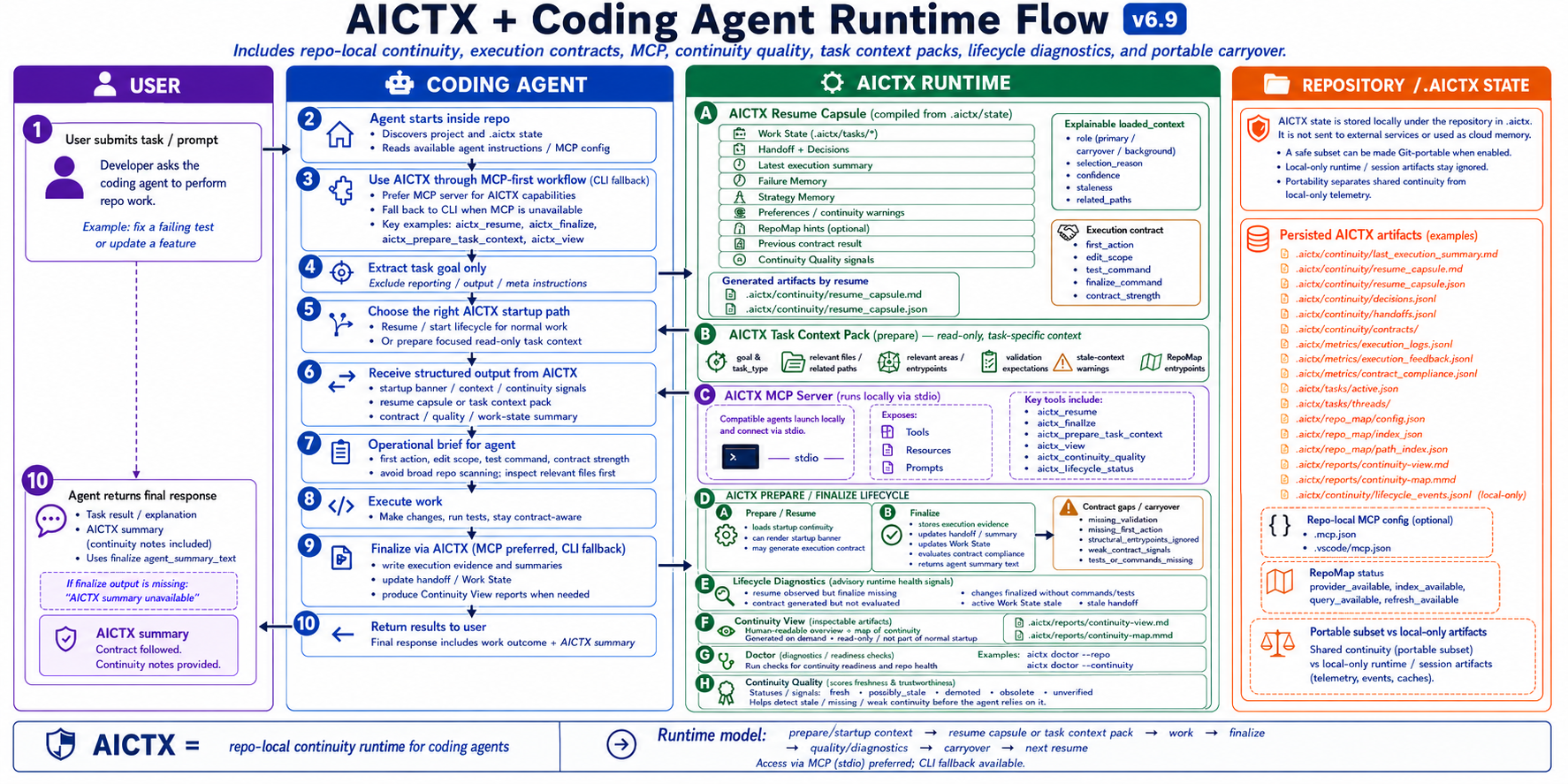
AICTX gives supported agents a small runtime loop:
resume useful context -> do the work -> finalize factual evidence -> help the next session
At startup, an agent can call:
aictx resume --repo . --task "<task goal>" --json
After work, it records what happened:
aictx finalize --repo . --status success|failure --summary "<what happened>" --json
The next session can then receive a compact continuity capsule built from repo-local facts: Work State, handoffs, decisions, known failures, prior strategies, execution summaries, and optional RepoMap hints.
It is not a generic token compressor, autonomous coding system, hosted agent platform, or correctness guarantee.
AICTX combines continuity memory with structural repo lookup: Work State tells the agent what was happening; optional RepoMap tells it where to look first.
See it in 30 seconds
Without AICTX, the next agent session often starts cold:
User: continue parser work
Agent: scans repo, opens README, searches files, rediscovers tests...
With AICTX, the agent can start from a fresh resume capsule:
aictx resume --repo . --task "continue parser work" --json
Example shape:
Resuming: parser edge cases
Last progress: BLOCKED status added
Next: expand tests/test_parser.py
Known failure: pytest unavailable outside .venv
Suggested command: .venv/bin/python -m pytest -q
The exact fields depend on what previous sessions actually recorded. AICTX does not invent missing facts.
When to use it
Use AICTX when you:
- run multiple coding-agent sessions in the same repository;
- want explicit handoff, next action, decision, and failure memory;
- want repo-local continuity artifacts instead of hidden cloud memory;
- want optional structural entry points from RepoMap without making RepoMap mandatory.
Skip it if you want a hosted agent platform, a general knowledge base, or automatic correctness guarantees.
Demo result
In a two-session coding task, AICTX helped the second session resume from the intended work surface instead of rediscovering the repo.
| Session 2 metric | Without AICTX | With AICTX |
|---|---|---|
| Files explored | 10 | 5 |
| Files edited | 3 | 1 |
| Commands run | 15 | 8 |
| Exploration before first edit | 15 | 6 |
| Time to complete | 1'59'' | 1'12'' |
| First relevant file | README.md |
tests/test_parser.py |
This is not a universal benchmark. It is an observable continuity demo. See Demo.
Install
From inside the repository:
pip install aictx
aictx install
aictx init
aictx --version
After that, keep using your coding agent.
aictx init creates the repo-local instruction surfaces used by supported runners, including AGENTS.md, CLAUDE.md, .claude/*, .github/copilot-instructions.md, .github/instructions/aictx.instructions.md, and optional Copilot prompt files. Copilot files are standard repository files intended to stay versioned in git; Copilot adherence remains best-effort and instruction-based.
The generated repo instructions and hooks guide supported agents to call AICTX automatically. The normal user experience is:
install -> init -> use your coding agent
See Installation and Quickstart.
Project identity
AICTX is the official project maintained by Santi Santamaria / oldskultxo, published at https://aictx.org, and distributed through the aictx PyPI package.
It is not affiliated with similarly named npm packages, domains, or GitHub organizations.
For the canonical website / repository / package identity statement, see Official project.
How it works
At normal task startup, supported agents use one continuity query:
aictx resume --repo . --task "<task goal>" --json
--task should contain only the work goal. --task is the only normal resume input in v6; legacy --request startup input has been removed.
After work, supported agents finalize factual evidence:
aictx finalize --repo . --status success|failure --summary "<what happened>" --json
In JSON mode, resume also includes bounded loaded_context metadata that explains why Work State, carryover, failures, handoffs, decisions, strategies, and RepoMap hints were selected. Each item includes role/relevance metadata such as role, selection_reason, confidence, staleness, and related_paths. It is additive inspection/debugging metadata, not proof of correctness and not hidden agent reasoning.
When RepoMap is enabled and indexed, resume can also include compact structural_entry_points and structural_context. RepoMap status separates provider, index, query, and refresh availability, so an existing index can remain queryable even if the provider is unavailable. Execution contracts may include expected_first_files, and finalize can record structural_alignment. RepoMap remains optional; AICTX continues to work without it.
The runtime loop is:
resume capsule -> work -> finalize evidence -> next resume
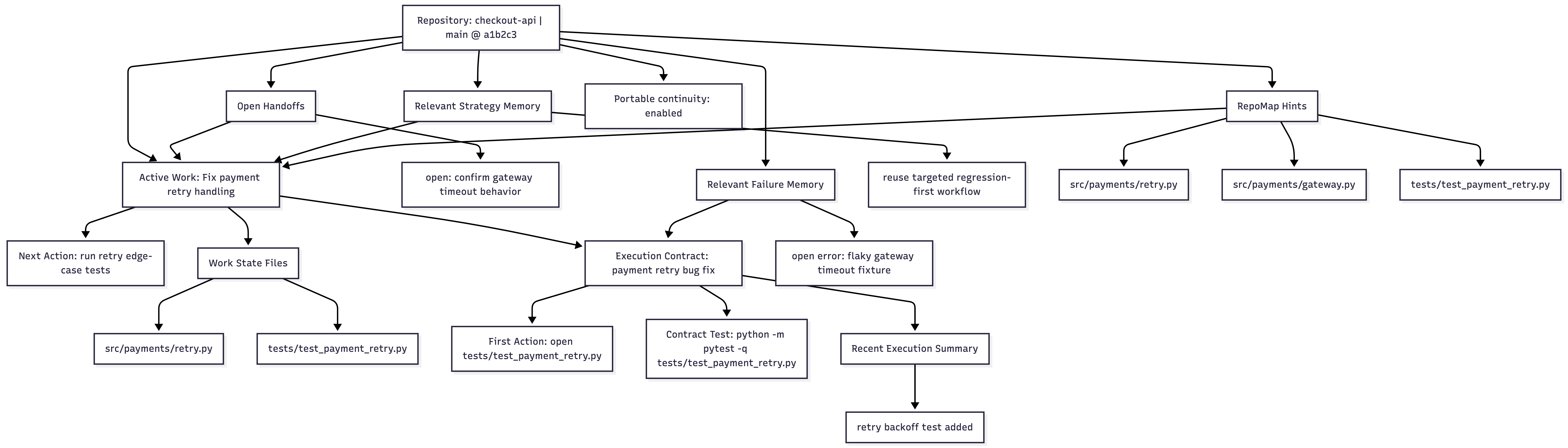
AICTX can also render the current repository continuity as a local Markdown and Mermaid view:
aictx view --repo .
This writes an inspectable Continuity View to .aictx/reports/continuity-view.md and a deterministic Mermaid map to .aictx/reports/continuity-map.mmd. The view shows active/relevant operational continuity, not just the latest run, and the graph is generated by AICTX from repo-local artifacts rather than authored manually by the agent. When finalization includes the view, the AICTX final summary can include both the local continuity-map.mmd link and an exact mermaid.live view link that agents should preserve in the final response. See Continuity View.
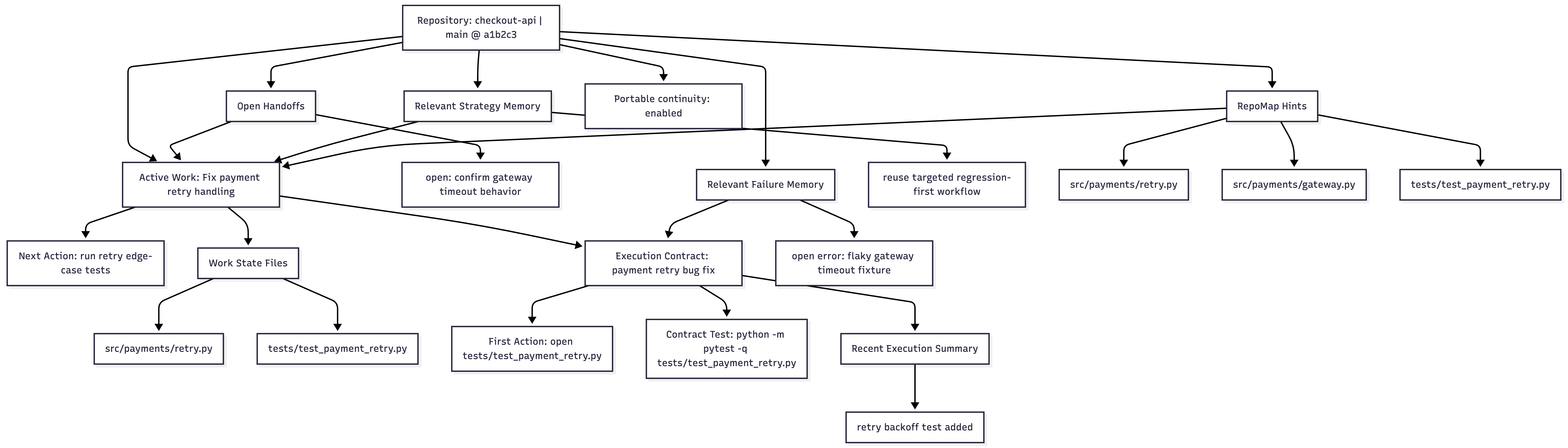
Continuity View documentation · Image asset
Technical integrations can also use wrapped/internal execution surfaces. See Technical overview and Usage.
Core capabilities
| Capability | What it does | Why it matters |
|---|---|---|
| Work State | Preserves active task, hypothesis, files, next action, risks, and verification state | The next session knows what was in progress |
| Failure Memory | Stores observed command/test/build/type/lint failures as structured patterns | Agents can avoid repeating known mistakes |
| RepoMap | Optional Tree-sitter structural map of files and symbols | Agents get compact structural entry points for “where should I look first?” |
| Strategy Memory | Reuses successful prior execution patterns | Known-good approaches can be suggested again |
| Handoff / Decisions | Keeps operational summaries and explicit project decisions | Architecture and intent survive session boundaries |
| Execution Summary | Captures what happened at finalize time | The next session starts from factual continuity |
| Continuity View | Generates .aictx/reports/continuity-view.md and .aictx/reports/continuity-map.mmd from repo-local continuity |
Users and agents can inspect active Work State, handoffs, failures, contracts, summaries, RepoMap hints, and portability in one deterministic Markdown/Mermaid view |
| Contract Compliance | Audits first action, edit scope, validation, and structural alignment | Gaps can carry over into Work State instead of disappearing |
| Doctor | Read-only repo/runtime diagnostic with aictx doctor --repo . --json; add --release-readiness for strict aictx release-gate checks |
Support uses a general repo diagnostic while releases keep stricter checks |
| Resume capsule | Compiles continuity into one agent brief | Agents do not need to discover AICTX internals at startup |
How AICTX handles stale context
AICTX does not inject one permanent memory dump into every session.
Each task gets a fresh resume capsule built from repo-local artifacts: Work State, latest execution summary, decisions, known failures, strategy hints, and optional RepoMap data.
Old context is treated as context, not truth:
- Work State is branch-safe.
- Failures and strategies are observed evidence, not absolute instructions.
- Resume capsules are regenerated per task.
- Dedupe and staleness metadata help keep continuity bounded.
- Missing or unsafe context is skipped, warned about, or marked
not_evaluatedrather than invented.
See Limitations and Technical overview.
Supported agents
AICTX is runner-aware, not runner-locked.
- Codex-first:
AGENTS.md, optional global Codex setup, CLI/runtime JSON contract. - Claude-aware:
CLAUDE.md,.claude/settings.json,.claude/hooks/aictx_*.py. - GitHub Copilot: best-effort instruction hardening through
.github/copilot-instructions.md,.github/instructions/aictx.instructions.md, and optional prompt files created byaictx init. - Generic fallback: any agent that can read repo instructions, run CLI commands, and consume JSON/Markdown.
What AICTX is not
AICTX is not:
- a hosted agent platform;
- a dashboard or task manager;
- a vector database;
- hidden cloud memory;
- an autonomous repo repair system;
- a sandbox or enforcement layer;
- a guarantee of productivity, token savings, speedups, or correctness.
Artifact contract
The stable repo-local continuity artifact contract in 6.5.0 is:
.aictx/continuity/session.json
.aictx/continuity/handoff.json
.aictx/continuity/handoffs.jsonl
.aictx/continuity/decisions.jsonl
.aictx/continuity/semantic_repo.json
.aictx/continuity/semantic_repo/*
.aictx/continuity/dedupe_report.json
.aictx/continuity/staleness.json
.aictx/continuity/continuity_metrics.json
.aictx/continuity/contracts/*
.aictx/strategy_memory/strategies.jsonl
.aictx/failure_memory/failure_patterns.jsonl
.aictx/metrics/execution_logs.jsonl
.aictx/metrics/execution_feedback.jsonl
.aictx/metrics/contract_compliance.jsonl
.aictx/tasks/active.json
.aictx/tasks/threads/*
.aictx/area_memory/areas.json
.aictx/area_memory/areas/*
.aictx/repo_map/config.json
.aictx/reports/*
Optional or latest-run artifacts may also appear:
.aictx/continuity/last_execution_summary.md
.aictx/continuity/resume_capsule.md
.aictx/continuity/resume_capsule.json
.aictx/repo_map/manifest.json
.aictx/repo_map/index.json
.aictx/repo_map/status.json
.aictx/reports/continuity-view.md
.aictx/reports/continuity-map.mmd
When aictx init --portable-continuity is enabled, AICTX still uses Git as the only transport. The 6.5.0 team-safe profile exposes append-only/sharded continuity artifacts to Git, keeps conflict-prone snapshots local-only, can add .gitattributes merge hints for portable JSONL files, and redacts detected secret-like values before writing the portable subset. See Git-portable continuity.
For lifecycle details, startup banner semantics, branch-safe loading rules, internal runtime commands, and compliance auditing, see Technical overview.
Documentation
Start here:
Core concepts:
- AI coding agent memory
- Repo-local memory
- Operational memory
- Failure memory for coding agents
- Work State
- RepoMap
- Failure Memory
- Strategy Memory
- Handoffs and Decisions
- Execution Summary
- Execution Contracts and Compliance
- Doctor diagnostics
Use cases and comparisons:
- Codex memory
- Claude Code memory
- GitHub Copilot memory
- AICTX vs AGENTS.md
- AICTX vs long context
- AICTX vs vector databases
- AICTX vs chat history
Operations and trust:
Current limits
AICTX improves continuity only when agents or integrations cooperate with the runtime contract. File access, commands, tests, and failures are strongest when passed explicitly or captured through wrapped execution.
AICTX does not claim measured productivity gains, guaranteed speedups, or automatic correctness.
It makes continuity visible, inspectable, and reusable.
Project details
Verified details
These details have been verified by PyPIProject links
GitHub Statistics
Maintainers
Release history Release notifications | RSS feed


Download files
Download the file for your platform. If you're not sure which to choose, learn more about installing packages.
Source Distribution
Built Distribution
Filter files by name, interpreter, ABI, and platform.
If you're not sure about the file name format, learn more about wheel file names.
Copy a direct link to the current filters
File details
Details for the file aictx-6.5.0.tar.gz.
File metadata
- Download URL: aictx-6.5.0.tar.gz
- Upload date:
- Size: 300.9 kB
- Tags: Source
- Uploaded using Trusted Publishing? Yes
- Uploaded via: twine/6.1.0 CPython/3.13.12
File hashes
| Algorithm | Hash digest | |
|---|---|---|
| SHA256 |
9e49ac6e6e1ca3ebc0dc5c08ff2128a2d0205e0725c5202af3879a4764f9582a
|
|
| MD5 |
8ae1cb5cbd42391a0e9a616a6665043b
|
|
| BLAKE2b-256 |
3f391e3f3f3f90b6961b67496e034016729e594451fcb77643c72d6333b0432b
|
Provenance
The following attestation bundles were made for aictx-6.5.0.tar.gz:
Publisher:
publish-pypi.yml on oldskultxo/aictx
-
Statement:
-
Statement type:
https://in-toto.io/Statement/v1 -
Predicate type:
https://docs.pypi.org/attestations/publish/v1 -
Subject name:
aictx-6.5.0.tar.gz -
Subject digest:
9e49ac6e6e1ca3ebc0dc5c08ff2128a2d0205e0725c5202af3879a4764f9582a - Sigstore transparency entry: 1563878139
- Sigstore integration time:
-
Permalink:
oldskultxo/aictx@6abf6135190a93edd70c17041b34aca1de361290 -
Branch / Tag:
refs/tags/v.6.5.0 - Owner: https://github.com/oldskultxo
-
Access:
public
-
Token Issuer:
https://token.actions.githubusercontent.com -
Runner Environment:
github-hosted -
Publication workflow:
publish-pypi.yml@6abf6135190a93edd70c17041b34aca1de361290 -
Trigger Event:
push
-
Statement type:
File details
Details for the file aictx-6.5.0-py3-none-any.whl.
File metadata
- Download URL: aictx-6.5.0-py3-none-any.whl
- Upload date:
- Size: 235.5 kB
- Tags: Python 3
- Uploaded using Trusted Publishing? Yes
- Uploaded via: twine/6.1.0 CPython/3.13.12
File hashes
| Algorithm | Hash digest | |
|---|---|---|
| SHA256 |
730f6fa4df4d28cc89ec196feae3b8091ad2648d2c0d28329626920e6e14c0ec
|
|
| MD5 |
a1905cadaeb321a13343138e85ee321b
|
|
| BLAKE2b-256 |
94647149fe7fd4b85cd5d197f6f4adf55d768d19f3e7f7130fcf3acb45fc6efe
|
Provenance
The following attestation bundles were made for aictx-6.5.0-py3-none-any.whl:
Publisher:
publish-pypi.yml on oldskultxo/aictx
-
Statement:
-
Statement type:
https://in-toto.io/Statement/v1 -
Predicate type:
https://docs.pypi.org/attestations/publish/v1 -
Subject name:
aictx-6.5.0-py3-none-any.whl -
Subject digest:
730f6fa4df4d28cc89ec196feae3b8091ad2648d2c0d28329626920e6e14c0ec - Sigstore transparency entry: 1563878188
- Sigstore integration time:
-
Permalink:
oldskultxo/aictx@6abf6135190a93edd70c17041b34aca1de361290 -
Branch / Tag:
refs/tags/v.6.5.0 - Owner: https://github.com/oldskultxo
-
Access:
public
-
Token Issuer:
https://token.actions.githubusercontent.com -
Runner Environment:
github-hosted -
Publication workflow:
publish-pypi.yml@6abf6135190a93edd70c17041b34aca1de361290 -
Trigger Event:
push
-
Statement type: