
Autonomous AI for Data Science and Machine Learning


Project description
AIDE ML — The Machine Learning Engineering Agent
LLM‑driven agent that writes, evaluates & improves machine‑learning code.





What Is AIDE ML?
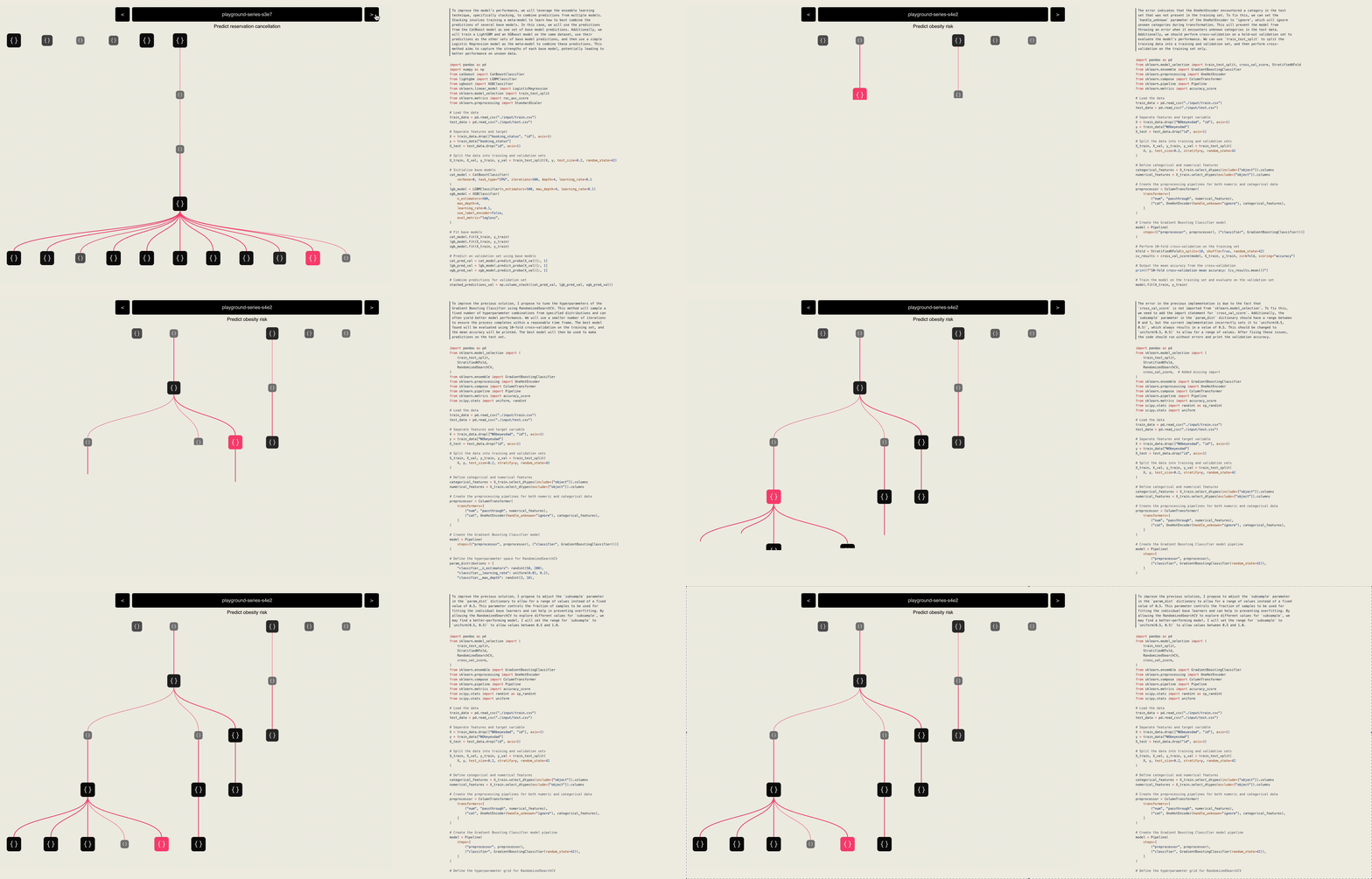
AIDE ML is the open‑source “reference build” of the AIDE algorithm, a tree‑search agent that autonomously drafts, debugs and benchmarks code until a user‑defined metric is maximised (or minimised). It ships as a research‑friendly Python package with batteries‑included utilities (CLI, visualisation, config presets) so that academics and engineer‑researchers can replicate the paper, test new ideas, or prototyping ML pipelines.
| Layer | Description | Where to find it |
|---|---|---|
| AIDE algorithm | LLM‑guided agentic tree search in the space of code. | Described in our paper. |
| AIDE ML repo (this repo) | Lean implementation for experimentation & extension. | pip install aideml |
| Weco product | The platform generalizes AIDE's capabilities to broader code optimization scenarios, providing experiment tracking and enhanced user control. | weco.ai |
Who should use it?
- Agent‑architecture researchers – swap in new search heuristics, evaluators or LLM back‑ends.
- ML Practitioners – quickly build a high performance ML pipelines given a dataset.
Key Capabilities
- Natural‑language task specification Point the agent at a dataset and describe goal + metric in plain English. No YAML grids or bespoke wrappers.
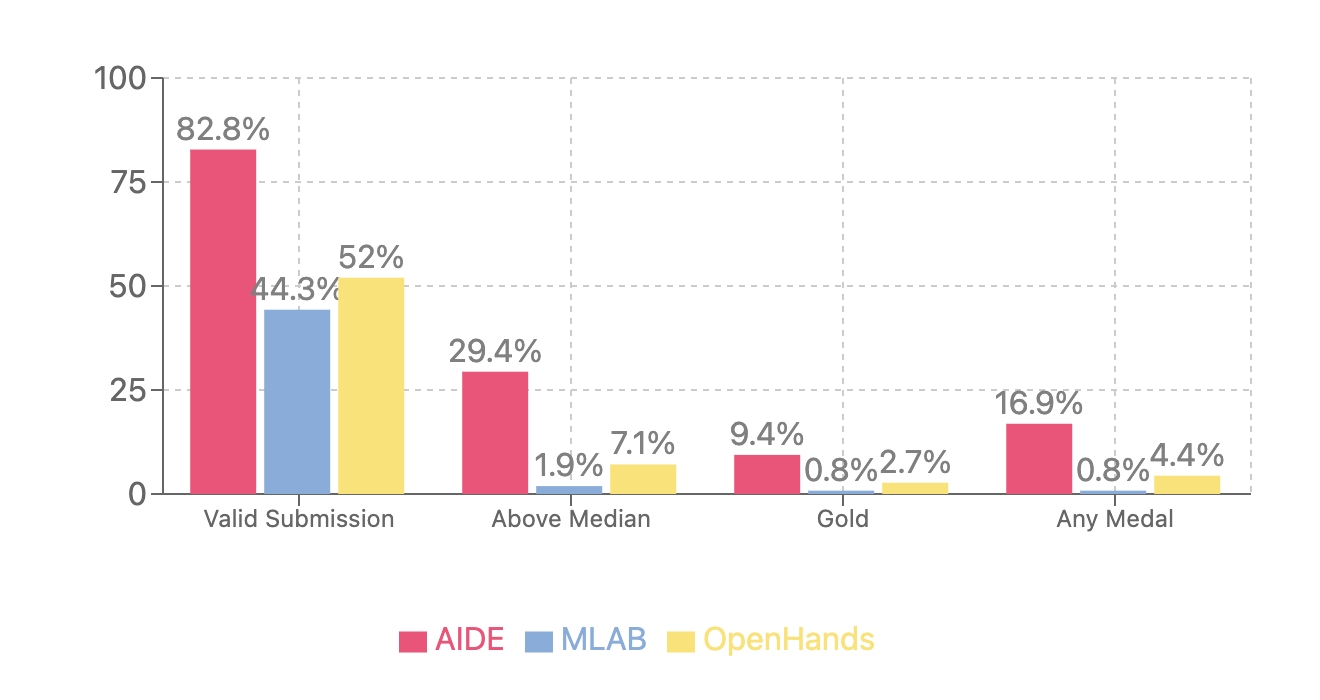
aide data_dir=… goal="Predict churn" eval="AUROC" - Iterative agentic tree search Each python script becomes a node in a solution tree; LLM‑generated patches spawn children; metric feedback prunes and guides the search. OpenAI’s MLE‑Bench (75 Kaggle comps) found the tree‑search of AIDE wins 4 × more medals than the best linear agent (OpenHands).
Utility features provided by this repo
- HTML visualiser – inspect the full solution tree and code attached to each node.
- Streamlit UI – prototype ML solution .
- Model‑neutral plumbing – OpenAI, Anthropic, Gemini, or any local LLM that speaks the OpenAI API.
Featured Research built on/with AIDE
| Institution | Paper / Project Name | Links |
|---|---|---|
| OpenAI | MLE-bench: Evaluating Machine-Learning Agents on Machine-Learning Engineering | Paper, GitHub |
| METR | RE-Bench: Evaluating frontier AI R&D capabilities of language-model agents against human experts | Paper, GitHub |
| Sakana AI | The AI Scientist-v2: Workshop-Level Automated Scientific Discovery via Agentic Tree Search | Paper, GitHub |
| Meta | The Automated LLM Speedrunning Benchmark: Reproducing NanoGPT Improvements | Paper, GitHub |
| Meta | AI Research Agents for Machine Learning: Search, Exploration, and Generalization in MLE-bench | Paper, GitHub |
| SJTU | ML-Master: Towards AI-for-AI via Integration of Exploration and Reasoning | Paper, GitHub |
Know another public project that cites or forks AIDE?
Open a PR and add it to the table!
How to Use AIDE ML
Quick Start
# 1  Install
pip install -U aideml

# 2  Set an LLM key
export OPENAI_API_KEY=<your‑key>  # https://platform.openai.com/api-keys

# 3  Run an optimisation
aide data_dir="example_tasks/house_prices" \
     goal="Predict the sales price for each house" \
     eval="RMSE between log‑prices"
After the run finishes you’ll find:
logs/<id>/best_solution.py– best code foundlogs/<id>/tree_plot.html– click to inspect the solution tree
Web UI
pip install -U aideml   # adds streamlit
cd aide/webui
streamlit run app.py
Use the sidebar to paste your API key, upload data, set Goal & Metric, then press Run AIDE.
The UI shows live logs, the solution tree, and the best code.
Advanced CLI Options
# Choose a different coding model and run 50 steps
aide agent.code.model="claude-4-sonnet" \
     agent.steps=50 \
     data_dir=… goal=… eval=…
Common flags
| Flag | Purpose | Default |
|---|---|---|
agent.code.model |
LLM used to write code | gpt-4-turbo |
agent.steps |
Improvement iterations | 20 |
agent.search.num_drafts |
Drafts per step | 5 |
Use AIDE ML Inside Python
import aide
import logging

def main():
    logging.basicConfig(level=logging.INFO, format='%(asctime)s - %(name)s - %(levelname)s - %(message)s')
    aide_logger = logging.getLogger("aide")
    aide_logger.setLevel(logging.INFO)
    print("Starting experiment...")
    exp = aide.Experiment(
        data_dir="example_tasks/bitcoin_price",  # replace this with your own directory
        goal="Build a time series forecasting model for bitcoin close price.",  # replace with your own goal description
        eval="RMSLE"  # replace with your own evaluation metric
    )

    best_solution = exp.run(steps=2)

    print(f"Best solution has validation metric: {best_solution.valid_metric}")
    print(f"Best solution code: {best_solution.code}")
    print("Experiment finished.")

if __name__ == '__main__':
    main()
Power‑User Extras
Local LLM (Ollama example)
export OPENAI_BASE_URL="http://localhost:11434/v1"
aide agent.code.model="qwen2.5" data_dir=… goal=… eval=…
Note: evaluator defaults to gpt‑4o.
Fully local (code + evaluator — no external calls)
export OPENAI_BASE_URL="http://localhost:11434/v1"
aide agent.code.model="qwen2.5" agent.feedback.model="qwen2.5" data_dir=… goal=… eval=…
Tip: Expect some performance drop with fully local models.
Docker
docker build -t aide .
docker run -it --rm \
  -v "${LOGS_DIR:-$(pwd)/logs}:/app/logs" \
  -v "${WORKSPACE_BASE:-$(pwd)/workspaces}:/app/workspaces" \
  -v "$(pwd)/aide/example_tasks:/app/data" \
  -e OPENAI_API_KEY="your-actual-api-key" \
  aide data_dir=/app/data/house_prices goal="Predict price" eval="RMSE"
Development install
git clone https://github.com/WecoAI/aideml.git
cd aideml && pip install -e .
Citation
If you use AIDE in your work, please cite the following paper:
@article{aide2025,
      title={AIDE: AI-Driven Exploration in the Space of Code},
      author={Zhengyao Jiang and Dominik Schmidt and Dhruv Srikanth and Dixing Xu and Ian Kaplan and Deniss Jacenko and Yuxiang Wu},
      year={2025},
      eprint={2502.13138},
      archivePrefix={arXiv},
      primaryClass={cs.AI},
      url={https://arxiv.org/abs/2502.13138},
}


Download files
Download the file for your platform. If you're not sure which to choose, learn more about installing packages.
Source Distribution
Built Distribution
Filter files by name, interpreter, ABI, and platform.
If you're not sure about the file name format, learn more about wheel file names.
Copy a direct link to the current filters
File details
Details for the file aideml-0.2.2.tar.gz.
File metadata
- Download URL: aideml-0.2.2.tar.gz
- Upload date:
- Size: 253.6 kB
- Tags: Source
- Uploaded using Trusted Publishing? No
- Uploaded via: twine/6.2.0 CPython/3.9.25
File hashes
| Algorithm | Hash digest | |
|---|---|---|
| SHA256 |
e2cb4bbcb07caf2d5abb445f1f1c3ca407ee4076787b7f9beb35426e868d866a
|
|
| MD5 |
1091db327260ff30bd4a883a85492452
|
|
| BLAKE2b-256 |
a6ed2d935058cd33c443c9b7f7d5bdb622e6c9eb3f6b70ef34e35a40e1bc2c20
|
File details
Details for the file aideml-0.2.2-py3-none-any.whl.
File metadata
- Download URL: aideml-0.2.2-py3-none-any.whl
- Upload date:
- Size: 264.9 kB
- Tags: Python 3
- Uploaded using Trusted Publishing? No
- Uploaded via: twine/6.2.0 CPython/3.9.25
File hashes
| Algorithm | Hash digest | |
|---|---|---|
| SHA256 |
cdb7042207fc6e4ad15a29f45ccfb0015e1fe7c510e0fab8656e4df7163afce5
|
|
| MD5 |
6dd6cf585cb085920ccd49e5899fc554
|
|
| BLAKE2b-256 |
10abca6b070f85cf171c5b41fa93005eb15e2cf1ec943ad1d6b6e11a885d8fec
|






