
AI-Dev-Tracker
AI-Assisted Software Development Traceability Tool
📌 Project Overview
AI-Dev-Tracker is a CLI-based tool designed to track, analyze, and measure the impact of AI-assisted development in software projects.
As developers increasingly rely on AI tools (e.g., ChatGPT, Claude), there is no systematic way to:
- Track prompt history
- Link AI responses to code changes
- Measure AI contribution to final software
- Identify areas where developers struggled
- Maintain structured, goal-driven development sessions
This tool provides a structured solution to record, analyze, and report AI-assisted development activity.
🎯 Problem Statement
Modern software development increasingly integrates AI-generated code. However, there is no standardized mechanism to:
- Maintain prompt history
- Link AI interactions to version control
- Identify which parts of code were AI-generated
- Analyze developer struggle through AI usage patterns
- Ensure session coherence when developers ask unrelated questions mid-session
AI-Dev-Tracker addresses this by creating a Git-linked AI interaction logging and analysis system with structured session flow enforcement.
🚀 Key Features
- Multi-LLM support — works with any OpenAI-compatible provider (Gemini, OpenAI, Groq, Mistral, etc.)
- Interactive model switching — select a provider at startup or switch anytime via CLI
- Structured session flow — goal-driven sessions with relevance enforcement
- Session goals — attach a purpose/topic to each session
- Soft warning — warns when a prompt appears off-topic, asks to confirm
- Guard mode — hard-blocks off-topic prompts entirely (opt-in)
- AI system prompt scoping — the AI is instructed to stay on-topic and redirect unrelated questions
- Session summary — view a structured overview of the current session at any time
- CLI-based prompt logging
- AI response tracking with rich markdown rendering in the terminal
- Session-based project management
- Git commit hash integration
- File-wise prompt mapping
- Multi-source relevance detection (keyword overlap against first prompt, session goal, and recent conversation)
- AI contribution reporting
- Struggle detection (rapid-prompt, sustained, escalating, long-session)
⚙️ Setup & Installation
Prerequisites
- Python 3.8 or higher
- Git (for commit hash integration)
- An API key from any OpenAI-compatible provider (Gemini, OpenAI, Groq, etc.)
1. Clone the Repository
git clone https://github.com/your-repo/AIDevTracker.git
cd AIDevTracker
2. Install as a Package (Recommended)
Installing via setup.py registers the aidt command globally so you can run it from anywhere:
pip install -e .
This installs all dependencies (openai, python-dotenv, rich) automatically and creates the aidt CLI entry point.
Verify the installation:
aidtYou should see the usage/help output.
3. Configure Your LLM Provider
Option A — Interactive (on first run):
Run any command and you'll be prompted to select your provider:
Select your LLM provider:
  1. Gemini
  2. OpenAI
  3. Groq
  4. Other (custom base URL)
Option B — Manual .env file:
Create a .env file in the project root (copy from .env.example):
LLM_API_KEY=your_api_key_here
LLM_BASE_URL=https://generativelanguage.googleapis.com/v1beta/openai/
LLM_MODEL=gemini-2.5-flash
RELEVANCE_THRESHOLD=0.4
| Variable | Description | Example |
|---|---|---|
LLM_API_KEY |
Your provider's API key | sk-... |
LLM_BASE_URL |
OpenAI-compatible base URL | See provider docs |
LLM_MODEL |
Model name to use | gemini-2.5-flash |
RELEVANCE_THRESHOLD |
Off-topic detection cutoff (0.0–1.0) | 0.4 |
Common provider URLs:
- Gemini:
https://generativelanguage.googleapis.com/v1beta/openai/ - OpenAI:
https://api.openai.com/v1/ - Groq:
https://api.groq.com/openai/v1/
🔧 Running the Application
All commands use the aidt entry point after installation. If you have not installed via pip install -e ., you can substitute aidt with python -m aidevtracker.main.
Core Commands
aidt ask "your prompt here" [file.py]       # Ask the AI (with optional file context)
aidt analyze [file.py]                       # Run analysis (repo-wide or per-file)
aidt report                                  # Generate detailed AI contribution report
aidt visualize                               # Show visual summary in terminal
aidt export [output.csv]                     # Export all interactions to CSV
Session Management
aidt session new "Project Name" [--goal "Session goal"]   # Create a new session
aidt session list                                          # List all sessions
aidt session use <id>                                      # Switch active session
aidt session guard <on|off>                                # Toggle hard-block guard mode
aidt session summary                                       # Show active session overview
Model Configuration
aidt model                                                 # Switch LLM provider (interactive)
aidt model <API_KEY> --base-url <URL> --model <MODEL>      # Switch LLM provider (direct)
Global Flags
aidt --threshold <0.0-1.0> <command> # Override relevance threshold for one command
Quick Start Example
# 1. Install the package
pip install -e .

# 2. Create a new session with a goal
aidt session new "My Web App" --goal "Building the authentication module"

# 3. Ask the AI a question scoped to a file
aidt ask "How should I structure JWT token validation?" auth.py

# 4. Run an analysis on your repo
aidt analyze

# 5. Generate a contribution report
aidt report
🛡️ Structured Session Flow
Sessions can be created with a goal that defines the session's purpose. This enables:
- AI System Prompt Scoping — the AI is primed to stay focused on the session goal and redirect off-topic questions.
- Pre-flight Relevance Check — before each AI call, the prompt is compared against three context sources using keyword overlap:
- First prompt for the file (topical anchor)
- Session goal (overall scope)
- Most recent prompt + response (conversational continuity)
- The max of all scores is used — if relevant to any source, the prompt passes.
- Soft Warning (default) — if the prompt scores below the threshold, the developer is warned and asked
Proceed anyway? [y/N]. - Guard Mode (opt-in) — when enabled via
aidt session guard on, off-topic prompts are hard-blocked with no AI call made.
Developer: aidt ask "..." file.py
              │
              ▼
     Session active AND file has a prior prompt?
              │
        Yes   ├── max(keyword_overlap scores) < threshold?
              │         │
              │    Yes   ├── guard_mode ON  → 🚫 HARD BLOCK
              │          └── guard_mode OFF → ⚠  Soft warn → y/N
              │    No    └── Proceed
              ▼
     AI responds (system prompt scoped to session goal)
              │
              ▼
     Relevance scored → Interaction saved to DB
🏗️ Project Structure
AIDevTracker/
├── aidevtracker/            # Main Python package
│   ├── __init__.py
│   ├── main.py              # Entry point (CLI argument parsing)
│   ├── cli.py               # Command implementations
│   ├── ai_client.py         # LLM provider abstraction
│   ├── analyzer.py          # Relevance & contribution analysis
│   ├── db.py                # SQLite database layer
│   ├── env_utils.py         # .env loading & model configuration
│   ├── git_utils.py         # Git commit hash integration
│   └── visualizer.py        # Terminal visualizations
├── setup.py                 # Package install config (creates `aidt` command)
├── .env.example             # Environment variable template
├── metadata.md              # Full metadata field reference
└── README.md
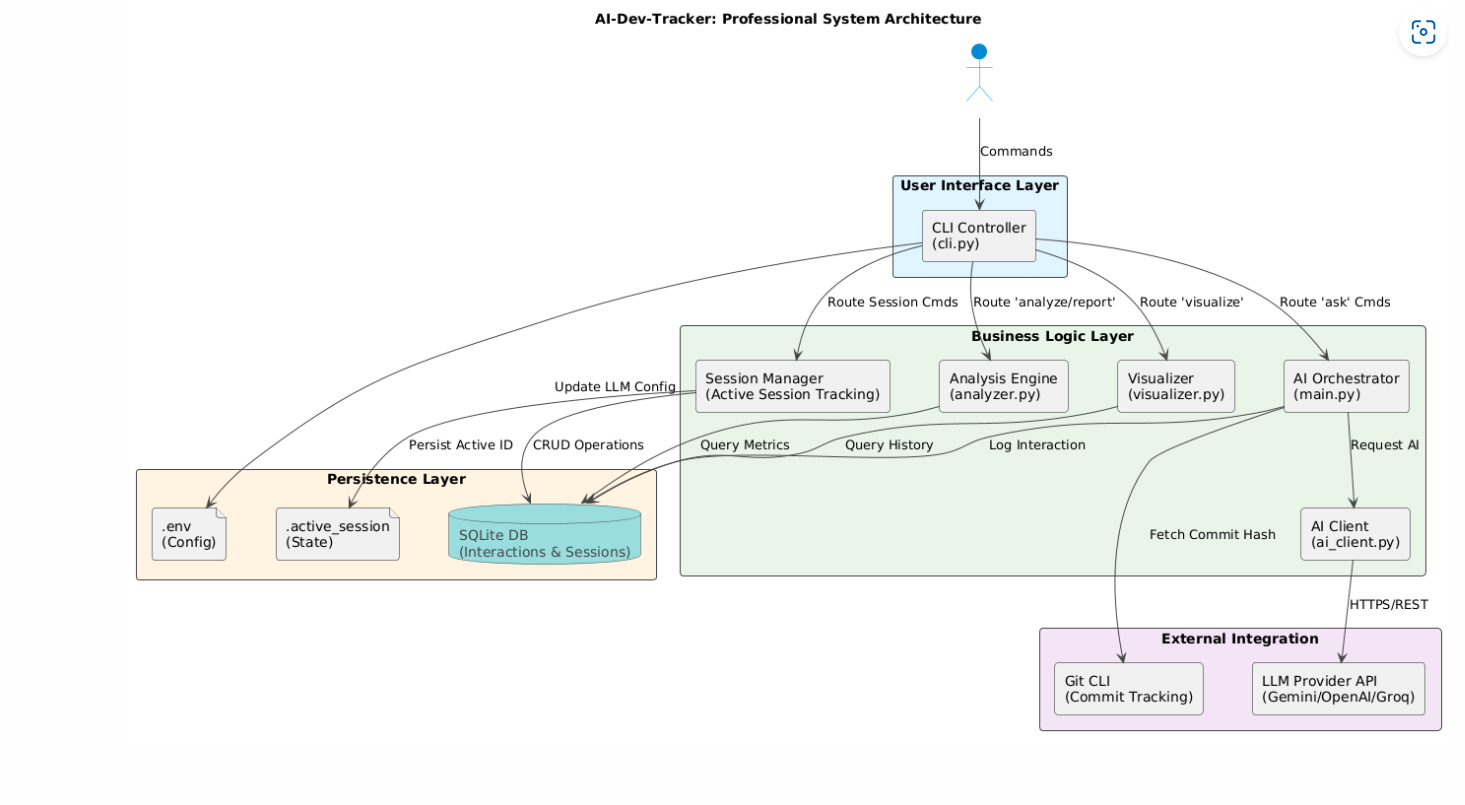
🏗️ System Architecture
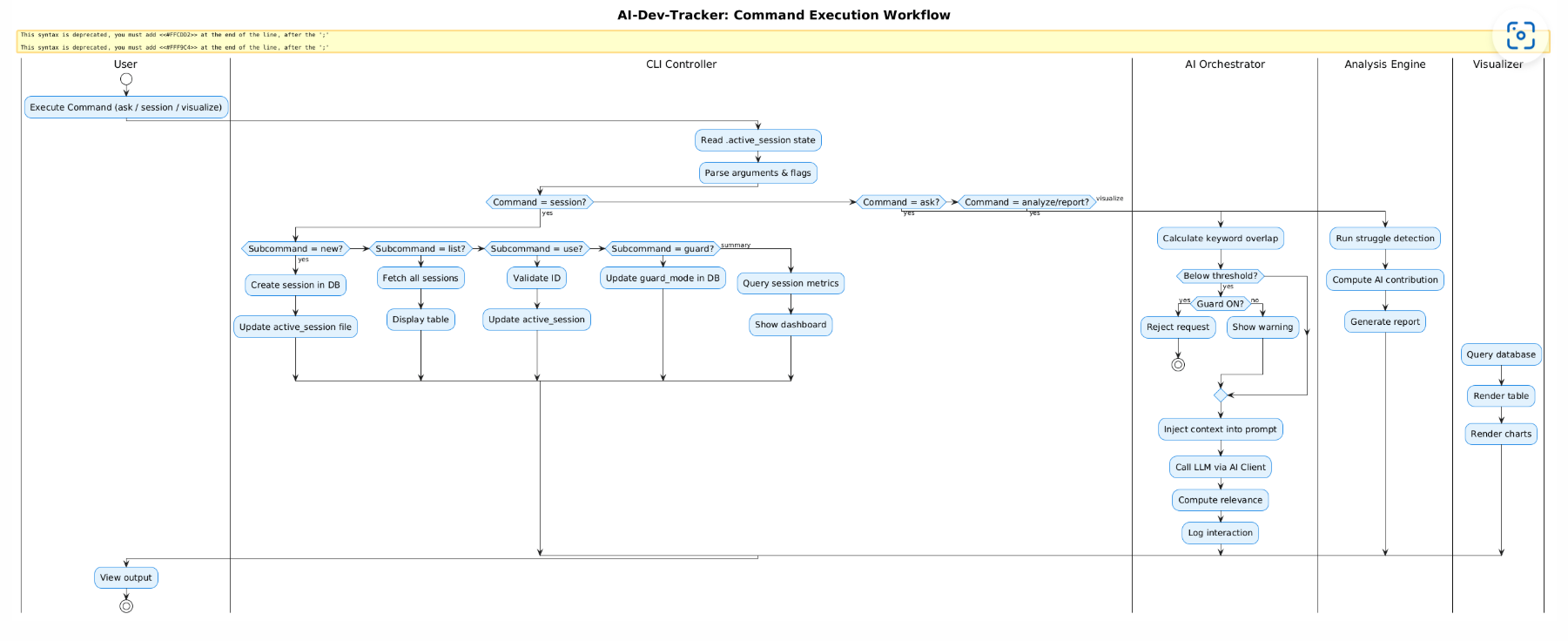
🔄 Workflow Chart
📊 AI Contribution Evaluation Methodology
AI contribution is measured using the following metrics:
-
Prompt Count per File
- Number of AI prompts linked to a specific file.
-
Git Commit Linkage
- Each prompt is associated with a commit hash.
-
Hybrid Relevance Detection
- Two methods are used and the higher score is taken:
SequenceMatcher— catches verbatim text/code reuseKeyword Overlap— catches topical relevance (shared terms)
- Default threshold = 0.4 (configurable via
.envor--thresholdflag)
- Two methods are used and the higher score is taken:
-
Relevance Classification
- If score ≥ threshold → Marked as AI-contributed.
- Otherwise → Marked as non-contributing interaction.
-
Struggle Detection
- Rapid-prompt struggle (< 5 min between prompts)
- Sustained struggle (3+ prompts within a 30-min window)
- Escalating dependency (prompt frequency accelerating over time)
- Long session (continuous AI usage over 2+ hours on a file)
These metrics help identify:
- AI-dependent modules
- Developer struggle areas
- AI usage intensity across project timeline
📋 Metadata Captured
Per-interaction: prompt, response, file_path, commit_hash, timestamp, prompt_length, response_length, model_used, response_time, relevance, session_id
Per-session: project_name, created_at, goal, guard_mode
See metadata.md for the full reference.
⚠️ Limitations
- Uses text-based similarity (not semantic embeddings)
- Mock AI engine used for offline testing
- Similarity threshold may require tuning
- No deep architectural inference implemented
🔮 Future Enhancements
- Embedding-based similarity scoring
- Web dashboard visualization
- Developer struggle heatmap
- Architectural drift detection
- Export reports to PDF
👥 Team Members
- Shivam – System Architecture & Core Implementation
- Suhail – API Testing & Database Design
- Sreeja – Documentation,analyser.py, System Architecture & workflow chart
- Anil – Testing & CLI Validation
- Harsith – Research & Architectural Drift Study
📚 Academic Purpose
This project is developed as part of a Software Engineering Lab to study:
- AI-assisted development traceability
- Version control integration
- AI contribution quantification
- Software maintainability analysis
1 maintainer

Metadata
1 maintainer
Release files for aidevtracker 1.0.0
For a detailed explanation of source distributions (sdists) and built distributions (wheels), please see the package formats documentation.
Source distribution (sdist)
| File | Size | Uploaded | Provenance | |
|---|---|---|---|---|
| aidevtracker-1.0.0.tar.gz | 27.0 kB | Without provenance | Details |
Built distribution (wheel)
| File | Interpreter | ABI | Platform | Reset |
|---|---|---|---|---|
| aidevtracker-1.0.0-py3-none-any.whl | Python 3 | none | any | Details |
Total release size: 53.2 kB
Release files / aidevtracker-1.0.0.tar.gz
| Download URL | aidevtracker-1.0.0.tar.gz |
|---|---|
| Size | 27.0 kB |
| Tags | Source |
|
SHA-256 checksum How to use checksums |
221c3c403dd581be7a9f02620883cc90b11b2d375c8309dd941f48033e3fe3f5
|
|
BLAKE2b-256 checksum How to use checksums |
43b40668a883fe2672b7926896b1b5f3bf4420a396ab7cace3123ac3c98075aa
|
| Upload date | |
|
Uploaded using Trusted Publishing? What is trusted publishing? |
No |
| Uploaded via |
twine/6.2.0 CPython/3.11.9
|
Release files / aidevtracker-1.0.0-py3-none-any.whl
| Download URL | aidevtracker-1.0.0-py3-none-any.whl |
|---|---|
| Size | 26.2 kB |
| Tags | Python 3 |
|
SHA-256 checksum How to use checksums |
3e54548faf82279399edf6309ccb7806ccebc215b6d5421c72bdaff63e4f757d
|
|
BLAKE2b-256 checksum How to use checksums |
a20f82dcea7adef48219cfd394c1ff21bca0351ed127bdf5c5b257da2eaf6f90
|
| Upload date | |
|
Uploaded using Trusted Publishing? What is trusted publishing? |
No |
| Uploaded via |
twine/6.2.0 CPython/3.11.9
|
Security for aidevtracker 1.0.0
Provenance
Provenance describes where a file came from. On PyPI, provenance is shared via attestations, which provide a verifiable record of the build or publishing details. View details, limitations and caveats.
No provenance found
None of the files in this release were uploaded with provenance metadata.
A note on package security
PyPI is a repository for distributing packages, not a service for auditing them. While third-party security researchers and our staff do their best to detect and remove malicious packages, PyPI cannot guarantee the quality, security or suitability of any given package.
To learn more about protecting yourself from malicious actors, visit our package security documentation.













