
AIHubKR
(비공식) NIPA AIHub (aihub.or.kr) Downloader CLI & GUI 유틸리티
📦 Installation
pip3 install git+https://github.com/jungin500/aihubkr.git@main
🚀 Quick Start
Prerequisites
You need an AIHub API key to use this tool. You can get your API key from the AIHub website.
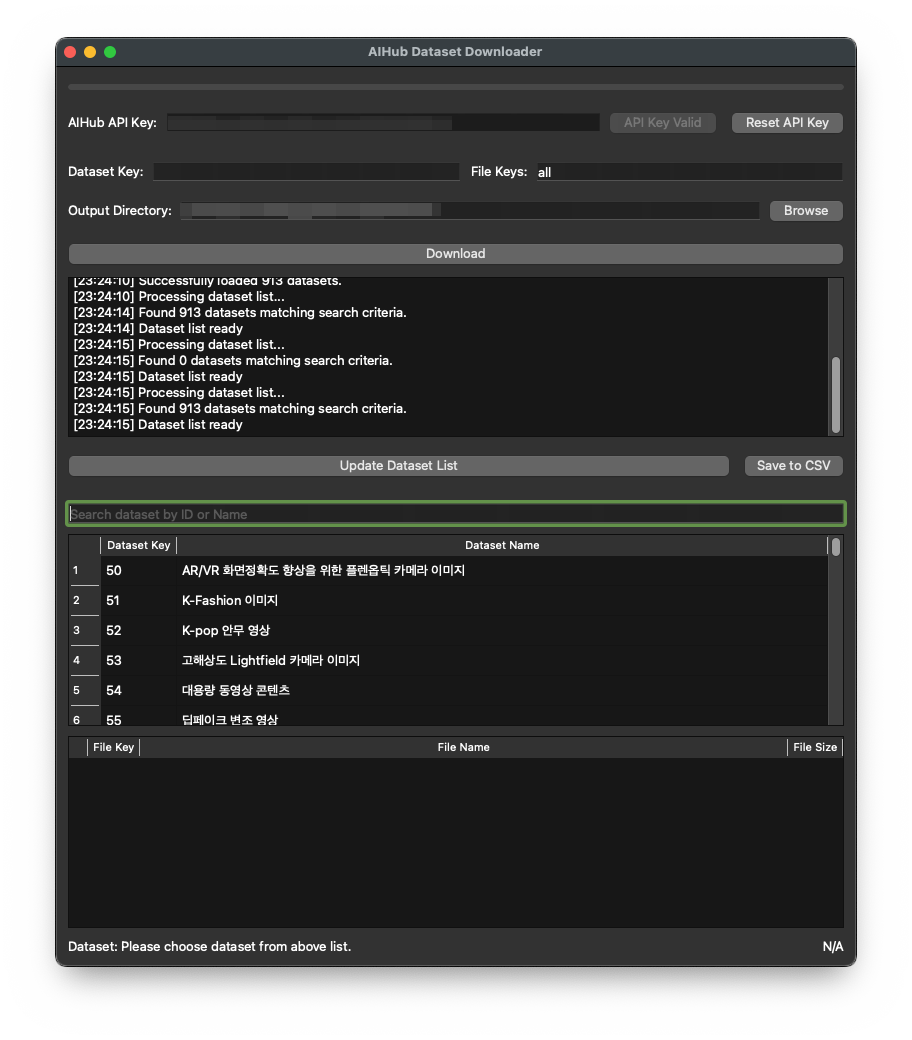
GUI Interface
aihubkr-gui
CLI Interface
aihubkr-dl --help
📖 Usage
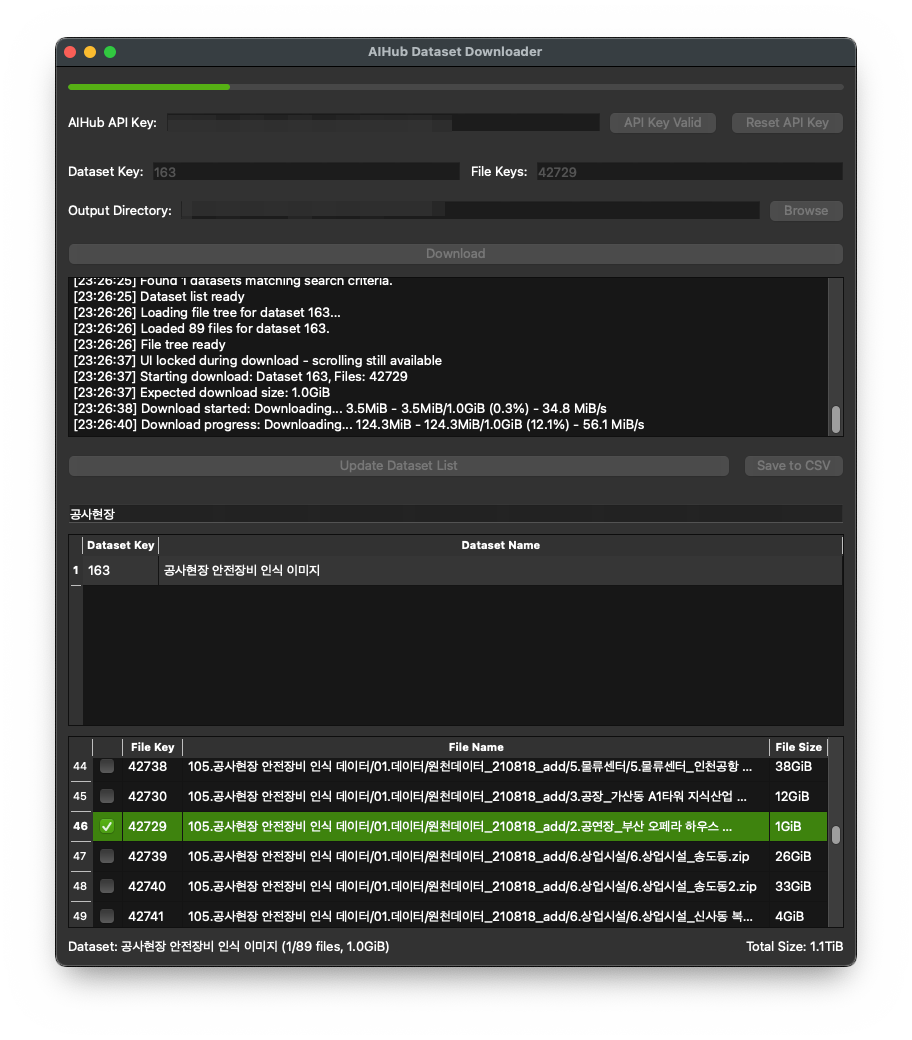
GUI Features
- Modern Interface: Clean, intuitive PyQt6-based GUI
- Dataset Browser: Browse and search through all available datasets
- File Tree View: View detailed file structure and sizes
- Selective Download: Choose specific files or download entire datasets
- Progress Tracking: Real-time download progress with speed and size information
- Status Logging: Detailed operation logs and error messages
- API Key Management: Secure API key storage and validation
CLI Commands
List all available datasets
aihubkr-dl list
View files in a specific dataset
aihubkr-dl files DATASET_KEY
Download all files from a dataset
aihubkr-dl download DATASET_KEY
Download specific files from a dataset
aihubkr-dl download DATASET_KEY --file-key 1,2,3
Download to a custom directory
aihubkr-dl download DATASET_KEY --output-dir /path/to/downloads
Show API usage information
aihubkr-dl help
Using API key from command line
aihubkr-dl list --api-key your-api-key-here
Using API key from environment variable
export AIHUB_APIKEY="your-api-key-here"
aihubkr-dl list
🔐 API Key Authentication
This tool uses API key authentication instead of username/password. You can provide your API key in several ways:
- Command line argument:
--api-key your-key-here - Environment variable: Set
AIHUB_APIKEYenvironment variable - Saved credentials: The tool will prompt you to enter the API key once and save it for future use
✨ Features
Core Features
- 🔑 API Key Authentication: Simple, secure authentication without login/logout
- 📋 Dataset Management: Browse and search through all available datasets
- 🌳 File Tree View: Detailed view of dataset structure with file sizes
- 📥 Selective Download: Download specific files or entire datasets
- 📊 Progress Tracking: Real-time download progress with speed and size information
- 🔄 File Merging: Automatic merging of split files after download
- 💾 CSV Export: Export dataset lists to CSV format for analysis
Advanced Features
- 🎯 Custom Output Directories: Specify download locations
- ⚡ Background Processing: Non-blocking operations in GUI
- 🛡️ Error Handling: Comprehensive error handling and user feedback
- 📝 Status Logging: Detailed operation logs and debugging information
- 🔒 Secure Storage: Encrypted storage of API keys
- 🌐 Cross-Platform: Works on Windows, macOS, and Linux
Technical Features
- 📦 Modern CLI: Subcommand-based interface following modern CLI standards
- 🎨 PyQt6 GUI: Modern, responsive graphical interface
- 🔧 Modular Architecture: Clean, maintainable codebase
- 📈 Progress Callbacks: Real-time progress updates
- 🔄 State Management: Proper UI state management during operations
🏗️ Architecture
aihubkr/
├── src/aihubkr/
│   ├── core/           # Core functionality
│   │   ├── auth.py     # API key authentication
│   │   ├── config.py   # Configuration management
│   │   ├── downloader.py # Download engine
│   │   ├── file_utils.py # File operations
│   │   └── filelist_parser.py # File tree parsing
│   ├── cli/            # Command-line interface
│   │   └── main.py     # CLI entry point
│   └── gui/            # Graphical interface
│       └── main.py     # GUI entry point
├── external/           # External tools
│   └── aihubshell      # Original aihubshell (reference)
└── setup.py           # Package configuration
🔧 Development
Prerequisites
- Python 3.8 or higher
- Git
Local Development Setup
# Clone the repository
git clone https://github.com/jungin500/aihubkr.git
cd aihubkr

# Install dependencies
pip install -r requirements.txt

# Install in development mode
pip install -e .

# Run CLI
python -m src.aihubkr.cli.main list

# Run GUI
python -m src.aihubkr.gui.main
Dependencies
- requests: HTTP client for API communication
- PyQt6: GUI framework
- prettytable: CLI table formatting
- tqdm: Progress bars (for internal use)
📋 Requirements
- Python: 3.8 or higher
- Operating System: Windows, macOS, or Linux
- AIHub Account: Valid AIHub account with API key
- Internet Connection: Required for dataset access and downloads
🐛 Troubleshooting
Common Issues
API Key Authentication Failed
- Verify your API key is correct
- Check if you have accepted the terms on AIHub website
- Ensure your API key has proper permissions
Download Fails
- Check available disk space
- Verify internet connection
- Ensure you have accepted dataset terms on AIHub website
GUI Not Starting
- Ensure PyQt6 is properly installed
- Check Python version compatibility
- Verify all dependencies are installed
Getting Help
- Check the CLI help:
aihubkr-dl --help - Use the help command:
aihubkr-dl help - Review error messages in the GUI status log
📄 License
This project is licensed under the Apache License 2.0 - see the LICENSE file for details.
🤝 Contributing
Contributions are welcome! Please feel free to submit a Pull Request.
📝 Changelog
See CHANGELOG.md for a detailed history of changes.
🔗 Links
- AIHub Website: https://aihub.or.kr
- GitHub Repository: https://github.com/jungin500/aihubkr
- API Documentation: https://api.aihub.or.kr/info/api.do
Made with ❤️ for the AI/ML community
1 maintainer

Metadata
1 maintainer
Release files for aihubkr-dl 0.2.0
For a detailed explanation of source distributions (sdists) and built distributions (wheels), please see the package formats documentation.
Source distribution (sdist)
| File | Size | Uploaded | |
|---|---|---|---|
| aihubkr_dl-0.2.0.tar.gz | 28.2 kB | Details |
Built distribution (wheel)
| File | Interpreter | ABI | Platform | Reset |
|---|---|---|---|---|
| aihubkr_dl-0.2.0-py3-none-any.whl | Python 3 | none | any | Details |
Total release size: 57.4 kB
Release files / aihubkr_dl-0.2.0.tar.gz
| Download URL | aihubkr_dl-0.2.0.tar.gz |
|---|---|
| Size | 28.2 kB |
| Tags | Source |
|
SHA-256 checksum How to use checksums |
fedcfe7a0a938495220b3fc2b62e20ca5e1d43f1fc3ddd9ec71318ebeb118dbe
|
|
BLAKE2b-256 checksum How to use checksums |
9a4e585e47d04aa4c867891f821b3cf5f6d277d415667d0a910b680a9d330398
|
| Upload date | |
|
Uploaded using Trusted Publishing? What is trusted publishing? |
Yes |
| Uploaded via |
twine/6.1.0 CPython/3.12.9
|
Provenance
Provenance describes where a file came from. On PyPI, provenance is shared via attestations, which provide a verifiable record of the build or publishing details. View details, limitations and caveats.


PyPI Publish Attestation
PyPI verified that this artifact, at this checksum, originated from the publisher listed below.
Signed by GitHub Actions, verified by PyPI on Jul 5, 2025.
Transparency logRelease files / aihubkr_dl-0.2.0-py3-none-any.whl
| Download URL | aihubkr_dl-0.2.0-py3-none-any.whl |
|---|---|
| Size | 29.2 kB |
| Tags | Python 3 |
|
SHA-256 checksum How to use checksums |
799267fbf4ce09edfe01cf8d9c4be0363d8af357f59981dd3d85c2162026c75a
|
|
BLAKE2b-256 checksum How to use checksums |
6588cbf2e33a38a73021ed93a5c987c2c505326587aa4ecd0768578388e889cd
|
| Upload date | |
|
Uploaded using Trusted Publishing? What is trusted publishing? |
Yes |
| Uploaded via |
twine/6.1.0 CPython/3.12.9
|
Provenance
Provenance describes where a file came from. On PyPI, provenance is shared via attestations, which provide a verifiable record of the build or publishing details. View details, limitations and caveats.
PyPI Publish Attestation
PyPI verified that this artifact, at this checksum, originated from the publisher listed below.
Signed by GitHub Actions, verified by PyPI on Jul 5, 2025.
Transparency log












