

Aikito
Multi-Agent · Multi-Project · Multi-OS · Multi-Machine






简体中文 · Homepage · Documentation
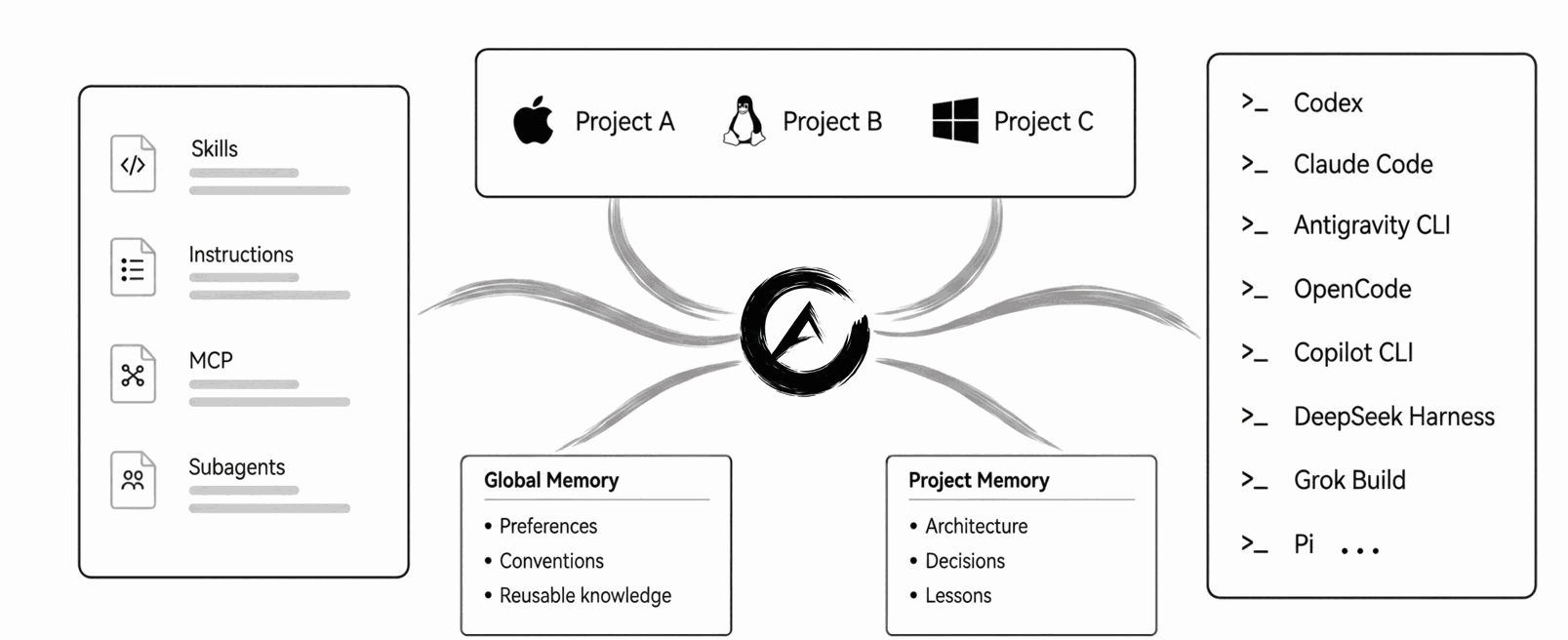
Aikito keeps coding-agent instructions, skills, MCP definitions, subagents, and durable memory in one Git-managed workspace, shared across agents and projects.
It is built for people whose Agent setup already works, but has become tedious to keep consistent across tools, projects, machines, and time.
Aikito governs the workspace, agents maintain the memory, and you oversee it all.
Why Aikito
AI agent resources fragment in three directions:
- Across tools: each agent requires a different configuration format
- Across projects: reusable knowledge, skills, and instructions are copied or maintained across multiple repositories
- Across time: valuable decisions and hard-won lessons disappear into old sessions
Aikito keeps the source files in one personal workspace and connects selected resources to each agent and project. No database, daemon, vector store, or hosted service is required.
Durable Memory
The bundled durable-memory skill guides agents to retrieve useful notes, retain verified conclusions, and update stale knowledge. Notes are plain Markdown with Git history.
For example, a writing preference belongs in global memory, while an API retry decision belongs to its project. A project normally connects to global memory and its own notes; these scopes organize context, not filesystem access permissions.
New workspaces enable the workflow by default; synchronization connects it to agents. See memory usage and opt-out and why memory needs a maintainer.
Quick Start
Let your coding agent set it up (recommended)
Install and configure Aikito from https://github.com/lsaint/aikito. Read the README,
src/aikito/templates/skills/aikito/SKILL.md, and any linked documentation relevant to the setup. Inspect the Agent configuration I already use, initialize the Aikito workspace, adopt supported existing resources, synchronize them through Aikito, and verify the result withaikito status.adoptandsyncpreflight their complete plans before writing. If either command stops, explain the findings and ask before using--skip,--force,--prune, or manually resolving a conflict. Preserve my current setup and do not register a project without my confirmation. If there is nothing to adopt, skip that step and tell me.
Install manually (macOS / Linux / Windows)
Cross-platform with uv (recommended):
uv tool install aikito
Or with Homebrew (macOS / Linux):
brew install lsaint/tap/aikito
Or with pipx:
pipx install aikito
Bring your existing Agent setup under Aikito:
aikito init workspace ~/aikito
aikito adopt
aikito sync
aikito status
aikito adopt and aikito sync check their complete plans before writing and
stop if anything needs attention. Use --dry-run for a concise read-only
summary, or add --verbose for every item and path. For adoption details, see
migration and safety.
Starting without existing Agent configuration? Skip aikito adopt; the rest of
the workflow is unchanged.
On Windows, enable Developer Mode and use uv tool install aikito or the
PowerShell installation guide.
Continue with the existing-setup guide to consolidate what your Agents already use. To create resources from scratch, connect a project, or handle other tasks, use Agent Request Examples.
See the Result
aikito status shows resource state across agents. Example output from a
configured workspace (agents and counts depend on your setup):
┌───────────────────────┬──────────────┬────────┬────────────┬───────────┐
│ Agent                 │ Instructions │ Skills │ MCP Config │ Subagents │
├───────────────────────┼──────────────┼────────┼────────────┼───────────┤
│ Codex                 │ ✓            │ 2 ›    │ 0          │ 0         │
│ Claude Code           │ ✓            │ 2 »    │ 0          │ 0         │
│ Antigravity CLI       │ ✓            │ 2 »    │ 0          │ 0         │
│ OpenCode              │ ✓            │ 2 ›    │ 0          │ 0         │
│ GitHub Copilot CLI    │ ✓            │ 2 ›    │ 0          │ 0         │
│ DeepSeek Harness      │ ✓            │ 2 ›    │ 0          │ 0         │
│ Grok Build            │ ✓            │ 2 ›    │ 0          │ 0         │
│ Pi                    │ ✓            │ 2 ›    │ –          │ –         │
└───────────────────────┴──────────────┴────────┴────────────┴───────────┘

✓ all synced · 8 agents · 2 skills · 0 notes across 1 scopes
aikito show memory lists retained knowledge by scope. This separate example
shows one global note and two notes for project example:
┌─────────┬───────────────────┬──────────────────────────────┬──────┐
│ Scope   │ Note File         │ Title                        │ Link │
├─────────┼───────────────────┼──────────────────────────────┼──────┤
│ Global  │ writing-style     │ Keep explanations concise    │ –    │
├─────────┼───────────────────┼──────────────────────────────┼──────┤
│ example │ api-retry-policy  │ Retry external APIs safely   │ ✓    │
│ example │ release-checklist │ Release verification steps   │ ✓    │
└─────────┴───────────────────┴──────────────────────────────┴──────┘
Global notes hold cross-project knowledge; project notes hold local decisions. See memory operations for the full workflow.
Use synchronization troubleshooting to investigate
missing links, conflicts, or drift. Prefer a browser view? Run
aikito web for the local, read-only Console.
Boundaries
Aikito uses plain files and Git, with no background service required.
What Aikito does not do
- capture every agent action or conversation automatically
- run a vector store, embedding pipeline, or memory service
- inject context into every prompt through a background daemon
- orchestrate supervisor and worker agents
- replace your coding agent's native runtime
Migration and Safety
Already have agent configuration? Run aikito adopt; it checks the complete
import plan and stops before writing if anything needs attention. Use
aikito adopt --dry-run --verbose for a detailed read-only review; see
adoption and backups. aikito doctor reports the
same adoption issues; when one resource is intentionally excluded, use
the exact resource-level --skip command shown in the finding.
Your workspace is a local Git repository. Review it for secrets and private data before publishing; removing a secret in a later commit does not erase it from history. Read the safety model and report vulnerabilities through the Security Policy.
Documentation
- Getting started: installation through adopting and synchronizing your existing setup.
- Workspace and synchronization: source files, scopes, and resource ownership.
- Connect another machine: existing workspaces and custom paths.
- CLI reference: commands and shell completion.
- Comparison and FAQ: design choices and common questions.
Chat Distiller can turn browser AI conversations into Markdown notes in your Aikito Inbox. See the capture and review workflow.
Browse the full documentation site for more.
Support
If you find Aikito useful, you can support its development.
1 maintainer

Release files for aikito 1.41.0
For a detailed explanation of source distributions (sdists) and built distributions (wheels), please see the package formats documentation.
Source distribution (sdist)
| File | Size | Uploaded | |
|---|---|---|---|
| aikito-1.41.0.tar.gz | 646.1 kB | Details |
Built distribution (wheel)
| File | Interpreter | ABI | Platform | Reset |
|---|---|---|---|---|
| aikito-1.41.0-py3-none-any.whl | Python 3 | none | any | Details |
Total release size: 1.2 MB
Release files / aikito-1.41.0.tar.gz
| Download URL | aikito-1.41.0.tar.gz |
|---|---|
| Size | 646.1 kB |
| Tags | Source |
|
SHA-256 checksum How to use checksums |
4a125021351ec43a55f818a337acd66aa8f92ec425c7bdb860965a9194e1875f
|
|
BLAKE2b-256 checksum How to use checksums |
5aa33a88564e56683afcddcb634bf11be0f738b8736c02c7b472404f1161574d
|
| Upload date | |
|
Uploaded using Trusted Publishing? What is trusted publishing? |
Yes |
| Uploaded via |
twine/6.1.0 CPython/3.12.9
|
Provenance
Provenance describes where a file came from. On PyPI, provenance is shared via attestations, which provide a verifiable record of the build or publishing details. View details, limitations and caveats.


PyPI Publish Attestation
PyPI verified that this artifact, at this checksum, originated from the publisher listed below.
Signed by GitHub Actions, verified by PyPI on Sep 17, 2026.
Transparency logRelease files / aikito-1.41.0-py3-none-any.whl
| Download URL | aikito-1.41.0-py3-none-any.whl |
|---|---|
| Size | 582.2 kB |
| Tags | Python 3 |
|
SHA-256 checksum How to use checksums |
fb18c89a11ceb7f33045397863aa69b2d9ffda7eff8a628ed45e572f067ddd29
|
|
BLAKE2b-256 checksum How to use checksums |
668c0a054f178c3063d0ba2be5db74ed7c95874d7defd2d014b124fc7df6b3e8
|
| Upload date | |
|
Uploaded using Trusted Publishing? What is trusted publishing? |
Yes |
| Uploaded via |
twine/6.1.0 CPython/3.12.9
|
Provenance
Provenance describes where a file came from. On PyPI, provenance is shared via attestations, which provide a verifiable record of the build or publishing details. View details, limitations and caveats.
PyPI Publish Attestation
PyPI verified that this artifact, at this checksum, originated from the publisher listed below.
Signed by GitHub Actions, verified by PyPI on Sep 17, 2026.
Transparency log













