
A lightweight CLI for installing and managing AppImages on Linux.

Project description
Aim AppImage Manager
Aim is a lightweight CLI for installing, launching, updating, and removing AppImages on Linux. It keeps AppImages in one predictable place, adds desktop launcher entries, extracts icons when possible, and cleans everything up when you uninstall.
Current release: 0.1.0 alpha.
Demo
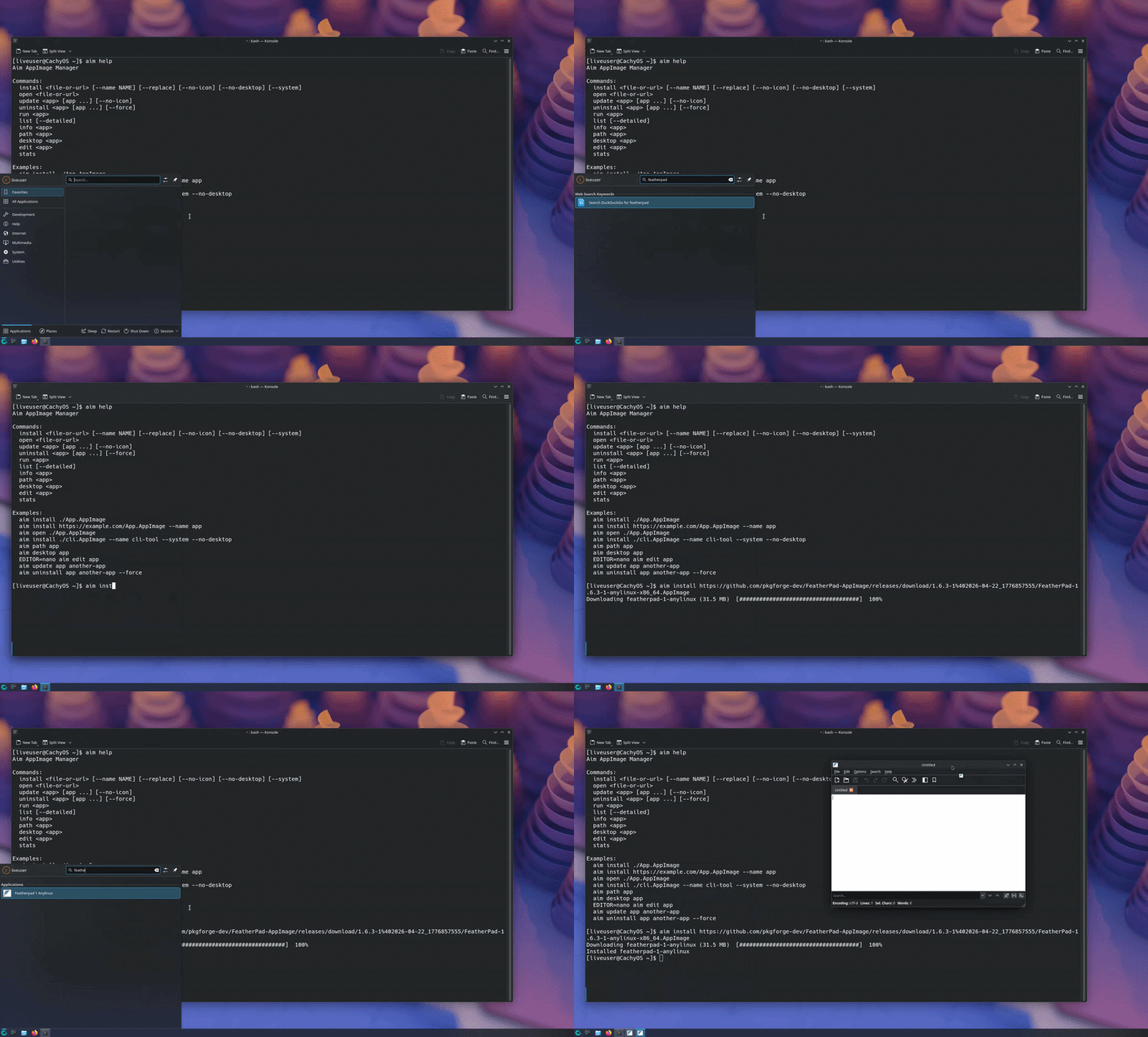
Install an AppImage from a URL, then launch it from your app menu with its icon in place.
Why Aim?
- Install local AppImages or direct AppImage URLs with one command.
- Add apps to your desktop launcher automatically.
- Keep managed AppImages in a consistent user-local folder.
- Update URL-installed apps by redownloading from their saved source.
- Remove installed AppImages, desktop entries, icons, and symlinks cleanly.
- Inspect managed apps without hunting through your filesystem.
- Run without root by default.
Requirements
- Linux
- Python 3.9+
pipxrecommended for installation
Check your Python version with:
python3 --version
Installation
Install With pipx
pipx install git+https://github.com/leonfrancis37/Aim-AppImage-Manager.git
After installation:
aim help
Install pipx
Fedora:
sudo dnf install pipx
pipx ensurepath
Debian/Ubuntu:
sudo apt install pipx
pipx ensurepath
Arch:
sudo pacman -S python-pipx
pipx ensurepath
Install From Source
git clone https://github.com/leonfrancis37/Aim-AppImage-Manager.git
cd Aim-AppImage-Manager
python3 -m venv .venv
source .venv/bin/activate
pip install -r requirements.txt
pip install .
Then run:
aim help
Run From Source
Useful while developing or testing changes:
git clone https://github.com/leonfrancis37/Aim-AppImage-Manager.git
cd Aim-AppImage-Manager
python3 -m venv .venv
source .venv/bin/activate
pip install -r requirements.txt
python3 src/main.py help
Quick Start
aim install ./App.AppImage
aim install https://example.com/App.AppImage --name app
aim run app
aim list --detailed
aim update app
aim uninstall app
Aim should be run as your normal user. For --system, Aim asks for sudo only when it needs to create or remove a /usr/local/bin symlink.
Commands
| Command | Description |
|---|---|
aim install <file-or-url> |
Install and register an AppImage. |
aim open <file-or-url> |
Run an AppImage once without installing it. |
aim run <app> |
Run an installed AppImage by name. |
aim update <app> [app ...] |
Redownload URL-installed apps. |
aim uninstall <app> [app ...] |
Remove apps and their managed files. |
aim list |
Show installed apps. |
aim list --detailed |
Show installed apps with paths, source type, and size. |
aim info <app> |
Show metadata for one app. |
aim path <app> |
Print the managed AppImage path. |
aim desktop <app> |
Print the desktop entry path. |
aim edit <app> |
Open the desktop entry in your editor. |
aim stats |
Show app count and total disk usage. |
Install Options
| Option | Description |
|---|---|
--name NAME |
Choose the managed app name. |
--replace |
Replace an existing app with the same name. |
--no-icon |
Skip icon extraction. |
--no-desktop |
Skip desktop entry creation. |
--system |
Add a /usr/local/bin command symlink. |
Example for a CLI-style AppImage:
aim install ./tool.AppImage --name tool --system --no-desktop
Updating Apps
Aim can update apps that were installed from a URL because it stores the original source URL:
aim update app
aim update app another-app
Local file installs cannot be updated automatically unless they are reinstalled with --replace.
Where Files Are Stored
Aim stores everything in user-local locations by default:
| What | Location |
|---|---|
| AppImages | ~/.local/appimages/ |
| Desktop entries | ~/.local/share/applications/ |
| Extracted icons | ~/.local/share/icons/aim/ |
| Aim app database | ~/.local/share/aim/apps.json |
| Optional system command symlinks | /usr/local/bin/ |
The optional /usr/local/bin/ symlink is only created when using --system.
Distribution
Currently, Aim can be installed with pipx from GitHub or from source.
Planned distribution:
- PyPI package for
pipx install aim-appimage-manager - Arch User Repository package
License
Aim is released under the MIT License. See LICENSE for details.
Release history Release notifications | RSS feed

Download files
Download the file for your platform. If you're not sure which to choose, learn more about installing packages.
Source Distribution
Built Distribution
Filter files by name, interpreter, ABI, and platform.
If you're not sure about the file name format, learn more about wheel file names.
Copy a direct link to the current filters
File details
Details for the file aim_appimage_manager-0.1.0.tar.gz.
File metadata
- Download URL: aim_appimage_manager-0.1.0.tar.gz
- Upload date:
- Size: 13.0 kB
- Tags: Source
- Uploaded using Trusted Publishing? No
- Uploaded via: twine/6.2.0 CPython/3.14.4
File hashes
| Algorithm | Hash digest | |
|---|---|---|
| SHA256 |
4bdb5a153d6a8ade58b9e6b354899d91eed84ca0cf267bc92ea169ee6109d311
|
|
| MD5 |
16d7f9560527ae350ffa2f1bc6ef83ef
|
|
| BLAKE2b-256 |
1bf3fa8a6d7969ef52f9a43396ca4176f32649481afa1557bb95f6beeea26ce2
|
File details
Details for the file aim_appimage_manager-0.1.0-py3-none-any.whl.
File metadata
- Download URL: aim_appimage_manager-0.1.0-py3-none-any.whl
- Upload date:
- Size: 15.2 kB
- Tags: Python 3
- Uploaded using Trusted Publishing? No
- Uploaded via: twine/6.2.0 CPython/3.14.4
File hashes
| Algorithm | Hash digest | |
|---|---|---|
| SHA256 |
44f165320d24109aad20e3e47ca892ea303dbe8d7995fdd0ea12d5815ccfc178
|
|
| MD5 |
2c00638bcffb29169b338222dae50ad6
|
|
| BLAKE2b-256 |
5cd5888da2e2bf9945baa475a142a99c81c09a4127e7acad7b7fbfb818cb5d32
|






