
A build tool for C++.

Project description








Aim
A command line tool for building C++ projects.
Introduction
Aim is an attempt to make building C++ projects from source as simple as possible while encouraging a modular approach to software development.
Aim only requires a target.py file which is used to specify the builds of your project. Each build specifies a
component of your project, like a static library, dynamic library, or an executable.
Each target you aim to support requires its own target.py file. This is easier to explain with an example:
+ Project
  + builds
    + linux-debug
      - target.py
    + linux-release
      - target.py
    + windows-debug
      - target.py
    + windows-release
      - target.py
  + src
    + ...
Where windows/linux and debug/release compose to make make different targets.
When running commands, you often need to specify the path to directory of the target.py file. For example: builds/windows-debug or builds/linux-release.
Do not add target.py to the path.
Aim supports:
- Windows with
msvcfrontend. - Linux with
gccfrontend. - It should also be possible to use the
gccfrontend on Windows when using GCC-like compilers but this hasn't been tested.
Updates
- (23/01/2022) CLI has changed again. Removed previous change. There is now a
execcommand that executes several commands in one. For exampleaim exec <path> <build> clobber build run. - (23/12/2021) CLI has changed.
list,build,runandclobberare nowtargetcommands and are executed like so:aim target <path> build <name>instead ofaim build --target=<path> <name>. This is to make switching between commands easier. - Aim no longer uses the
tomlfor thetargetfile format.targetfiles are now written in Python. The motivation for this change is that it can be useful to access environment variables and to store properties, such as compiler flags, as variables. To support this change, there is theutil/convert_toml.pyscript. To convert atomlfile, execute from the aim root directory:poetry run python util\convert_toml.py <relative/path/to/target.toml>. The Python file will be written to the same directory as thetarget.tomlfile.
Getting Started
Prerequisites
Aim requires the following dependencies:
- python - version 3.7 or above.
- ninja
- poetry - for development only
- linux-debug
- target.py
- linux-release
- target.py
- linux-debug
Installation
Aim is a python project and is installed using pip.
pip install --user aim-build
Using
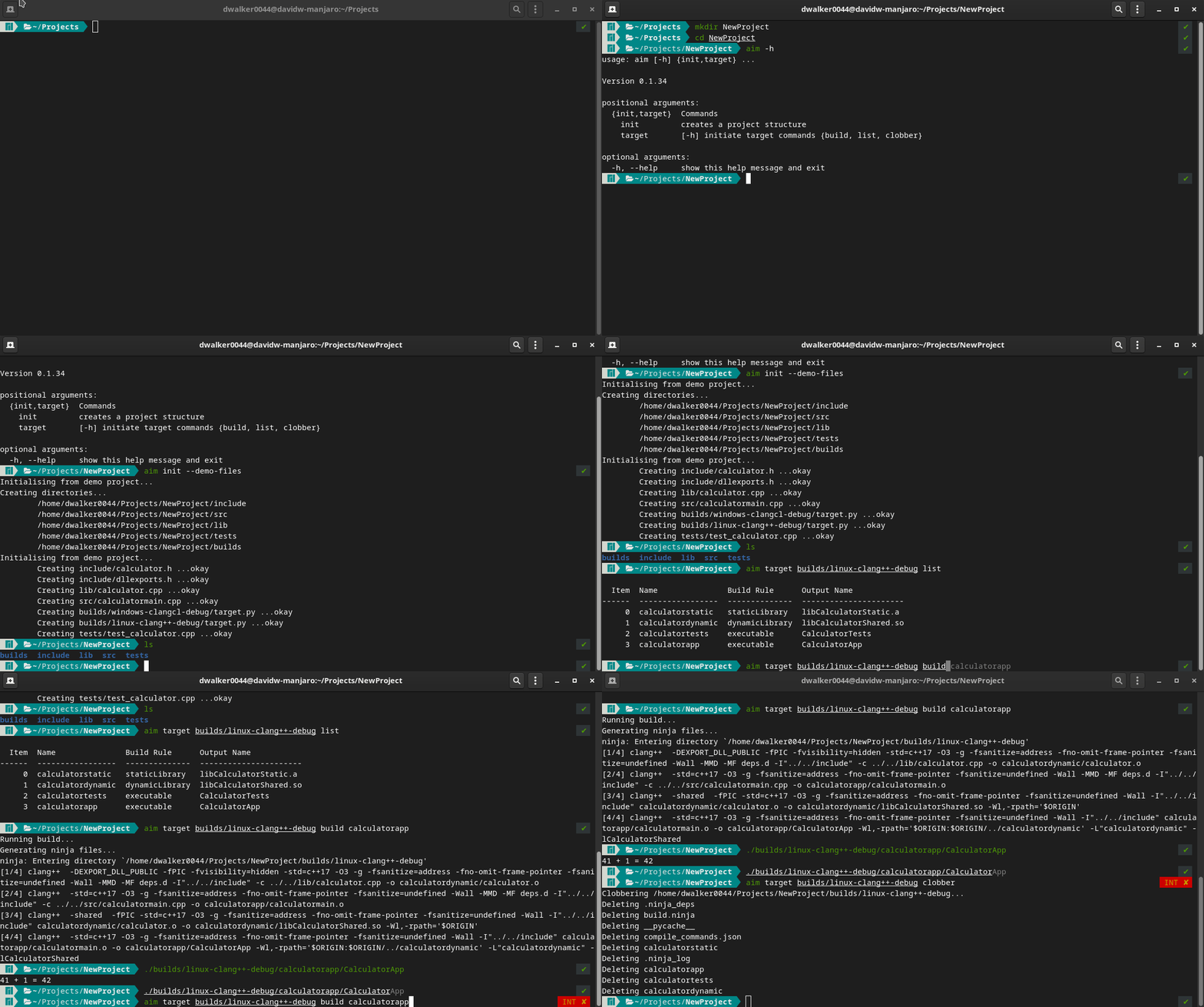
Basic usage:
aim --help                                    # displays the help.
aim init --demo-files                         # creates src, include, lib directory and adds demo files.
aim list builds/linux-clang++-debug           # lists the builds in target.py
aim build builds/linux-clang++-debug <build>  # executes <build>.
aim clobber builds/linux-clang++-debug        # deletes all build artifacts.
You can run executables directly or using the run command:
./builds/clang++-linux-debug/<build-name>/<output-name>
aim run builds/clang++-linux-debug run <build-name>
Target files
A target.py file describes a project and its build components.
Begin by specifying projectRoot which is the path from the target file to your source files. All relative paths
will be relative to this directory.
The compiler frontend informs Aim how to construct the arguments for the compiler. Use gcc
for GCC-like compilers and msvc for Microsoft cl-like compilers. Next specify the compiler, archiver, flags and any defines.
projectRoot = "../.."

compilerFrontend="gcc"
compiler = "clang++"
archiver = "ar"

flags = [
    "-std=c++17",
    "-O3",
    "-g",
    "-Wall",
]

# defines = [...] # Defines do not need the -D prefix.
Next specify your builds. For each build you must specify the name and buildRule. Valid build rules are
staticLibrary, dynamicLibrary, executable, headerOnly or libraryReference. A target.py that consists of a
dynamic or shared library, an application and a test executable looks like:
builds = [
    {
        "name": "calculatorstatic",
        "buildRule": "staticLibrary",
        "outputName": "CalculatorStatic",
        "sourceFiles": ["lib/*.cpp"],
        "includePaths": [
            "include"
        ]
    },
    {
        "name": "calculatordynamic",
        "buildRule": "dynamicLibrary",
        "outputName": "CalculatorShared",
        "sourceFiles": ["lib/*.cpp"],
        "includePaths": [
            "include"
        ]
    },
    {
        "name": "calculatortests",
        "buildRule": "executable",
        "requires": ["calculatorstatic"],
        "outputName": "CalculatorTests",
        "sourceFiles": ["tests/*.cpp"],
        "includePaths": ["include"]
    },
    {
        "name": "calculatorapp",
        "buildRule": "executable",
        "requires": ["calculatordynamic"],
        "outputName": "CalculatorApp",
        "sourceFiles": ["src/*.cpp"],
        "includePaths": ["include"]
    }
]
Other notes:
-
The
requiresfield is important as it is how you specify the dependencies for a build. For example, if you create a static library named "myAwesomeLibrary", this can be used in other builds simply by specifyingrequires=["myAwesomeLibrary"]. -
A
headerOnlybuild does not have anoutputNameorsourceFilesas it is not built. TheheaderOnlyrule is not essential and is mostly for convenience. If you have a header only library, repeating the include paths across several builds can be become repetitive. Instead, create aheaderOnlybuild to capture the include paths and use it in other builds by adding the rule to the buildsrequiresfield. -
A
libraryReferencedoes not havesourceFilesas it is not built. Like theheaderOnlyrule it is mostly for convience to reduce duplication. The primary use case is for capturing theincludePaths,libraryPathsandlibrariesof a third party library that you need to use in a build. AlibraryReferencecan then be used by other builds by adding it to a buildsrequiresfield. -
The fields
compiler,flagsanddefinesare normally written at the top of the target file before the builds section. By default, all builds will use these fields i.e. they are global, but they can also be overridden by specifying them again in a build. Note that when these fields are specified specifically for a build, they completely replace the global definition; anyflagsordefinesthat you specify must be written out in full as they will not share any values with the global definition. -
Since target files are just python, you can have variables. However, since target files are validated with a schema, variables must be escaped with a leading underscore. For example
_custom_defines = [...]is okay, butcustom_defines = [...]will cause a schema error.
Supporting Multiple Targets
Aim treats any build variation as its own unique build target with its own unique target.py.
A build target is some combination of things that affects the output binary such as:
- operating system (Windows, OSX, Gnu Linux)
- compiler (MSVC, GCC, Clang)
- build type (Release, Debug, Sanitized)
- etc.
Each build target and corresponding target.py file must have its own directory ideally named using a unique
identifier that comprises the 'parts' that make up the build. For example, builds/linux-clang++-release/target.py indicates that the target file describes a project that is a release build, uses the clang++ compiler and is for the linux operating system.
As an example, if you were developing an application for both Windows and Linux, you may end up with a build directory structure like the following:
builds/linux-clang++-release/target.pybuilds/linux-clang++-debug/target.pybuilds/windows-clangcl-release/target.pybuilds/windows-clangcl-debug/target.py
Note: each target.py file must be written out in full for each target that you need to support. There is no way for
target files to share information or to depend on another. While this leads to duplication between target files, it
makes them very explicit and makes debugging builds much easier.
Advice Structuring Projects
If you structure your project/libraries as individual repositories then it may seem logical to nest dependencies inside one another. For example, if library B depends on library A, then B needs a copy of A in order for it to be built. So you may choose to nest the source of A inside B, perhaps using a git submodule.
The problem comes when your dependency hierarchy becomes more complex. If library C also depends on A, and an application D depends on B and C, you'll end up with multiple copies of library A which can become difficult to manage.
You may need to use this approach, as it can be useful to build a library in isolation, however you should do so in such a way where pulling the source for the dependencies is optional.
The approach the author uses is to use a non-project-specific directory that includes all your projects directly below it i.e. a "flat" structure. So rather than nesting dependencies you have:
 + MyProjects
 + - LibA
 + - LibB
 + - LibC
 + - Application_1
 + - Application_2
 + - builds
 + - - App1
 + - - - linux-clang++-debug
 + - - - - target.py
The flat structure has a single build directory and a single target file for each build target you need to support. This eliminates any
duplication and is easy to manage. Aim is flexible enough that you can add additional levels to the project structure
should you need to. For example, you may want to group all libraries under a libraries sub-directory. But the take-away message
is that you should not enforce nested dependencies as this leads to duplication.
Developing Aim
Aim is a Python project and uses the poetry dependency manager. See poetry installation for instructions.
Once you have cloned the project, the virtual environment and dependencies can be installed by executing:
poetry install
Dev Install
Unfortunately, unlike setuptools, there is no means to do a 'dev install' using poetry. A dev install effectively generates
an application that internally references the active source files under development. This allows developers to test the application
without having to re-install the application after each change.
In order to use a development version of Aim on the command line, is it recommended creating an alias. The alias needs to:
- add the Aim directory to
PYTHONPATHto resolve import/module paths - execute the main Aim script using the virtualenv created by poetry
There are dev-env.bash and dev-env.fish scripts that configure this for you in the root of the Aim project directory.
Note, these files must be sourced in order for them to work.
Release history Release notifications | RSS feed


Download files
Download the file for your platform. If you're not sure which to choose, learn more about installing packages.
Source Distribution
Built Distribution
Filter files by name, interpreter, ABI, and platform.
If you're not sure about the file name format, learn more about wheel file names.
Copy a direct link to the current filters
File details
Details for the file aim-build-0.1.38.tar.gz.
File metadata
- Download URL: aim-build-0.1.38.tar.gz
- Upload date:
- Size: 35.1 kB
- Tags: Source
- Uploaded using Trusted Publishing? No
- Uploaded via: poetry/1.1.12 CPython/3.10.1 Linux/5.15.12-1-MANJARO
File hashes
| Algorithm | Hash digest | |
|---|---|---|
| SHA256 |
e25e84be8c10b9382cfcbdc28ca2689aea5af63a4a464dd86b75204f61573e61
|
|
| MD5 |
7e28a4796984cf46324171070f123034
|
|
| BLAKE2b-256 |
8c17bdba89d40354d01ef8ddf84947122554b72a94c6db51835bf31984904f47
|
File details
Details for the file aim_build-0.1.38-py3-none-any.whl.
File metadata
- Download URL: aim_build-0.1.38-py3-none-any.whl
- Upload date:
- Size: 39.2 kB
- Tags: Python 3
- Uploaded using Trusted Publishing? No
- Uploaded via: poetry/1.1.12 CPython/3.10.1 Linux/5.15.12-1-MANJARO
File hashes
| Algorithm | Hash digest | |
|---|---|---|
| SHA256 |
bdebd5ea8755781ab6712d4444f1164dfe96e08ced87a9e989318a9c39b77b34
|
|
| MD5 |
7fcd9486599bb13ed1cd861e4a51ff75
|
|
| BLAKE2b-256 |
1e0c7dff7b7a3d61966537eed0b7abce129d0d7061927cf5c413ea7527ee0142
|






