
AIMAT: AI Music Artist Toolkit - Simplified AI Music workflows.

Project description
AI Music Artist Toolkit (AIMAT)


⚠️ AIMAT is currently under active development.
Features and setup steps may change frequently. Expect some instability!
A modular framework for experimenting with AI in music
The AI Music Artist Toolkit (AIMAT) is an environment designed to make working with AI in music easier and more practical for artists, musicians, and creative technologists. By bringing different generative models into a single, reusable workflow, AIMAT lowers some of the technical barriers that might otherwise make these tools difficult to access or experiment with.
AIMAT is also about preserving, repurposing and combining interesting AI music projects, keeping them in one place where they can be explored in a practical, creative setting. It’s designed to help artists experiment with AI-generated sound, explore different parameters, and find new possibilities they might not have come across otherwise.
At the moment, AIMAT supports Musika! (a deep learning model for generating high-quality audio), Basic Pitch (Automatic Music Transcription) and Midi DDSP (audio generation model for synthesizing MIDI), with plans to include other AI music models in the future. It integrates with Max/MSP, PD, Max for Live, and other OSC-enabled applications, making AI-generated music easier to incorporate into creative workflows.
🚀 Features
- ✔️ Modular and Expandable – Easily add and switch between different combinations of AI models.
- ✔️ OSC Integration – Send messages from Max/MSP or other OSC software to trigger AI music generation
- ✔️ Docker-based – Simplifies setup and runs in an isolated environment
- ✔️ Interactive CLI – Simplified commands for starting and stopping AIMAT services.
- ✔️ Cross-Platform – Works on Windows, macOS, and Linux
📥 Installation & Setup
1️⃣ Prerequisites
🔹 Docker – Install Docker Desktop
🔹 Miniconda – Install Miniconda for managing Python dependencies
2️⃣ Setting Up AIMAT
Once you have Docker and Conda installed, follow these steps:
🐍 Create a dedicated Conda environment:
conda create -n aimat python=3.10
conda activate aimat
✅ Install AIMAT via pip:
pip install aimat
3️⃣ Quick Start
Start AIMAT with a single command:
aimat start
This command:
- Starts the Docker containers with your AI models.
- Launches the OSC listener, ready to receive messages.
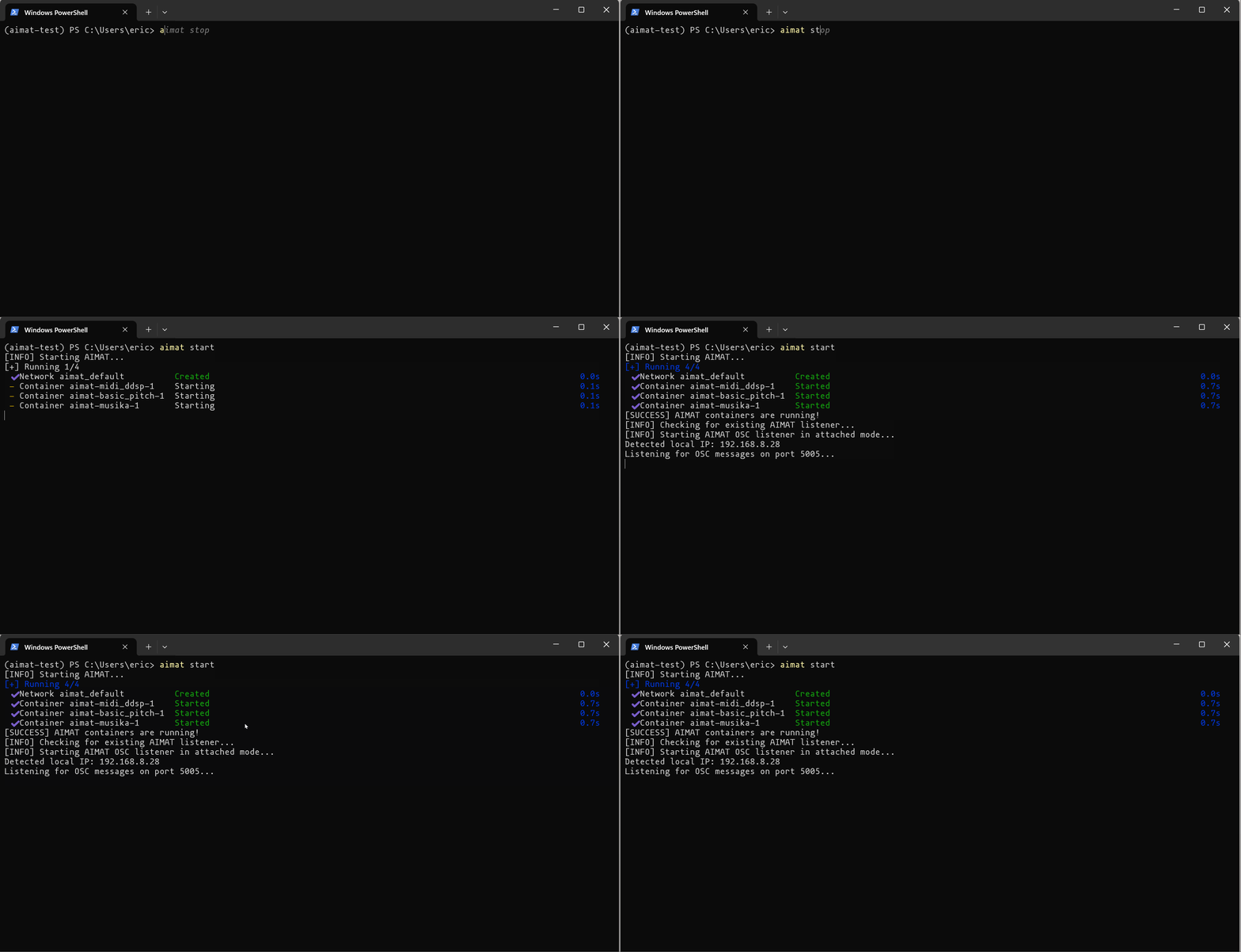
To stop AIMAT:
aimat stop
🛠️ What Happens During Setup?
✅ Checks for Docker & Conda – Ensures all dependencies are installed
✅ Creates & Configures the AIMAT Docker Environment – Automatically Downloads and Configures AI Music models
✅ Starts OSC Listener – Listens for incoming OSC messages to trigger music generation
⚠️ macOS Users with Apple Silicon (M1/M2/M3) - Not Currently Supported 😢
AIMAT does not currently support Apple Silicon Macs (M1/M2/M3) due to incompatibilities with TensorFlow and Docker images that lack ARM support.
🎵 OSC Usage Examples
Use OSC messages from tools like Max/MSP, Pure Data, or any other OSC-compatible software to trigger AIMAT's AI music generation models.
The AIMAT OSC listener expects messages on port 5005 at your computer's local IP address.
OSC Message Syntax
Send OSC messages in the following general format:
/trigger_model <model_type> [additional_parameters]
<model_type>: The AI model you're triggering (musika,midi_ddsp, orbasic_pitch).[additional_parameters]: Varies depending on the model chosen (see specific examples below).
Examples:
Musika (Audio Generation)
Generate audio using the Musika model:
/trigger_model musika 0.8 10 techno
0.8: Truncation value (controls randomness, higher = more random)10: Duration in secondstechno: Model preset (included:technoandmisc[trained on popular music])
MIDI-DDSP (Instrument Synthesis from MIDI)
Synthesize realistic instrument sounds from MIDI:
/trigger_model midi_ddsp your-midi-file.mid violin
your-midi-file.mid: MIDI file name (must be placed in the input folder)violin: Instrument name (available: violin, viola, oboe, horn, tuba, bassoon, saxophone, trumpet, flute, clarinet, cello, guitar, bass, double bass)
Basic Pitch (Audio-to-MIDI Conversion)
Convert audio recordings into MIDI:
/trigger_model basic_pitch path/to/audio-file.wav
path/to/audio-file.wav: Path to the audio file you wish to convert.
Simple AIMAT Musika generation using the MAX/MSP example
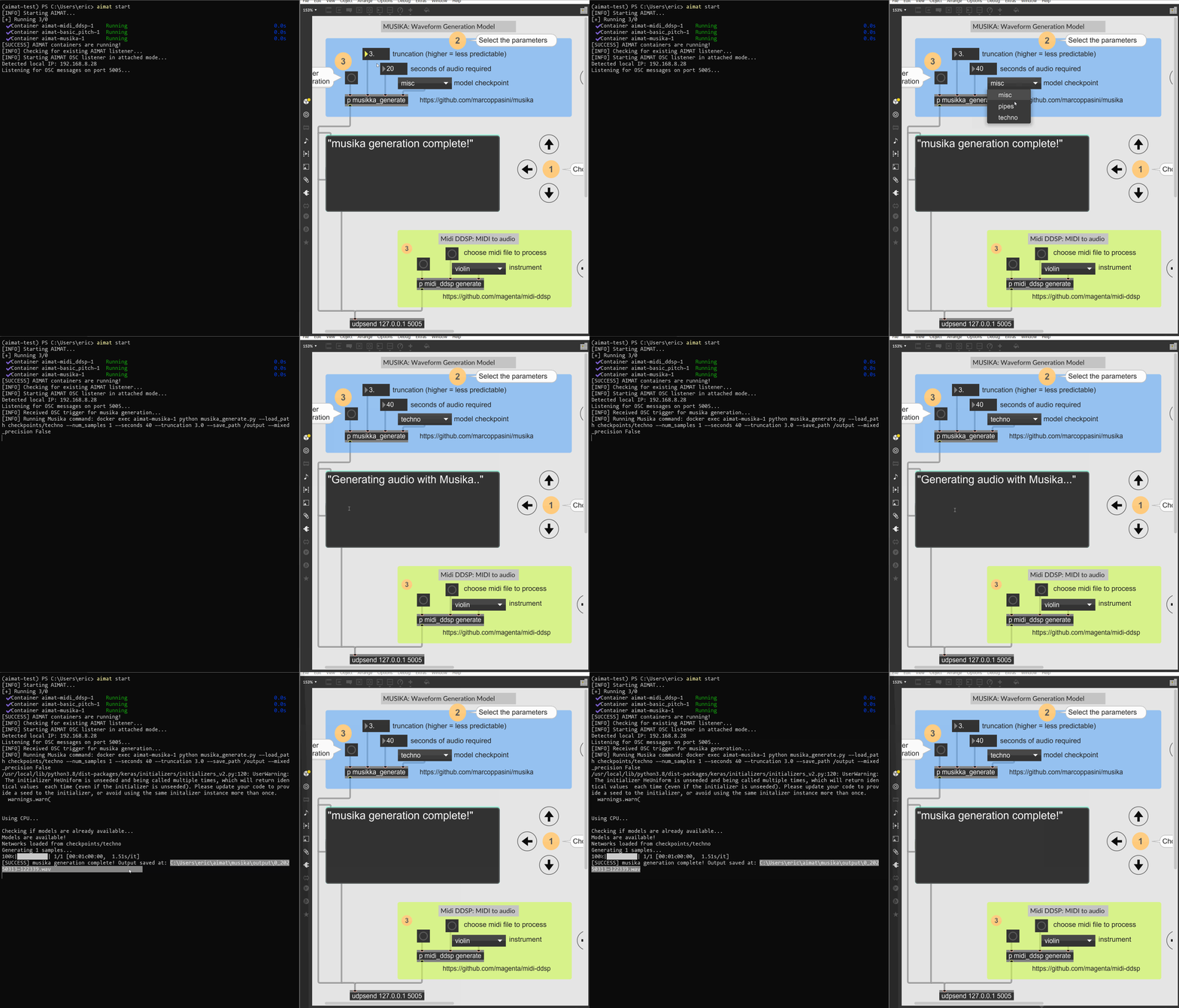
Make sure the input files (audio or MIDI) are correctly placed in AIMAT's designated input directories.
📂 Output Directories
Generated files are stored by default in your home directory under:
- Musika:
~/aimat/musika/output - MIDI-DDSP:
~/aimat/midi_ddsp/output - Basic Pitch:
~/aimat/basic_pitch/output
⚠️ Troubleshooting
- Listener or Docker Issues: Restart with
aimat restart - Missing Generated Files: Check container logs with:
docker logs <container-name>
🔜 Future Plans
- 🟢 GUI interface for easier model management and monitoring
- 🟢 Integration of more AI music models
- 🟢 Expanded customization through additional OSC commands
📜 License
MIT License © Eric Browne


Download files
Download the file for your platform. If you're not sure which to choose, learn more about installing packages.
Source Distribution
Built Distribution
Filter files by name, interpreter, ABI, and platform.
If you're not sure about the file name format, learn more about wheel file names.
Copy a direct link to the current filters
File details
Details for the file aimat-0.1.5.tar.gz.
File metadata
- Download URL: aimat-0.1.5.tar.gz
- Upload date:
- Size: 12.6 kB
- Tags: Source
- Uploaded using Trusted Publishing? No
- Uploaded via: twine/6.1.0 CPython/3.9.6
File hashes
| Algorithm | Hash digest | |
|---|---|---|
| SHA256 |
a8e7bdc402825041fc6d6ec34f5492e405edbd13b62e9445cf9349eb1d543b1a
|
|
| MD5 |
7084998c4f5ba7b0b00137a1d3d0cf4f
|
|
| BLAKE2b-256 |
94900f05f350530192f7f0b7221dea805feb8632799d8ce8e5dcd182021f342c
|
File details
Details for the file aimat-0.1.5-py3-none-any.whl.
File metadata
- Download URL: aimat-0.1.5-py3-none-any.whl
- Upload date:
- Size: 10.7 kB
- Tags: Python 3
- Uploaded using Trusted Publishing? No
- Uploaded via: twine/6.1.0 CPython/3.9.6
File hashes
| Algorithm | Hash digest | |
|---|---|---|
| SHA256 |
658ce27e2fc9b202a54e2485051baa4c7ae7b2e70493ca4cb4b77996ad2670e6
|
|
| MD5 |
5cbcb67bb4d133521dea85ae7b1d2a67
|
|
| BLAKE2b-256 |
fedd7fe476e3fa81758265f85b25d42ff276b741588e1799390587e95c7b9084
|






