
Asyncio Dead Easy Sql API







Simplify Your Personal Projects with AIODesa
Are you tired of the hassle of setting up complex databases for small scale applications and personal projects? Designed to streamline monotony, AIODesa makes managing asynchronous database access easy. Perfect for smaller-scale applications where extensive database operations are not a priority.
No need to write even a single line of raw SQL.
A straightforward and 100% Python interface for managing asynchronous database API's by leveraging Python's built-ins and standard library. It wraps around AioSqlite, providing a hassle-free experience to define, generate, and commit data effortlessly, thanks to shared objects for tables and records.
Ideal for Personal Projects
AIODesa is specifically crafted for simpler projects where database IO is minimal. It's not intended for heavy production use but rather serves as an excellent choice for personal projects that require SQL structured data persistence without the complexity of a full-scale database setup. SQLite is leveraged here, meaning youre free to use other SQLite drivers to consume and transform the data if your project outgrows AIODesa.
Read the docs
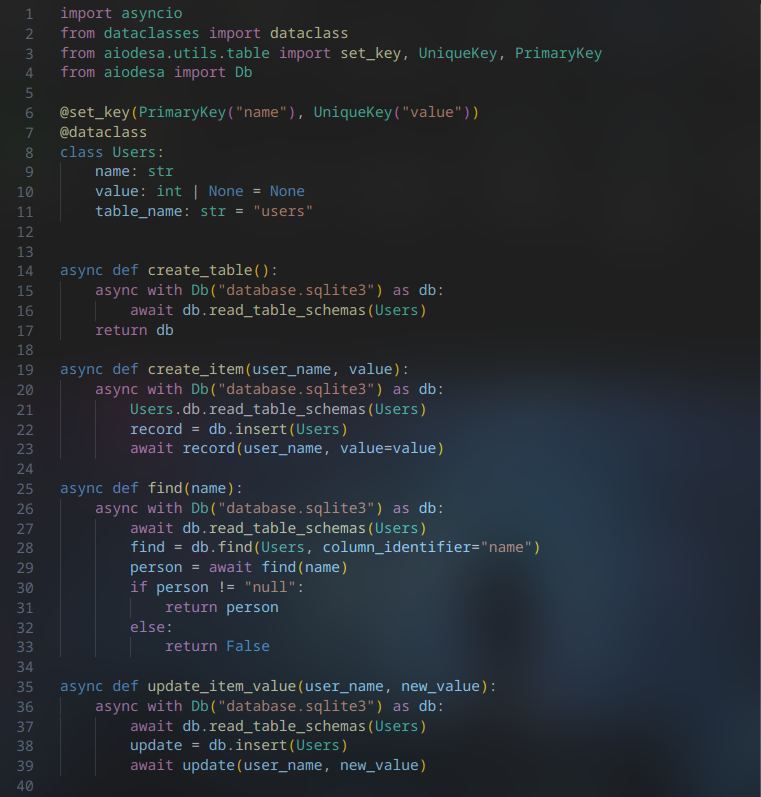
Usage
Install via pip
pip install aiodesa
Sample API usage:
from aiodesa import Db
import asyncio
from dataclasses import dataclass
from aiodesa.utils.tables import ForeignKey, UniqueKey, PrimaryKey, set_key


async def main():
	# Define structure for both tables and records
	# Easily define key types
	@dataclass
	@set_key(PrimaryKey("username"), UniqueKey("id"), ForeignKey("username", "anothertable"))
	class UserEcon:
		username: str
		credits: int | None = None
		points: int | None = None
		id: str | None = None
		table_name: str = "user_economy"


	async with Db("database.sqlite3") as db:
		# Create table from UserEcon class
		await db.read_table_schemas(UserEcon)

		# Insert a record
		record = db.insert(UserEcon)
		await record('sockheadrps', id="fffff")

		# Update a record
		record = db.update(UserEcon, column_identifier="username")
		await record('sockheadrps', points=2330, id="1234")

		# Find All in a table
		find_all_users = db.find_all(UserEcon)
		all_users = await find_all_users()
		for user in all_users:
			print(user.username)

asyncio.run(main())
Development:
Ensure poetry is installed:
pip install poetry
Install project using poetry
poetry add git+https://github.com/sockheadrps/AIODesa.git
poetry install
create a python file for using AIODesa and activate poetry virtual env to run it
poetry shell
poetry run python main.py
1 maintainer

Release files for aiodesa 0.2.0
For a detailed explanation of source distributions (sdists) and built distributions (wheels), please see the package formats documentation.
Source distribution (sdist)
| File | Size | Uploaded | |
|---|---|---|---|
| aiodesa-0.2.0.tar.gz | 9.9 kB | Details |
Built distribution (wheel)
| File | Interpreter | ABI | Platform | Reset |
|---|---|---|---|---|
| aiodesa-0.2.0-py3-none-any.whl | Python 3 | none | any | Details |
Total release size: 19.8 kB
Release files / aiodesa-0.2.0.tar.gz
| Download URL | aiodesa-0.2.0.tar.gz |
|---|---|
| Size | 9.9 kB |
| Tags | Source |
|
SHA-256 checksum How to use checksums |
640407956e5c6b7afd2cc917d3414d0c861fa068a92172ee2d2ad0d3f475cac6
|
|
BLAKE2b-256 checksum How to use checksums |
5362f1d08154671f0a454dc60a59d094376534ca8c12046374e33aa93cb932c9
|
| Upload date | |
|
Uploaded using Trusted Publishing? What is trusted publishing? |
No |
| Uploaded via |
poetry/1.5.1 CPython/3.12.1 Linux/6.7.3-200.fc39.x86_64
|
Release files / aiodesa-0.2.0-py3-none-any.whl
| Download URL | aiodesa-0.2.0-py3-none-any.whl |
|---|---|
| Size | 9.8 kB |
| Tags | Python 3 |
|
SHA-256 checksum How to use checksums |
8409893b7148532e5ba2da583839c72a8a8e90e6bd95a321c41b69cf230d7dbf
|
|
BLAKE2b-256 checksum How to use checksums |
e68b69c79e665d0d1b3fb0e6ea3e172fca5f25c97d6243abe801c5c932520a85
|
| Upload date | |
|
Uploaded using Trusted Publishing? What is trusted publishing? |
No |
| Uploaded via |
poetry/1.5.1 CPython/3.12.1 Linux/6.7.3-200.fc39.x86_64
|














