
aiogovee
Python 3 /asyncio library for communication with Govee devices using their local API.



This is my first time coding in Python, this library was written using François Wautier's aiolifx as sample / guide and adapted to communicate with the much simpler Govee Local API
Installation
This library is published on PyPi so:
pip3 install aiogovee
or
python3 -m pip install aiogovee
How to control your Govee Devices
First, you need enable local API for each supported device:
 - Open the Govee App
 - Click on the Device
 - Click on the Gear signs at the top right corner
 - Turn On "Lan Control"
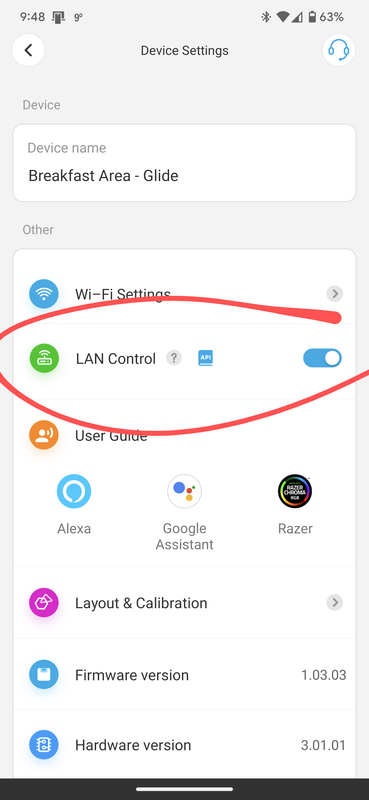
NOTE: If your don't see the "Lan Control" switch, most likely your device is not supported, you can check the Govee Local API documentation linked above to for the list of supported devices, they update this document as they add support for more devices. If your device is listed there then either your device does not have the latest firmware or its hardware version is too old and does not support this feature (I've sees reports of this from some users), at this point your best bet it to contact Govee Support about it, they are very responsive and helpful.
Once you have enabled "Lan Control" for your devices, you can test the library by using the example utility to fully manage your those Devices:
python3 -m aiogovee
While the application is running, it will run discovery over each network interface available (including VLAN interfaces) every 5s (Library default is 180s but I configured it lower for this demo utility). Devices do not always respond to the discovery broadcast but they usually all show up after a couple of discovery attempts, just let the application run for a bit longer and hit enter to refresh the list of discovered devices.
At the moment the API is very limited, these are the only supported operations:
 - Get Status
 - Turn On/Off
 - Change Brightness (0-100)
 - Change Color (R) (G) (B)
 - Change ColorTemperature in Kelvin (0-9000)
How to use the Library
Essentially, you create an object with at least 2 methods:
- register
- unregister
You then start the GoveeListener task in asyncio, passing the object created above, the IP of the desired network interface to run discovery on (you can start multiple GoveeListeners if you have multiple network interfaces to subnets with Govee devices) and the discovery interval in seconds (180s by default). It will register any new Device it finds.
Once a device is registered, there are attribute methods for any of the supported actions in the API.
The easiest way is to look at the main.py which is the demo utility included as an example of how to use the library.
Thanks
Thanks to François Wautier, his aiolifx library which provided a great learning resource and base for this project.
1 maintainer

Release files for aiogovee 0.1.2
For a detailed explanation of source distributions (sdists) and built distributions (wheels), please see the package formats documentation.
Source distribution (sdist)
| File | Size | Uploaded | |
|---|---|---|---|
| aiogovee-0.1.2.tar.gz | 15.1 kB | Details |
Built distribution (wheel)
| File | Interpreter | ABI | Platform | Reset |
|---|---|---|---|---|
| aiogovee-0.1.2-py3-none-any.whl | Python 3 | none | any | Details |
Total release size: 30.8 kB
Release files / aiogovee-0.1.2.tar.gz
| Download URL | aiogovee-0.1.2.tar.gz |
|---|---|
| Size | 15.1 kB |
| Tags | Source |
|
SHA-256 checksum How to use checksums |
d4e06dd84c42d7ee06a97eb246146e9d19cf22aa0d61637535c012ee2ebcb94b
|
|
BLAKE2b-256 checksum How to use checksums |
3fd3852742e6d6634078a5e94d163163159a4b7d71784d84d832b8431d9127e0
|
| Upload date | |
|
Uploaded using Trusted Publishing? What is trusted publishing? |
No |
| Uploaded via |
twine/4.0.1 CPython/3.9.2
|
Release files / aiogovee-0.1.2-py3-none-any.whl
| Download URL | aiogovee-0.1.2-py3-none-any.whl |
|---|---|
| Size | 15.7 kB |
| Tags | Python 3 |
|
SHA-256 checksum How to use checksums |
aab1d5d7be523d34fa4b81588039d87e4b4b33f7fa00eb475c6d6ce6b0004c2c
|
|
BLAKE2b-256 checksum How to use checksums |
0471d6c8b119b71e2706a050017ebddb1b4ba6b9e18e363ec669924db4f37a79
|
| Upload date | |
|
Uploaded using Trusted Publishing? What is trusted publishing? |
No |
| Uploaded via |
twine/4.0.1 CPython/3.9.2
|













