
Date Selection tool for Aiogram Telegram Bots
Description
A simple inline calendar, date selection tool for aiogram telegram bots written in Python.
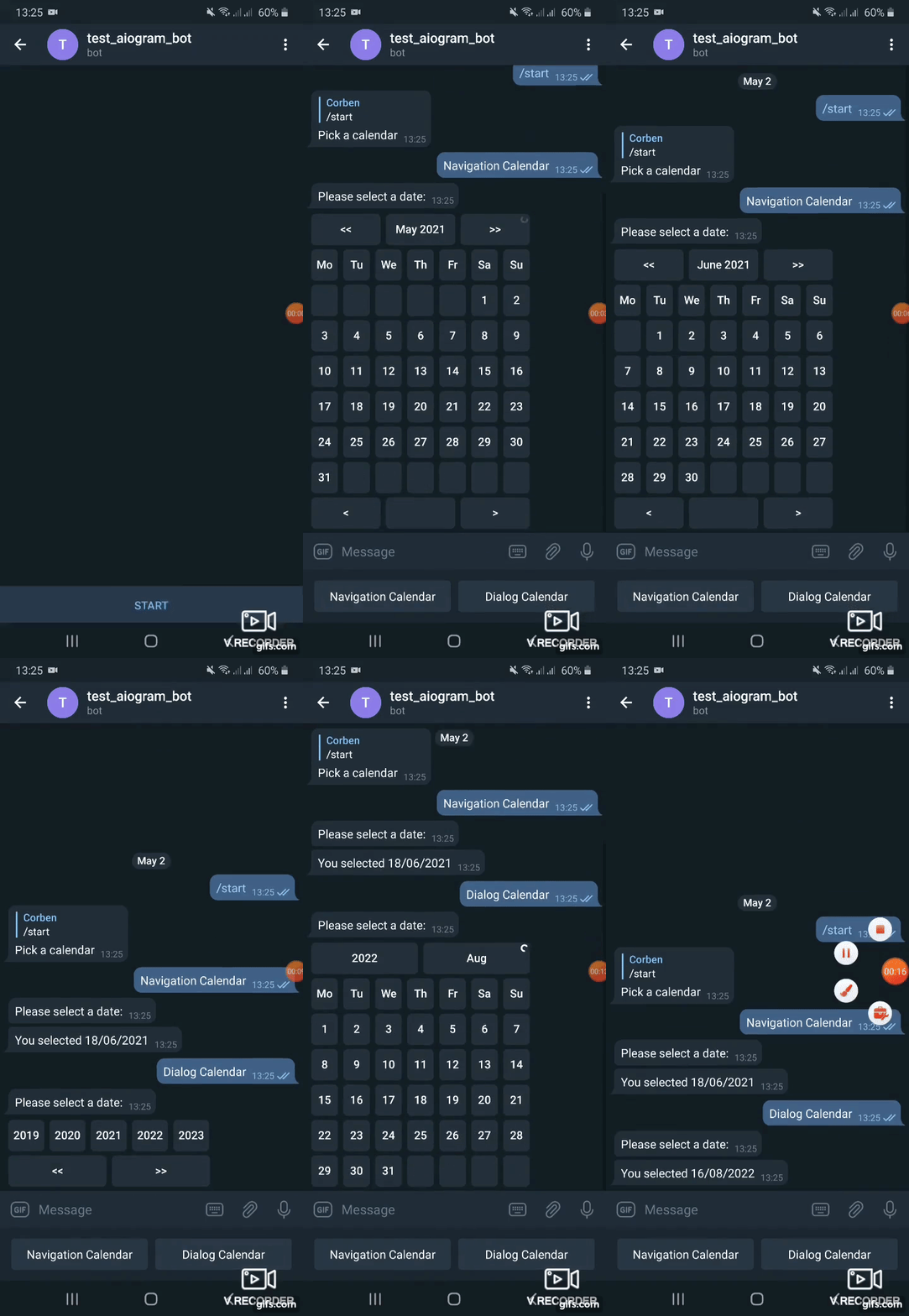
Offers two types of date pickers:
Navigation calendar - user can either select a date or move to the next or previous month/year by clicking a singe button.
Dialog calendar - user selects year on first stage, month on next stage, day on last stage.
From version 0.2 supports aiogram 3, use version 0.1.1 with aiogram 2. **From version 0.6 supports aiogram 3.7, use version 0.5 with aiogram <3.7 **
Main features
- Two calendars with abilities to navigate years, months, days altogether or in dialog
- Ability to set specified locale (language of captions) or inherit from user`s locale
- Limiting the range of dates to select from
- Highlighting todays date
Usage
Install package
pip install aiogram_calendar
A full working example on how to use aiogram-calendar is provided in *bot_example.py*.
In example keyboard with buttons is created.
Each button triggers a calendar in a different way by adding it to a message with a reply_markup.
reply_markup=await SimpleCalendar().start_calendar()
^^ will reply with a calendar created using English localization (months and days of week captions). Locale can be overridden by passing locale argument:
reply_markup=await SimpleCalendar(locale='uk_UA').start_calendar()
or by getting locale from User data provided by telegram API using get_user_locale method by passing message.from_user to it
reply_markup=await SimpleCalendar(locale=await get_user_locale(message.from_user)).start_calendar()
Depending on what button of calendar user will press callback is precessed using the process_selection method.
selected, date = await SimpleCalendar(locale=await get_user_locale(callback_query.from_user)).process_selection(callback_query, callback_data)
Here locale is specified from callback_query.from_user
Gif demo:
1 maintainer

Release files for aiogram-calendar 0.6.0
For a detailed explanation of source distributions (sdists) and built distributions (wheels), please see the package formats documentation.
Source distribution (sdist)
| File | Size | Uploaded | |
|---|---|---|---|
| aiogram_calendar-0.6.0.tar.gz | 11.0 kB | Details |
Built distribution (wheel)
| File | Interpreter | ABI | Platform | Reset |
|---|---|---|---|---|
| aiogram_calendar-0.6.0-py3-none-any.whl | Python 3 | none | any | Details |
Total release size: 23.7 kB
Release files / aiogram_calendar-0.6.0.tar.gz
| Download URL | aiogram_calendar-0.6.0.tar.gz |
|---|---|
| Size | 11.0 kB |
| Tags | Source |
|
SHA-256 checksum How to use checksums |
deef542841e348032621823c727e30fd668339056771bdaaf937b5f765973ab8
|
|
BLAKE2b-256 checksum How to use checksums |
0cce7eb2320392a9f830ddc19db784878d29e35c2395c2c2a5be6fdb03e2dc71
|
| Upload date | |
|
Uploaded using Trusted Publishing? What is trusted publishing? |
No |
| Uploaded via |
twine/6.0.1 CPython/3.11.1
|
Release files / aiogram_calendar-0.6.0-py3-none-any.whl
| Download URL | aiogram_calendar-0.6.0-py3-none-any.whl |
|---|---|
| Size | 12.7 kB |
| Tags | Python 3 |
|
SHA-256 checksum How to use checksums |
75e6616eb7ffb399362a2e29d94d75a3750921e354067bb0c2f3097de15db34f
|
|
BLAKE2b-256 checksum How to use checksums |
1e95828e8c0606db969082e0c13e8a98de0fe31bcfded1863786c0a8e3e3386b
|
| Upload date | |
|
Uploaded using Trusted Publishing? What is trusted publishing? |
No |
| Uploaded via |
twine/6.0.1 CPython/3.11.1
|














