
Aiogram datepicker widget
Installing
pip install aiogram-datepicker --upgrade
Demo:
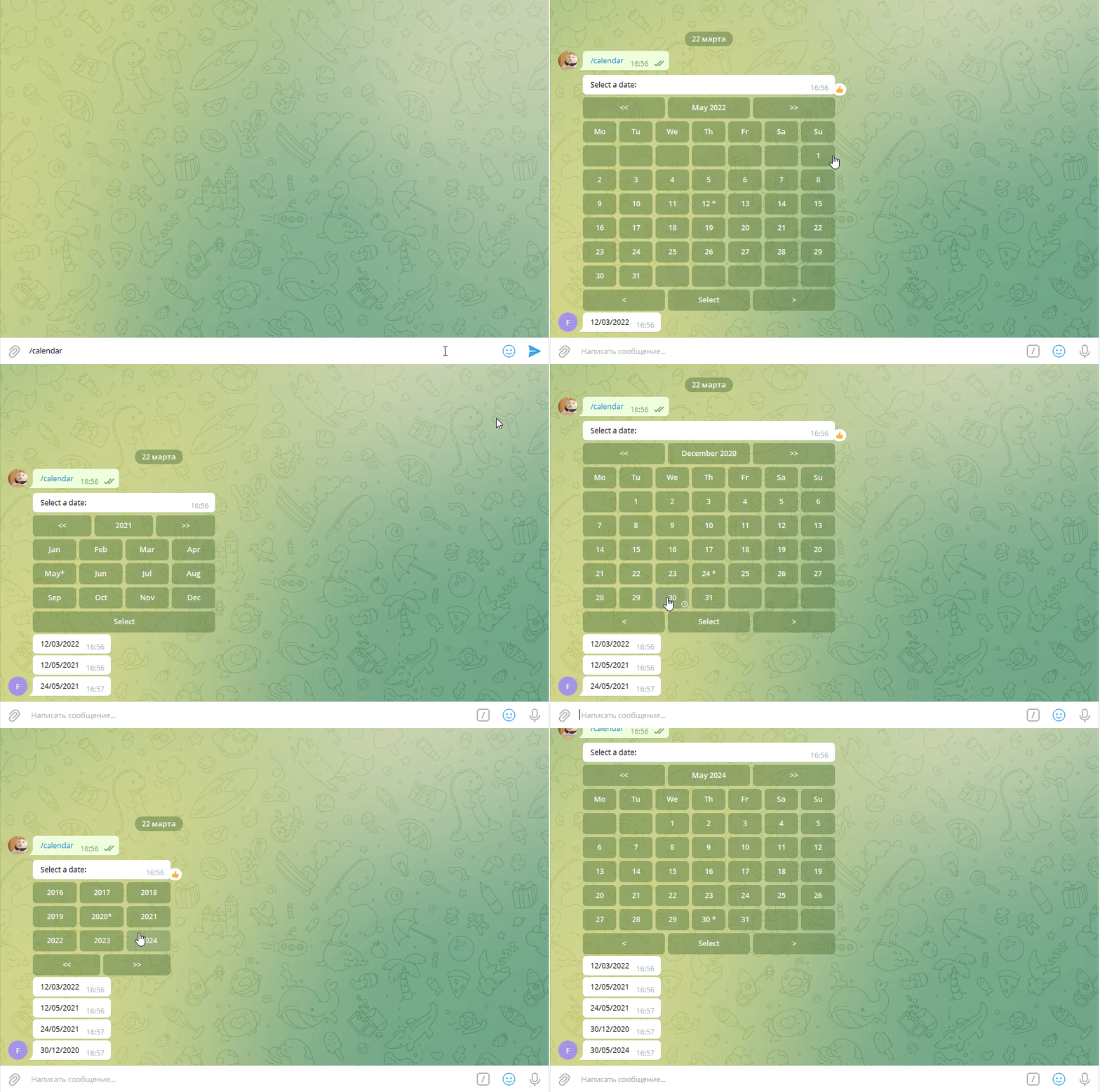

Simple usage
import logging
import os
from datetime import datetime

from aiogram import Bot, Dispatcher
from aiogram.types import Message, CallbackQuery
from aiogram.utils import executor

from aiogram_datepicker import Datepicker, DatepickerSettings

logging.basicConfig(level=logging.INFO)

bot = Bot(token=os.environ['API_TOKEN'])
dp = Dispatcher(bot, run_tasks_by_default=True)


def _get_datepicker_settings():
    return DatepickerSettings() #some settings


@dp.message_handler(state='*')
async def _main(message: Message):
    datepicker = Datepicker(_get_datepicker_settings())

    markup = datepicker.start_calendar()
    await message.answer('Select a date: ', reply_markup=markup)


@dp.callback_query_handler(Datepicker.datepicker_callback.filter())
async def _process_datepicker(callback_query: CallbackQuery, callback_data: dict):
    datepicker = Datepicker(_get_datepicker_settings())

    date = await datepicker.process(callback_query, callback_data)
    if date:
        await callback_query.message.answer(date.strftime('%d/%m/%Y'))

    await callback_query.answer()


if __name__ == '__main__':
    executor.start_polling(dp, skip_updates=True)
Settings
DatepickerSettings(
    initial_view='day',  #available views -> day, month, year
    initial_date=datetime.now().date(),  #default date
    views={
        'day': {
            'show_weekdays': True,
            'weekdays_labels': ['Mo', 'Tu', 'We', 'Th', 'Fr', 'Sa', 'Su'],
            'header': ['prev-year', 'days-title', 'next-year'],
            'footer': ['prev-month', 'select', 'next-month'], #if you don't need select action, you can remove it and the date will return automatically without waiting for the button select
            #available actions -> prev-year, days-title, next-year, prev-month, select, next-month, ignore
        },
        'month': {
            'months_labels': ['Jan', 'Feb', 'Mar', 'Apr', 'May', 'Jun', 'Jul', 'Aug', 'Sep', 'Oct', 'Nov', 'Dec'],
            'header': [
                        'prev-year',
                        ['year', 'select'], #you can separate buttons into groups
                        'next-year'
                       ],
            'footer': ['select'],
            #available actions -> prev-year, year, next-year, select, ignore
        },
        'year': {
            'header': [],
            'footer': ['prev-years', 'next-years'],
            #available actions -> prev-years, ignore, next-years
        }
    },
    labels={
        'prev-year': '<<',
        'next-year': '>>',
        'prev-years': '<<',
        'next-years': '>>',
        'days-title': '{month} {year}',
        'selected-day': '{day} *',
        'selected-month': '{month} *',
        'present-day': '• {day} •',
        'prev-month': '<',
        'select': 'Select',
        'next-month': '>',
        'ignore': ''
    },
    custom_actions=[] #some custom actions

)
Custom action example
from aiogram_datepicker import Datepicker, DatepickerSettings, DatepickerCustomAction

class TodayAction(DatepickerCustomAction):
    action: str = 'today'
    label: str = 'Today'

    def get_action(self, view: str, year: int, month: int, day: int) -> InlineKeyboardButton:
        """
        Required function
        """
        return InlineKeyboardButton(self.label,
                                    callback_data=self._get_callback(view, self.action, year, month, day))

    async def process(self, query: CallbackQuery, view: str, _date: date) -> bool:
        """
        Required function
        """
        if view == 'day':
            await self.set_view(query, 'day', datetime.now().date())
            return False
        elif view == 'month':
            await self.set_view(query, 'month', date(_date.year, datetime.now().date().month, _date.day))
            return False
        elif view == 'year':
            await self.set_view(query, 'month', date(datetime.now().date().year, _date.month, _date.day))
            return False

settings = DatepickerSettings(
    views={
        'day': {
            'footer': ['prev-month', 'today', 'next-month', ['cancel']],
        },
        'month': {
            'footer': ['today']
        },
        'year': {
            'header': ['today'],
        }
    },
    custom_actions=[TodayAction]
)
1 maintainer

Metadata
1 maintainer
Release files for aiogram-datepicker 0.0.8
For a detailed explanation of source distributions (sdists) and built distributions (wheels), please see the package formats documentation.
Source distribution (sdist)
| File | Size | Uploaded | |
|---|---|---|---|
| aiogram_datepicker-0.0.8.tar.gz | 8.7 kB | Details |
Built distribution (wheel)
| File | Interpreter | ABI | Platform | Reset |
|---|---|---|---|---|
| aiogram_datepicker-0.0.8-py3-none-any.whl | Python 3 | none | any | Details |
Total release size: 20.3 kB
Release files / aiogram_datepicker-0.0.8.tar.gz
| Download URL | aiogram_datepicker-0.0.8.tar.gz |
|---|---|
| Size | 8.7 kB |
| Tags | Source |
|
SHA-256 checksum How to use checksums |
3e28b688e35652c510915fb15497e31cbb97b0c1557cb113f27dd80ff89c73ec
|
|
BLAKE2b-256 checksum How to use checksums |
8928d6a212cc02fb81e1ab376f87759416085545a1d7c63170350edb8edcd93d
|
| Upload date | |
|
Uploaded using Trusted Publishing? What is trusted publishing? |
No |
| Uploaded via |
twine/3.8.0 pkginfo/1.8.2 readme-renderer/34.0 requests/2.26.0 requests-toolbelt/0.9.1 urllib3/1.26.6 tqdm/4.62.3 importlib-metadata/4.11.3 keyring/21.8.0 rfc3986/2.0.0 colorama/0.4.4 CPython/3.9.5
|
Release files / aiogram_datepicker-0.0.8-py3-none-any.whl
| Download URL | aiogram_datepicker-0.0.8-py3-none-any.whl |
|---|---|
| Size | 11.5 kB |
| Tags | Python 3 |
|
SHA-256 checksum How to use checksums |
cc23e1e296be4167aee8f45eea139f1670ff29b188a13e6629cb081cf188c020
|
|
BLAKE2b-256 checksum How to use checksums |
289740a1e481ed5fe79728b694d644a925fcef0d183e932f7df626c680f9a47b
|
| Upload date | |
|
Uploaded using Trusted Publishing? What is trusted publishing? |
No |
| Uploaded via |
twine/3.8.0 pkginfo/1.8.2 readme-renderer/34.0 requests/2.26.0 requests-toolbelt/0.9.1 urllib3/1.26.6 tqdm/4.62.3 importlib-metadata/4.11.3 keyring/21.8.0 rfc3986/2.0.0 colorama/0.4.4 CPython/3.9.5
|














