
aiogram-dialog-i18n





Translated text widget for aiogram-dialog powered by aiogram-i18n or fluentogram.
The examples use these translations:
hello-user = Hello, { $name }! Balance: { $balance }
payment-method = • { $method }
pay-btn = Pay
aiogram-i18n
Installation
uv add "aiogram-dialog-i18n[aiogram-i18n]"
# or
pip install "aiogram-dialog-i18n[aiogram-i18n]"
Setup
Set up I18nMiddleware as usual.
Usage
I18nFormat, short alias T:
from aiogram_dialog import Window
from aiogram_dialog.widgets.kbd import Button
from aiogram_dialog.widgets.text import Format, List
from magic_filter import F

from aiogram_dialog_i18n.aiogram_i18n import I18nFormat, T

Window(
    I18nFormat("hello-user", name=F["user"].full_name, balance=Format("{balance:.2f}")),
    List(T("payment-method", method=F["item"]), F["methods"]),
    Button(T("pay-btn"), id="pay", when=F["methods"]),
    state=...,
)
fluentogram
Installation
uv add "aiogram-dialog-i18n[fluentogram]"
# or
pip install "aiogram-dialog-i18n[fluentogram]"
Setup
FluentogramMiddleware puts the TranslatorRunner of the user and the TranslatorHub into the data, set it up after the other middlewares:
from aiogram_dialog_i18n.fluentogram import FluentogramMiddleware

FluentogramMiddleware(hub).setup(dp)
To take the locale from a database, override get_locale:
class DbFluentogramMiddleware(FluentogramMiddleware):
    async def get_locale(self, event, data):
        user = await data["repo"].get_user(data["event_from_user"].id)
        return user.language if user else None


DbFluentogramMiddleware(hub).setup(dp)
Usage
FluentogramFormat, short alias T:
from aiogram_dialog import Window
from aiogram_dialog.widgets.kbd import Button
from aiogram_dialog.widgets.text import Format, List
from magic_filter import F

from aiogram_dialog_i18n.fluentogram import FluentogramFormat, T

Window(
    FluentogramFormat("hello-user", name=F["user"].full_name, balance=Format("{balance:.2f}")),
    List(T("payment-method", method=F["item"]), F["methods"]),
    Button(T("pay-btn"), id="pay", when=F["methods"]),
    state=...,
)
Outside widgets, take them from the data: i18n is the TranslatorRunner of the user, translator_hub is the TranslatorHub:
from aiogram.filters import Command
from aiogram.types import Message
from fluentogram import TranslatorHub, TranslatorRunner


@router.message(Command("start"))
async def start(message: Message, i18n: TranslatorRunner, translator_hub: TranslatorHub):
    await message.answer(i18n.get("hello-user", name=message.from_user.full_name))
    # another locale
    await message.answer(translator_hub.get_translator_by_locale("en").get("pay-btn"))
In aiogram-dialog callbacks and getters they are in dialog_manager.middleware_data["i18n"] and dialog_manager.middleware_data["translator_hub"].
Arguments
I18nFormat(key, locale=None, /, *, when=None, **params)
FluentogramFormat(key, locale=None, /, *, when=None, **params)
key: the translation key.locale: overrides the user's locale; positional-only, solocale=...is still a message param.when: the usual aiogram-dialog condition, not a message param.params: a text widget (rendered), aMagicFilter(resolved against window data) or a constant.Nonebecomes"", so in Jinja2 use{% if x %}, notis none.
locale can be a constant, a magic filter or a text widget:
T("k", "en")  # fixed locale
T("k", F["lang"])  # locale from window data
T("k", locale=F["lang"])  # not a locale: a message param named "locale"
Preview
There is no middleware data in aiogram_dialog.tools.render_preview, so both widgets show the key with its params instead of a translation. An empty value is shown as {name}, like Format does. The window from the examples looks like this:
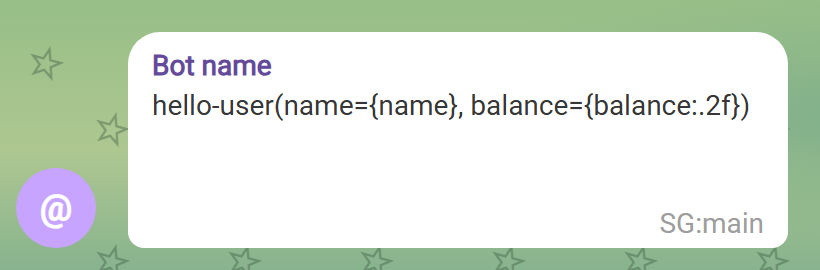
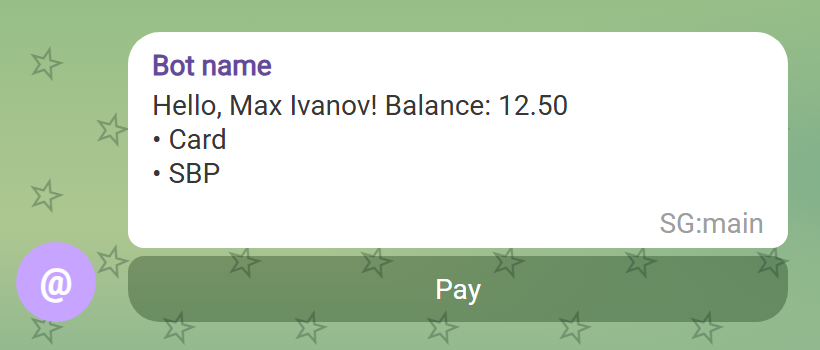
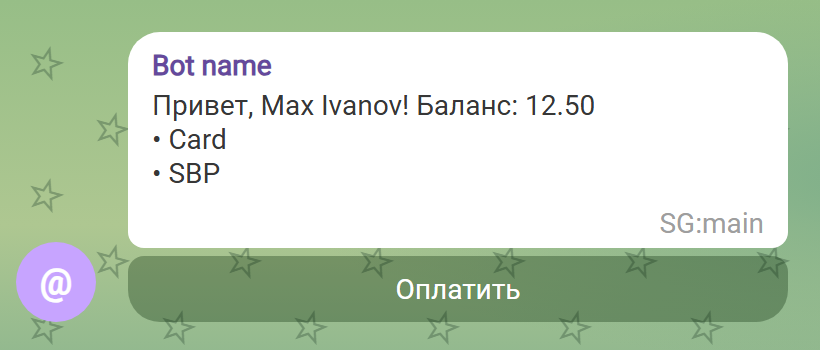
With the middleware the same window is rendered with translations, here in English and Russian:
| English | Русский |
|---|---|
 |
 |
1 maintainer

Release files for aiogram-dialog-i18n 0.2.0
For a detailed explanation of source distributions (sdists) and built distributions (wheels), please see the package formats documentation.
Source distribution (sdist)
| File | Size | Uploaded | |
|---|---|---|---|
| aiogram_dialog_i18n-0.2.0.tar.gz | 6.2 kB | Details |
Built distribution (wheel)
| File | Interpreter | ABI | Platform | Reset |
|---|---|---|---|---|
| aiogram_dialog_i18n-0.2.0-py3-none-any.whl | Python 3 | none | any | Details |
Total release size: 16.3 kB
Release files / aiogram_dialog_i18n-0.2.0.tar.gz
| Download URL | aiogram_dialog_i18n-0.2.0.tar.gz |
|---|---|
| Size | 6.2 kB |
| Tags | Source |
|
SHA-256 checksum How to use checksums |
031a6163d4ae496b685dc0cbfb6f8a3372f5ae426274d95c128c51744988b69b
|
|
BLAKE2b-256 checksum How to use checksums |
ad2ede12e60d46708259127f5524de37ffcc46ddbd3af545040d0ddb03e93303
|
| Upload date | |
|
Uploaded using Trusted Publishing? What is trusted publishing? |
Yes |
| Uploaded via |
uv/0.12.18 {"installer":{"name":"uv","version":"0.12.18","subcommand":["publish"]},"python":null,"implementation":{"name":null,"version":null},"distro":{"name":"Ubuntu","version":"24.04","id":"noble","libc":null},"system":{"name":null,"release":null},"cpu":null,"openssl_version":null,"setuptools_version":null,"rustc_version":null,"ci":true}
|
Release files / aiogram_dialog_i18n-0.2.0-py3-none-any.whl
| Download URL | aiogram_dialog_i18n-0.2.0-py3-none-any.whl |
|---|---|
| Size | 10.1 kB |
| Tags | Python 3 |
|
SHA-256 checksum How to use checksums |
cd1d577ff9592bd8682dae21a0ab254dbfb26c6a466b896dd07006ca905616ec
|
|
BLAKE2b-256 checksum How to use checksums |
4ffb4b27208ffa65fd53c8d14352eb487f2de90e5d8997f45b8c5668bdf82b88
|
| Upload date | |
|
Uploaded using Trusted Publishing? What is trusted publishing? |
Yes |
| Uploaded via |
uv/0.12.18 {"installer":{"name":"uv","version":"0.12.18","subcommand":["publish"]},"python":null,"implementation":{"name":null,"version":null},"distro":{"name":"Ubuntu","version":"24.04","id":"noble","libc":null},"system":{"name":null,"release":null},"cpu":null,"openssl_version":null,"setuptools_version":null,"rustc_version":null,"ci":true}
|














