
aiogram-inline-paginations
Description
A simple library for aiogram that allows you to easily do pagination for any Inline keyboards.
Install for pip:
pip install aiogram-inline-paginations
Install for poetry:
poetry add aiogram-inline-paginations
Create paginations object
from aiogram_inline_paginations.paginator import Paginator
from aiogram import types

kb = types.InlineKeyboardMarkup()
paginator = Paginator(data=kb, size=5)
Params
data: Any ready-to-use keyboard InlineKeyboardMarkup or any iterable object with InlineKeyboardButton.
size: The number of rows of buttons on one page, excluding the navigation bar.
Return
A paginator object that, when called, returns a ready-made keyboard with pagination.
Get data for registrations handler paginator
from aiogram_inline_paginations.paginator import Paginator
from aiogram import types

kb = types.InlineKeyboardMarkup()
paginator = Paginator(data=kb, size=5)


@dp.message_handler()
async def some_func(message: types.Message):
    await message.answer(
        text='Some menu',
        reply_markup=paginator()
    )
Return paginator_handler()
Data for registrations paginator.
Example
import random

from aiogram import Bot, Dispatcher, types
from aiogram.contrib.fsm_storage.memory import MemoryStorage
from aiogram.dispatcher.filters import CommandStart
from aiogram.utils.executor import Executor

from aiogram_inline_paginations.paginator import Paginator

token = 'your token'

storage = MemoryStorage()
bot = Bot(token=token)
dp = Dispatcher(bot, storage=storage)


@dp.message_handler(CommandStart(), state='*')
async def start(message: types.Message):
    await message.answer('Hello text')

    kb = types.InlineKeyboardMarkup()  # some keyboard

    '''To demonstrate, I will add more than 50 buttons to the keyboard and divide them into 5 lines per page'''
    kb.add(
        *[
            types.InlineKeyboardButton(
                text=str(random.randint(1000000, 10000000)),
                callback_data='pass'
            ) for i in range(2)
        ]
    )

    kb.add(
        *[
            types.InlineKeyboardButton(
                text=str(random.randint(1000000, 10000000)),
                callback_data='pass'
            ) for i in range(3)
        ]
    )

    kb.add(
        types.InlineKeyboardButton(
            text=str(random.randint(1000000, 10000000)),
            callback_data='pass'
        )
    )

    kb.add(
        *[
            types.InlineKeyboardButton(
                text=str(random.randint(1000000, 10000000)),
                callback_data='pass'
            ) for i in range(2)
        ]
    )

    kb.add(
        *[
            types.InlineKeyboardButton(
                text=str(random.randint(1000000, 10000000)),
                callback_data='pass'
            ) for i in range(50)
        ]
    )

    paginator = Paginator(data=kb, size=5, dp=dp)

    await message.answer(
        text='Some menu',
        reply_markup=paginator()
    )


if __name__ == '__main__':
    Executor(dp).start_polling()
Check box paginations exemple
import random

from aiogram import Bot, Dispatcher, types
from aiogram.contrib.fsm_storage.memory import MemoryStorage
from aiogram.dispatcher import FSMContext
from aiogram.dispatcher.filters import CommandStart, Text
from aiogram.utils.executor import Executor

from aiogram_inline_paginations.paginator import CheckBoxPaginator

token = 'your token'

storage = MemoryStorage()
bot = Bot(token=token)
dp = Dispatcher(bot, storage=storage)


@dp.message_handler(CommandStart(), state='*')
async def start(message: types.Message):
    await message.answer('Hello text')

    kb = types.InlineKeyboardMarkup()  # some keyboard
    kb.add(
        *[
            types.InlineKeyboardButton(
                text=str(random.randint(1000000, 10000000)),
                callback_data=f'pass_{str(random.randint(1000000, 10000000))}'
            ) for i in range(2)
        ]
    )
    kb.add(
        *[
            types.InlineKeyboardButton(
                text=str(random.randint(1000000, 10000000)),
                callback_data=f'pass_{str(random.randint(1000000, 10000000))}'
            ) for i in range(3)
        ]
    )
    kb.add(
        types.InlineKeyboardButton(
            text=str(random.randint(1000000, 10000000)),
            callback_data=f'pass_{str(random.randint(1000000, 10000000))}'
        )
    )
    kb.add(
        *[
            types.InlineKeyboardButton(
                text=str(random.randint(1000000, 10000000)),
                callback_data=f'pass_{str(random.randint(1000000, 10000000))}'
            ) for i in range(2)
        ]
    )
    kb.add(
        *[
            types.InlineKeyboardButton(
                text=str(random.randint(1000000, 10000000)),
                callback_data=f'pass_{str(random.randint(1000000, 10000000))}'
            ) for i in range(50)
        ]
    )
    paginator = CheckBoxPaginator(
        data=kb,
        size=5,
        callback_startswith='page_',
        callback_startswith_button='pass_',
        confirm_text='Approve',
        dp=dp
    )
    await message.answer(
        text='Some menu',
        reply_markup=paginator()
    )


@dp.callback_query_handler(Text(startswith='Approve', endswith='confirm'))
async def approve(call: types.CallbackQuery, state: FSMContext):
    data = await state.get_data()
    selected = data.get('page_selected', None)
    await call.answer(
        text='Your selected"\n'.join(selected)
    )


if __name__ == '__main__':
    Executor(dp).start_polling()
confirim callback:
f"{confirm_text}confirm"
selected data:
data = await state.get_data()
selected = data.get(f'{startswith}selected', None)
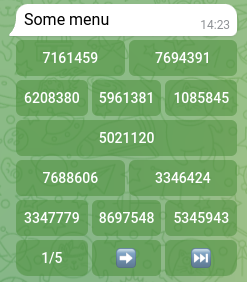
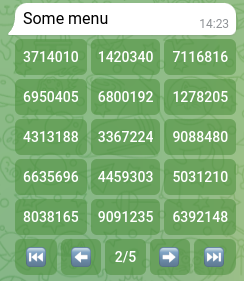
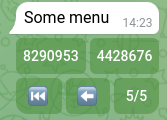
Screenshots
First page:
Second page:
Last page:
The order of entries is not lost.
License MIT
1 maintainer

Metadata
1 maintainer
Release files for aiogram-inline-paginations 0.1.12
For a detailed explanation of source distributions (sdists) and built distributions (wheels), please see the package formats documentation.
Source distribution (sdist)
| File | Size | Uploaded | |
|---|---|---|---|
| aiogram_inline_paginations-0.1.12.tar.gz | 6.5 kB | Details |
Built distribution (wheel)
| File | Interpreter | ABI | Platform | Reset |
|---|---|---|---|---|
| aiogram_inline_paginations-0.1.12-py3-none-any.whl | Python 3 | none | any | Details |
Total release size: 12.7 kB
Release files / aiogram_inline_paginations-0.1.12.tar.gz
| Download URL | aiogram_inline_paginations-0.1.12.tar.gz |
|---|---|
| Size | 6.5 kB |
| Tags | Source |
|
SHA-256 checksum How to use checksums |
a0821edd020b722deaf113f5eb6146cb347aa0012213bc22cd35855febf79cce
|
|
BLAKE2b-256 checksum How to use checksums |
bff0c9026e745867266a38f85374260dea6f7725da1a149e57addd604f32a4fb
|
| Upload date | |
|
Uploaded using Trusted Publishing? What is trusted publishing? |
No |
| Uploaded via |
poetry/1.2.2 CPython/3.10.8 Darwin/20.6.0
|
Release files / aiogram_inline_paginations-0.1.12-py3-none-any.whl
| Download URL | aiogram_inline_paginations-0.1.12-py3-none-any.whl |
|---|---|
| Size | 6.2 kB |
| Tags | Python 3 |
|
SHA-256 checksum How to use checksums |
2e1c276c4d27796afd63cf621228876b6fa76adc89bfe1e4fa05e7463dc52b91
|
|
BLAKE2b-256 checksum How to use checksums |
b803a5dec4761a20bdebecd95bd53ca6eab3f48500b16e5839d76a5f7813bd8b
|
| Upload date | |
|
Uploaded using Trusted Publishing? What is trusted publishing? |
No |
| Uploaded via |
poetry/1.2.2 CPython/3.10.8 Darwin/20.6.0
|














