



Python Wrapper For sqlite3 and aiosqlite
Main Features:
- Easy conversion between sqlite table and Python dictionary and vice-versa.
- Execute SQL queries.
- Get values of a certain column in a Python list.
- delete from your table.
- convert your json file into a sql database table.
- Order your list with parameters like
order_by,limit..etc - Choose any number of columns to your dict, which makes it faster for your dict to load instead of selecting all.
Installation
py -m pip install -U aiosqlitedict
Usage
Aiosqlite is used to import a SQLite3 table as a Python dictionary.
In this example we have a database file named ds_data.db this database has a table named ds_salaries
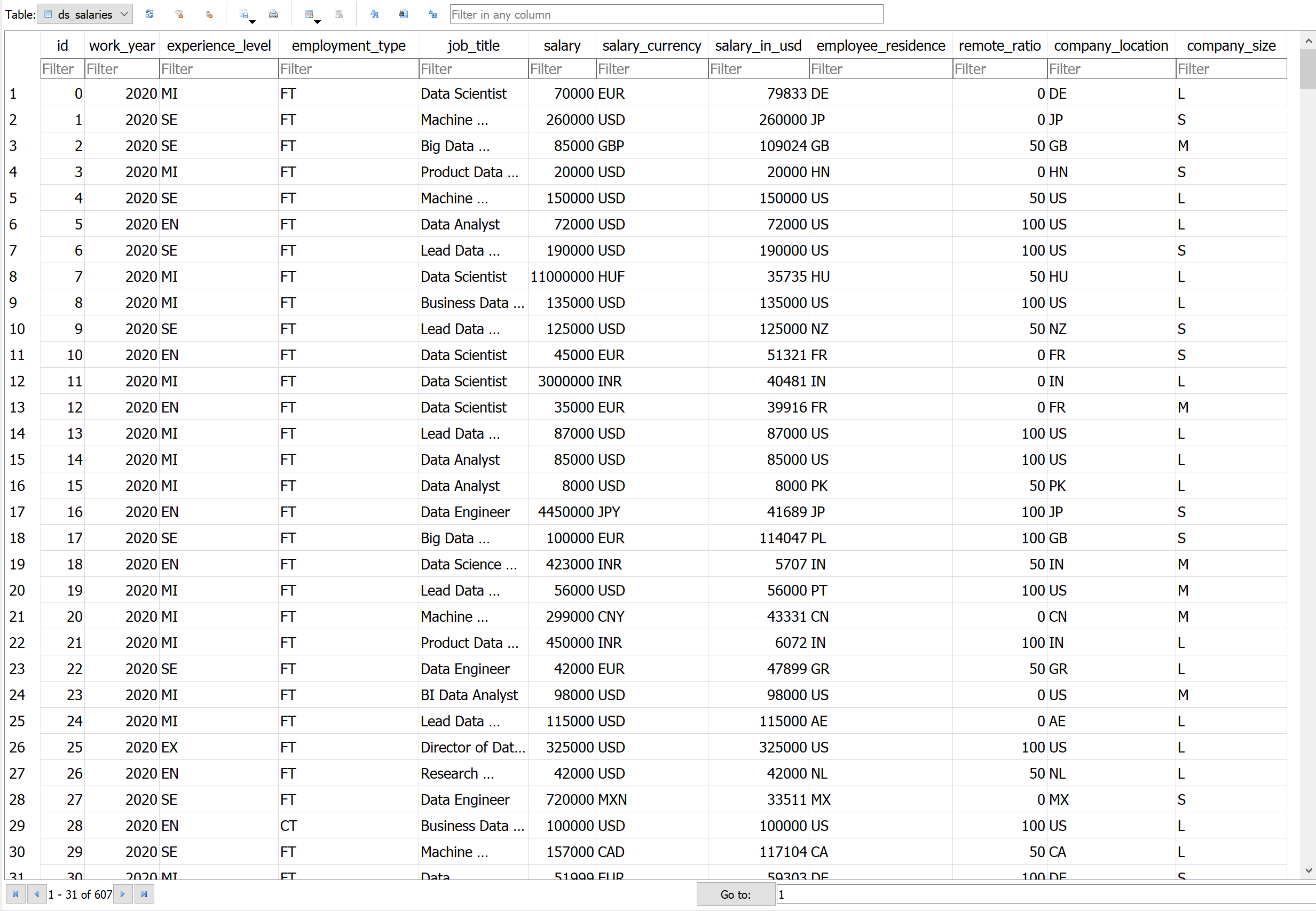
>>> from aiosqlitedict.database import Connect

>>> ds_salaries = Connect("ds_data.db", "ds_salaries", "id")
now we can get rows of this table.
>>> async def some_func():
    ...
    >>> user_0 = await ds_salaries.to_dict(0, "job_title", "salary") # to get `job_title` and `salary` of user with id 0
    >>> print(user_0)
    {'job_title': 'Data Scientist', 'salary': 70000}
    >>> user_0 = await ds_salaries.to_dict(0, "*")  # to get all columns of user with id 0
    >>> print(user_0)
    {'id': 0, 'work_year': 2020, 'experience_level': 'MI', 'employment_type': 'FT', 'job_title': 'Data Scientist', 'salary': 70000, 'salary_currency': 'EUR', 'salary_in_usd': 79833, 'employee_residence': 'DE', 'remote_ratio': 0, 'company_location': 'DE', 'company_size': 'L'}
now lets do some operations on our data
    >>> user_0 = await ds_salaries.to_dict(0, "job_title", "salary")
    >>> user_0["salary"] += 676  # increase user 0's salary
    >>> print(user_0["salary"])
    70676

    # getting top 5 rows by salaries
    >>> salaries = await ds_salaries.select("salary", limit=5, ascending=False)
    >>> print(salaries)
    [70000, 260000, 85000, 20000, 150000]

    # to get "job_title" but order with salaries
    >>> best_jobs = await ds_salaries.select("job_title", order_by="salary", limit=5, ascending=False)
    >>> print(best_jobs)
    ['Data Scientist', 'Data Scientist', 'BI Data Analyst', 'ML Engineer', 'ML Engineer']

    # We can do the same task by executing a query
    >>> best_jobs_2 = await ds_salaries.execute("SELECT job_title FROM ds_salaries ORDER BY salary DESC LIMIT 5")
    >>> print(best_jobs_2)
    [('Data Scientist',), ('Data Scientist',), ('BI Data Analyst',), ('ML Engineer',), ('ML Engineer',)]

    # to get job_titles that includes the title "scientist" without duplicates
    >>> scientists = await ds_salaries.select("job_title", like="scientist", distinct=True)
    >>> print(scientists)
    ['Data Scientist', 'Machine Learning Scientist', 'Lead Data Scientist', 'Research Scientist', 'AI Scientist', 'Principal Data Scientist', 'Applied Data Scientist', 'Applied Machine Learning Scientist', 'Staff Data Scientist']

    # to get all users' salary that have the title "ML Engineer" using a query
    >>> ML_Engineers = await ds_salaries.execute("SELECT salary FROM ds_salaries WHERE job_title = 'ML Engineer'")
    >>> print(ML_Engineers)
    [(14000,), (270000,), (7000000,), (8500000,), (256000,), (20000,)]

    # to get the highest salaries
    >>> high_salaries = await ds_salaries.select("salary", between=(10000000, 40000000))  # between 30M and 40M salary
    >>> print(sorted(high_salaries, reverse=True))
    [30400000, 11000000, 11000000]

    # but what if we want to know their ids? here order_by is best used
    >>> high_salaries2 = await ds_salaries.select("salary", order_by="salary", limit=3, ascending=False) # same task with different method
    >>> print(high_salaries2)
    [30400000, 11000000, 11000000]
    >>> high_salaries3 = await ds_salaries.select("id", order_by="salary", limit=3, ascending=False) # id of richest to poorest
    >>> print(high_salaries3)
    [177, 7, 102]
| :warning: Warning: Connect.select method is vulnerable to SQL injection. |
|---|
Lets say you want to delete a certain user
>>> await ds_salaries.delete(5) # removing user with id 5 from the table.
finally updating our SQLite table
>>> await ds_salaries.to_sql(0, user_0) # Saving user 0's data to the table
Contributing
Pull requests are welcome. For major changes, please open an issue first to discuss what you would like to change.
Please make sure to update tests as appropriate.
License
Please notice that
this package is built-on top of aiosqlite
MIT
1 maintainer

Metadata
1 maintainer
Release files for aiosqlitedict 0.0.29
For a detailed explanation of source distributions (sdists) and built distributions (wheels), please see the package formats documentation.
Source distribution (sdist)
| File | Size | Uploaded | |
|---|---|---|---|
| aiosqlitedict-0.0.29.tar.gz | 8.0 kB | Details |
Built distribution (wheel)
| File | Interpreter | ABI | Platform | Reset |
|---|---|---|---|---|
| aiosqlitedict-0.0.29-py3-none-any.whl | Python 3 | none | any | Details |
Total release size: 14.4 kB
Release files / aiosqlitedict-0.0.29.tar.gz
| Download URL | aiosqlitedict-0.0.29.tar.gz |
|---|---|
| Size | 8.0 kB |
| Tags | Source |
|
SHA-256 checksum How to use checksums |
660cd5074c8c356c9f707b908b87e73f6d7f4c29fb1faf1f3ac44ddf7f8568d6
|
|
BLAKE2b-256 checksum How to use checksums |
6acc68e61c4cb7501229f13c218447910f19bacc9fca1d86876430d0642b98dc
|
| Upload date | |
|
Uploaded using Trusted Publishing? What is trusted publishing? |
No |
| Uploaded via |
twine/4.0.1 CPython/3.7.6
|
Release files / aiosqlitedict-0.0.29-py3-none-any.whl
| Download URL | aiosqlitedict-0.0.29-py3-none-any.whl |
|---|---|
| Size | 6.4 kB |
| Tags | Python 3 |
|
SHA-256 checksum How to use checksums |
7e692cef1ee98e5f73fce98e46b6417a5a9eb4a21e2befa61fb5d56acdcbf07d
|
|
BLAKE2b-256 checksum How to use checksums |
36e77a9aa646062dac0a722b7d2954cb22f3f8135e9341d2b3562a9c2aae6fbc
|
| Upload date | |
|
Uploaded using Trusted Publishing? What is trusted publishing? |
No |
| Uploaded via |
twine/4.0.1 CPython/3.7.6
|














