
This release is a pre-release and may not be stable for production use.
AIPerf





AIPerf is a comprehensive benchmarking tool that measures the performance of generative AI models served by your preferred inference solution. It provides detailed metrics using a command line display as well as extensive benchmark performance reports.
Quick Start
This quick start guide leverages Ollama via Docker Desktop.
Setting up a Local Server
In order to set up an Ollama server, run granite4:350m using the following commands:
docker run -d \
  --name ollama \
  -p 11434:11434 \
  -v ollama-data:/root/.ollama \
  ollama/ollama:latest
docker exec -it ollama ollama pull granite4:350m
Basic Usage
Create a virtual environment and install AIPerf:
python3 -m venv venv
source venv/bin/activate
pip install aiperf
Optional integrations:
pip install "aiperf[mlflow]"enables MLflow uploads and live telemetry streamingpip install "aiperf[otel]"enables OpenTelemetry metric streamingpip install "aiperf[wandb]"enables Weights & Biases result uploadspip install "aiperf[mlflow,otel,wandb]"installs all telemetry extras
To run a simple benchmark against your Ollama server:
aiperf profile \
  --model "granite4:350m" \
  --streaming \
  --endpoint-type chat \
  --tokenizer ibm-granite/granite-4.0-micro \
  --url http://localhost:11434 \
  --request-count 10
Example with Custom Configuration
aiperf profile \
  --model "granite4:350m" \
  --streaming \
  --endpoint-type chat \
  --tokenizer ibm-granite/granite-4.0-micro \
  --url http://localhost:11434 \
  --concurrency 5 \
  --request-count 10
Example output:
NOTE: The example performance is reflective of a CPU-only run and does not represent an official benchmark.
                                               NVIDIA AIPerf | LLM Metrics
┏━━━━━━━━━━━━━━━━━━━━━━━━━━━━━━━━━━━━━━┳━━━━━━━━━━━┳━━━━━━━━━━┳━━━━━━━━━━━┳━━━━━━━━━━━┳━━━━━━━━━━━┳━━━━━━━━━━━┳━━━━━━━━━━┓
┃                               Metric ┃       avg ┃      min ┃       max ┃       p99 ┃       p90 ┃       p50 ┃      std ┃
┡━━━━━━━━━━━━━━━━━━━━━━━━━━━━━━━━━━━━━━╇━━━━━━━━━━━╇━━━━━━━━━━╇━━━━━━━━━━━╇━━━━━━━━━━━╇━━━━━━━━━━━╇━━━━━━━━━━━╇━━━━━━━━━━┩
│             Time to First Token (ms) │  7,463.28 │ 7,125.81 │  9,484.24 │  9,295.48 │  7,596.62 │  7,240.23 │   677.23 │
│            Time to Second Token (ms) │     68.73 │    32.01 │    102.86 │    102.55 │     99.80 │     67.37 │    24.95 │
│      Time to First Output Token (ms) │  7,463.28 │ 7,125.81 │  9,484.24 │  9,295.48 │  7,596.62 │  7,240.23 │   677.23 │
│                 Request Latency (ms) │ 13,829.40 │ 9,029.36 │ 27,905.46 │ 27,237.77 │ 21,228.48 │ 11,338.31 │ 5,614.32 │
│             Inter Token Latency (ms) │     65.31 │    53.06 │     81.31 │     81.24 │     80.64 │     63.79 │     9.09 │
│     Output Token Throughput Per User │     15.60 │    12.30 │     18.85 │     18.77 │     18.08 │     15.68 │     2.05 │
│                    (tokens/sec/user) │           │          │           │           │           │           │          │
│      Output Sequence Length (tokens) │     95.20 │    29.00 │    295.00 │    283.12 │    176.20 │     63.00 │    77.08 │
│       Input Sequence Length (tokens) │    550.00 │   550.00 │    550.00 │    550.00 │    550.00 │    550.00 │     0.00 │
│ Output Token Throughput (tokens/sec) │      6.85 │      N/A │       N/A │       N/A │       N/A │       N/A │      N/A │
│    Request Throughput (requests/sec) │      0.07 │      N/A │       N/A │       N/A │       N/A │       N/A │      N/A │
│             Request Count (requests) │     10.00 │      N/A │       N/A │       N/A │       N/A │       N/A │      N/A │
└──────────────────────────────────────┴───────────┴──────────┴───────────┴───────────┴───────────┴───────────┴──────────┘

CLI Command: aiperf profile --model 'granite4:350m' --streaming --endpoint-type 'chat' --tokenizer 'ibm-granite/granite-4.0-micro' --url 'http://localhost:11434'
Benchmark Duration: 138.89 sec
CSV Export: /home/user/aiperf/artifacts/granite4:350m-openai-chat-concurrency1/profile_export_aiperf.csv
JSON Export: /home/user/Code/aiperf/artifacts/granite4:350m-openai-chat-concurrency1/profile_export_aiperf.json
Log File: /home/user/Code/aiperf/artifacts/granite4:350m-openai-chat-concurrency1/logs/aiperf.log
Features
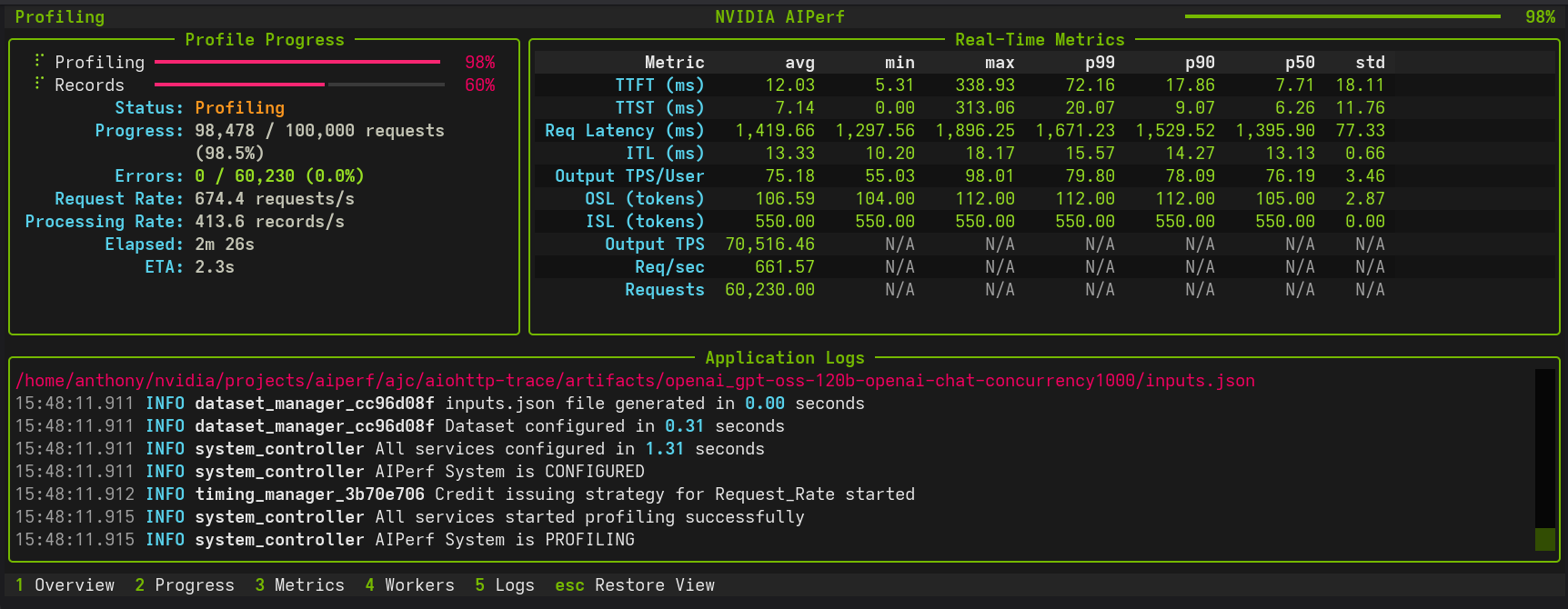
- Scalable multiprocess architecture with 10 services communicating via ZMQ
- 3 UI modes:
dashboard(real-time TUI),simple(progress bars),none(headless) - Multiple benchmarking modes: concurrency, request-rate, request-rate with max concurrency, trace replay
- Extensible plugin system for endpoints, datasets, transports, and metrics
- Public dataset support including ShareGPT and custom formats
Supported APIs
- OpenAI chat completions, completions, embeddings, audio, images
- NIM embeddings, rankings
Tutorials and Feature Guides
Getting Started
- Basic Tutorial - Profile Qwen3-0.6B with vLLM
- Comprehensive Benchmarking Guide - 5 real-world use cases
- Interactive Chat Sanity Checks - Talk to an endpoint with
aiperf chatand see per-turn TTFT/TPS/ITL - YAML Configuration Files - Drive AIPerf from a config file instead of CLI flags
- Sampling Distributions in YAML Configs - Fixed, Normal, Log-normal, Multimodal, and Empirical shapes for ISL/OSL/turns/etc.
- User Interface - Dashboard, simple, or headless
- Hugging Face TGI - Profile Hugging Face TGI models
- OpenAI Text Endpoints - Profile OpenAI-compatible text APIs
Load Control and Timing
- Request Rate with Max Concurrency - Dual request control
- Arrival Patterns - Constant, Poisson, gamma traffic
- Prefill Concurrency - Memory-safe long-context benchmarking
- Adaptive Scale - Single-run SLA boundary discovery and sustain
- Gradual Ramping - Smooth ramp-up of concurrency and request rate
- Warmup Phase - Eliminate cold-start effects
- Benchmark Control Hooks - KV-cache reset and server profiler around profiling phases
- Control Hooks by Server - vLLM, SGLang, and TensorRT-LLM path mappings
- User-Centric Timing - Per-user rate limiting for KV cache benchmarking
- Request Cancellation - Timeout and resilience testing
- Multi-URL Load Balancing - Distribute across servers
Workloads and Data
- Trace Benchmarking - Deterministic workload replay
- Bailian Traces - Bailian production trace replay
- Baseten Traces - Baseten Parquet production trace replay
- BurstGPT Traces - BurstGPT real-world bursty traffic trace replay
- SageMaker Data Capture - Replay production traffic from SageMaker endpoints
- Custom Prompt Benchmarking - Send exact prompts as-is
- Custom Dataset - Custom dataset formats
- Inline Datasets - Embed records directly in the YAML config (single_turn, multi_turn, multi-pool random_pool, traces)
- ShareGPT Dataset - Profile with ShareGPT dataset
- AIMO Dataset - Profile with AIMO math reasoning datasets (NuminaMath-TIR, NuminaMath-CoT, NuminaMath-1.5, AIME)
- MMStar Dataset - Profile vision language models with MMStar visual QA benchmark
- MMVU Dataset - Profile video language models with MMVU expert-level video understanding benchmark
- VisionArena Dataset - Profile with real-world vision conversations from Chatbot Arena
- LLaVA-OneVision Dataset - Profile with diverse multimodal instruction-following data
- SPEED-Bench Dataset - Profile speculative decoding with SPEED-Bench
- Per-Request Spec-Decode Metrics - Inline per-request acceptance length, draft rate, and pooled histogram from a normal profile run
- InstructCoder Dataset - Profile with InstructCoder code generation dataset
- SpecBench Dataset - Profile with SpecBench speculative decoding dataset
- Blazedit Dataset - Profile with Blazedit code editing dataset
- ASR Datasets - Profile ASR models with LibriSpeech, VoxPopuli, GigaSpeech, AMI, and SPGISpeech
- Synthetic Dataset Generation - Generate synthetic datasets
- Agentic Code Generator - Generate multi-turn coding-agent traces for KV cache benchmarking
- Weka Traces - Replay real agentic coding sessions with KV-cache-aware Weka traces
- TraceLab Traces - Replay the public TraceLab corpus of real agentic coding sessions
- InferenceX AgentX MVP - SemiAnalysis AgentX-MVP submission benchmark (
--scenario inferencex-agentx-mvp) - Fixed Schedule - Precise timestamp-based execution
- Time-based Benchmarking - Duration-based testing
- Sequence Distributions - Mixed ISL/OSL pairings
- Prefix Synthesis - Prefix data synthesis for KV cache testing
- Reproducibility - Deterministic datasets with
--random-seed - Template Endpoint - Custom Jinja2 request templates
- Multi-Turn Conversations - Multi-turn conversation benchmarking
- Raw Payload Replay - Verbatim JSONL payload replay (single file or directory)
- Inputs JSON Replay - Verbatim multi-turn replay of AIPerf inputs.json artifacts
- Local Tokenizer - Use local tokenizers without HuggingFace
Endpoint Types
- Embeddings - Profile embedding models
- Rankings - Profile ranking models
- OpenAI Responses API - Profile OpenAI Responses API endpoints
- Audio - Profile audio language models
- NIM Image Retrieval - Profile NIM image retrieval models
- Vision - Profile vision language models
- Image Generation - Benchmark any OpenAI-compatible image generation API
- SGLang Image Edit - Benchmark OpenAI-compatible image-to-image (image edit) endpoints
- SGLang Video Generation - Video generation benchmarking
- Synthetic Video - Synthetic video generation
Kubernetes
- Kubernetes Benchmark Recipes - Validated model and engine workload manifests
- Getting Started on Kubernetes - Install operator, run first benchmark, retrieve results
- Deploy from Source Checkout - Build and push AIPerf, Helm install, run on a real cluster
- Kubernetes Configuration - CRD fields, CLI flags, Helm chart, config patterns
- Monitoring and Troubleshooting - Watch, debug, logs, and common issues
- Production Deployments - CI/CD, Kueue, secrets, GitOps, multi-tenant
- AI Agent Debugging Guide - Machine-parseable diagnostics and decision trees for AI agents
- Parameter Sweeps on Kubernetes - grid/scenarios sweeps, multi-run trials, adaptive convergence on cluster
Analysis and Monitoring
- Timeslice Metrics - Per-timeslice performance analysis
- Goodput - SLO-based throughput measurement
- Parameter Sweeps - YAML reference for grid/zip/scenarios sweeps + multi-run, with picker for choosing a sweep mode
- Adaptive Search - Bayesian-optimization walkthrough (single-objective + multi-objective Pareto)
- Adaptive Scale - Single-run SLA boundary discovery and sustain
- Search Recipes - Named recipe catalog including
pareto-sweep,max-throughput-ttft-sla,max-concurrency-under-sla - HTTP Trace Metrics - DNS, TCP/TLS, TTFB timing
- Multi-Run Confidence - Confidence intervals across repeated runs
- Profile Exports - Post-processing with Pydantic models
- Visualization and Plotting - PNG charts and multi-run comparison
- Auto-Plot After Profile - Run
aiperf plotautomatically afteraiperf profile - GPU Telemetry - DCGM metrics collection
- OTel + MLflow Live Telemetry - Stream metrics to OTel and MLflow in real time
- Weights & Biases Export - Upload results tables and artifacts to wandb
- Server Metrics - Prometheus-compatible metrics
Documentation
| Document | Purpose |
|---|---|
| Architecture | Three-plane architecture, core components, credit system, data flow |
| CLI Options | Complete command and option reference |
| Metrics Reference | All metric definitions, formulas, and requirements |
| Environment Variables | All AIPERF_* configuration variables |
| Plugin System | Plugin architecture, 25+ categories, creation guide |
| Creating Plugins | Step-by-step plugin tutorial |
| Accuracy Benchmarks | Accuracy evaluation against MMLU, AIME, and other benchmarks |
| Benchmark Modes | Trace replay and timing modes |
| Server Metrics | Prometheus-compatible server metrics collection |
| Tokenizer Auto-Detection | Pre-flight tokenizer detection |
| Conversation Context Mode | How conversation history accumulates in multi-turn |
| Dataset Synthesis API | Synthesis module API reference |
| Code Patterns | Code examples for services, models, messages, plugins |
| Migrating from Genai-Perf | Migration guide and feature comparison |
| Design Proposals | Enhancement proposals and discussions |
Contributing
See CONTRIBUTING.md for development setup, coding conventions, and contribution guidelines.
License
AIPerf is licensed under the Apache License 2.0. Because helm package only includes files beneath the chart directory, the aiperf-operator Helm chart contains a symlink to the repository's top-level license solely so the license is included in the packaged chart archive. Helm dereferences the symlink at packaging time, so the archive contains a regular LICENSE file with the top-level license contents.
Known Issues
- Output sequence length constraints (
--output-tokens-mean) cannot be guaranteed unless you passignore_eosand/ormin_tokensvia--extra-inputsto an inference server that supports them. - Very high concurrency settings (typically >15,000) may lead to port exhaustion on some systems. Adjust system limits or reduce concurrency if connection failures occur.
- Startup errors caused by invalid configuration settings can cause AIPerf to hang indefinitely. Terminate the process and check configuration settings.
- Copying selected text may not work reliably in the dashboard UI. Use the
ckey to copy all logs.
4 maintainers


Release files for aiperf-nightly 0.13.0.dev20260921
For a detailed explanation of source distributions (sdists) and built distributions (wheels), please see the package formats documentation.
Built distribution (wheel)
| File | Interpreter | ABI | Platform | Reset |
|---|---|---|---|---|
| aiperf_nightly-0.13.0.dev20260921-py3-none-any.whl | Python 3 | none | any | Details |
Release files / aiperf_nightly-0.13.0.dev20260921-py3-none-any.whl
| Download URL | aiperf_nightly-0.13.0.dev20260921-py3-none-any.whl |
|---|---|
| Size | 6.8 MB |
| Tags | Python 3 |
|
SHA-256 checksum How to use checksums |
d96271330c5bddfb0c3007ba247e4fe8054034fae544bc98f428d6f0c6699c2d
|
|
BLAKE2b-256 checksum How to use checksums |
e33ff2e5661cad675787d19b73bc639a65f6fa079e5245081021f5d7631cb18f
|
| Upload date | |
|
Uploaded using Trusted Publishing? What is trusted publishing? |
No |
| Uploaded via |
twine/7.0.0 CPython/3.12.14
|














