
Aird - A lightweight web-based file browser, editor, and streamer with real-time capabilities

Project description
Aird - A Lightweight Web-Based File Browser, Editor and Share
v0.4.2 - 🎨 Custom HTML/CSS Popups + Enhanced Share Management + File Browser Navigation!
A modern, lightweight, and fast web-based file browser, editor, and streamer built with Python and Tornado. It provides a comprehensive file management solution with real-time streaming, in-browser editing, and mobile-responsive design through a clean and intuitive web interface.
Note: Currently using this in conjunction with WireGuard to handle file management and sharing for internal/private cloud.
🆕 What's New in v0.4.2
🎨 Custom HTML/CSS Popups (NEW!)
- Modern Dialog System: Replaced all native browser alerts, confirms, and prompts with custom HTML/CSS modals
- Consistent UI/UX: Beautiful, responsive popups that match the application's design language
- Enhanced User Experience: Better visual feedback with styled buttons, proper spacing, and smooth animations
- Cross-browser Compatibility: Custom popups work consistently across all browsers and devices
- Keyboard Support: Full keyboard navigation with Enter to confirm and Escape to cancel
- Accessibility: Improved accessibility with proper focus management and screen reader support
🔗 Enhanced Share Management (NEW!)
- Dynamic File Management: Add and remove files from existing shares without recreating them
- Interactive File Browser: Navigate through directories to select additional files for sharing
- Real-time Share Updates: Instantly modify share contents with live preview of changes
- Improved Share Modal: Enhanced share management interface with better organization and controls
- File Selection Preview: See selected files before adding them to shares
- Directory Navigation: Full directory tree navigation within the share management interface
🗂️ Advanced File Browser Navigation (NEW!)
- Full Directory Tree Access: Navigate through all accessible directories when managing shares
- Smart Path Handling: Proper path construction and navigation for complex directory structures
- File Type Recognition: Enhanced file icons and type detection for better visual organization
- Breadcrumb Navigation: Clear path display showing current location in the directory tree
- Error Handling: Robust error handling with user-friendly messages for navigation issues
🛠️ Backend API Enhancements (NEW!)
- Share Update API: New endpoint for modifying existing shares with file additions/removals
- Database Migration: Automatic database schema updates for new share management features
- Improved Error Handling: Better error messages and status codes for API operations
- Path Validation: Enhanced security with proper path validation and sanitization
🆕 What's New in v0.4.1
⚙️ WebSocket Admin Configuration (NEW!)
- Dynamic Settings: Adjust WebSocket connection limits and timeouts through admin UI
- Real-time Changes: Settings apply instantly without server restart
- Granular Control: Separate limits for feature flags, file streaming, and search handlers
- Performance Tuning: Optimize for your specific traffic patterns and system resources
- Live Statistics: View connection stats at
/admin/websocket-stats
🔍 Super Search (NEW!)
- Powerful File Content Search: Search through file contents across your entire directory tree
- Real-time WebSocket Results: Live search results as you type with instant feedback
- Advanced Pattern Matching: Support for regex patterns and multiple search terms
- Path-aware Search: Automatically filters results based on current directory context
- Performance Optimized: Fast searching even in large codebases using memory-mapped operations
🐍 Enhanced Python File Icons (NEW!)
- Smart Python File Recognition: Distinctive icons for different Python file types
- Source Files (.py, .pyw): Enhanced snake with gem (🐍💎) indicating precious/valuable source code
- Compiled Files (.pyc, .pyo): Snake with lightning (🐍⚡) representing fast/optimized compiled code
- Better Visual Distinction: Easily differentiate between source and compiled Python files at a glance
- Consistent Branding: Maintains Python's snake identity while adding meaningful visual context
⚡ Performance & Usability Upgrades
- Direct Executable: Run with simple
airdcommand instead ofpython -m aird - 50-80% Faster: Memory-mapped file operations for massive performance gains
- Enhanced Security: CSRF protection, XSS prevention, and improved input validation
- Memory Efficient: Handle GB-sized files with constant ~64KB memory usage
🚀 Installation
Option 1: Install from PyPI (Recommended)
pip install aird
Option 2: Install from Source
-
Clone the repository:
git clone https://github.com/blinkerbit/aird.git
cd aird
-
Create a virtual environment (recommended):
python -m venv venv
source venv/bin/activate  # On Windows: venv\Scripts\activate
-
Install dependencies:
pip install -r requirements.txt
-
Install the package:
pip install .
Run directly:
aird --help
✨ Features
🔍 Super Search (NEW!)
- Powerful Content Search: Search through file contents across your entire directory tree with real-time results
- WebSocket-powered: Live search results as you type with instant feedback and progress indicators
- Advanced Pattern Matching: Support for regex patterns, case-sensitive/insensitive search, and multiple search terms
- Path-aware Filtering: Automatically filters results based on current directory context for focused searching
- Smart Result Display: Shows matching lines with context, file paths, and line numbers for easy navigation
- Performance Optimized: Fast searching even in large codebases using memory-mapped file operations
- Interactive Interface: Click any result to instantly navigate to the file and line
📁️ File Management
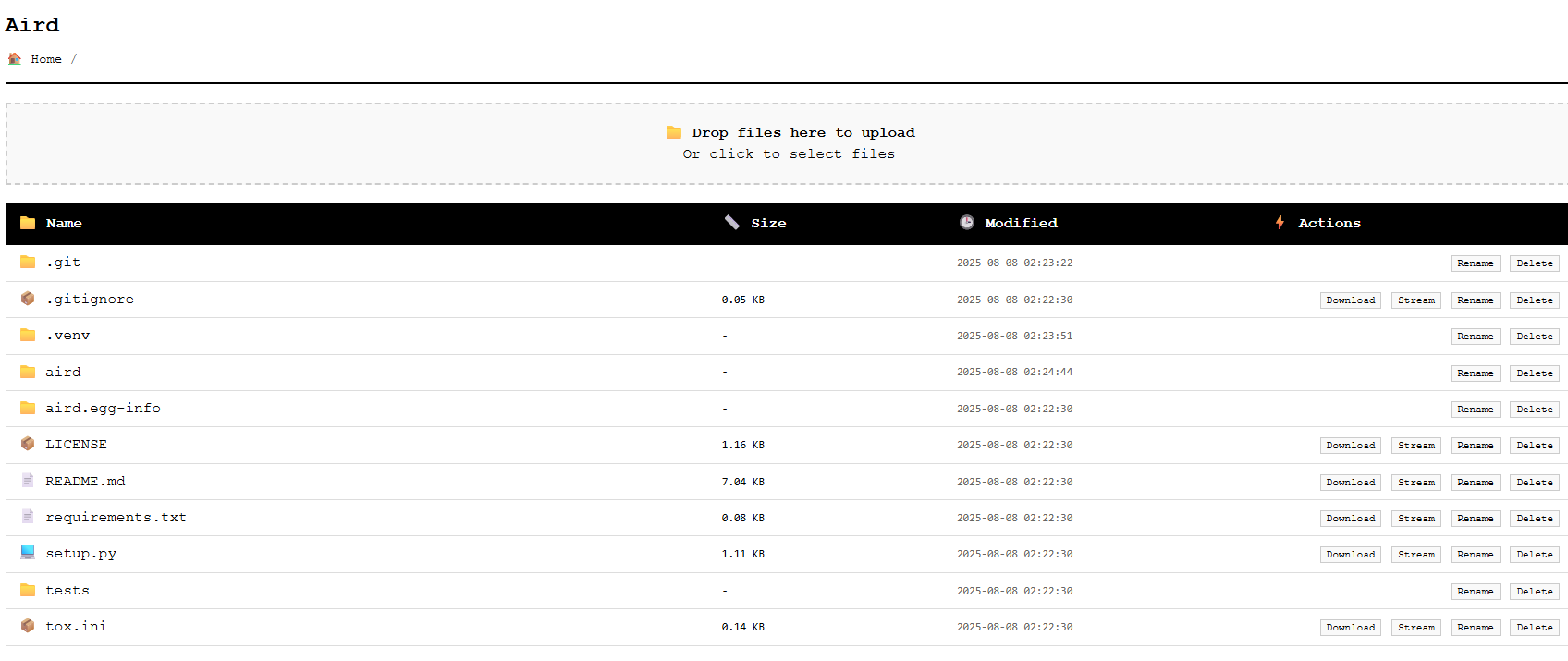
- Smart File Browser: Navigate through your server's directory structure with resizable columns and mobile-friendly design
- Enhanced File Icons: Intelligent file type recognition with special Python file icons:
- Python Source (*.py, *.pyw): 🐍💎 Snake with gem (precious source code)
- Python Compiled (*.pyc, *.pyo): 🐍⚡ Snake with lightning (optimized/fast)
- 50+ File Types: Comprehensive icon coverage for all common file formats
- Advanced File Operations:
- Download files with progress indicators and compression support
- Upload files with drag-and-drop support (can be disabled)
- Delete files and directories (can be disabled)
- Rename files and directories (can be disabled)
- In-browser File Editing: Full-featured editor with syntax highlighting, line numbers, and memory safety
- Range-based Viewing: View specific line ranges (start/end) without loading entire files
- Line-by-line Streaming: Real-time file streaming for monitoring logs and large files
- File Sharing: Create secure, temporary public links for files and directories
- Select multiple files and folders to share together
- Generate unique, time-limited shareable URLs
- No login required for shared link access
- Manage active shares with easy revocation
📡 Real-time Streaming & Editing
- WebSocket-based File Streaming: Stream large files with animated progress indicators
- Configurable Tail Lines: Control how many recent lines to display when streaming (customizable Last N parameter)
- Live File Monitoring: Real-time updates as files change, perfect for log monitoring
- Range-based File Viewing: View specific line ranges without loading entire files
- Dedicated Edit Mode: Full-featured in-browser editor with:
- Syntax highlighting and line numbers
- Memory-safe editing (prevents loading huge files)
- Save/Cancel operations with confirmation
- Separate edit view for focused editing experience
- Performance Optimized: Stream line-by-line without loading entire files into memory
- Memory Efficient: Handles large files gracefully with size limits and streaming
🔐 Security & Authentication
- Token-based Authentication: Secure access with customizable access tokens
- LDAP/Active Directory Integration: Enterprise-grade authentication support
- Path Traversal Protection: Built-in security measures to prevent unauthorized access
⚙️ Administration
- Admin Panel: Dedicated admin interface to toggle features on the fly
- Feature Flags: Granular control over file operations (upload, delete, rename, edit, download)
- Real-time Configuration: Changes apply instantly without server restart
📱 Modern UI/UX
- Mobile-Responsive Design: Optimized for smartphones and tablets with touch-friendly controls
- Real-time Search Interface: Modern Super Search with live results and WebSocket updates
- Resizable Columns: Customize the file browser layout to your preference
- Animated Indicators: Visual feedback for streaming, searching, and loading operations
- Intuitive Interface: Clean, minimalist design with well-organized toolbars
- Streaming Controls: Dedicated streaming toolbar with configurable options (Last N lines, play/stop controls)
- Interactive Results: Click-to-navigate search results with context highlighting
- Keyboard Shortcuts: Efficient navigation and operations via keyboard
- Clean Layout: Left-aligned file actions, right-aligned streaming controls for better organization
- Custom HTML/CSS Popups (NEW!): Modern dialog system replacing all native browser popups
- Enhanced Share Management UI (NEW!): Improved share management interface with better organization
- File Browser Navigation (NEW!): Full directory tree navigation with breadcrumb display
📖 Usage
Quick Start
After installation, you can run Aird using the aird command:
# Basic usage with a specific port
aird --port 8000

# A token will be generated and printed. To specify one:
aird --port 8000 --token "your-secret-token"

# With admin capabilities
aird --port 8000 --token "user-token" --admin-token "admin-token"

# Serve from a specific directory
aird --root "/path/to/files" --token "your-token"
Navigate to http://localhost:8000 and enter your access token to start browsing files.
🎮 Command-Line Arguments
| Argument | Description | Default |
|---|---|---|
--port |
The port to listen on | 8000 |
--root |
The root directory to serve files from | Current directory |
--token |
The token required for user login | (auto-generated) |
--admin-token |
The token required for admin login | (auto-generated) |
--hostname |
Host name for the server, used for display | (auto-detected) |
--config |
Path to a JSON configuration file | None |
--ldap |
Enable LDAP authentication | False |
--ldap-server |
The LDAP server address (required if --ldap) | None |
--ldap-base-dn |
The base DN for LDAP searches (required if --ldap) | None |
⚙️ Configuration File
For advanced setups, use a JSON configuration file to define all settings:
Example config.json:
{
  "host": "0.0.0.0",
  "port": 8080,
  "root_dir": "/path/to/your/files",
  "access_token": "your-secret-token",
  "admin_token": "your-admin-secret-token",
  "enable_ldap": false,
  "ldap_server": null,
  "ldap_base_dn": null,
  "feature_flags": {
    "file_upload": true,
    "file_delete": true,
    "file_rename": true,
    "file_download": true,
    "file_edit": true
  },
  "max_file_size": 10485760,
  "max_readable_file_size": 10485760,
  "chunk_size": 65536
}
Run with configuration file:
aird --config /path/to/config.json
🔐 LDAP Authentication
For enterprise environments, enable LDAP authentication:
aird --enable-ldap \
     --ldap-server "ldap://your.ldap.server" \
     --ldap-base-dn "ou=users,dc=example,dc=com" \
     --access-token "fallback-token"
Users can authenticate with their LDAP credentials, with token authentication as fallback.
🔍 Super Search
The Super Search feature provides powerful, real-time content searching across your entire file system:
-
Access Super Search:
- Click the "🚀 Super Search" button in the main file browser
- Or navigate directly to
/searchafter logging in
-
Search Interface:
- Search Query: Enter text, regex patterns, or multiple terms to find
- Current Path: Automatically set based on your current directory (can be modified)
- Case Sensitive: Toggle case-sensitive matching on/off
- Max Results: Limit the number of results to control performance
-
Real-time Results:
- Results appear instantly as you type via WebSocket connection
- See matching lines with surrounding context for better understanding
- Click any result to navigate directly to the file and specific line
- Progress indicators show search status and completion
-
Advanced Features:
- Regex Support: Use regular expressions for complex pattern matching
- Path Filtering: Search within specific directories or file types
- Context Lines: See surrounding lines for better match understanding
- Performance Optimized: Fast searching even in large codebases
Example URLs:
- Super Search page:
http://localhost:8888/search - Search with preset path:
http://localhost:8888/search?path=/specific/folder
🔗 Enhanced File Sharing
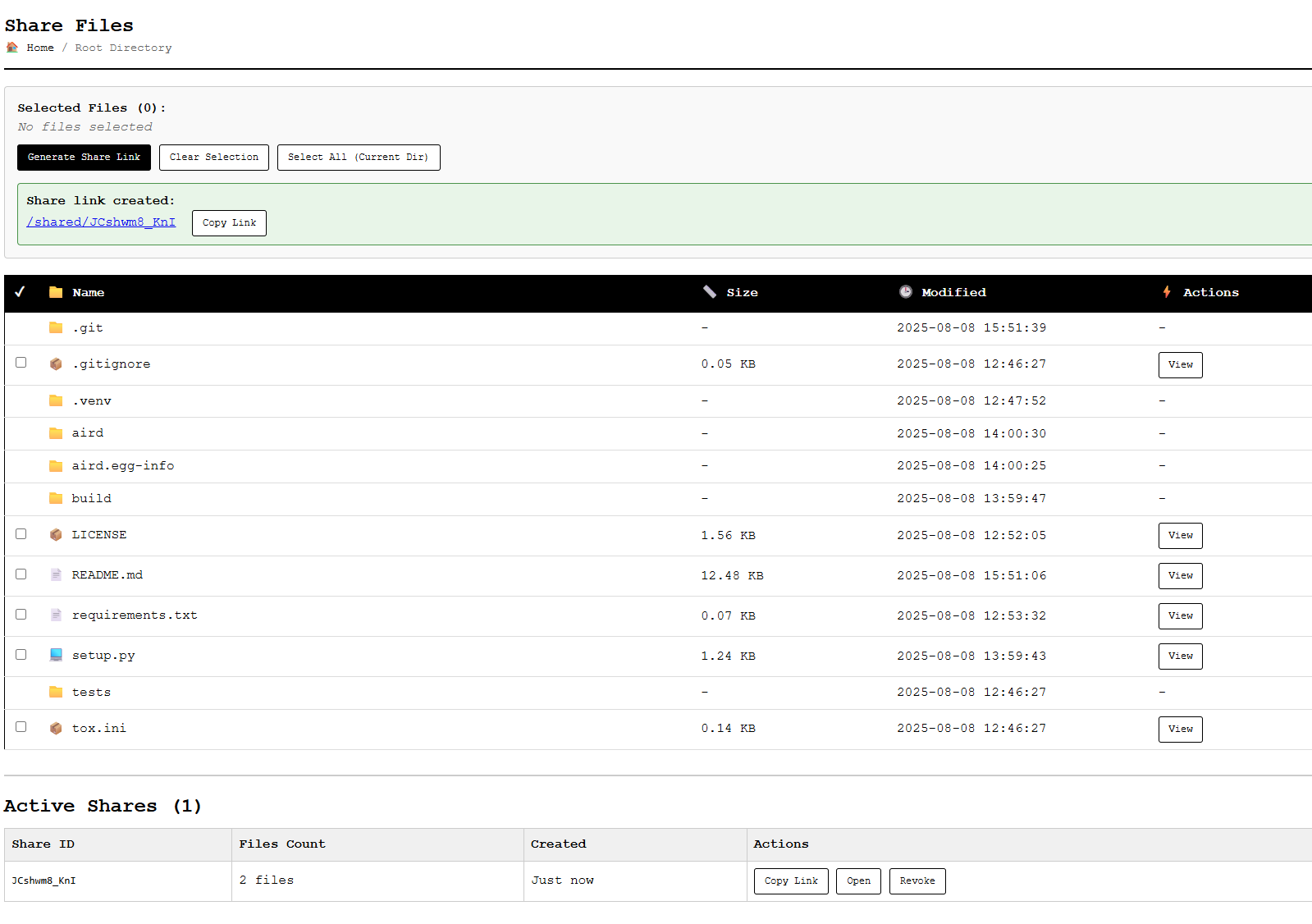
The enhanced file sharing feature allows you to create and manage public, temporary links for files and directories:
-
Access the Share Page:
- Navigate to
/shareafter logging in - Or click the "Share Files" button in the main file browser
- Navigate to
-
Select Files to Share:
- Browse directories and select files using checkboxes
- Navigate between folders to select files from different locations
- Use "Select All (Current Dir)" to quickly select all visible files
-
Generate Share Links:
- Click "Generate Share Link" after selecting files
- Copy the generated URL using the "Copy Link" button
- Share the URL with others for public access (no login required)
-
Manage Active Shares:
- View all active shares in the bottom panel
- Copy existing share links or open them in a new tab
- NEW: Click "Manage" to modify existing shares
-
Enhanced Share Management (NEW!):
- Add Files: Click "Add Files" to browse and select additional files for existing shares
- Remove Files: Click "Remove" next to any file to remove it from the share
- Directory Navigation: Use the file browser to navigate through all accessible directories
- File Selection Preview: See selected files before adding them to shares
- Real-time Updates: Changes apply instantly without recreating the share
-
Custom Dialog System (NEW!):
- All confirmations and prompts use modern HTML/CSS popups
- Consistent UI/UX across all share management operations
- Keyboard support with Enter to confirm and Escape to cancel
Example URLs:
- Share page:
http://localhost:8888/share - Public shared files:
http://localhost:8888/shared/abc123def456
👑 Admin Panel
The admin panel provides real-time control over server features and capabilities.
Access the Admin Panel
-
Start server with admin token:
aird --admin-token "your-admin-secret-token"
-
Navigate to admin interface: Visit
http://localhost:8888/adminand authenticate with your admin token -
Feature Management:
- File Upload: Toggle file upload capability
- File Delete: Enable/disable file and directory deletion
- File Rename: Control rename functionality
- File Edit: Toggle in-browser file editing
- File Download: Control file download access
- File Share: Enable/disable file sharing functionality
-
WebSocket Connection Management (NEW!):
- Feature Flags WebSocket: Configure max connections (1-1000) and idle timeout (30-7200s)
- File Streaming WebSocket: Optimize settings for high-traffic file operations
- Search WebSocket: Tune search handler performance limits
- Real-time Statistics: View live connection stats at
/admin/websocket-stats - Dynamic Configuration: All settings apply instantly without restart
All changes apply immediately to all connected users via WebSocket updates.
🎯 Key Features in Detail
🔍 Super Search (Latest Feature!)
- Content-based Search: Find text within files across your entire directory structure
- Real-time Results: Live search with WebSocket updates as you type
- Regex Support: Advanced pattern matching with regular expressions
- Context Display: See matching lines with surrounding context for better understanding
- Performance Optimized: Memory-mapped operations for fast searching in large codebases
- Interactive Navigation: Click any result to jump directly to the file and line
📝 In-Browser File Editing
- Real-time editing with syntax highlighting
- Line numbers with toggle capability
- Auto-save functionality with keyboard shortcuts
- Large file support with efficient loading
- Responsive design for mobile editing
📊 File Browser Enhancements
- Resizable columns for Name, Size, and Modified date
- Mobile-optimized responsive layout
- Drag-and-drop upload with visual feedback
- Real-time file streaming with progress animations
- Keyboard navigation support
🔗 Enhanced File Sharing System
- Multi-file selection: Choose multiple files and directories to share in a single link
- Dynamic Share Management: Add and remove files from existing shares without recreating them
- Interactive File Browser: Navigate through directories to select additional files for sharing
- Real-time Share Updates: Instantly modify share contents with live preview of changes
- On-the-fly browsing: Navigate directories dynamically without pre-loading all files
- Secure URL generation: Each share gets a unique, hard-to-guess identifier
- Public access: Shared files can be viewed without authentication
- Active share management: View, copy, and revoke existing shares in real-time
- One-click copy: Copy shareable URLs to clipboard with visual feedback
- Temporary access: All shares are session-based and can be easily revoked
- Custom HTML/CSS Popups: Modern dialog system for all share management operations
🚀 Performance Features (New in v0.4.1!)
- Enhanced Python File Icons: Smart visual distinction between source (🐍💎) and compiled (🐍⚡) Python files
- Memory-mapped file operations: Efficient handling of large files (>1MB) using mmap
- Enhanced security: CSRF protection, XSS prevention, improved input validation
- Direct executable support: Run with simple
airdcommand instead ofpython -m aird - Chunked file operations for large files
- Async WebSocket streaming for real-time updates
- Configurable buffer sizes for optimal performance
- Memory-efficient file handling with constant memory usage
🛠️ Technical Improvements (New in v0.4.2!)
- Database Schema Migration: Automatic database updates for new share management features
- API Endpoint Enhancements: New
/share/updateendpoint for dynamic share modifications - Path Validation & Security: Enhanced path handling and validation for file operations
- Error Handling Improvements: Better error messages and status codes throughout the application
- Frontend Architecture: Modular JavaScript functions for better maintainability
- Cross-browser Compatibility: Improved compatibility across different browsers and devices
- Accessibility Enhancements: Better keyboard navigation and screen reader support
🐛 Bug Fixes & Improvements (New in v0.4.2!)
- Fixed Share Management: Resolved "Failed to load share details" error in share management modal
- Fixed File Browser Navigation: Corrected directory navigation issues in the Add Files modal
- Fixed API Response Handling: Proper handling of API responses for file listing and share management
- Fixed Path Construction: Corrected path building logic for file and directory operations
- Fixed Console Popup Dependencies: Replaced all native browser popups with custom HTML/CSS modals
- Fixed Async Dialog Handling: Proper async/await handling for all confirmation dialogs
- Fixed File Selection State: Corrected file selection state management in share management
- Fixed Error Display: Improved error message display and user feedback throughout the application
📋 Requirements
Core Requirements
- Python: 3.10 or higher
- Dependencies: Tornado, ldap3, aiofiles (automatically installed)
- Storage: Minimal disk space for the application
- Network: HTTP/HTTPS and WebSocket support
Development Requirements
For development and testing, additional dependencies are available in the test extras:
pip install -e .[test]
This includes:
- Testing frameworks: pytest, pytest-asyncio, pytest-mock, pytest-cov
- Development tools: coverage, mock for comprehensive testing
🧪 Testing
The project includes a comprehensive test suite with multiple testing utilities:
Running Tests
# Run all tests
python run_tests.py

# Run with coverage
python run_coverage.py

# Run specific test files
pytest tests/test_handlers.py

# Run tests with verbose output
pytest -v
Test Coverage
- Comprehensive Coverage: Tests for all major components including handlers, utilities, and database operations
- WebSocket Testing: Real-time functionality testing with pytest-tornado
- File Operations: Testing file streaming, editing, and sharing features
- Security Testing: Path traversal protection and authentication testing
- Performance Testing: Large file handling and memory efficiency tests
🤝 Contributing
We welcome contributions! Here's how you can help:
- Fork the repository
- Create a feature branch:
git checkout -b feature/amazing-feature - Make your changes and test thoroughly
- Commit your changes:
git commit -m 'Add amazing feature' - Push to the branch:
git push origin feature/amazing-feature - Open a Pull Request
Development Setup
git clone https://github.com/blinkerbit/aird.git
cd aird
python -m venv venv
source venv/bin/activate  # Windows: venv\Scripts\activate
pip install -r requirements.txt
pip install -e .  # Install in development mode
👥 Contributors & Thanks
We extend our heartfelt gratitude to all contributors who have helped make aird better:
💡 Community Contributors
A special thanks to everyone who has contributed through:
- Bug reports and feature requests
- Code contributions and pull requests
- Documentation improvements
- Testing and feedback
- Spreading the word about aird
🔧 Feature Contributors
Thanks to all contributors who helped implement key features:
- File editing capabilities with syntax highlighting
- Mobile-responsive design and resizable columns
- Real-time streaming with WebSocket support
- Admin panel with live feature toggling
- Security enhancements and path traversal protection
Want to see your name here? Check out our Contributing Guidelines and join our community!
🎉 Thank you to all our stars, forks, and users who make this project worthwhile!
If you've benefited from aird, consider:
- ⭐ Starring the repository
- 🍴 Forking and contributing
- 🐛 Reporting issues
- 💝 Sharing with others
📄 License
This project is licensed under a Custom License that prohibits commercial use without explicit written consent from the author. See the LICENSE file for complete details.
Key License Points:
- ✅ Free for personal and non-commercial use
- ✅ Open source for educational purposes
- ❌ Commercial use requires written permission (usually given for free, but requires written consent.)
- ❌ No warranty or liability coverage
🔗 Links
- GitHub Repository: https://github.com/blinkerbit/aird
- PyPI Package: https://pypi.org/project/aird/
- Issue Tracker: https://github.com/blinkerbit/aird/issues
🎯 Roadmap & Future Plans
🔜 Upcoming Features
- File Previews: In-browser previews for images, PDFs, and Markdown
- Enhanced Search: Advanced search filters, file type filtering, and search history
- Multi-File Operations: Batch actions for multiple files
- Theme Support: Dark mode and customizable themes
🚀 Advanced Features (Planned)
- User Management: Role-based permissions system
- File History: Version tracking and backup features
- API Integration: RESTful API for external integrations
- Plugin System: Extensible architecture for custom features
Made with ❤️ by Viswantha Srinivas P
Star ⭐ this repo if you find it useful!
Release history Release notifications | RSS feed


Download files
Download the file for your platform. If you're not sure which to choose, learn more about installing packages.
Source Distribution
Built Distribution
Filter files by name, interpreter, ABI, and platform.
If you're not sure about the file name format, learn more about wheel file names.
Copy a direct link to the current filters
File details
Details for the file aird-0.4.3.tar.gz.
File metadata
- Download URL: aird-0.4.3.tar.gz
- Upload date:
- Size: 125.7 kB
- Tags: Source
- Uploaded using Trusted Publishing? No
- Uploaded via: twine/6.2.0 CPython/3.13.1
File hashes
| Algorithm | Hash digest | |
|---|---|---|
| SHA256 |
39b3754fb480872fbf41d219dc38420abfe8ecbf13ac6c98ce45252639cb8fb4
|
|
| MD5 |
b3f826ae3e5a2c60f00dc395464c9087
|
|
| BLAKE2b-256 |
a17612329f46e3016f4ef3efad5186ecf8115927d01d057a995515f862ba980c
|
File details
Details for the file aird-0.4.3-py3-none-any.whl.
File metadata
- Download URL: aird-0.4.3-py3-none-any.whl
- Upload date:
- Size: 132.8 kB
- Tags: Python 3
- Uploaded using Trusted Publishing? No
- Uploaded via: twine/6.2.0 CPython/3.13.1
File hashes
| Algorithm | Hash digest | |
|---|---|---|
| SHA256 |
271650a9cbcd37e8bce58e65bb043e9d85a1bca96091944b6c4bf64d155c8ce9
|
|
| MD5 |
8e5b150461bab28d8059935f40148c5f
|
|
| BLAKE2b-256 |
2d9043a9a36cac5f9ec2fe2d719987a60590f0feebeb57ac6861ea0828262875
|






