

Turn incoming webhooks into asset events that trigger your Airflow Dags.





airflow-provider-inbound-webhooks lets any service that can send a signed or secret-carrying
webhook trigger your Apache Airflow Dags.
Each verified delivery becomes an asset event, named after what happened. A Dag subscribes by scheduling on that name, and Airflow does the rest. There is no routing code to write, and adding a sender is one Airflow connection.
GitHub, GitLab and Jira are built in. Any other service that signs its deliveries with HMAC-SHA256 or sends a secret header works too, described in its connection.
See it work
Someone adds the deploy-preview label to a pull request in GitHub:
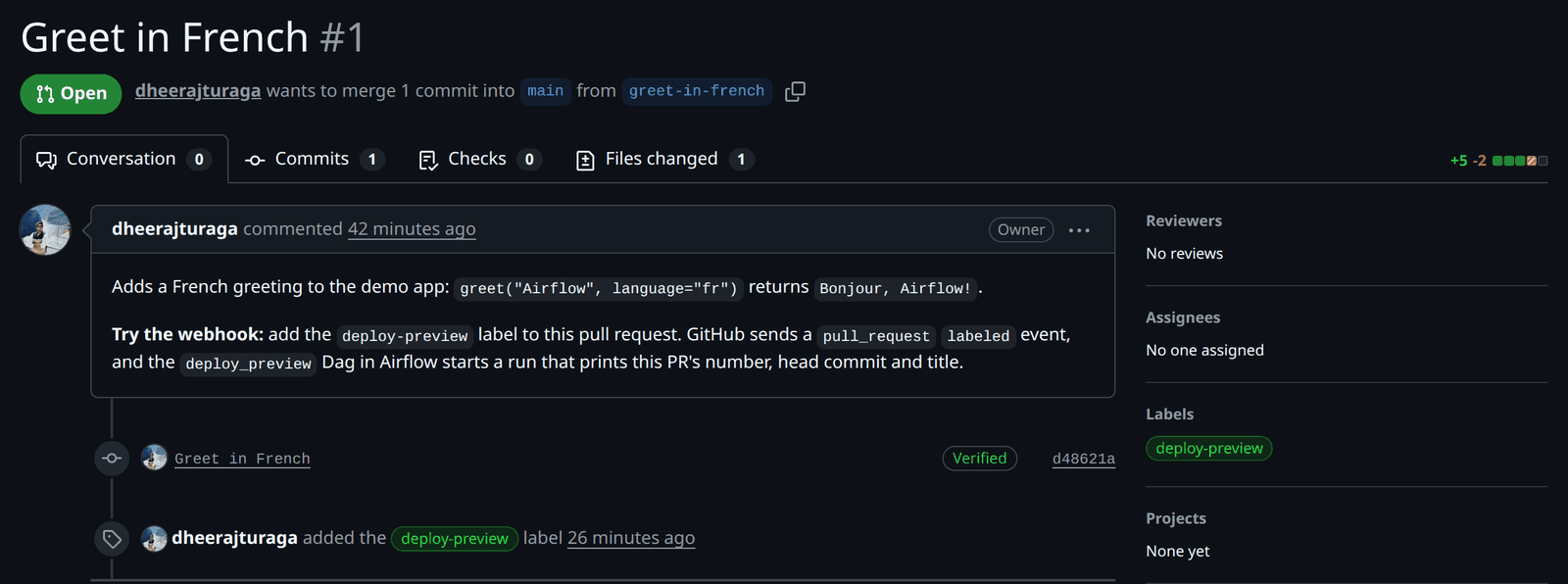
GitHub's delivery becomes an event on the asset
github/dheerajturaga/inbound-webhooks-demo/pull_request/labeled/deploy-preview, which the
deploy_preview Dag schedules on:

So deploy_preview runs, with the pull request from the delivery's payload:
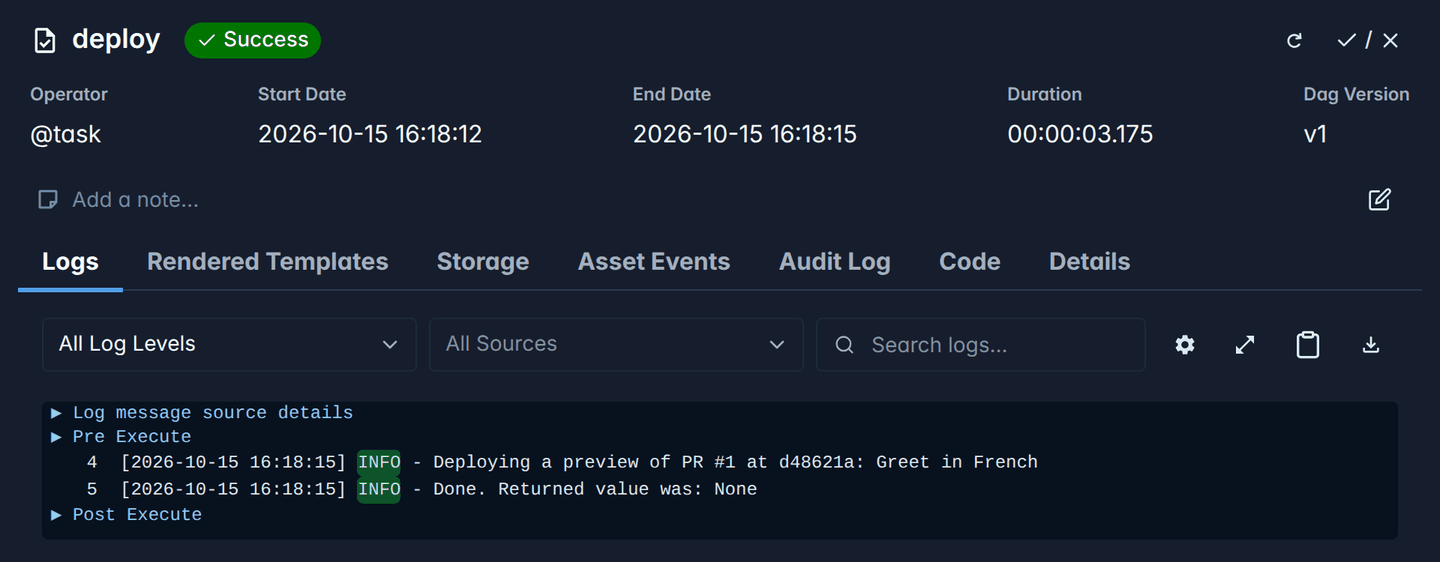
Here is that Dag. WebhookTopic builds the name it schedules on from its parts; a plain
Asset("github/dheerajturaga/inbound-webhooks-demo/pull_request/labeled/deploy-preview") matches
the same deliveries:
from airflow.sdk import dag, task

from airflow_inbound_webhooks import WebhookTopic

preview_requested = WebhookTopic(
    webhook="github",
    path="dheerajturaga/inbound-webhooks-demo",
    event="pull_request",
    action="labeled",
    detail="deploy-preview",
)


@dag(schedule=preview_requested)
def deploy_preview():
    @task
    def deploy(*, triggering_asset_events=None):
        for event in triggering_asset_events[preview_requested]:
            pr = event.extra["payload"]["pull_request"]
            print(f"Deploying a preview of PR #{pr['number']} at {pr['head']['sha'][:7]}: {pr['title']}")

    deploy()


deploy_preview()
The repository and its Dags are in dheerajturaga/inbound-webhooks-demo.
Why
Airflow can be triggered from outside through its REST API, but webhook senders can't use it: they cannot obtain or attach an Airflow API token. They sign their requests with a shared secret instead, and each service posts its own payload format. The usual workarounds are a relay service in front of Airflow, or sensors that poll the other service and hold worker or triggerer capacity while they wait.
This plugin adds the missing piece: an endpoint on the Airflow API server that verifies each service's signature and records the delivery as an asset event.
How it works
See the diagram of this flow on GitHub.
The plugin never runs Dags itself. It records asset events, Airflow queues every Dag that schedules
on them, and the scheduler creates the runs. So one delivery can start several Dags, and asset
expressions such as a | b work as usual. Events are only recorded on names that a Dag that is not
paused schedules on, so a delivery that only paused Dags subscribe to records nothing, and unpausing
a Dag never replays such a delivery; see When Dags run for
what a Dag gets of events recorded while it was paused.
A delivery offers several names, from broad to specific, such as github/*/pull_request and
github/my-org/web/pull_request/labeled/deploy-preview, so a Dag subscribes as broadly or as
narrowly as it needs; Event names gives the rule.
Install
On the machine running the Airflow API server, with Airflow 3.1.1 or later, install the plugin and create its table in Airflow's metadata database:
pip install airflow-provider-inbound-webhooks "apache-airflow==$(airflow version)"
airflow db migrate
Pinning apache-airflow to the version you run keeps pip from changing it. On Airflow 3.1,
airflow db migrate only creates the table once external_db_managers names the plugin; see
Compatibility. Dag files that import WebhookTopic also need the package
wherever they are parsed: on the Dag processor and the workers.
To try it without a service account, the quick start sends a signed test delivery from the command line.
Connect a service
Every service takes the same steps: in Airflow, enable the webhook's name and create a connection holding a secret; in the service, add a webhook with that secret; then, in Airflow, schedule a Dag on one of its events.
| Service | Source type | Setup |
|---|---|---|
| GitHub | github, built in |
Connect GitHub, below |
| GitLab | gitlab, built in |
Connect GitLab |
| Jira | jira, built in |
Connect Jira |
| Any service that signs the body with HMAC-SHA256, or sends a secret in a header | hmac_json or token_header, described in the connection |
Connect any other service |
More built-in services are on the way. To ask for one, open a feature request with a link to the service's webhook documentation.
The service must be able to reach the API server. A cloud service, such as GitHub.com, needs a
public HTTPS address: put a reverse proxy in front of the API server that forwards only the paths of
your webhooks, such as /webhooks/github (see Security). <your-airflow> below
stands for that address.
Connect GitHub
In Airflow
-
Add
githubtowebhook_names, the comma-separated list inairflow.cfg, and restart the API server. -
Create the connection
webhook_githubwith a new secret, and copy the secret it prints:SECRET="$(openssl rand -hex 32)" && echo "$SECRET" airflow connections add webhook_github --conn-type inbound_webhook --conn-password "$SECRET"
Or in the Airflow UI
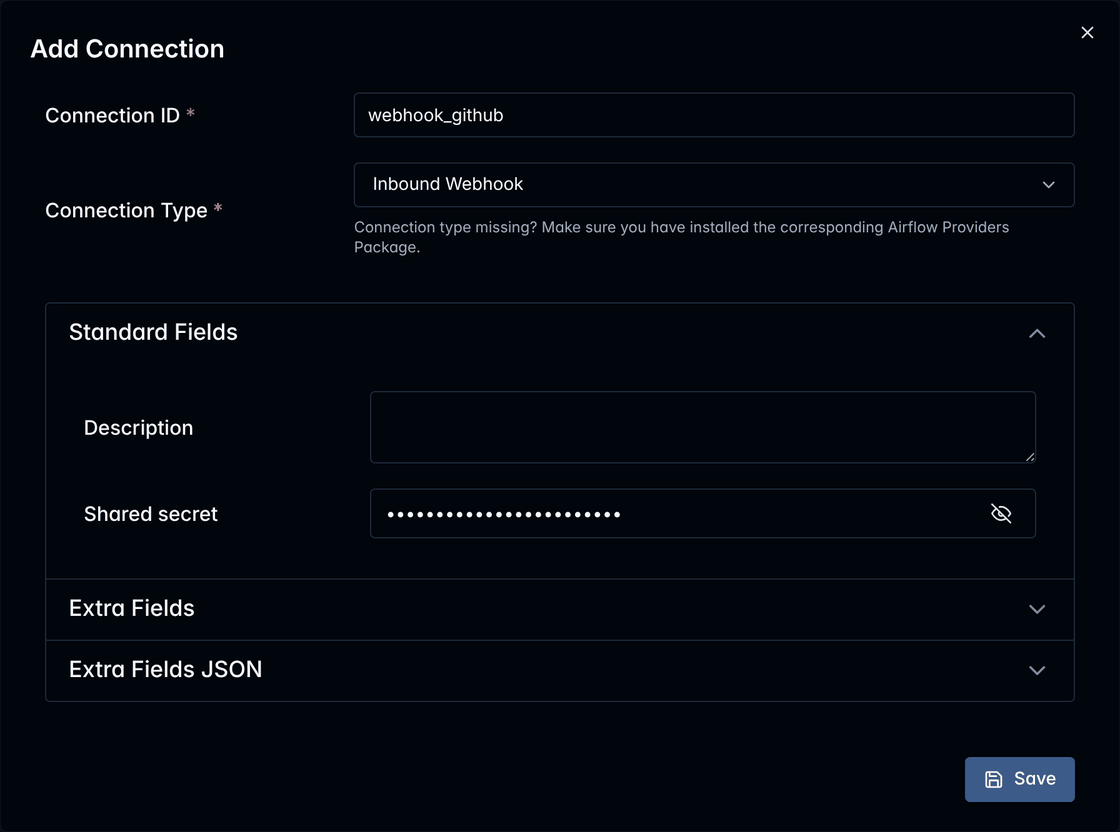
Under Admin → Connections, add a connection of type Inbound Webhook with the Connection Id
webhook_github, and a new secret, such as one fromopenssl rand -hex 32, as its shared secret:
In GitHub
-
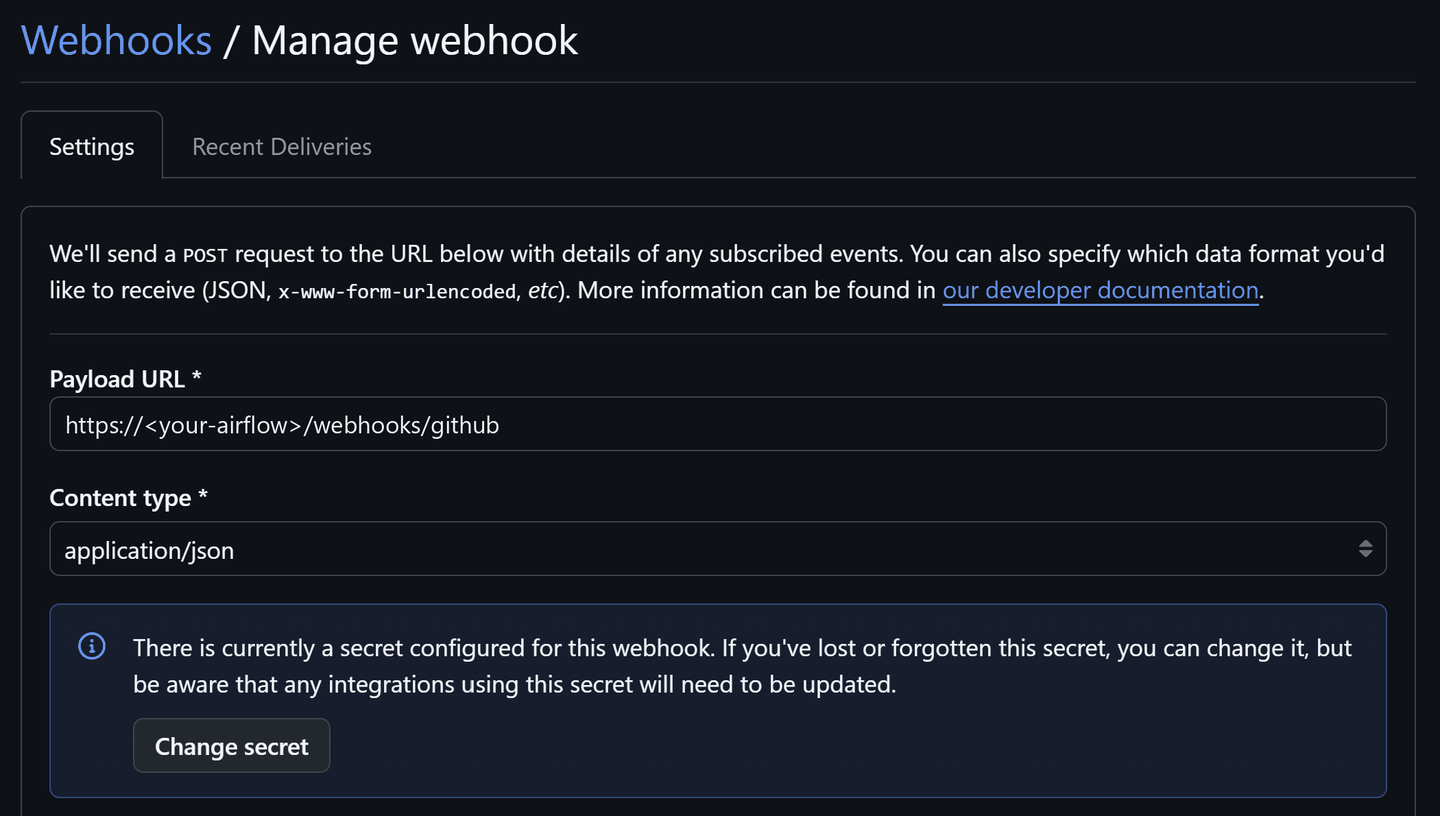
In the repository, open Settings → Webhooks → Add webhook. To cover every repository of an organization, use the organization's Settings → Webhooks instead, as an organization owner.
-
Fill in the form, then select Add webhook:
Field Value Payload URL https://<your-airflow>/webhooks/githubContent type application/json. The default,application/x-www-form-urlencoded, is refused.Secret The secret from step 2 Which events would you like to trigger this webhook? Let me select individual events, then the ones your Dags need, such as Pull requests or Pushes Active Checked -
Check it. GitHub sends a
pingright away: on the webhook's Recent Deliveries tab it should have a green check, and its response should be202with"outcome":"no_subscribers".
In Airflow
-
Add a Dag that schedules on an event, such as
Asset("github/my-org/web/pull_request/labeled/deploy-preview"), and unpause it. To find a name, trigger the event once and copy one of the names it offered from its delivery under Browse → Webhook deliveries, which you can search by thedelivery_idof its response. That needs permission to read the connectionwebhook_github; anyone can build a name as Event names describes. The Dag's page shows the name it schedules on:

Documentation
| Page | What it covers |
|---|---|
| Quick start | Trying the plugin locally with its test sender, no service account needed |
| Connecting services | GitLab, Jira and any other service, step by step |
| Event names | How deliveries are named, how to find a name, and the names GitHub, GitLab and Jira deliveries offer |
| Writing Dags | WebhookTopic, the payload and the keys of each event's extra, when Dags run, and the checks of Dags that use topics |
| Reference | Source types and their options, the connection, configuration, delivery records, the deliveries page and API, the command line, audit log and metrics, responses and troubleshooting |
| Security | What the endpoint exposes, secrets, payloads and replays, and the limitations |
| Compatibility | Supported Airflow versions, the public interfaces versioning covers, and the FAQ |
| Design notes | How the plugin works inside, for contributors |
Compatibility
Airflow 3.1.1 and later, on the Python versions each supports. Airflow 3.1 needs one extra setting; Compatibility has the details for each version.
Who uses it
Organizations that use this provider are listed in the wild. If yours does, open a pull request that adds it to the list.
Contributing
See CONTRIBUTING.md for development setup, tests and adding a source type, and CHANGELOG.md for changes.
License
Apache Airflow, Airflow, Apache, the Apache feather logo, and the Apache Airflow project logo are either registered trademarks or trademarks of The Apache Software Foundation in the United States and other countries. This project is not affiliated with or endorsed by The Apache Software Foundation.
1 maintainer

Metadata
1 maintainer
Release files for airflow-provider-inbound-webhooks 0.2.0
For a detailed explanation of source distributions (sdists) and built distributions (wheels), please see the package formats documentation.
Source distribution (sdist)
| File | Size | Uploaded | Provenance | |
|---|---|---|---|---|
| airflow_provider_inbound_webhooks-0.2.0.tar.gz | 192.4 kB | With provenance | Details |
Built distribution (wheel)
| File | Interpreter | ABI | Platform | Reset |
|---|---|---|---|---|
| airflow_provider_inbound_webhooks-0.2.0-py3-none-any.whl | Python 3 | none | any | Details |
Total release size: 252.4 kB
Release files / airflow_provider_inbound_webhooks-0.2.0.tar.gz
| Download URL | airflow_provider_inbound_webhooks-0.2.0.tar.gz |
|---|---|
| Size | 192.4 kB |
| Tags | Source |
|
SHA-256 checksum How to use checksums |
9b16be42b945621c576a224bfdac233628c4a4e3f9220d640babad64822ac3a6
|
|
BLAKE2b-256 checksum How to use checksums |
e22b993a1b48814861858f1050fbc225949cd9a4f4895c343d87f3bab391f3ba
|
| Upload date | |
|
Uploaded using Trusted Publishing? What is trusted publishing? |
Yes |
| Uploaded via |
twine/7.0.0 CPython/3.13.14
|
Provenance
Provenance describes where a file came from. On PyPI, provenance is shared via attestations, which provide a verifiable record of the build or publishing details. View details, limitations and caveats.


PyPI Publish Attestation
PyPI verified that this artifact, at this checksum, originated from the publisher listed below.
Signed by GitHub Actions, verified by PyPI on Oct 19, 2026.
Transparency logRelease files / airflow_provider_inbound_webhooks-0.2.0-py3-none-any.whl
| Download URL | airflow_provider_inbound_webhooks-0.2.0-py3-none-any.whl |
|---|---|
| Size | 60.0 kB |
| Tags | Python 3 |
|
SHA-256 checksum How to use checksums |
1674158606293299e2de3ea5b014b35b4d1c146e48672f3b825859704ad79210
|
|
BLAKE2b-256 checksum How to use checksums |
b43cc85219f654a9c408b9c5fa13356b076afeae0f58664b23cb776f68fe822b
|
| Upload date | |
|
Uploaded using Trusted Publishing? What is trusted publishing? |
Yes |
| Uploaded via |
twine/7.0.0 CPython/3.13.14
|
Provenance
Provenance describes where a file came from. On PyPI, provenance is shared via attestations, which provide a verifiable record of the build or publishing details. View details, limitations and caveats.
PyPI Publish Attestation
PyPI verified that this artifact, at this checksum, originated from the publisher listed below.
Signed by GitHub Actions, verified by PyPI on Oct 19, 2026.
Transparency logSecurity for airflow-provider-inbound-webhooks 0.2.0
Provenance
Provenance describes where a file came from. On PyPI, provenance is shared via attestations, which provide a verifiable record of the build or publishing details. View details, limitations and caveats.
Full provenance
All 2 files in this release have been uploaded with provenance metadata.
Attestation for airflow_provider_inbound_webhooks-0.2.0.tar.gz
PyPI Publish Attestation
PyPI verified that this artifact, at this checksum, originated from the publisher listed below.
Signed by GitHub Actions, verified by PyPI on Oct 19, 2026.
Transparency logA note on package security
PyPI is a repository for distributing packages, not a service for auditing them. While third-party security researchers and our staff do their best to detect and remove malicious packages, PyPI cannot guarantee the quality, security or suitability of any given package.
To learn more about protecting yourself from malicious actors, visit our package security documentation.














