
airflow-provider-openfeature
Feature flags for Apache Airflow. Ramp a change across your DAGs, measure it, and revert with a flag, not a redeploy.














A platform team moves a subset of tasks to a different pool, queue, or executor, ramps a worker or executor migration, or flips a kill switch mid-incident, all centrally, without touching anyone's DAG. A DAG author gates a code path or A/B-tests a model inside a task. Both go through OpenFeature, so it works with the flag backend you already run: flagd, LaunchDarkly, GrowthBook, Unleash, Statsig, or an in-house engine.
It installs as an ordinary pip package and plugs into two extension points Airflow and OpenFeature already expose: an Airflow cluster policy and an OpenFeature provider. So it doesn't fork Airflow, patch the scheduler, or make you rewrite a DAG, and it stays off until you switch it on in config.
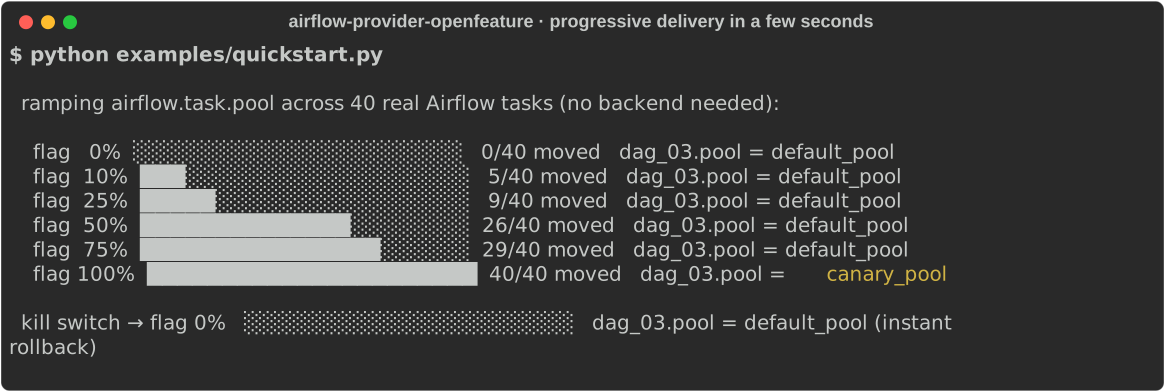
▶ Try the live demo: a real Airflow 3.x and a real Flipt backend. Change a flag, watch tasks change pool. No install, no login.
Quickstart
Install with a backend, here flagd:
pip install "airflow-provider-openfeature[flagd]"
Point OpenFeature at that backend once, in
airflow_local_settings.py
or any bootstrap, and turn the policy on:
from openfeature import api
from openfeature.contrib.provider.flagd import FlagdProvider

api.set_provider(FlagdProvider(host="localhost", port=8013))
[openfeature]
enable_policy = True   # flag-driven pool / queue / executor placement, no DAG edits
Set the flag airflow.task.pool in your backend and the next DAG parse moves that subset of tasks to the
pool you picked. Nothing else changes. Full walkthrough: the
5-minute getting-started guide
and the documentation site.
Start here
Two ways in, both on real Airflow. Or skip the setup and poke at the live demo first.
You run the Airflow platform. Install the provider, turn the policy on, and move a subset of DAGs to a different pool, queue, or executor from a flag. Ramp a worker or executor migration, or flip a kill switch mid-incident, without editing anyone's DAG. The getting-started walkthrough runs the whole thing on a local Airflow in about 5 minutes.
You write DAGs. Gate a code path or A/B a model inside a task with one call, no platform access needed. See Gate a task and the runnable example DAGs.
Why
Feature flags are the standard way to change software behavior at runtime without shipping code. This brings the same four moves to data pipelines:
- Ramp, don't flip. Roll a change out to 1% of runs, then 10%, then 100%, checking each step instead of switching everything at once.
- Experiment. A/B two implementations (a model version, a join strategy, a new library) across a subset of runs and measure which wins, rather than guessing.
- Kill switch. Turn a misbehaving feature off during an incident with a flag change, not a redeploy.
- Target. Enable something for one team, tenant, or dataset before everyone else.
Those are the standard toggle categories
(release, experiment, ops, permission). The Airflow-specific part: the same flag can also move a task's
pool, queue, or executor, so you canary infrastructure (a worker migration, a new executor) the
same way you canary a feature. Container-canary tools like
Argo Rollouts and Flagger
shift HTTP traffic between versions and, by their own docs, don't handle queue workers; Airflow
schedules from a pull queue, so a scheduler-level flag is how you ramp a subset of DAGs.
What you get
- Move where and how tasks run. A cluster policy reads a flag and sets a task's pool, queue, executor, or priority for a chosen subset of DAGs, at parse time. No DAG edits.
- Ramp and revert live. Change a percentage in your backend. No redeploy, no scheduler restart.
- Any backend. flagd, LaunchDarkly, GrowthBook, Statsig, Unleash, or an in-house engine, through OpenFeature. Switch backends without code changes.
- Measure the result. One call records the outcome to your experiment platform (Statsig, GrowthBook) or your warehouse (OpenTelemetry, Grafana).
- Safe to install. The policy and listener do nothing until you turn them on in config.
When to reach for this
Airflow is already Python, so a fair question is why take a dependency instead of writing the flag logic yourself. The answer differs by which half you mean.
The reason to install it is the placement policy. A task's pool, queue, and executor are read
by the scheduler before the task's own code runs, so you can't change them from inside a task or from
dag_run.conf. The cluster-policy
hook is the one place Airflow lets you set them at parse time for a task you don't own, and this turns
that into a flag the platform team controls: ramp a subset, kill-switch it, revert in seconds, no DAG
edits and no redeploy. The deterministic cohorts and the exposure record are the parts you tend to get
wrong by hand (a plain hash() is salted per process,
so a home-grown percentage drifts across restarts).
The in-task gate (hook, sensor, gate) is a convenience over the OpenFeature
SDK. If you already run a flag client, calling it in a task is fine. What the wrapper adds is a
vendor-neutral API, so you can swap flagd, Flipt, or an in-house engine without touching DAGs, plus the
exposure wiring through Airflow's own metrics. If you don't need those, skip it.
So: if moving placement for a subset of DAGs from a flag isn't a problem you have, you don't need this.
See it run
Airflow decides how each task runs from a few settings: its pool (a named cap on how many tasks run at once), its queue (which set of workers picks the task up), and its executor (whether the task runs on a shared worker or gets its own Kubernetes pod). Normally you change these by editing DAGs or redeploying, and the change hits every DAG at once.
Change them with a flag instead, for a subset of DAGs: the ones you pick, by name, by team, or by a percentage you ramp. A cluster policy reads the flag and applies the setting to that subset, so there is no rollout logic in the DAG itself:
# a large fan-out you would rather move a few at a time (full DAG in example_dags/)
with DAG("features_pipeline", schedule=None, start_date=datetime(2024, 1, 1)) as dag:
    PythonOperator.partial(task_id="process", python_callable=build).expand(op_args=shards)
Say you want to try the KubernetesExecutor (each task runs as its own pod) on a handful of DAGs before
moving everything to it. Set airflow.task.executor to that executor for the subset; those tasks run as
pods while the rest stay on the shared workers, and turning the flag off puts them back. No redeploy.
That is the safe way to adopt a change like #68480 (a
faster pod-creation path): the case study ramps it and measures how long tasks wait
to start, checking for a regression on a real cluster before widening.
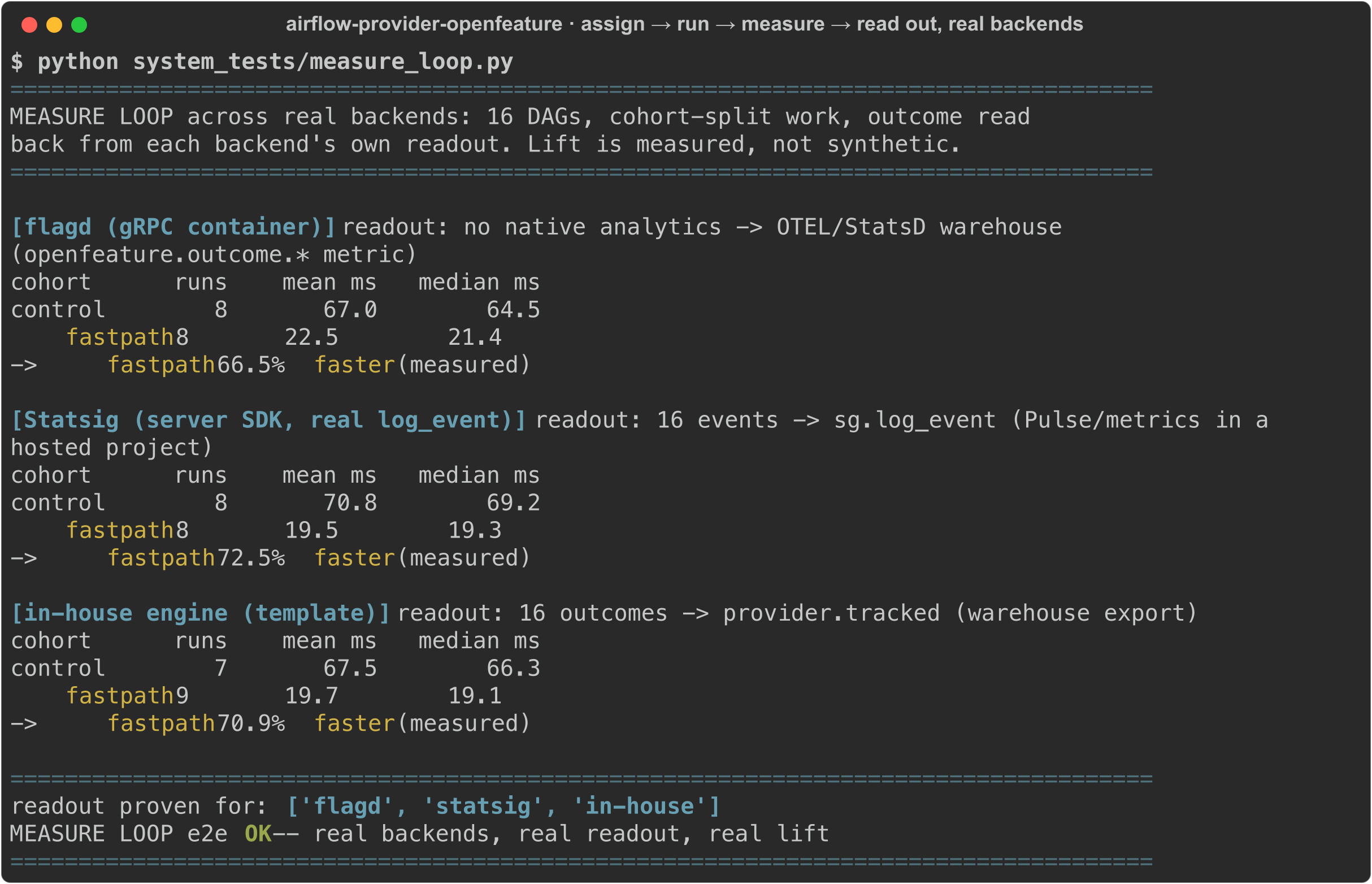
Measure the outcome, don't guess. The exposure and the result flow back to your platform or warehouse, so a rollout comes with a number. Here the same policy runs on real Airflow and the lift is read back from each backend:
No vendor lock-in. The same DAG and policy work on flagd, GrowthBook, Unleash, Statsig, or an in-house engine through OpenFeature, so you use the backend you already run:
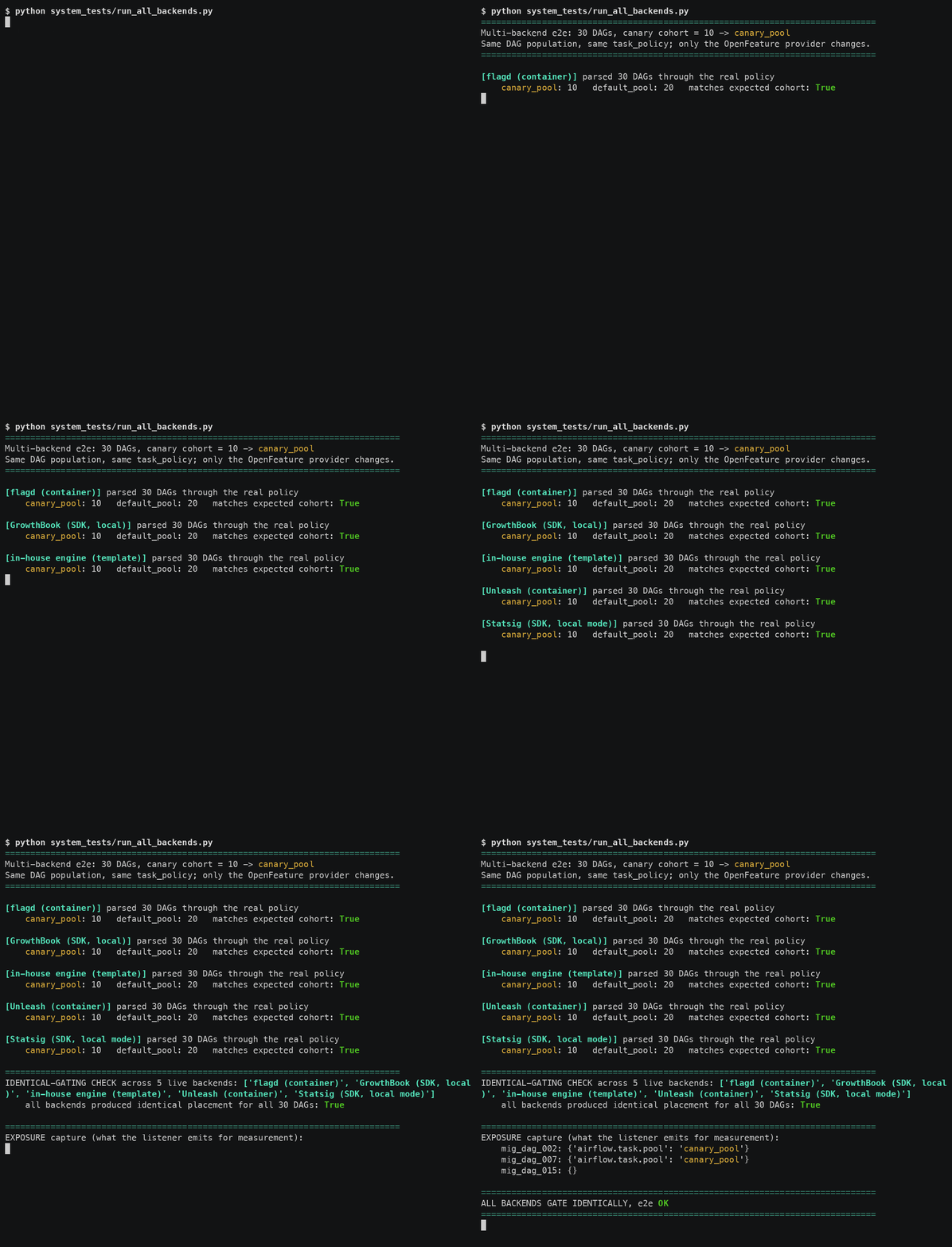
Commands and raw output for all of this are in system_tests/E2E.md.
It works with your setup; it doesn't replace anything. Your flag backend keeps storing and targeting
the flags. Airflow keeps scheduling. This provider reads the flag through OpenFeature and applies it
where neither of them does: at task placement, in the scheduler. The bundled FractionalProvider is
just a no-backend default for the quickstart and tests; in production you point at your real backend and
change nothing else.
Worked example: canary a pipeline change, end to end
A nightly revenue_rollup ETL is missing its SLA. An engineer has a faster rewrite of the aggregation
(rollup_v2), but it feeds finance dashboards, so shipping a wrong total to every region at once is not
an option. Put the rewrite behind a flag and ramp it across regions instead.
In the DAG, the task reads the flag through this provider, runs the chosen path, and records the outcome. There is no rollout logic in the DAG; the subset lives in the backend.
from openfeature_airflow.gate import flag_enabled
from openfeature_airflow.measure import track_outcome

use_v2 = flag_enabled("revenue_rollup.use_fast_agg", region)      # the backend decides the subset
result = (rollup_v2 if use_v2 else rollup_v1)(shard)              # run the chosen implementation
track_outcome("rollup_ms", region, value=elapsed_ms, variant="v2" if use_v2 else "v1")
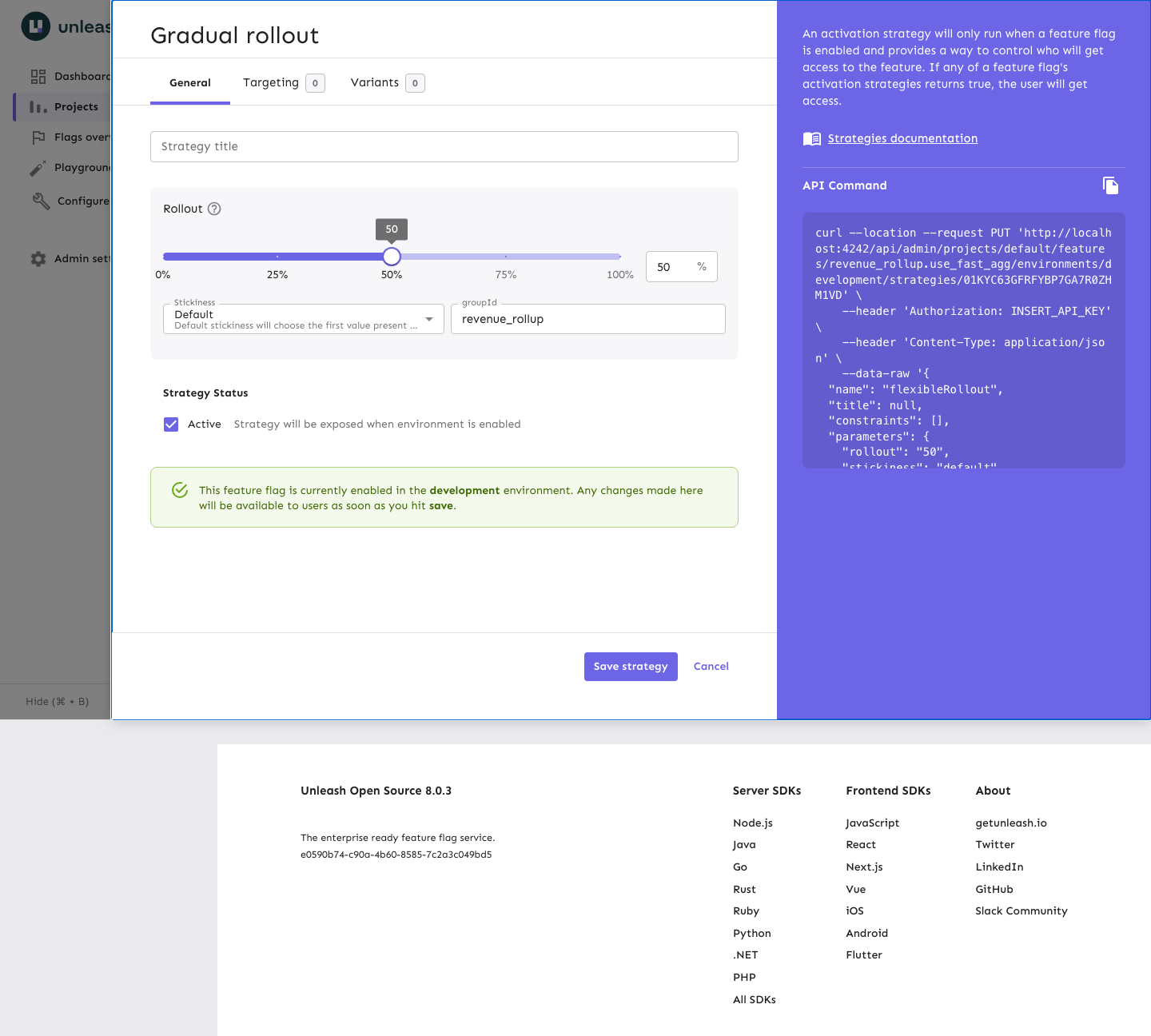
In the backend (here Unleash), the rollout is a dial. Stickiness on the region key keeps a region in its group as you raise the percentage. The provider reads any backend identically, so the same flag drives it from GrowthBook, Statsig, or flagd with a one-line change.
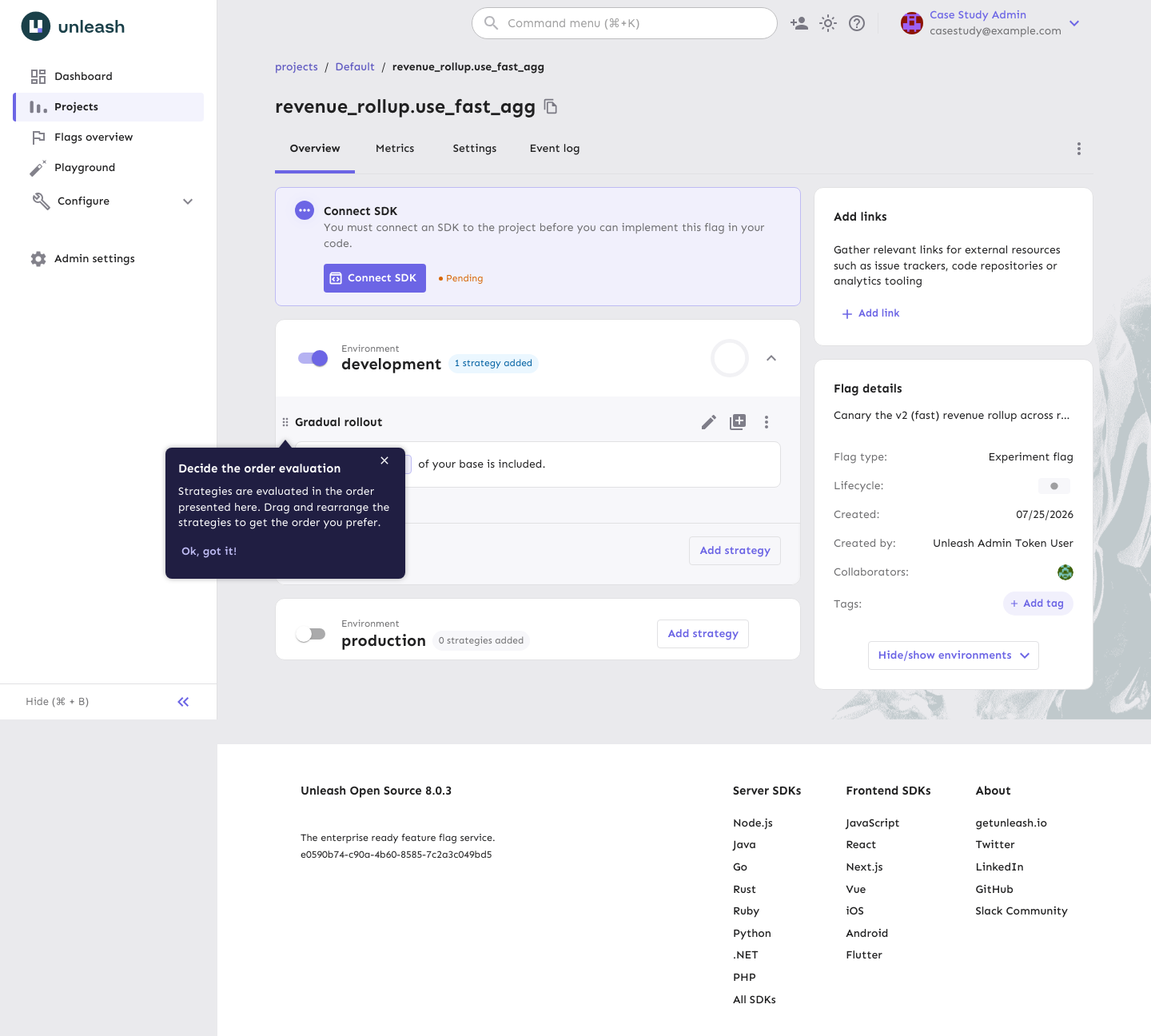
The result: ramping 0 → 100% while Airflow reads the flag on each run, v2 comes out about 89%
faster and the revenue stays identical to the cent at every step. A wrong total would trip the
guardrail, and the fix would be one dial back to 0%, with no redeploy.
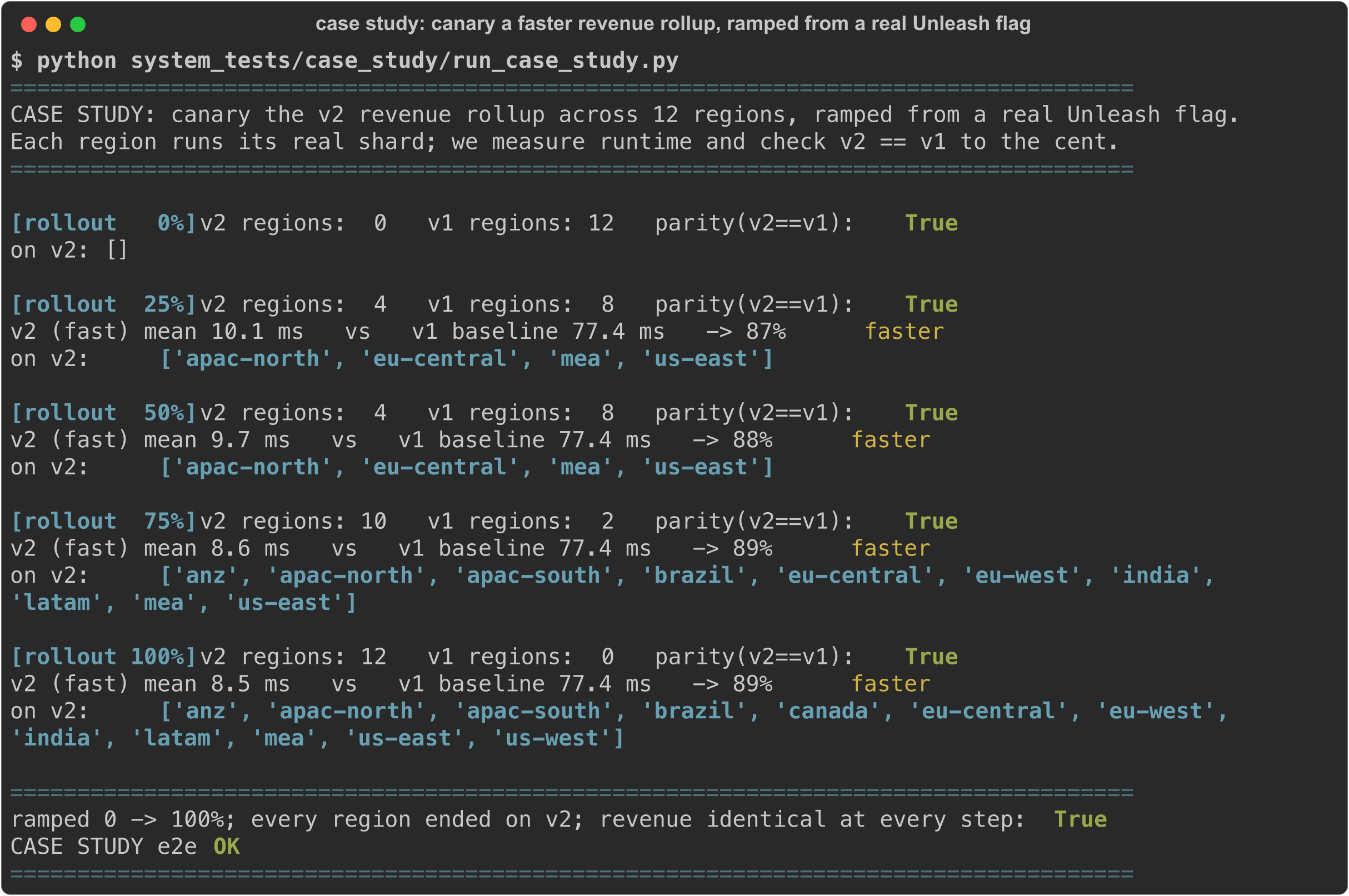
The full walkthrough, plus a second example that canaries the KubernetesExecutor on a real kind cluster (a flag routes a subset of DAGs to real pods), is in docs/case-study.
Examples
Runnable templates in example_dags/; the patterns, mapped to the standard toggle
taxonomy, are in docs/use-cases.md.
| Use case | What the flag does |
|---|---|
| Canary a faster rollup | run a rewritten aggregation for a subset of regions, with a revenue-parity guardrail |
| Airflow 2→3 migration | route a subset of DAGs onto a 3.x worker pool, ramp, roll back |
| KubernetesExecutor canary | shift a subset to concurrent pod creation (apache/airflow#68480), watch, widen |
| A/B a model | pick a model variant per run and emit the exposure + outcome |
| Worker / queue migration | move a subset onto a Kubernetes queue gradually |
| Kill switch | revert placement for everyone with one flag change |
Install
pip install airflow-provider-openfeature            # core
pip install "airflow-provider-openfeature[flagd]"   # + a backend, e.g. flagd
It is a standard PyPI package, so uv works the same way:
uv pip install airflow-provider-openfeature.
Point OpenFeature at your backend once, in airflow_local_settings.py or a bootstrap:
from openfeature import api
from openfeature.contrib.provider.flagd import FlagdProvider

api.set_provider(FlagdProvider(host="localhost", port=8013))
Then turn on the piece you want (both default to off):
[openfeature]
enable_policy = True             # flag-driven pool/queue/executor placement
enable_exposure_listener = True  # record which group each run landed in
Bundled adapters for backends whose OpenFeature provider needs a nudge: providers.growthbook,
providers.unleash, providers.statsig, providers.inhouse (template for a proprietary engine), and
providers.fractional (dependency-free deterministic %-rollout for testing).
flagd, LaunchDarkly,
Flagsmith and others ship their own
OpenFeature providers; use those directly.
Gate a task, or measure an outcome
Evaluate a flag anywhere in a task:
from openfeature_airflow.gate import flag_enabled

if flag_enabled("airflow.rollout.new_parser", dag_id):
    ...
Record the outcome for analysis (routes to Statsig, GrowthBook, LaunchDarkly, or your warehouse):
from openfeature_airflow.measure import track_outcome

track_outcome("task_duration_ms", f"{dag_id}:{task_id}", value=elapsed_ms, variant=group)
See docs/measurement.md for the per-backend readout.
Docs
- Live demo (no login) and its source repo: a real Airflow 3.x + Flipt you can change flags on.
- Getting started: a 5-minute walkthrough on real Airflow.
- Running a rollout: the end-to-end loop, and how to read a ramp.
- Case study: canary a faster pipeline step end to end, with a real Unleash backend.
- Use cases: the toggle taxonomy mapped to Airflow, with recipes.
- Measurement: closing the loop with your experiment platform or warehouse.
- Architecture: the flow and the surfaces it registers.
- Extending: add a backend.
- Contributing · AGENTS.md.
These docs also build into a site: pip install -e ".[docs]" then mkdocs serve (or see
mkdocs.yml); .github/workflows/docs.yml publishes it to GitHub Pages.
How it works
Everything goes through the OpenFeature evaluation API, so the backend is a swap. The package adds three Airflow surfaces, auto-discovered via entry points; the backend decides which subset each run lands in.
flowchart TB
    subgraph airflow["Airflow"]
        author["DAG / task code"]
        parse["parse & schedule<br/>(task_policy)"]
        done["task finished"]
    end
    subgraph pkg["openfeature_airflow"]
        hook["hook / sensor / gate"]
        policy["placement policy"]
        listener["exposure listener"]
    end
    api[["OpenFeature<br/>evaluation API"]]
    subgraph backends["Any OpenFeature backend"]
        flagd["flagd"]
        gb["GrowthBook"]
        unleash["Unleash"]
        inhouse["in-house engine"]
    end
    measure["warehouse /<br/>experiment platform"]

    author --> hook --> api
    parse --> policy --> api
    done --> listener --> api
    api --> flagd & gb & unleash & inhouse
    listener --> measure
It gives you two independent capabilities, both no-ops until you turn them on in config:
- Placement policy. A cluster policy consults a flag and overrides a task's
pool/queue/executor/priority_weightfor the chosen subset. A rollout is a backend config change, not a DAG edit. - In-DAG evaluation. The hook, sensor, and gate read a flag for a stable entity inside a task, and the exposure listener records which group each run landed in, so you can measure it.
| Surface | Entry point | Purpose |
|---|---|---|
OpenFeatureHook, FeatureFlagSensor, openfeature connection |
apache_airflow_provider |
evaluate a flag in a task |
| flag-driven placement policy | airflow.policy |
override pool/queue/executor/priority_weight per subset |
| exposure listener | airflow.plugins |
emit the resolved group for measurement |
The policy reads these well-known flags, keyed on dag_id:task_id: airflow.task.pool,
airflow.task.queue, airflow.task.executor, airflow.task.priority_weight. Register your own
flag-driven dimensions for any operator attribute (a Spark version, a checkpoint toggle) with
register_placement; see docs/extending.md. The entity is bucketed
deterministically, so a task lands in the same group every parse until the backend config changes.
docs/architecture.md has the step-by-step ramp and exposure sequence diagrams
and the Airflow version notes.
Status
Alpha (0.1.0). The API may change before 1.0.
License
Apache-2.0.
1 maintainer

Download files
Download the file for your platform. If you're not sure which to choose, learn more about installing packages.
Source Distribution
Built Distribution
Filter files by name, interpreter, ABI, and platform.
If you're not sure about the file name format, learn more about wheel file names.
Copy a direct link to the current filters
File details
Details for the file airflow_provider_openfeature-0.2.1.tar.gz.
File metadata
- Download URL: airflow_provider_openfeature-0.2.1.tar.gz
- Upload date:
- Size: 50.4 kB
- Tags: Source
- Uploaded using Trusted Publishing? Yes
- Uploaded via:
twine/6.1.0 CPython/3.13.14
File hashes
| Algorithm | Hash digest | |
|---|---|---|
| SHA256 |
e8a4bbc405da69a3f734d318a7f6d12d9f17e17d84eac22773dff44a2198fdfc
|
|
| MD5 |
ac6d405fdaf79d5a9e8a956671e796bb
|
|
| BLAKE2b-256 |
47f8a8065876c12ee8c217b054c4a9821e2d91957f523598ee5820096b671f59
|
Provenance
The following attestation bundles were made for airflow_provider_openfeature-0.2.1.tar.gz:
Publisher:
publish.yml on 1fanwang/airflow-provider-openfeature
-
Statement:
-
Statement type:
https://in-toto.io/Statement/v1 -
Predicate type:
https://docs.pypi.org/attestations/publish/v1 -
Subject name:
airflow_provider_openfeature-0.2.1.tar.gz -
Subject digest:
e8a4bbc405da69a3f734d318a7f6d12d9f17e17d84eac22773dff44a2198fdfc - Sigstore transparency entry: 2257016316
- Sigstore integration time:
-
Permalink:
1fanwang/airflow-provider-openfeature@7dfed06dc5fec333f1f86a58f7e627b1bf16e023 -
Branch / Tag:
refs/heads/main - Owner: https://github.com/1fanwang
-
Access:
public
-
Token Issuer:
https://token.actions.githubusercontent.com -
Runner Environment:
github-hosted -
Publication workflow:
publish.yml@7dfed06dc5fec333f1f86a58f7e627b1bf16e023 -
Trigger Event:
workflow_dispatch
-
Statement type:
File details
Details for the file airflow_provider_openfeature-0.2.1-py3-none-any.whl.
File metadata
- Download URL: airflow_provider_openfeature-0.2.1-py3-none-any.whl
- Upload date:
- Size: 37.4 kB
- Tags: Python 3
- Uploaded using Trusted Publishing? Yes
- Uploaded via:
twine/6.1.0 CPython/3.13.14
File hashes
| Algorithm | Hash digest | |
|---|---|---|
| SHA256 |
061b3ce53929a20c0980e4eb76444084d8e12cb042bd6e53e1fd34cd78169f74
|
|
| MD5 |
67d67a8c29469047fd97b15725d95e4b
|
|
| BLAKE2b-256 |
055365f37c0c65ac7542bede782524c84f9290acdfc79d74cd31404ac6010c5d
|
Provenance
The following attestation bundles were made for airflow_provider_openfeature-0.2.1-py3-none-any.whl:
Publisher:
publish.yml on 1fanwang/airflow-provider-openfeature
-
Statement:
-
Statement type:
https://in-toto.io/Statement/v1 -
Predicate type:
https://docs.pypi.org/attestations/publish/v1 -
Subject name:
airflow_provider_openfeature-0.2.1-py3-none-any.whl -
Subject digest:
061b3ce53929a20c0980e4eb76444084d8e12cb042bd6e53e1fd34cd78169f74 - Sigstore transparency entry: 2257016330
- Sigstore integration time:
-
Permalink:
1fanwang/airflow-provider-openfeature@7dfed06dc5fec333f1f86a58f7e627b1bf16e023 -
Branch / Tag:
refs/heads/main - Owner: https://github.com/1fanwang
-
Access:
public
-
Token Issuer:
https://token.actions.githubusercontent.com -
Runner Environment:
github-hosted -
Publication workflow:
publish.yml@7dfed06dc5fec333f1f86a58f7e627b1bf16e023 -
Trigger Event:
workflow_dispatch
-
Statement type:














