

airflow-provider-paradime-dbt
This is the provider for Paradime to run and manage dbt™ jobs in production. The provider enables interaction with Paradime’s Bolt scheduler and management APIs.
Usage
Create a connection
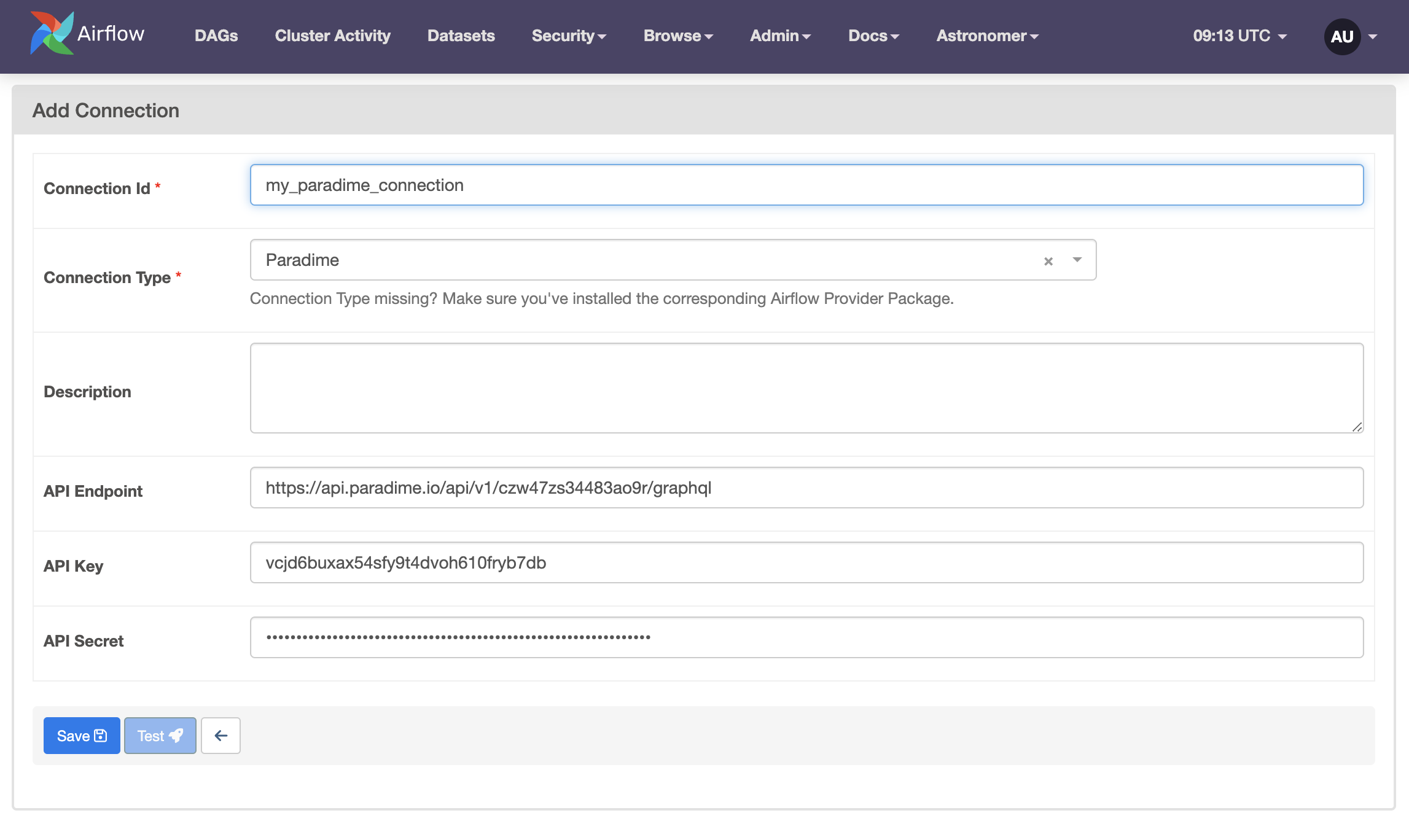
- Generate your API key, secret and endpoint from Paradime Workspace settings.
- Create a connection in Airflow, as shown below.
Create a DAG
Here is one example:
from airflow.decorators import dag

from paradime_dbt_provider.operators.paradime import ParadimeBoltDbtScheduleRunArtifactOperator, ParadimeBoltDbtScheduleRunOperator
from paradime_dbt_provider.sensors.paradime import ParadimeBoltDbtScheduleRunSensor

PARADIME_CONN_ID = "your_paradime_conn_id"  # Update this to your connection id
BOLT_SCHEDULE_NAME = "your_schedule_name"  # Update this to your schedule name


@dag(
    default_args={"conn_id": PARADIME_CONN_ID},
)
def run_schedule_and_download_manifest():
    # Run the schedule and return the run id as the xcom return value
    task_run_schedule = ParadimeBoltDbtScheduleRunOperator(task_id="run_schedule", schedule_name=BOLT_SCHEDULE_NAME)

    # Get the run id from the xcom return value
    run_id = "{{ task_instance.xcom_pull(task_ids='run_schedule') }}"

    # Wait for the schedule to complete before continuing
    task_wait_for_schedule = ParadimeBoltDbtScheduleRunSensor(task_id="wait_for_schedule", run_id=run_id)

    # Download the manifest.json file from the schedule run and return the path as the xcom return value
    task_download_manifest = ParadimeBoltDbtScheduleRunArtifactOperator(task_id="download_manifest", run_id=run_id, artifact_path="target/manifest.json")

    # Get the path to the manifest.json file from the xcom return value
    output_path = "{{ task_instance.xcom_pull(task_ids='download_manifest') }}"

    task_run_schedule >> task_wait_for_schedule >> task_download_manifest


run_schedule_and_download_manifest()
Refer to the example DAGs in this repository for more examples.
Advanced Configuration
HTTP / HTTPS Proxy
If you need to use a proxy to connect to Paradime's API, you can configure it in the connection on the Airflow UI. You can set the following parameters in the connection:
- Proxy: The URL for your proxy server (e.g.,
http://proxy.example.com:8080).
This setting is optional. If not provided, connections will be made directly without a proxy.
1 maintainer

Metadata
1 maintainer
Release files for airflow-provider-paradime-dbt 1.3.0
For a detailed explanation of source distributions (sdists) and built distributions (wheels), please see the package formats documentation.
Source distribution (sdist)
| File | Size | Uploaded | |
|---|---|---|---|
| airflow_provider_paradime_dbt-1.3.0.tar.gz | 15.4 kB | Details |
Built distribution (wheel)
| File | Interpreter | ABI | Platform | Reset |
|---|---|---|---|---|
| airflow_provider_paradime_dbt-1.3.0-py3-none-any.whl | Python 3 | none | any | Details |
Total release size: 35.6 kB
Release files / airflow_provider_paradime_dbt-1.3.0.tar.gz
| Download URL | airflow_provider_paradime_dbt-1.3.0.tar.gz |
|---|---|
| Size | 15.4 kB |
| Tags | Source |
|
SHA-256 checksum How to use checksums |
3dce1b48372861e77d6b7de15a6c1102a0c1692d1ae793b754383833b8ed995e
|
|
BLAKE2b-256 checksum How to use checksums |
51a3cc5781f044e75a27bd93d8108439f11e7a5303bf33f43a6ac371be6806f1
|
| Upload date | |
|
Uploaded using Trusted Publishing? What is trusted publishing? |
Yes |
| Uploaded via |
twine/6.1.0 CPython/3.13.12
|
Provenance
Provenance describes where a file came from. On PyPI, provenance is shared via attestations, which provide a verifiable record of the build or publishing details. View details, limitations and caveats.


PyPI Publish Attestation
PyPI verified that this artifact, at this checksum, originated from the publisher listed below.
Signed by GitHub Actions, verified by PyPI on Jul 3, 2026.
Transparency logRelease files / airflow_provider_paradime_dbt-1.3.0-py3-none-any.whl
| Download URL | airflow_provider_paradime_dbt-1.3.0-py3-none-any.whl |
|---|---|
| Size | 20.1 kB |
| Tags | Python 3 |
|
SHA-256 checksum How to use checksums |
05b08c17dbdd373c0250f6f248ab588235f2758075692084cbf10b9ca032283e
|
|
BLAKE2b-256 checksum How to use checksums |
78a80446594238b46ea245643a7d4d4e347478508cd551a45e5bc4657e4a2ffc
|
| Upload date | |
|
Uploaded using Trusted Publishing? What is trusted publishing? |
Yes |
| Uploaded via |
twine/6.1.0 CPython/3.13.12
|
Provenance
Provenance describes where a file came from. On PyPI, provenance is shared via attestations, which provide a verifiable record of the build or publishing details. View details, limitations and caveats.
PyPI Publish Attestation
PyPI verified that this artifact, at this checksum, originated from the publisher listed below.
Signed by GitHub Actions, verified by PyPI on Jul 3, 2026.
Transparency log













